Claude
By Anthropic · claude.ai ↗ · Checked 17 Oct 2026
Anthropic's AI assistant on the web, desktop and phone: it writes, reads long files and researches, hands back Word, PowerPoint and Excel files, and on paid plans can work your computer and browser.
Verdict
One of the most careful assistants for writing and analysis: it shows its reasoning and points out what your request left open, and since September a single chat box takes whole jobs such as research, documents and decks. The price is usage limits: the free plan gets only Sonnet and Haiku, paid plans are metered in five-hour windows plus a weekly cap, and heavy users hit them often. It is not offered in mainland China, where account bans are widely reported.
Use it if
- People who write and edit long pieces or read contracts, papers and reports
- Office workers who want to hand over research, reports and first-draft decks whole
- Analysis where you need the reasoning and assumptions spelled out
- Anyone already on Google Drive, Gmail, Slack or Notion
Use something else if
- Living in mainland China: unsupported and bans are common; use DeepSeek, Kimi or Qwen
- Photographic images or video: Claude draws with code; use ChatGPT or Gemini
- A finished web page in one go: Silicon Star found ChatGPT Work more polished
- Whole software projects: use Claude Code, included in the same plan, not the chat window
- Free plan
- Sonnet and Haiku, smaller allowance
- Paid
- Pro $20, Max $100 / $200 a month
- Where
- claude.ai on the web, Windows and Mac apps, iOS and Android, Chrome extension
- Models
- Opus 5.5, Sonnet 5.5, Haiku 5.5; Fable 5.1 on paid plans
- Sign-in
- Email or Google account
- Region
- Mainland China, Hong Kong and Macau are not supported; Taiwan and Singapore are
- Data
- Consumer chats can train models, can be turned off; if allowed, kept up to five years
- Rating
- 4.7 from 281,000 ratings on the US App Store (October 2026)
Claude is the AI assistant made by Anthropic. Most people know it as the one that writes most like a person and explains its reasoning most carefully; programmers know its coding tool, Claude Code, even better. It changed a lot in 2026. On 16 September the separate “Cowork” app was folded into ordinary chat, so the same box now answers a question or takes on a whole job, such as researching, building a spreadsheet, writing a report or making a deck, and keeps working in the cloud after you close your laptop.
This page is about the Claude app itself (web, desktop and phone). The table below sums up the official help centre, media tests and forum discussion; each section after it goes into detail.
What to hand it, and what not to
| What you want | How | Free plan | How it goes |
|---|---|---|---|
| Writing, editing, long files | Just chat; keep reference files in a Project | Free | Careful and shows its reasoning; long chats eat the allowance |
| Research | Just ask; for depth, + → Research | Search free; Research paid | Lists sources and flags pages it couldn't read, but slower than ChatGPT |
| Word, PowerPoint, Excel files | Say which file you want | Free, metered | Usable drafts with a templated look |
| Small tools, charts, pages | Describe what you want | Free | Great for flashcards and calculators |
| Work your computer and browser | Grant a folder in the desktop app; install Claude in Chrome | Pro and up | Gets things done; watch anything that deletes or sends |
| Running out of allowance | Settings → Usage | — | The most common complaint |
| Using it from China | — | — | Unsupported; many ban reports |
Since September there is no mode to pick
Opening Claude used to start with a choice: Chat for simple questions, Cowork for bigger work, Claude Design for visuals, Claude Code for programming. As Synced (机器之心) put it, many tasks don’t obviously belong to any one of them, and switching halfway through left your context behind.
Since 16 September, Pro and Max accounts have been moving in stages to a single box where Claude decides whether you asked a one-line question or a job with steps. The help centre spells out what that means:
- If the message box no longer shows “Chat” and “Cowork”, you have the new version, and you can’t switch back. Free and Team plans “will follow soon”; Enterprise admins get at least 30 days’ notice.
- There is no web search toggle; it searches when it thinks it helps.
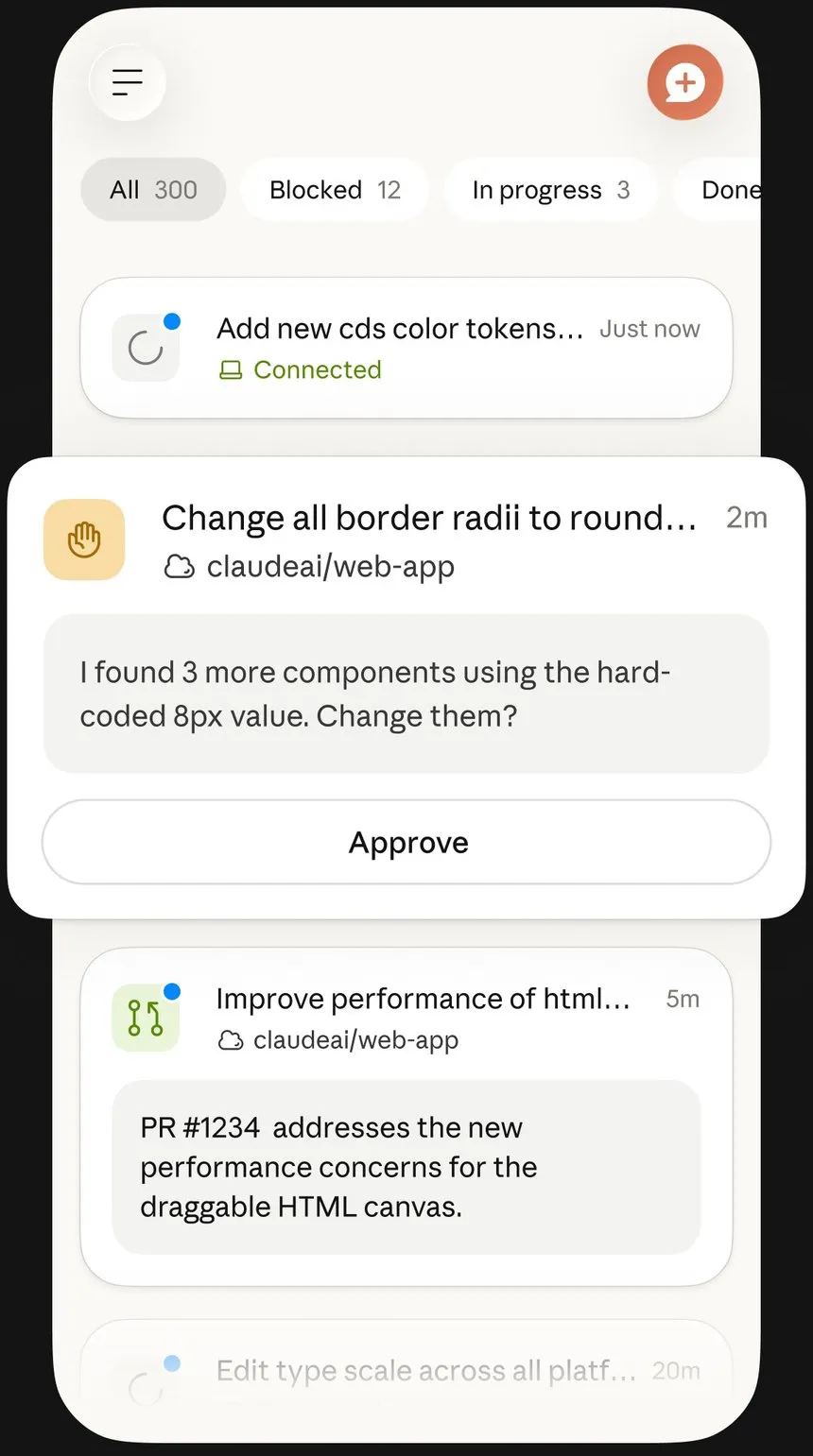
- Long tasks run in the cloud, carrying on after you close the laptop, and you can follow and answer them from your phone. Tasks that use files or programs on your computer need the desktop app open.
- Whether it asks before acting is a permission setting in the message box: “Manual”, the default, asks before each action; “Auto” keeps going with automated safety checks.
- A few things are gone for now: adding content from GitHub and branching a conversation from an earlier message. Incognito chats still work but open the old version, so they can’t create files or run code.
Models: the free plan gets Sonnet and Haiku only
Click the model name next to the send button to change model and “effort”. Effort has five levels, Low, Medium, High, Extra high and Max; higher means longer thinking and faster use of your allowance. The help centre suggests the default for everyday work and Extra high first for complex coding and long tasks. On the 5.5 models, Fable 5.1 and Opus 5, thinking is always on and can’t be turned off.
The four models in the Claude app
The smallest and fastest model, released on 7 October 2026.
- Use it for
- Quick questions, rewording a sentence, translating a paragraph
- Example
- Make this paragraph more conversational, under 100 words.
- Limits
- Weaker than the larger models at complex reasoning and long writing.
The mid-tier model, released on 28 September, positioned as a faster, cheaper companion to Opus 5.5.
- Use it for
- Most writing, analysis and daily work
- Example
- Read this 30-page tenancy agreement and list the clauses that work against the tenant.
- Limits
- The free allowance is small; long files and long chats use it up fast.
The flagship released on 22 September. Anthropic says it performs near Fable 5.1 on most work at 40% lower cost than Opus 5.
- Use it for
- Long reports, complex analysis, multi-step tasks
- Example
- Write an operating review from these three quarterly reports. List your assumptions first.
- Limits
- Uses more allowance than Sonnet.
The top tier for both capability and price, released on 1 September.
- Use it for
- The hardest, highest-stakes questions
- Example
- Check this financing agreement for logical gaps and explain each one.
- Limits
- Not in Pro's allowance: you turn on usage credits and pay API rates. Max can spend up to 50% of its weekly allowance on it. Sensitive requests may be switched to another model.
Sources: Claude pricing, help-centre articles on models and Fable, release notes (Sept–Oct 2026)
Writing and long documents: what it does best
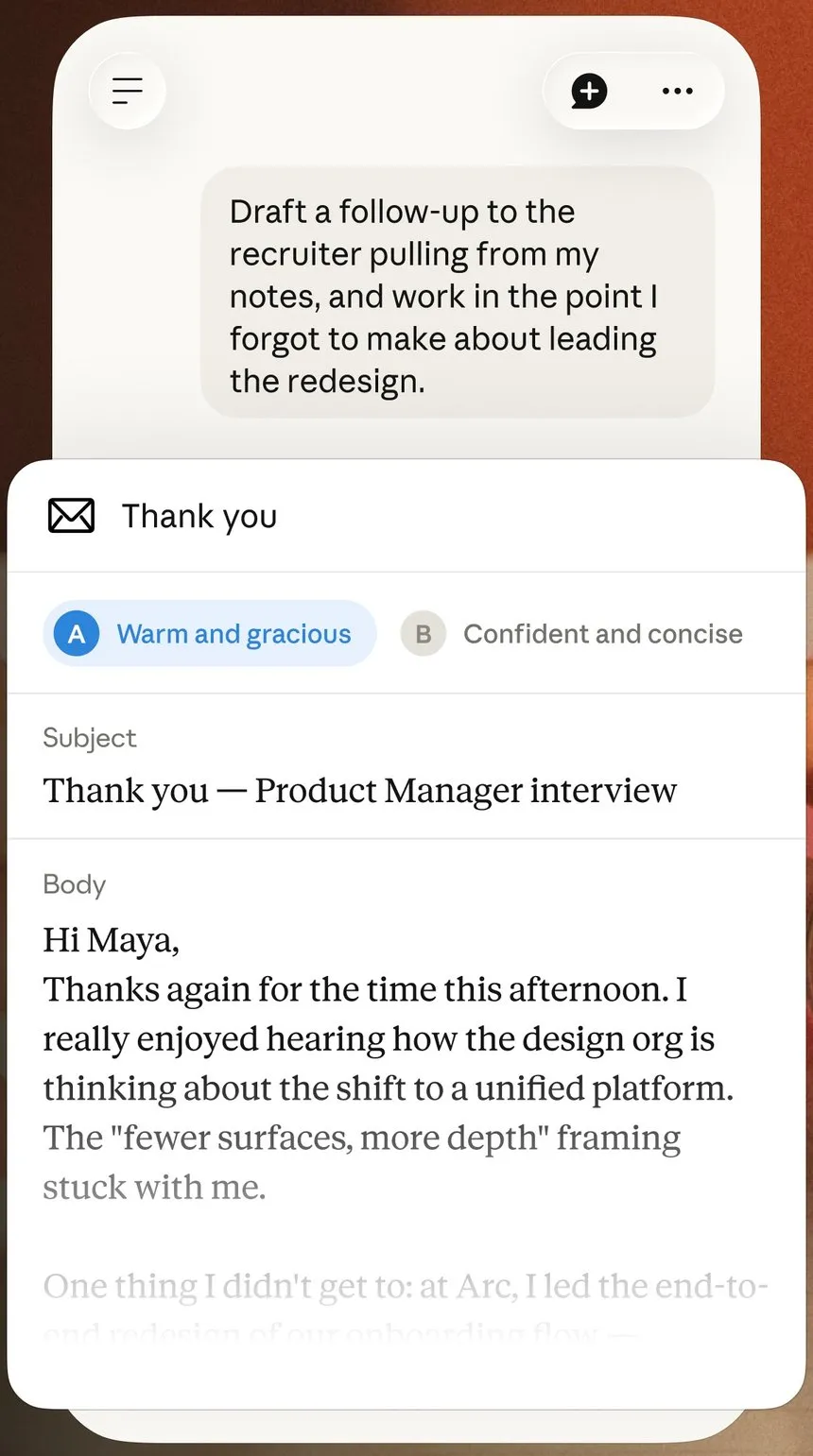
Writing and analysis are still the main reasons people pick Claude: it explains its reasoning and tells you when something in your request was left open. In September The New Stack gave the merged Claude and ChatGPT three developer tasks. Both got everything right and ChatGPT was faster every time, but Claude added GitHub’s separate limit for Actions tokens, noted a documentation page it couldn’t reach, and pointed out that the spec never said which way to round half a second. The writer chose Claude because “in today’s world, where AI can fabricate, detail matters”.
Habits that get better writing and stretch the allowance (from the help centre):
- Keep reference files in a Project. Project files are cached, so asking about them again counts for less than uploading them each time. The free plan allows up to five Projects.
- Say everything at once: the result, the format and the audience in one message costs less than back-and-forth.
- Fill in “Instructions for Claude” under Settings → General, for example “use British spelling, fewer bullet points”; it applies to every chat.
The context window is up to a million tokens, depending on the model. Longer is not free: long chats trigger automatic compaction, which the help centre says uses more of your limit.
Research: web search is free, Research mode is not
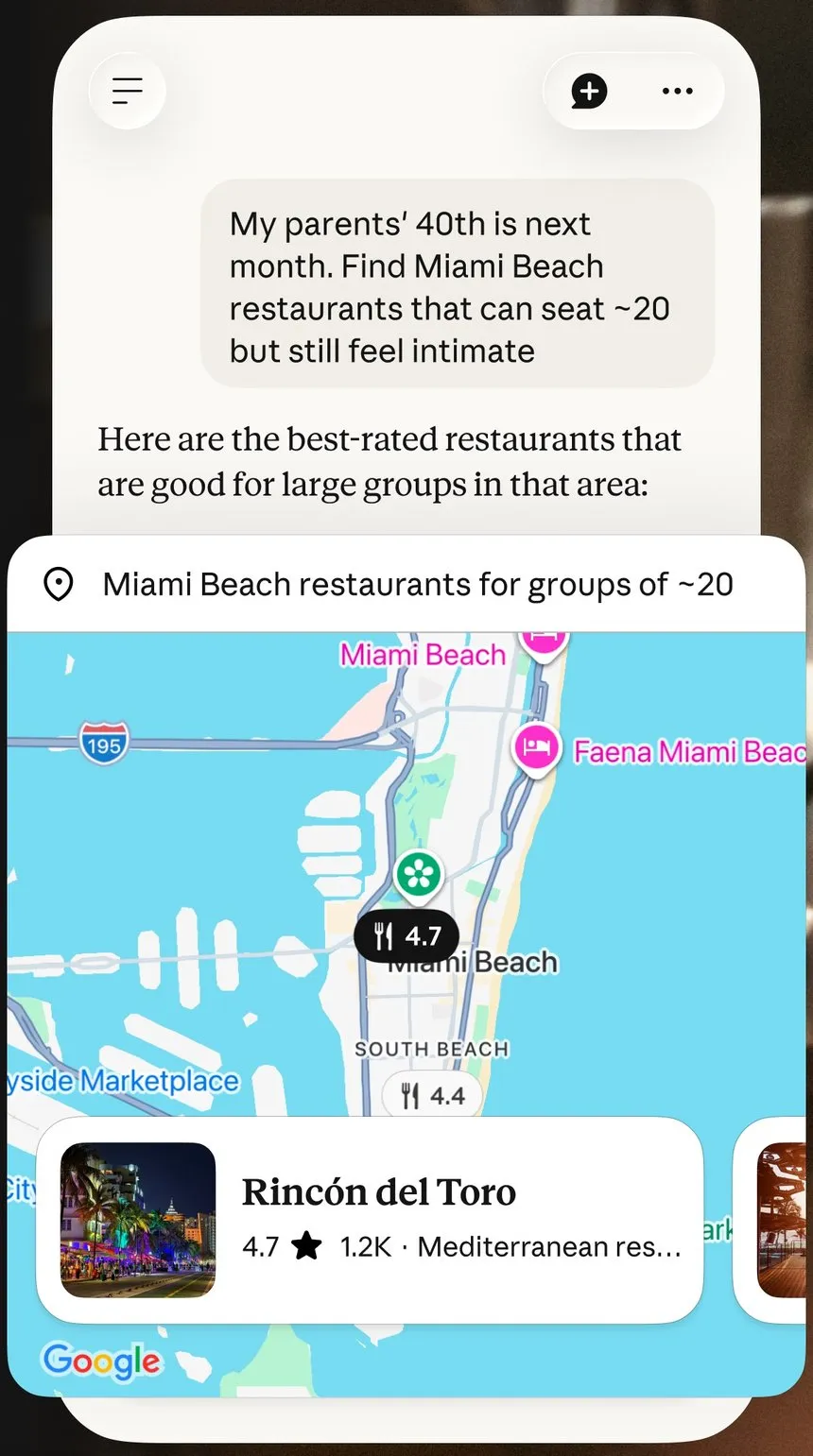
Ordinary web search is on every plan; Claude searches when it decides to and cites its sources. For deeper work, type “/deep-research” or click “+” under the message box and choose “Research”. Research is for Pro and above only.
The New Stack asked both apps for four developer APIs’ rate limits, free tiers and version identifiers, with sources. ChatGPT took 1 minute 17 seconds; Claude took 1 minute 44, read eight pages, listed nine sources and offered to export a spreadsheet. Slower, but the extra was useful.
The help centre singles out Research, web search and running code as uses that eat more allowance than plain questions.
Documents, decks and spreadsheets: good drafts, templated look
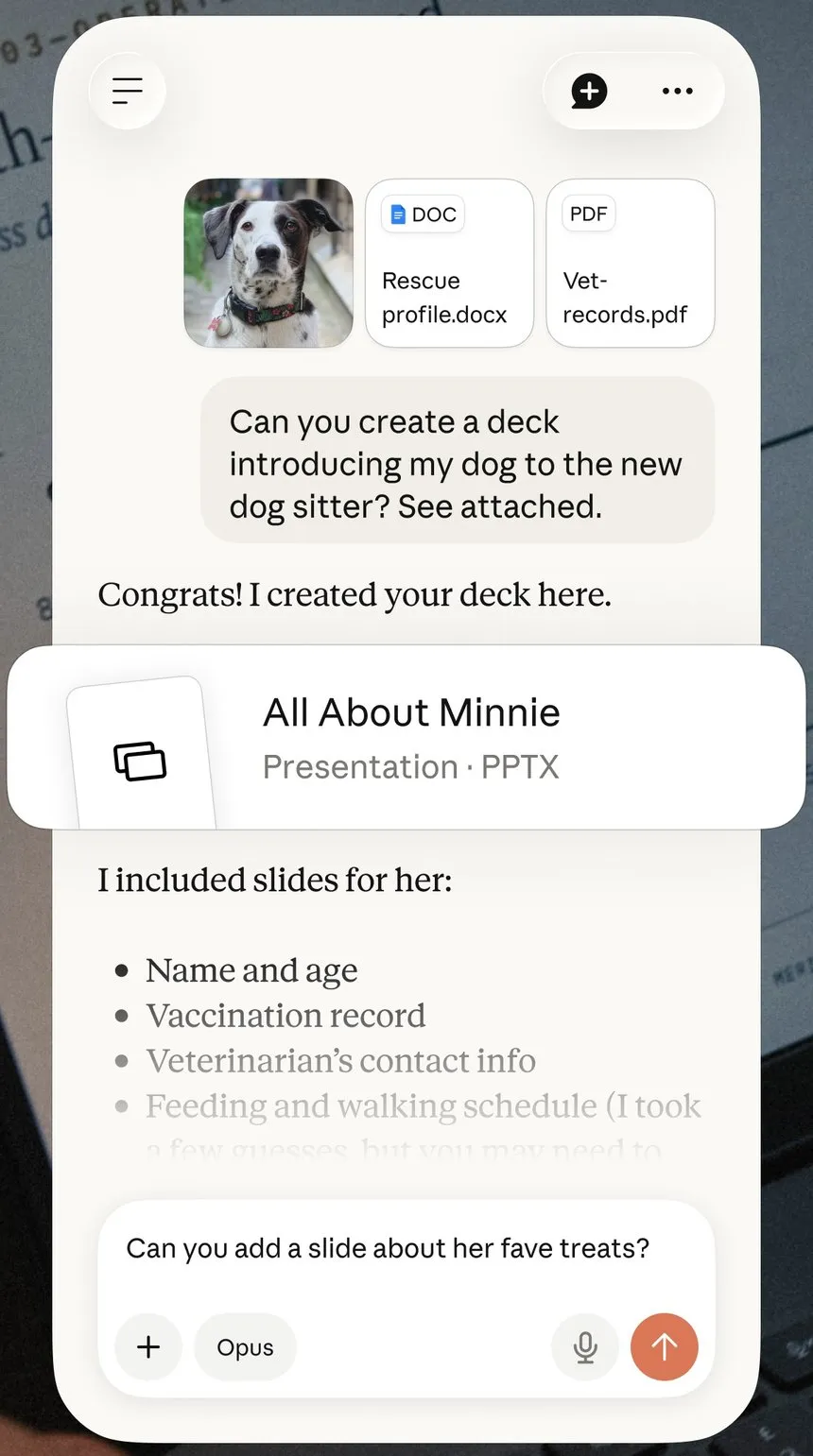
Ask for “a Word document”, “a 10-slide deck” or “a spreadsheet with formulas” and you get a file to download. September added Claude Docs, documents you edit together with Claude and colleagues, and Claude Slides, decks you can present inside Claude and download as PowerPoint or PDF; both left beta on 8 October and reached the free plan. Anthropic says users made more than 45 million docs, decks and designs since 16 September.
How it goes in tests:
- Spreadsheets are accurate. The New Stack had it read a log CSV from Google Drive and build an .xlsx of p50, p95 and p99 latency and error rate per endpoint with a bar chart. All 30 numbers were right and it named its percentile method, but it took about four minutes against ChatGPT’s 28 seconds.
- Decks read like reports. In July, before the merge and using Cowork with Fable 5, Silicon Star (硅星人, published by Huxiu) asked both for a research deck. Claude first asked who it was for and why, then delivered 12 slides that read “like a research report stuffed into PowerPoint”; both decks were “decent first drafts” at best.
- Web pages look templated. In the same test Claude’s page was a standard “rounded cards with emoji” layout, while ChatGPT’s was designed for the topic; Silicon Star gave that round to ChatGPT.
So: for something that looks finished, take its draft into PowerPoint or Keynote for the layout. For numbers you can trust, with the method explained, Claude is the safer bet.
Artifacts: a small app from one sentence
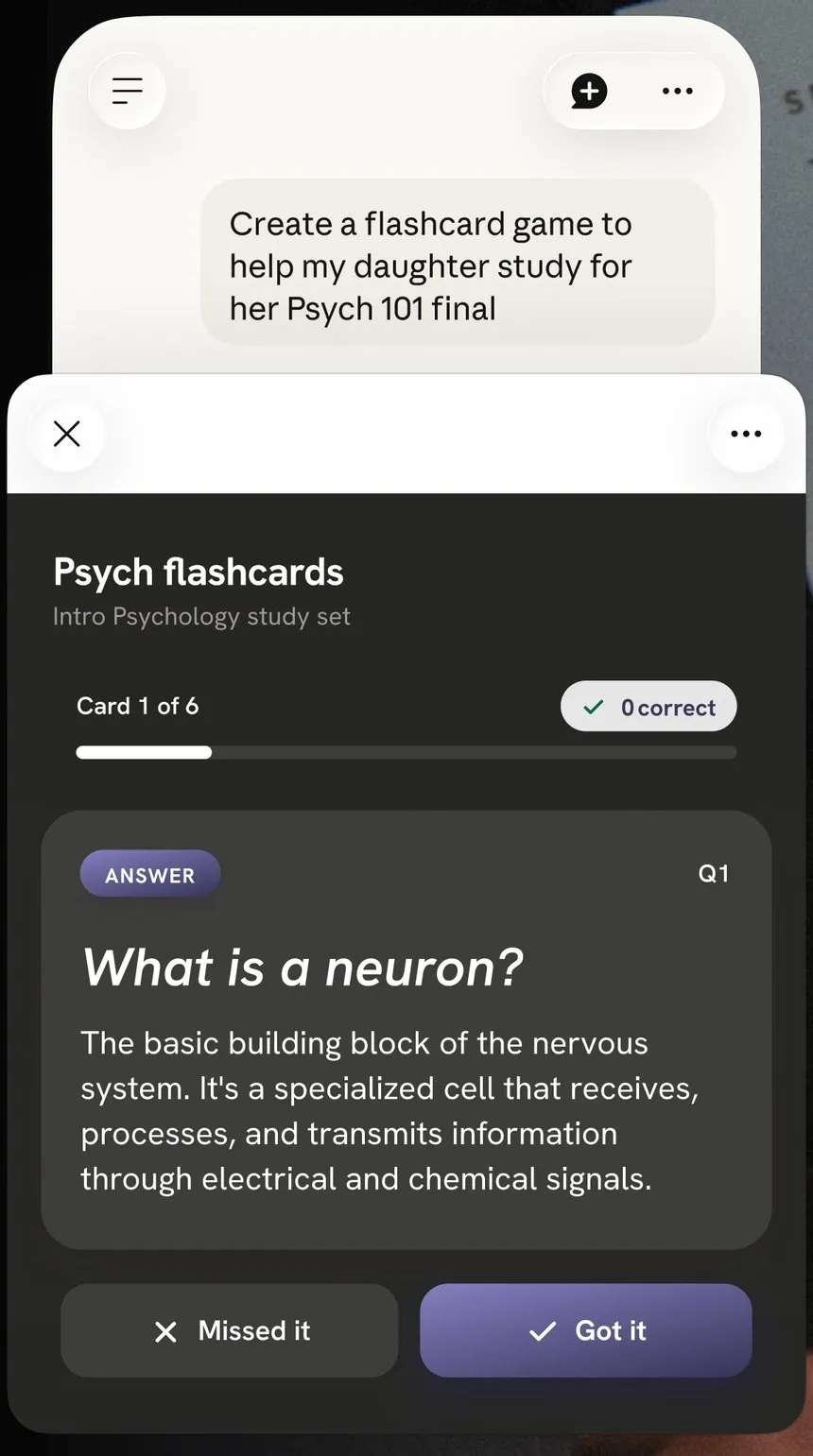
Artifacts are interactive things Claude builds beside the chat: flashcards, calculators, charts, small web pages, flowcharts. Every plan has them, and they open and can be edited on the phone.
They suit parents, teachers and anyone presenting: “make flip cards for these words and count right and wrong answers separately”, or “chart this data as a line graph I can switch by year”. You can share the result by link.
Claude draws with code (SVG, web pages) rather than generating photographs. Claude Motion, new in October, makes animated explainers, but only on Team and Enterprise, and Anthropic says it uses no video generation model.
Working your computer and browser: capable, but watch it
This needs a paid plan (Pro and up) and the desktop app:
- Folders: grant a folder in the desktop app and Claude can read, sort and create files in it, for example “sort my Downloads folder by type and date”. By default it asks before permanently deleting files.
- Computer use (beta, Pro and Max): it clicks, types and moves between windows, using the programs on your computer.
- Browser: either the browser built into the desktop app or the Claude in Chrome extension (Chrome only; no other Chromium browsers and no phones). The extension’s side panel starts in “automatically approve” mode and stops only when something needs you.
- Schedules: “every weekday at 8 a.m., summarise new messages in my Slack channels”; cloud tasks run even with your computer off.
Dispatch, which let your phone drive your desktop, is no longer open to new users, according to the help centre; existing users can keep it for now. The current way is to start a task on your phone and let it run in the cloud.
Take the risk seriously. In the help centre’s words, an instruction from your phone can trigger real actions on your computer, and a manipulated instruction or a phishing link “could cascade into actions that are difficult or impossible to undo”. In Silicon Star’s test, the research deck Claude made about itself listed two incidents from Cowork’s first week: a user’s 11 GB of files deleted by mistake and a demonstrated prompt-injection attack. For anything that deletes, sends or pays, keep the default “Manual” setting and approve each step.
Limits: five-hour windows and a weekly cap
| Plan | Price (USD, before tax) | Models | Main differences |
|---|---|---|---|
| Free | 0 | Sonnet, Haiku | Search, file creation, memory, connectors, Artifacts, Docs/Slides/Design, up to 5 Projects |
| Pro | 20 a month; 200 a year (17 a month) | Adds Opus; Fable costs extra | At least 5× Free per five hours; adds Research, Claude Code, Claude in Chrome, scheduled tasks, unlimited Projects |
| Max 5x | 100 a month | Adds Fable (up to 50% of weekly allowance) | 5× Pro; $100 of API credits a month; priority at busy times |
| Max 20x | 200 a month | As above | 20× Pro; $200 of API credits a month |
| Team | Standard seat 25 a month (20 yearly), premium seat 125 (100 yearly) | Fable on premium seats | 2–150 people; your content isn’t used for training by default |
| Enterprise | 20 per seat a month, billed yearly, plus usage at API rates | By usage | 20-seat minimum |
Max is monthly only. Anthropic notes these are web prices; buying through the App Store or Google Play may cost more.
Anthropic publishes multiples, not message counts:
- Two limits: every plan has a five-hour window; paid plans add a weekly cap that resets at a fixed day and time assigned to your account, regardless of when you start.
- One pool: web, desktop, mobile and Claude Code all draw from the same allowance. Two hours of coding in the morning means less chat in the afternoon.
- What costs more: long chats, big attachments, Research, running code, creating files, browsing, bigger models and higher effort.
- Where to look: Settings → Usage has bars for the session and the week, with Fable on its own bar. Occasionally you get a free “limit reset” button (“Reset for free”) on the same page; it isn’t on the mobile app yet.
- When you run out: wait, upgrade, or turn on usage credits to carry on at API rates.
Most complaints are about not knowing what you get. One V2EX user said 90 minutes of coding on Pro used 80% of a five-hour window. For chat and writing, Pro is usually enough; if you run long tasks or code every day, go straight to Max 5x.
Settings to change: training, memory, incognito
- Training: chats on consumer plans (Free, Pro, Max) can be used to train models. Click your name at bottom left → Settings → Privacy and turn off the model-improvement toggle. With it off, new chats aren’t used for training and data is kept for 30 days; with it on, for up to five years. Training already under way can’t be undone, and chats flagged by safety systems may still be used for safety work. Team and Enterprise don’t train on your content by default.
- Memory: on by default on Free, Pro and Max. Settings → Memory lists the “topics” it remembers, which you can edit or delete; turning off “Generate memory from chats” offers Pause or Reset, and Reset deletes everything permanently. To skip memory for one chat, click “+” and turn off “Memory” before your first message.
- Incognito: the ghost icon at the top right of a new chat. It stays out of your history and isn’t used for training, but in the new version it can’t create files.
- Chat search: paid plans can have Claude search your past chats; turn off “Search and reference chats” in Settings → Memory if you’d rather not.
Not available in mainland China, and bans are common
Anthropic’s list of supported regions leaves out mainland China, Hong Kong and Macau; Taiwan and Singapore are on it. Since September 2025 it has also refused service to companies majority-owned or controlled from unsupported regions, even when they are registered and staffed in a supported country.
So Chinese users mostly talk about bans. In August a V2EX user reported “two accounts banned in four days”: the first, paid through the App Store, was put on hold after one afternoon; the second, run through a US server, lasted three days, and he went back to GPT. In a September thread one person had two of three accounts banned at once while another’s free account had survived over a year; most called it “random, with no pattern”. These are personal accounts; Anthropic doesn’t publish its criteria.
If you live in mainland China and just want a good writing and analysis assistant, DeepSeek, Kimi and Qwen spare you all this.
Claude, Claude Code and Anthropic
| Name | What it is | Link with the Claude app |
|---|---|---|
| Anthropic | Company | The US AI company that makes Claude |
| Opus, Sonnet, Haiku, Fable | Models | Switched in the app’s model menu; developers pay per use through the API |
| Claude Cowork | The former “do the work” mode | Merged into ordinary chat in September |
| Claude Design, Docs, Slides | Design, document and deck features | Used inside chat; the standalone claude.ai/design site stays open until 14 December |
| Claude Code | Coding agent | Included in every paid plan, sharing the chat allowance; the app has a “Code” tab |
| Claude in Chrome | Browser extension | Paid plans; lets Claude work in web pages |
Claude Code handles whole software projects: reading and changing code and running tests; it has its own page. The chat window is fine for snippets, but for a whole project use Claude Code.
Three things to try first
- Open claude.ai, download the desktop app from claude.com/download, or search for “Claude by Anthropic” in your phone’s app store.
- Sign up with an email or Google account. The help centre is also available in Chinese, Japanese, Korean and other languages.
- Go to Settings → Privacy and decide about training, then write a short note about yourself and your preferences under Settings → General.
(Upload a contract or report) List the five points in this document that are worst for me, quote the original wording for each, and say where you're unsure.
Turn these three sets of meeting notes into a one-page weekly report, flag anything that has slipped, then make it a 5-slide deck. I need it tomorrow morning.
Make a vocabulary tool: I paste in 20 English words and it makes flip cards, counting right and wrong answers separately.
Recent changes
- Anthropic mathematician and Claude prove the Riemann hypothesis in 17 million lines of LeanOur coverage
- AI companies have lowered the bar for passing your chats to the policeOur coverage
- OpenAI shuts down GPT-4, o1 and other old models in its API; GPT-4o follows on 14 JanuaryOur coverage
- Four AI agents that watch your inbox: what they do unasked, and what they refuse even with approvalOur coverage
- DeepSeek updates V4.1 Flash with open weights and opens its search API at $0.75 per 1,000 callsOur coverage
- Claude submitted a real web form during testing; Anthropic cuts internet access from internal testsOur coverage
- Docs, Slides and Design leave beta and reach the free plan; Dashboards enters beta
- Google's business Gemini agent does staff work across more than 100 office appsOur coverage
- Haiku 5.5 launches; Max and Team plans get monthly API credits
- Claude Haiku 5.5 cuts its developer price by 90% and beats the previous mid-range model at office workOur coverage
Compared with similar products
| Product | Price | What it is |
|---|---|---|
| ChatGPTOpenAI · handbook | Unlimited text chat, other features capped, ads in some countries; Go $8 / Plus $20 / Pro $100–$500 a month | OpenAI's AI assistant and the most used one in the world. Chat, search, pictures and voice are free; paid plans let you hand over whole jobs such as slides, spreadsheets, websites and code. Not offered in mainland China or Hong Kong. |
| ClaudeAnthropic · handbook | Sonnet and Haiku, smaller allowance; Pro $20, Max $100 / $200 a month | Anthropic's AI assistant on the web, desktop and phone: it writes, reads long files and researches, hands back Word, PowerPoint and Excel files, and on paid plans can work your computer and browser. |
| Microsoft CopilotMicrosoft · handbook | Chat and images, with a daily cap; Microsoft 365 Personal $9.99, Premium $19.99, Pro $99.99 a month | Microsoft's AI assistant: chat and make images on the web, phone or PC, and with a Microsoft 365 subscription it writes and crunches numbers inside Word and Excel. |
| DeepSeekDeepSeek · handbook | App and web completely free, no subscription; No subscription; API pay per use, off-peak output $0.60 per million tokens | Hangzhou DeepSeek's free AI assistant: one chat box with two switches (DeepThink and Search), good at maths, reasoning and long files, and able to read pictures since this year. It cannot make images and has no paid plan. |
| Doubao 豆包ByteDance · handbook | Most features free; ¥68 / ¥200 / ¥500 a month | ByteDance's AI assistant and the most used one in China: it takes voice calls, answers questions about photos, makes slides, edits pictures and video, and can operate your computer. |
| GeminiGoogle · handbook | Auto model selection (mostly Flash-Lite), limits refresh every 5 hours; $4.99 / $19.99 / from $99.99 a month | Google's AI assistant, wired into Gmail, Calendar, Drive, Maps and YouTube, and now the assistant on Android phones in place of Google Assistant. It chats, researches and writes reports, makes pictures and video, and on paid plans runs multi-step tasks for you. |
| GrokSpaceXAI · handbook | Limited daily use, mainly Fast mode; Plus $8 / Premium $30 / Super $100 / Ultra $200 a month | The AI assistant from Musk's SpaceXAI, built into the X social network: it reads live discussion on X, answers questions with web search, makes pictures and video, talks by voice, and on paid plans can send agents to do work for you. |
| KimiMoonshot AI · handbook | Sign-up and chat; free allowance not published; China ¥49 / 99 / 199 / 699 a month; international $19 / 39 / 99 / 199 a month | Moonshot AI's assistant: it reads long files, does deep research, makes slides and websites and writes code, running on Kimi K3, the largest open-weight model. |
| Mistral Vibe (Le Chat)Mistral AI · handbook | Yes, with limited messages and web searches; Pro $14.99/month (students $5.99), Team $24.99 per user/month | The assistant from France's Mistral AI, called Le Chat until it was renamed Vibe in May 2026: chat, web search, multi-step tasks on your behalf, and coding. |
| Qwen 通义千问Alibaba · handbook | Chat and errands free; office and video have daily quotas; ¥19 / ¥49 / ¥128 a month; video credits extra | Alibaba's AI assistant, called Qianwen (千问) in China and Qwen abroad. Besides chat, slides and video, the Chinese app can use Taobao, Alipay, Amap and Fliggy to order food, book travel and run errands for you. |
Sources
- Claude · Pricing (read 2026-10-17)
- Claude Help Center · What is the Max plan? (updated 2026-10-13)
- Claude Help Center · Release notes
- Claude Help Center · Claude Fable models on your plan (2026-09-02)
- Claude Help Center · Understanding usage and length limits
- Claude Help Center · Usage limit best practices (updated 2026-09-22)
- Claude Help Center · What is a limit reset?
- Claude Help Center · Change the model, effort and extended thinking settings (updated 2026-10-07)
- Claude Help Center · Claude Cowork and chat are one Claude (2026-09-16)
- Claude blog · Claude Cowork and chat are now one Claude (2026-09-16)
- Claude blog · Dashboards and Motion (2026-10-08)
- Claude Help Center · Assign tasks from anywhere in Claude Cowork (Dispatch, updated 2026-10-15)
- Claude Help Center · Claude in Chrome (2026-08-26)
- Claude Help Center · Chat search and memory (updated 2026-10-14)
- Claude Privacy Center · How do I change my model improvement privacy settings? (2026-08-03)
- Anthropic · Updates to our consumer terms (2025-08-28)
- Anthropic · Supported countries and regions
- Anthropic · Updating restrictions of sales to unsupported regions (2025-09-04)
- App Store (US) · Claude by Anthropic, version 1.261014.20
- TechRadar · Claude is limiting usage more aggressively during peak hours (2026-03-27)
- The New Stack · Claude's merged chat and Cowork vs ChatGPT's Work mode (2026-09-22)
- Huxiu (Silicon Star) · ChatGPT Work vs Claude Cowork tested (2026-07-11)
- Sina Tech (Synced) · Claude unifies, Cowork retired (2026-09-17)
- V2EX · Two Claude accounts banned in four days (2026-08-25)
- V2EX · How bad are Claude bans now? (2026-09-07)
- Claude product overview
- Wikipedia: Claude