ChatGPT
By OpenAI · chatgpt.com ↗ · Checked 17 Oct 2026
OpenAI's AI assistant and the most used one in the world. Chat, search, pictures and voice are free; paid plans let you hand over whole jobs such as slides, spreadsheets, websites and code. Not offered in mainland China or Hong Kong.
Verdict
The most complete AI assistant: one account holds Chat, Work, which does tasks for you, and Codex for code, and free text chat has no message cap. The price is a product that changes almost weekly, model names and plans that confuse even long-time users, and ads on the Free and Go plans in some countries. The biggest trap is citations: some of the papers, court cases and links it gives are invented, so open every one.
Use it if
- People who want one app for every kind of question
- Anyone researching a topic and writing a sourced report (deep research)
- Office workers who want to hand over slides, spreadsheets or a small website (Plus and up)
- Programmers: Codex comes with the same subscription
- Anyone outside China who wants something that just works from the app store
Use something else if
- Living in mainland China: it isn't available; for everyday questions use Doubao, DeepSeek or Kimi
- Reliable references: check every citation in Google Scholar or the original database instead of copying them
- Long-form writing and editing long documents: Claude is steadier
- People who hate constant redesigns: Gemini and Claude change less often
- Free plan
- Unlimited text chat, other features capped, ads in some countries
- Paid
- Go $8 / Plus $20 / Pro $100–$500 a month
- Where
- Web, iOS, Android, Mac, Windows, Linux (preview), Word/Excel/PowerPoint add-ins, WhatsApp
- Models
- GPT-6 in Chat (Sol on paid plans, Luna on Free and Go); GPT-6 Astra for Pro effort and dots; ChatGPT Images 2.5
- Sign-in
- Email, Google, Microsoft, Apple
- Users
- More than 1.2 billion a week (OpenAI, October 2026)
- Region
- Not mainland China, Hong Kong or Macau; Taiwan is supported
- Data
- Personal chats can train models by default, can be turned off; business plans don't train by default
ChatGPT is OpenAI’s AI assistant and the most used one anywhere: on 7 October 2026 OpenAI said more than 1.2 billion people use it each week. Open it and you still see a chat box, but there is far more behind it now. Today’s ChatGPT is three things under one account: Chat for answers, Work for finished files, and Codex for code.
That is also what makes it hard to learn. OpenAI ships updates almost every week; models get renamed, plans get repriced, features arrive and disappear, and long-time users struggle to keep up. Below is what it is good for, then how each part works and how it actually performs.
What to hand it, and what not to
| What you want | How | Free plan | How it goes |
|---|---|---|---|
| Questions, writing, translation | Type or snap a photo in Chat | Free, no message cap | The most reliable everyday use; pick a thinking level yourself for hard ones |
| Making and editing pictures | Just describe it, or Images in the sidebar | Free, capped | Precise edits that keep a person's face |
| Talking | Voice button right of the message box | Free, capped | Natural, lets you interrupt; Live has no video |
| Researching a report | + → Deep research | Very little on Free | Saves hours; some citation links are invented |
| Slides, spreadsheets, small websites | Switch to Work at the top | Plus needed on web | Delivers finished files, but finished-looking isn't the same as correct |
| Writing code | Codex, top left of the desktop app | A little on Free | One of the most valuable parts of the subscription |
| Lab results and health questions | The Health tab | Free, US only | Useful for explaining a lab report; don't trust its scores |
| Finding papers, cases, citations | — | — | Check every single one yourself |
Chat, Work and Codex are different things
On a phone, a drop-down at the top switches between Chat and Work. In the desktop app you first choose ChatGPT or Codex at the top left, then Chat or Work at the top of the page. OpenAI divides them like this:
- Chat: questions, search, conversation and short drafts. Most people only ever use this.
- Work: an agent that plans its own steps and hands back documents, spreadsheets, slides, reports or a website. Launched on 9 July 2026; on web and mobile it needs Plus or higher.
- Codex: writes code, runs tests and edits repositories, with its history kept apart from Chat.
Two more things that get mixed up: Projects simply keep related chats, files and instructions together and work in both Chat and Work. A dot is the always-on agent launched at the end of September, with its own cloud computer, keeping an eye on a job around the clock. It is only for Pro and Business Premium, and Pro users in the EEA, Switzerland and the UK don’t have it yet.
In Chat you also choose how long it thinks. On the web the picker is in the message box; on phones it is at the top of the conversation:
Thinking levels in Chat
Fastest, the default for everyday questions. Paid plans run GPT-6 Sol; Free and Go run GPT-6 Luna.
- Use it for
- Facts, rewording, translation, conversation
- Example
- Make this email more polite without changing what it says.
- Limits
- No message cap even on Free. Since 14 September Plus and Pro no longer step up to thinking on their own, and asking it to “think harder” doesn't switch levels.
Reasons before answering; for questions that need breaking down, comparing or calculating.
- Use it for
- Plans, comparing options, budgets, long files
- Example
- I earn £3,000 a month, rent is £1,100 and I want to save £25,000 in three years. List your assumptions, then give me a plan.
- Limits
- Plus and up. Plus tops out at High.
The longest thinking GPT-6 Sol offers.
- Use it for
- Very hard reasoning, long reports
- Limits
- Pro, Business and Enterprise only.
Uses GPT-6 Astra, OpenAI's strongest model: slow but careful. Since 16 October it can run several sub-agents in parallel.
- Use it for
- Research-grade questions, complex analysis
- Limits
- Pro, Business and similar plans, with a weekly cap; on Pro 200 it falls back to GPT-5.6 at Medium when the cap runs out. No interactive answers.
The free plans' “think about it” button, in the + menu.
- Use it for
- Harder questions on a free account
- Limits
- Runs the smaller Luna model, clearly behind the paid plans on hard problems.
Sources: OpenAI Help Center, GPT-6 and other models in ChatGPT and Pro tiers; release notes (read 2026-10-17)
Chat: free and paid plans get different models
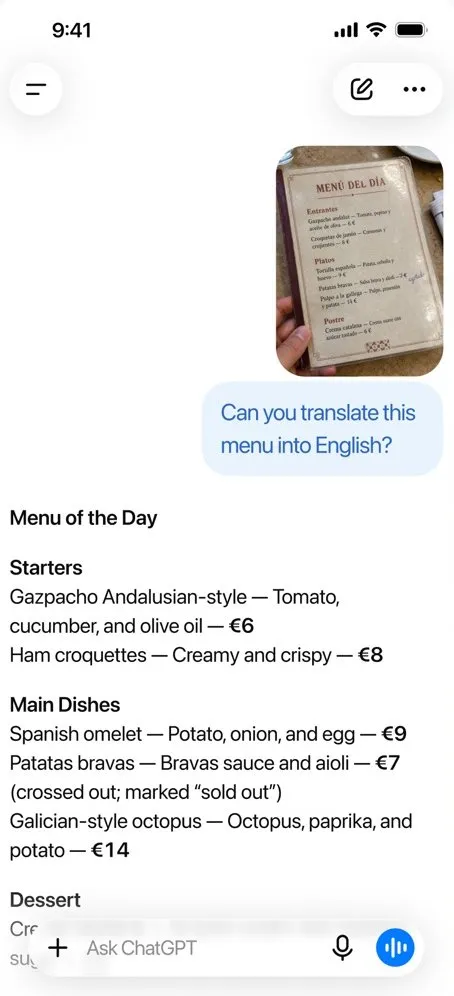
Since 7 October everyone’s Chat runs GPT-6. But it isn’t the same GPT-6: paying users (Plus and up) get GPT-6 Sol, while Free and Go get the smaller GPT-6 Luna. For chatting, rewording or translating a menu the gap is small; for maths, code and long files Luna is clearly weaker.
The headline change with GPT-6 is Intelligent UI: an answer can be a chart you can drag, a bill-splitting calculator or a side-by-side comparison rather than plain text. OpenAI also says it starts answering while still thinking, with the first words on search questions arriving 44% sooner than before (its own test). If that’s too busy, turn off Layout and visuals in Settings on the web; it reduces the visuals but doesn’t remove them all.
A few everyday habits:
- Pick the level yourself. Since 14 September Plus and Pro don’t step up from Instant automatically, so choose Medium or High for hard questions. On iPhone, long-press the send button to change the model for one message only.
- Ask with a photo. Menus, manuals, homework: it reads them all.
- Connect your email. With Gmail or Outlook connected you can draft and send an email from the chat (web, Plus and up).
Pictures: change one thing at a time

Ask for a picture in any chat, or open Images in the sidebar. ChatGPT Images 2.5 arrived on 8 September with three additions: Templates (posters, logos and so on; it asks follow-up questions once you pick one); Sketch on mobile, reached by typing @ in the message box, so you can draw first and then describe; and Select on a generated image to change only the area you circle.
The trick is the same as elsewhere: change one or two things at a time and say what must stay. OpenAI’s own help warns that selections “are not always precise, and edits may extend beyond the area you selected”.
Free accounts can make pictures within a cap; Plus adds image generation with thinking, which helps with infographics and text-heavy posters. Where ads run, Free users who choose the ad-free option lose image generation (see below).
Voice: Live listens while it talks
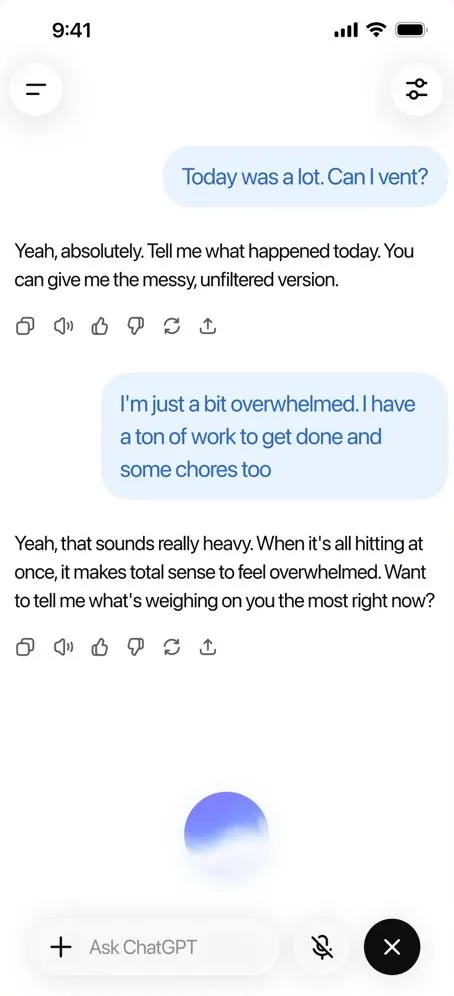
Tap the voice button to the right of the message box to start Live. Upgraded to GPT-Live-1.1 on 15 October, it listens and speaks at the same time, so you can cut in and it follows you. Everything said also stays as text in the chat, and you can upload files or use a Project’s material mid-call. Settings → Voice lets you change the voice; new options include Japanese, Korean, French and German accents.
Daily allowances, on a rolling 24 hours: Free is “limited”, Go 3 hours (on the smaller Quip model), Plus 3 hours, Pro 100 15 hours, Pro 200 unlimited.
One catch: Live doesn’t do video or screen sharing. To point your camera at something, switch back to the older Advanced option in Settings → Voice.
Deep research: sourced reports, but open every link
Tap + and choose Deep research, or type /Deepresearch. It first shows a research plan you can edit, then spends minutes to tens of minutes reading dozens of pages and returns a report with contents and sources, downloadable as Word, PDF or Markdown. Sites → Manage sites limits the search to sites you name, handy when you only want official documents or journals.
The weak point is the sources themselves. An April 2026 paper checked more than 50,000 citation links from ten models and agents: 3–13% pointed to pages that never existed. Deep research agents gave more citations and invented a higher share of them. However polished the report, open the original for every figure that matters.
Work: handing over a whole job
Work is ChatGPT’s biggest change of 2026. Switch to Work, describe the result you want, and it plans the steps, searches, writes code, drives a browser and hands back files. It can also run on a schedule, say checking a story every morning at 8 and telling you only if something changed.
After a month of poking at it, Simon Willison listed what Work has that Chat doesn’t: a code environment with internet access (it can install software and call APIs), a full Chrome browser (it fills in forms and takes screenshots, and hands you the keyboard to type passwords), folders that persist between chats, and one-step publishing as a website (ChatGPT Sites). His verdict: “extraordinarily confusing and very powerful”. He is also uneasy about safety: Work can read your private data, read untrusted web pages and send information out, exactly the combination prompt-injection attacks need, and OpenAI hasn’t explained how it defends against them.
A DataCamp author ran a full quarterly business review through it and got a report, a workbook, a deck and a dashboard site. His advice is practical:
- Give it one folder, so you can trace mistakes.
- Say which figures must not change, and “flag anything you can’t verify instead of guessing”.
- For anything important, ask for a plan first. Catching a wrong assumption in a plan “costs a sentence”; catching it in three finished files “costs a rebuild”.
- A file can look finished and still be wrong.
Work comes in two forms: cloud Work, which you can continue on web, phone or desktop, and Work in the desktop app, which can touch files on your computer. Web and mobile Work is for Plus and up; Free and Go get a small allowance in the desktop app only. Since August, Plus and Pro Work can also sign in to websites to get things done, and it stops for your confirmation before booking or paying.
Codex is at the top left of the desktop app. It shares one “agent allowance” with Work; Plus can use GPT-6 Astra there, but only a little, and you can buy credits to carry on.
Health: US only, and it gets things wrong too
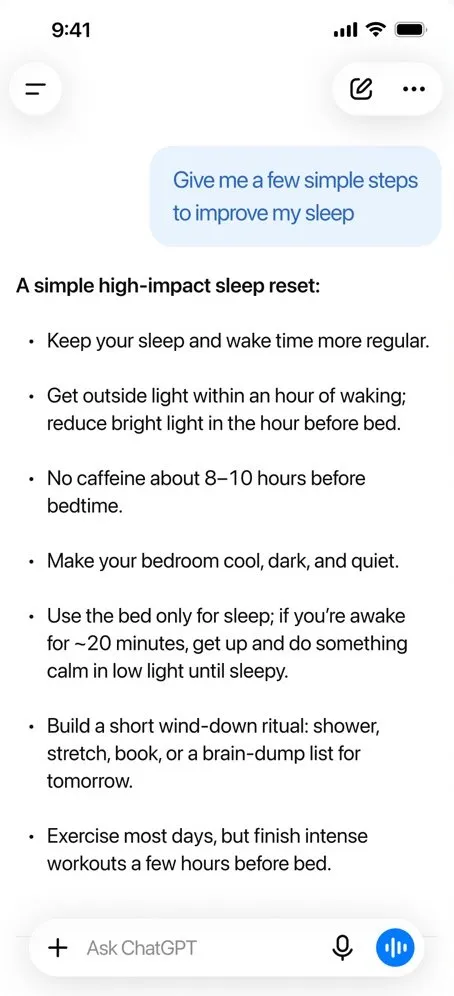
Since 23 July, US users aged 18 and over can connect hospital records and Apple Health data in the Health tab, follow trends in lab results and prepare questions for appointments. OpenAI says this data isn’t used to train models or target ads. Outside the US you can still ask health questions in an ordinary chat; you just can’t connect your own data.
Washington Post columnist Geoffrey Fowler uploaded ten years of Apple Watch data in the beta and asked for a cardiovascular grade. He got an F; uploading the same data again gave a different grade each time, and it forgot his age and sex. His doctor and the cardiologist Eric Topol both said the verdict was badly wrong. On the other side, US health official Amy Gleason said that after her daughter uploaded years of records, ChatGPT suggested she might qualify for a clinical trial after all and found a biopsy note every doctor had missed.
Use it to explain terms on a lab report and list questions for your doctor, not to grade you or diagnose. Also, since 14 September new Health connections default to letting ChatGPT use the data without asking each time for low-risk actions; to be asked every time, change it under Settings → Plugins → Health.
Plans: Free is enough to chat, Work needs Plus
Prices from the US pricing page; Go, Plus and Pro are monthly only:
| Plan | Per month | What changes |
|---|---|---|
| Free | $0 | GPT-6 Luna, unlimited text chat; uploads, pictures, voice and deep research capped; ads in some countries |
| Go | $8 | Higher caps than Free; still Luna; may show ads |
| Plus | $20 | GPT-6 Sol and thinking levels; Work, Sites; a little GPT-6 Astra; no ads |
| Pro 100 / 200 / 500 | $100 / $200 / $500 | Pro effort (Astra), Extra High, a dot; higher allowances in turn; Ultrafast only on Pro 500 |
| Business | $25 a seat ($20 billed annually) | At least 2 seats; no training on data by default; Premium seats $125 ($100 annually) |
| Enterprise | On request | Admin console, data residency, single sign-on |
- How usage is counted: apart from “unlimited” text chat, OpenAI doesn’t publish numbers, only “limited” or “expanded”. Work, Codex and the Office add-ins share one agent allowance, and you can buy credits once it runs out.
- The Pro 200 cut: new Pro 200 subscriptions since 29 September get a smaller allowance, and existing subscribers drop to it after 29 October. According to OpenAI emails posted by users on Hacker News, Work and Codex usage falls from 20 to 10 times Plus, and GPT-6 Pro from 200 to 100 messages a week.
- Which to pick: for chatting and the odd picture, Free is enough. For Work, better models and no ads, Plus is the best value. Only people who code or run Work all day need Pro.
Settings to change first
- Training: Settings → Data controls → Improve the model for everyone. Turned off, new chats aren’t used for training. Note that giving a thumbs up or down can still send that whole conversation for training.
- Temporary chat: kept out of history and memory, not used for training and shown no ads, but kept for up to 30 days for safety review. Since August you can choose whether a temporary chat uses your memories.
- Memory: Settings → Personalization → Memory. On the memory summary you can correct things directly or choose Delete and turn off memory. A project can be set to project-only memory so work and private life don’t mix.
- Ads: Settings → Ads controls turns off personalised ads and clears ad data. Free users can also go ad-free, at the cost of fewer messages and no image generation or deep research.
- Lockdown Mode: Settings → Security. It restricts web access and outside services to stop prompt injection stealing data; worth turning on when you work with sensitive material.
Ads: the price of Free and Go
OpenAI started showing ads to Free and Go users in the US on 9 February 2026, added the UK in June, and has been widening the test since. Ads sit below an answer and are labelled; a multi-image ad shown while pictures generate is also being tested. OpenAI says ads don’t change answers, conversations aren’t shared with advertisers, and no ads appear for under-18s or next to health and political topics.
The only way to be fully ad-free is Plus or higher; the $8 Go plan can show ads too.
Not available in mainland China
OpenAI’s list of supported places leaves out mainland China, Hong Kong and Macau (Taiwan is included), and warns that using it from elsewhere “may result in your account being blocked or suspended”.
In practice, people in China who want it have to solve both network access and payment. In October threads on V2EX, the usual routes are subscribing through the App Store with a foreign Apple ID, or paying a “top-up” reseller: posts quote ¥111 to ¥125 a month for Plus, and one user subscribes at Turkish App Store prices. All carry risk. OpenAI’s terms ban reselling and account sharing, resellers can stop working at any time, and your chats and work files sit in the account that gets banned. Some users point out that domestic apps such as Doubao, DeepSeek and Kimi now cover most everyday questions.
Company, product and models
| Name | What it is | How it relates to ChatGPT |
|---|---|---|
| OpenAI | The company | Makes ChatGPT and the GPT models |
| ChatGPT | The product (app and website) | The subject of this page |
| GPT-6 Sol / Luna | The chat models | Sol on paid plans, Luna on Free and Go |
| GPT-6 Astra | OpenAI’s strongest model | Behind Pro effort, dots and Work |
| GPT-6.1 Sol | The newer Sol | Only in Work and Codex for now |
| Codex | Coding agent | In the ChatGPT desktop app, on the same subscription |
| OpenAI API | Pay-as-you-go access for developers | Billed separately from ChatGPT plans |
Before you rely on it
- It invents citations. In the 2023 New York case Mata v. Avianca, a lawyer’s brief written with ChatGPT cited cases that didn’t exist, and the judge imposed sanctions. Three years on the problem hasn’t gone away: by early June 2026 legal researcher Damien Charlotin’s database counted 1,058 US court filings with AI-invented citations. A paper, case or source only counts once you’ve opened it.
- Features disappear. In 2026 alone GPT-5.2 and o3 were withdrawn, the Atlas browser, group chats and the Sora app were shut, and custom GPTs are on the way out. Any workflow built on one feature should be ready to change.
- The official docs contradict each other. At the time of writing, one help article still said Free runs GPT-5.6 Luna, while the pricing page and the 7 October release notes say GPT-6 Luna. When in doubt, trust the latest release notes.
- Limits are opaque. Beyond chat messages, nearly everything is just “limited”. At a limit it shows when access returns, and support can’t reset it.
Getting started
- Go to chatgpt.com, or download ChatGPT from the App Store or Google Play (not in the China store).
- Sign up with email, Google, Microsoft or Apple. You can chat without signing in, but nothing is saved.
- Open Settings → Data controls first and decide whether to turn off Improve the model for everyone.
(Snap a manual, a menu or a lab report) What does this say? Tell me in plain English what I should watch out for.
Research the total yearly cost of running an electric car in Manchester versus Bristol in 2026. Use only government and carmaker websites, and give a source link for every figure.
From the sales spreadsheet I've uploaded, make a 6-slide monthly report and a summary table. Don't change any of the original figures, flag anything you can't verify instead of guessing, and show me your plan before you start.
Recent changes
- AI companies have lowered the bar for passing your chats to the policeOur coverage
- ChatGPT's $200 Pro plan halves its allowance on 30 October and becomes two $100 plans in oneOur coverage
- OpenAI shuts down GPT-4, o1 and other old models in its API; GPT-4o follows on 14 JanuaryOur coverage
- ChatGPT ads reach 89 countries as OpenAI passes 100,000 advertisersOur coverage
- US states sue OpenAI over chatbot safety and seek testing restrictionsOur coverage
- Google's business Gemini agent does staff work across more than 100 office appsOur coverage
- GPT-6 arrives in Chat; answers can include charts and small interactive tools (Intelligent UI)
- ChatGPT answers can become interactive charts and tools, with free access rolling outOur coverage
- ChatGPT paid plans can now transcribe and answer questions about uploaded recordings up to 512 MBOur coverage
- OpenAI will watermark ChatGPT text in the EU; with a quarter of the words changed, only 17% is detectedOur coverage
Compared with similar products
| Product | Price | What it is |
|---|---|---|
| ChatGPTOpenAI · handbook | Unlimited text chat, other features capped, ads in some countries; Go $8 / Plus $20 / Pro $100–$500 a month | OpenAI's AI assistant and the most used one in the world. Chat, search, pictures and voice are free; paid plans let you hand over whole jobs such as slides, spreadsheets, websites and code. Not offered in mainland China or Hong Kong. |
| ClaudeAnthropic · handbook | Sonnet and Haiku, smaller allowance; Pro $20, Max $100 / $200 a month | Anthropic's AI assistant on the web, desktop and phone: it writes, reads long files and researches, hands back Word, PowerPoint and Excel files, and on paid plans can work your computer and browser. |
| Microsoft CopilotMicrosoft · handbook | Chat and images, with a daily cap; Microsoft 365 Personal $9.99, Premium $19.99, Pro $99.99 a month | Microsoft's AI assistant: chat and make images on the web, phone or PC, and with a Microsoft 365 subscription it writes and crunches numbers inside Word and Excel. |
| DeepSeekDeepSeek · handbook | App and web completely free, no subscription; No subscription; API pay per use, off-peak output $0.60 per million tokens | Hangzhou DeepSeek's free AI assistant: one chat box with two switches (DeepThink and Search), good at maths, reasoning and long files, and able to read pictures since this year. It cannot make images and has no paid plan. |
| Doubao 豆包ByteDance · handbook | Most features free; ¥68 / ¥200 / ¥500 a month | ByteDance's AI assistant and the most used one in China: it takes voice calls, answers questions about photos, makes slides, edits pictures and video, and can operate your computer. |
| GeminiGoogle · handbook | Auto model selection (mostly Flash-Lite), limits refresh every 5 hours; $4.99 / $19.99 / from $99.99 a month | Google's AI assistant, wired into Gmail, Calendar, Drive, Maps and YouTube, and now the assistant on Android phones in place of Google Assistant. It chats, researches and writes reports, makes pictures and video, and on paid plans runs multi-step tasks for you. |
| GrokSpaceXAI · handbook | Limited daily use, mainly Fast mode; Plus $8 / Premium $30 / Super $100 / Ultra $200 a month | The AI assistant from Musk's SpaceXAI, built into the X social network: it reads live discussion on X, answers questions with web search, makes pictures and video, talks by voice, and on paid plans can send agents to do work for you. |
| KimiMoonshot AI · handbook | Sign-up and chat; free allowance not published; China ¥49 / 99 / 199 / 699 a month; international $19 / 39 / 99 / 199 a month | Moonshot AI's assistant: it reads long files, does deep research, makes slides and websites and writes code, running on Kimi K3, the largest open-weight model. |
| Mistral Vibe (Le Chat)Mistral AI · handbook | Yes, with limited messages and web searches; Pro $14.99/month (students $5.99), Team $24.99 per user/month | The assistant from France's Mistral AI, called Le Chat until it was renamed Vibe in May 2026: chat, web search, multi-step tasks on your behalf, and coding. |
| Qwen 通义千问Alibaba · handbook | Chat and errands free; office and video have daily quotas; ¥19 / ¥49 / ¥128 a month; video credits extra | Alibaba's AI assistant, called Qianwen (千问) in China and Qwen abroad. Besides chat, slides and video, the Chinese app can use Taobao, Alipay, Amap and Fliggy to order food, book travel and run errands for you. |
Sources
- OpenAI Help Center · ChatGPT release notes (read 2026-10-17)
- ChatGPT · Plans and Pricing (US page, 2026-10-17)
- OpenAI Help Center · About ChatGPT Pro tiers
- OpenAI Help Center · What is ChatGPT Plus?
- OpenAI Help Center · What is ChatGPT Go?
- OpenAI Help Center · ChatGPT Free Tier FAQ
- OpenAI Help Center · What is ChatGPT Business?
- OpenAI Help Center · GPT-6 and other models in ChatGPT
- OpenAI Help Center · ChatGPT Work and Codex
- OpenAI Help Center · Data Controls FAQ
- OpenAI Help Center · Memory in ChatGPT
- OpenAI Help Center · Ads in ChatGPT
- OpenAI Help Center · ChatGPT supported countries
- OpenAI Help Center · ChatGPT Voice
- OpenAI Help Center · Images in ChatGPT
- OpenAI Help Center · Deep research FAQ
- OpenAI Help Center · Health in ChatGPT
- OpenAI Help Center · Getting started with your dot
- OpenAI Help Center · Using credits for flexible usage (personal plans)
- OpenAI · GPT-6 and Intelligent UI for everyone (2026-10-07)
- App Store (US) · ChatGPT, version 1.2026.279
- Simon Willison · Understanding ChatGPT Work (2026-08-30)
- DataCamp · Running a quarterly business review with ChatGPT Work (2026-08-18)
- MedCity News · A Washington Post columnist tests ChatGPT Health (2026-01-28)
- arXiv · Reference hallucinations in commercial LLMs and deep research agents (2026-04-03)
- UNC Law Library · Handling hallucinations: three years on (2026-06)
- Sébastien Dubois · Pro 500 and the Pro 200 cut (2026-10-14)
- V2EX · Do you still need a foreign card to renew Plus? (2026-10-09)
- V2EX · How to choose a top-up reseller (2026-10-13)
- V2EX · How much do you spend on AI each month? (2026-10-15)
- Wikipedia: ChatGPT