Kimi
By Moonshot AI · www.kimi.com ↗ · Checked 17 Oct 2026
Moonshot AI's assistant: it reads long files, does deep research, makes slides and websites and writes code, running on Kimi K3, the largest open-weight model.
Verdict
If you need a sourced industry report, a decent slide deck, or the strongest open model for coding, Kimi is the Chinese assistant most worth trying. The price is speed: a complex K3 job easily takes half an hour, and peak hours bring throttling. The biggest trap is membership: chat, research, slides and coding all draw on one credit pool whose size Moonshot does not publish, and users often run it dry without noticing.
Use it if
- Industry research and literature reviews that need long, sourced reports
- Office workers who want editable PowerPoint, Excel and Word files straight from their material
- Reading many long files at once: contracts, annual reports, papers
- Developers who want the strongest open model for coding (Kimi Code)
Use something else if
- Quick everyday questions: K3 is slow; DeepSeek or Doubao answer faster
- Voice, photo questions, pictures and video: Doubao is easier
- Heavy coding where you need to know your monthly allowance: credits are opaque; pay-as-you-go APIs from GLM or DeepSeek are easier to budget
- Keeping chats out of training without emailing support: Claude and ChatGPT have a switch in settings
- Free plan
- Sign-up and chat; free allowance not published
- Paid
- China ¥49 / 99 / 199 / 699 a month; international $19 / 39 / 99 / 199 a month
- Where
- Web, iOS, Android, HarmonyOS; Kimi Work desktop app (Mac, Windows); Kimi Code in the terminal and VS Code
- Models
- K2.6 (fast), K3 (2.8 trillion parameters, open weights), K3 Swarm
- Context
- K2.6 about 128K tokens; K3 up to 1 million tokens (top plan)
- Region
- China uses kimi.com, billed in yuan; elsewhere kimi.ai, billed in dollars; the same app is in the Chinese and US App Stores
- Data
- China version stored in China; chats may be used for training, opting out takes an email
- Rating
- 4.9 on the Chinese App Store (about 195,000 ratings, October 2026)
Kimi made its name in 2023 by reading a whole book in one go: it took 200,000 Chinese characters when other Chinese assistants could not. Three years on it is a different product. Long files are still there, but the star is now an agent that does the work itself: research reports, slide decks, websites, code. Underneath is Kimi K3, a 2.8-trillion-parameter open-weight model that, by Moonshot AI’s own account, trails only Anthropic’s Claude Fable 5 and OpenAI’s GPT-5.6 Sol overall.
It is genuinely strong, genuinely slow, and almost everything costs membership credits. The table below sums up the official help centre, media hands-on tests and forums such as V2EX; each section after it goes into detail.
What to hand it, and what not to
| What you want | How | Free plan | How it goes |
|---|---|---|---|
| Read long files, compare several | Upload with +, up to 50 files of 100 MB each | Yes; very long needs the top plan | An old strength, but K2.6 reads only about 128K tokens at once |
| Industry research, literature reviews | Pick K3 or K3 Swarm and ask | Free allowance unpublished | Its best work, with sources; one Swarm run can use a tenth of a month's credits |
| Slides, Excel, Word | Pick K3; say who it's for, length and style | Free allowance unpublished | Editable files of good quality; K2.6 gives text only |
| Websites and small games | Pick K3; describe it, or upload a screenshot or recording | Free allowance unpublished | Good taste, but slow and often wrong in the details |
| Coding | Kimi Code in the terminal or VS Code | No; from the ¥99 / $19 plan | Near the frontier; throttling and credits are the usual complaints |
| Operate your computer | Install the Kimi Work desktop app | Uses credits | The web and mobile apps can't; only the desktop app can |
| Quick questions | Switch to K2.6 | Yes | Fine, but not what it is best at |
One input box, three models
Kimi no longer has a separate thinking mode or agent mode: chat and agent share one input box, and Kimi decides by itself whether to search the web or start making files. You choose two things, both above the input box: the model and the thinking effort.
Kimi's three models
Fast chat and answers, with Standard or Advanced thinking. Text output only, such as a slide outline, Word body text or code.
- Use it for
- Everyday questions, translation, rewording a paragraph
- Example
- Translate this email into English and make it a bit more polite.
- Limits
- About 128K tokens per turn. Still uses membership credits.
The 2.8-trillion-parameter flagship. It reads images and video and delivers editable .pptx, .docx, .xlsx and .pdf files end to end. Adds a Max thinking level.
- Use it for
- Reports, slides and spreadsheets, multi-step tasks, finding details in pictures
- Example
- Make a 10-slide deck comparing the three annual reports I've uploaded.
- Limits
- Slow. The 1-million-token context needs the top plan; higher thinking effort uses more credits.
Splits one big job across up to 300 sub-agents working in parallel; Moonshot says over 4,000 parallel tool calls.
- Use it for
- Wide searches, batch work, very long reports
- Example
- Research the global solar industry and produce a report, a briefing deck and a financial model.
- Limits
- From the ¥99 plan in China. Uses a lot of credits.
Source: Kimi Help Centre, Choosing K2.6 / K3 / K3 Swarm
To save credits, set thinking to Standard. Pictures, video and voice are not in the picker: tap + → Plugins, add the plugin you need, then use it with K3.
Long files: the old strength, now metered
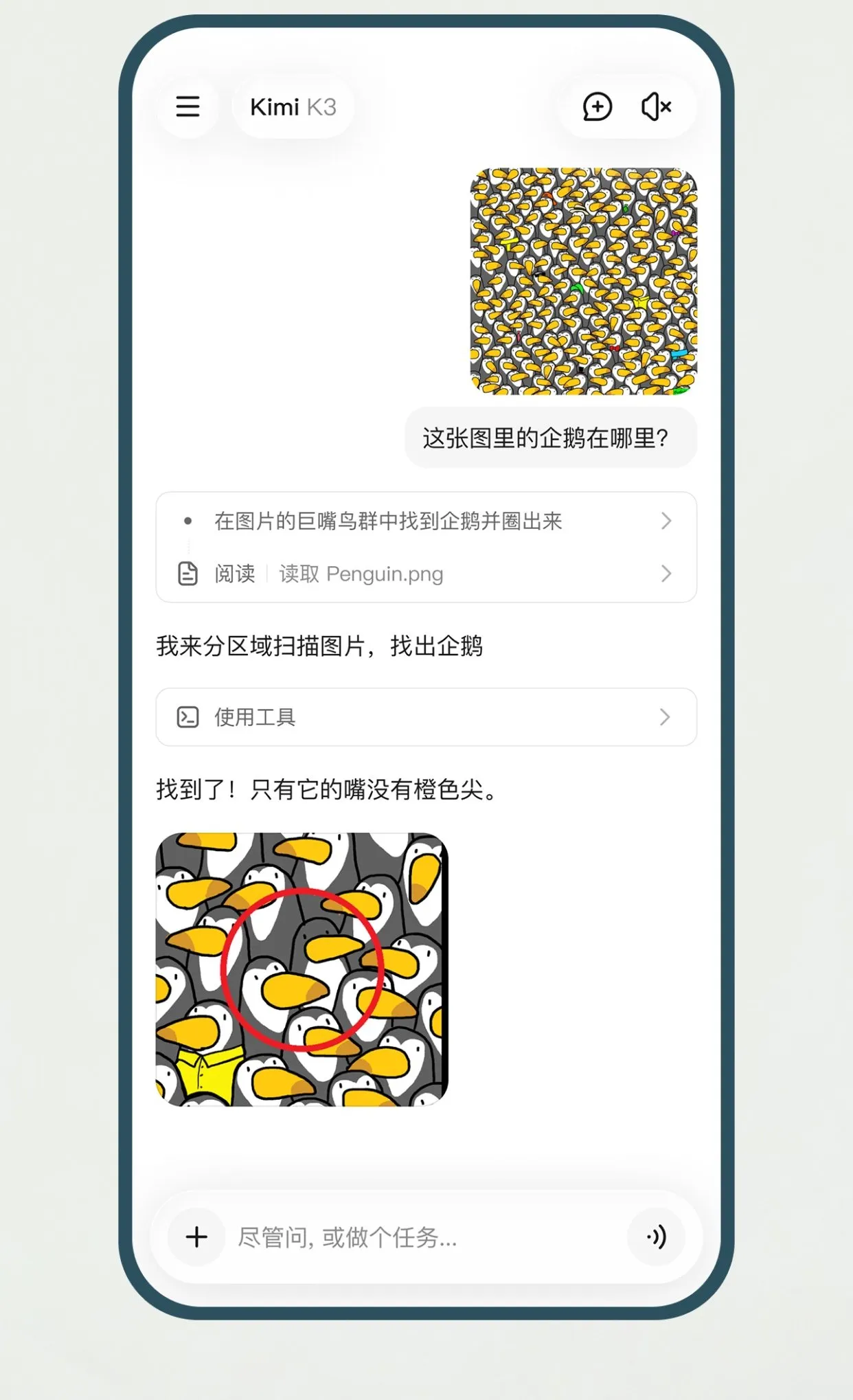
Upload with + on the left of the input box: PDF, Word, Excel, PowerPoint, images and video all work, up to 100 MB each and 50 files at a time. K3 is natively multimodal, so it reads scans and charts without a separate OCR step.
What you need to know is length. The default K2.6 handles about 128K tokens per turn, which the help centre puts at 50,000–60,000 Chinese characters: shorter than the 200,000 characters that made Kimi famous. K3 has a million tokens, but the help centre says this “needs the top membership tier”, which in China is the ¥699 plan; you then pick the “extra-long” conversation length in the input box. A long-time member on V2EX complained about the limit on the day K3 launched; another replied that with a million-token context “only the first 200-odd K works well”, so the money may not buy much.
Practical advice from the help centre itself:
- A file so big it fills the context in the first turn: split it and send the parts separately.
- It starts to “forget” after dozens of turns: ask it to “summarise and write a handover note”, then paste that into a new chat. Deleting old messages does not free up space.
- You keep reading the same material: put it in a Project, and every new chat starts with it.
Research and Swarm: its best work
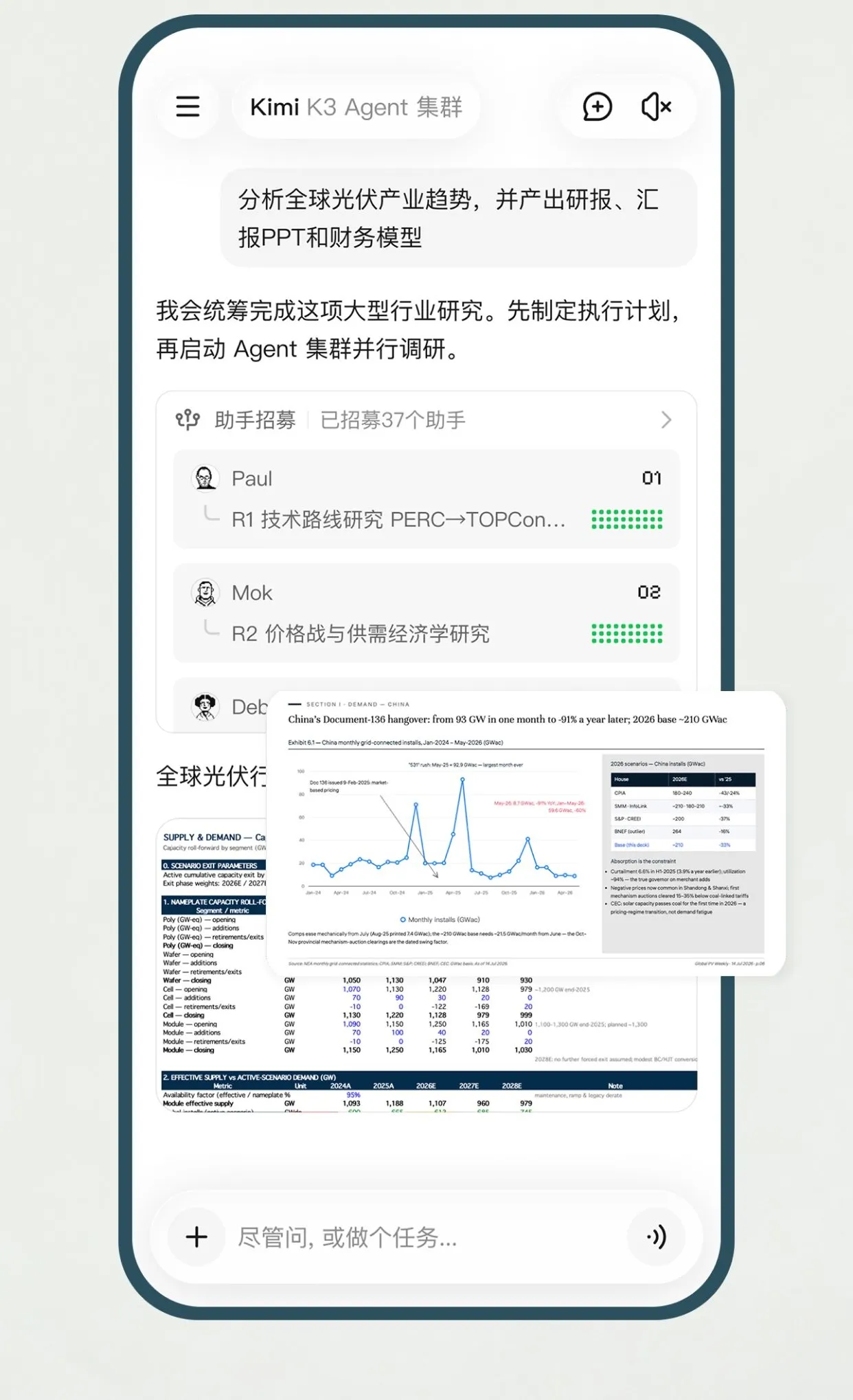
Kimi’s first agent was Deep Research, driven by Moonshot’s own Kimi-Researcher model. Moonshot says a report averages over 10,000 characters with about 26 cited sources; tapping a citation jumps to the highlighted original, and you also get a shareable visual version. The help centre also says plainly that it is not for fiction, fortune-telling or “editable slides”; that is K3’s job.
Bigger jobs go to K3 Swarm. In the app you see it “recruit helpers”, each taking one strand, say technology roadmaps for one and the price war for another.
How it does: AIX Caijing (republished by The Paper) had K3 write a consultancy-style report on on-device AI. The chapters on context, supply chain and market size “build on each other”, it found, but the data came almost entirely from two research houses, with no cross-checking. So when you get a report, open the citations behind the key numbers.
Watch your credits. Moonshot’s own example: on the ¥99 plan, one Deep Research run uses about 5–10% of the month’s credits. A V2EX user was blunter: “one Swarm run can use 10% of the ¥199 monthly limit”.
Slides, spreadsheets and websites: only K3 delivers files
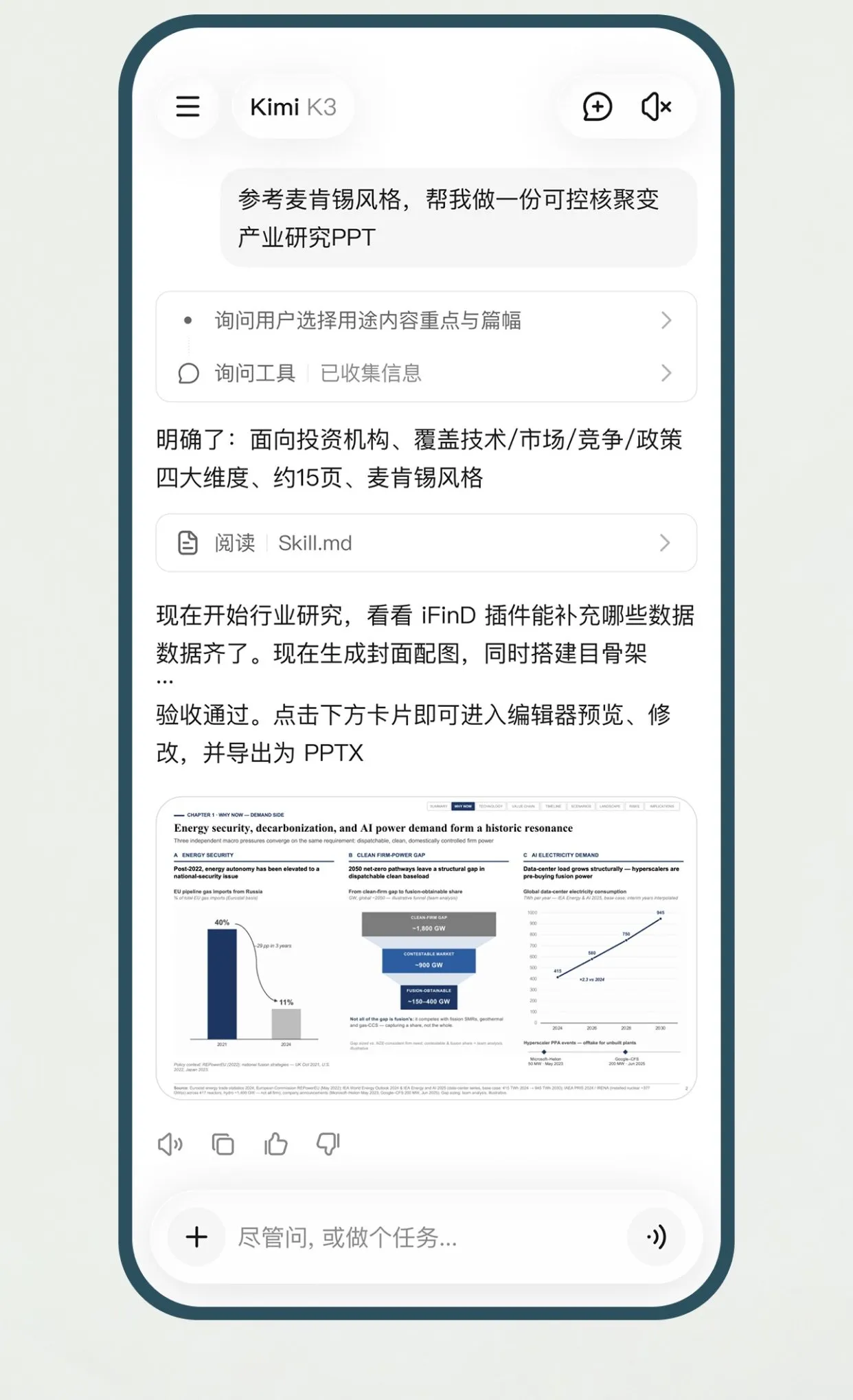
Pick K3 and say what you want. It asks back about purpose, focus and length, then builds the deck and hands you a card that opens an editor; from there you export a PPTX. You can upload a slide you like and ask it to match the style. K2.6 gives only an outline, and the chat window itself does not produce Office files.
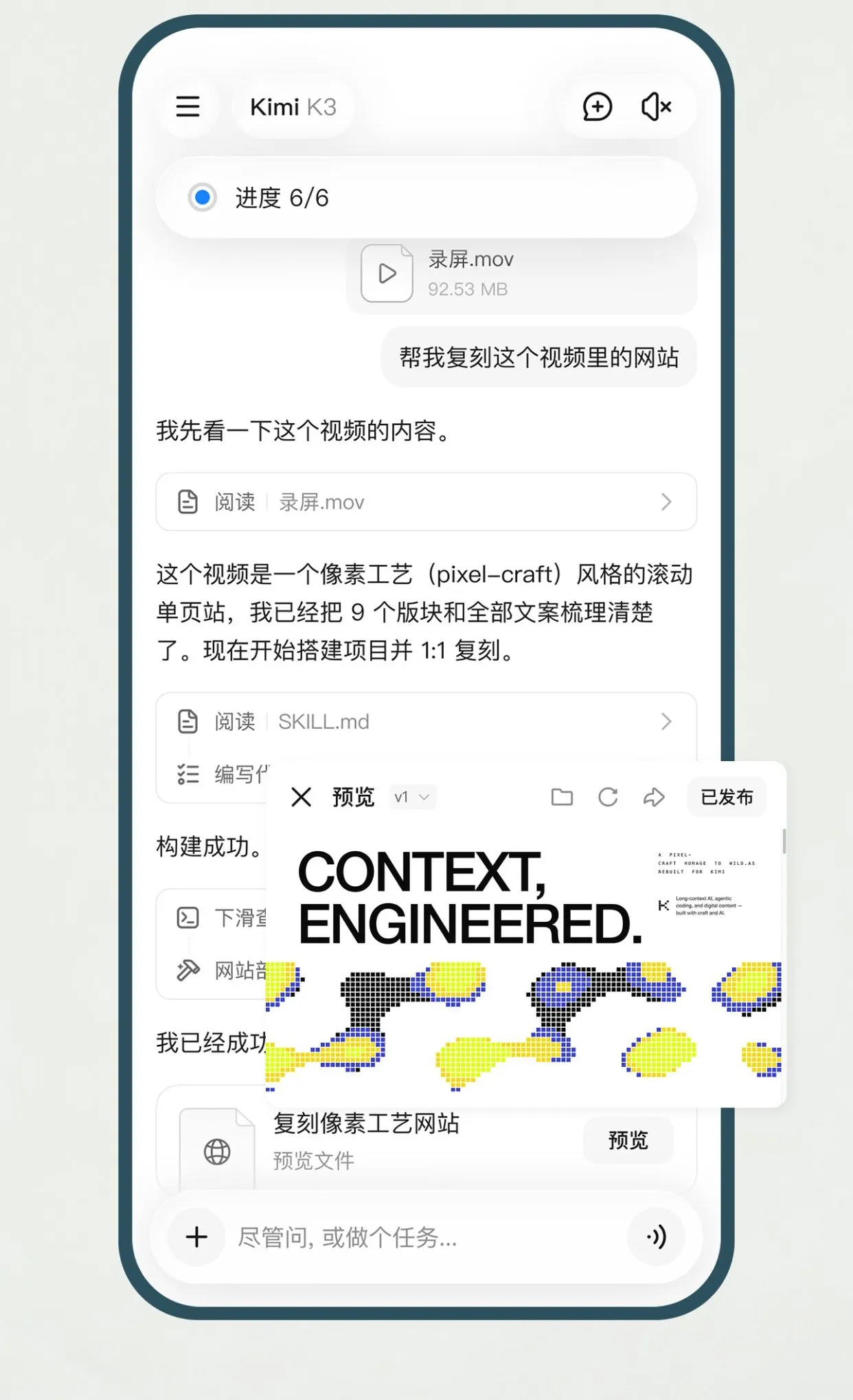
Websites and small games also go to K3: describe one in a sentence, or upload a screenshot or screen recording to copy, and publish it with one tap. A published site keeps drawing credits (about 0.08%, says the help centre), so click Unpublish when you no longer need it.
AIX Caijing’s test draws a clear picture. K3’s 3D city, waterfall and maze game looked better than GPT-5.6 Sol’s: it wins on “aesthetic instinct”. But trees and street lamps stood in the middle of the road, the first water-pouring simulation leaked through the bottom of the cup, and it took two to three times as long as Sol: nearly half an hour for the waterfall, almost two hours to cut a 30-second promo video.
In short: if you want it to look good and can wait, use K3; if you need it fast and right first time, use something else.
Coding: Kimi Code and the open models
Kimi Code is the developer kit: a command-line agent for the terminal, a VS Code extension and, since September, a desktop app. Once installed, choose K3 with the /model command. It also plugs into third-party tools such as Claude Code and Codex.
The model is strong. K3 briefly topped the Arena front-end coding blind test (1,679 points against Fable 5’s 1,631, as cited by AIX Caijing), and American companies such as Cursor and Thinking Machines have built models on Kimi. User complaints centre on three things:
- Membership: in China the ¥49 Go plan has no Kimi Code; it starts at the ¥99 Plus plan. All four international plans include it.
- Throttling: on top of the monthly credits, Kimi Code has a rolling five-hour limit. One V2EX user summed it up as “429, 429, 429 — what use are credits?”
- Speed: one user measured an average latency of 12.85 seconds for K3 on the ¥199 plan, against 3.54 seconds for the same requests through Ollama.
If you would rather pay per use, the Kimi API charges $3 per million input tokens for K3 ($0.30 when cached) and $15 per million output tokens. On the Chinese platform the minimum top-up is ¥10, and the ¥15 voucher for new users cannot be spent on K3.
Kimi Work: Kimi on your computer
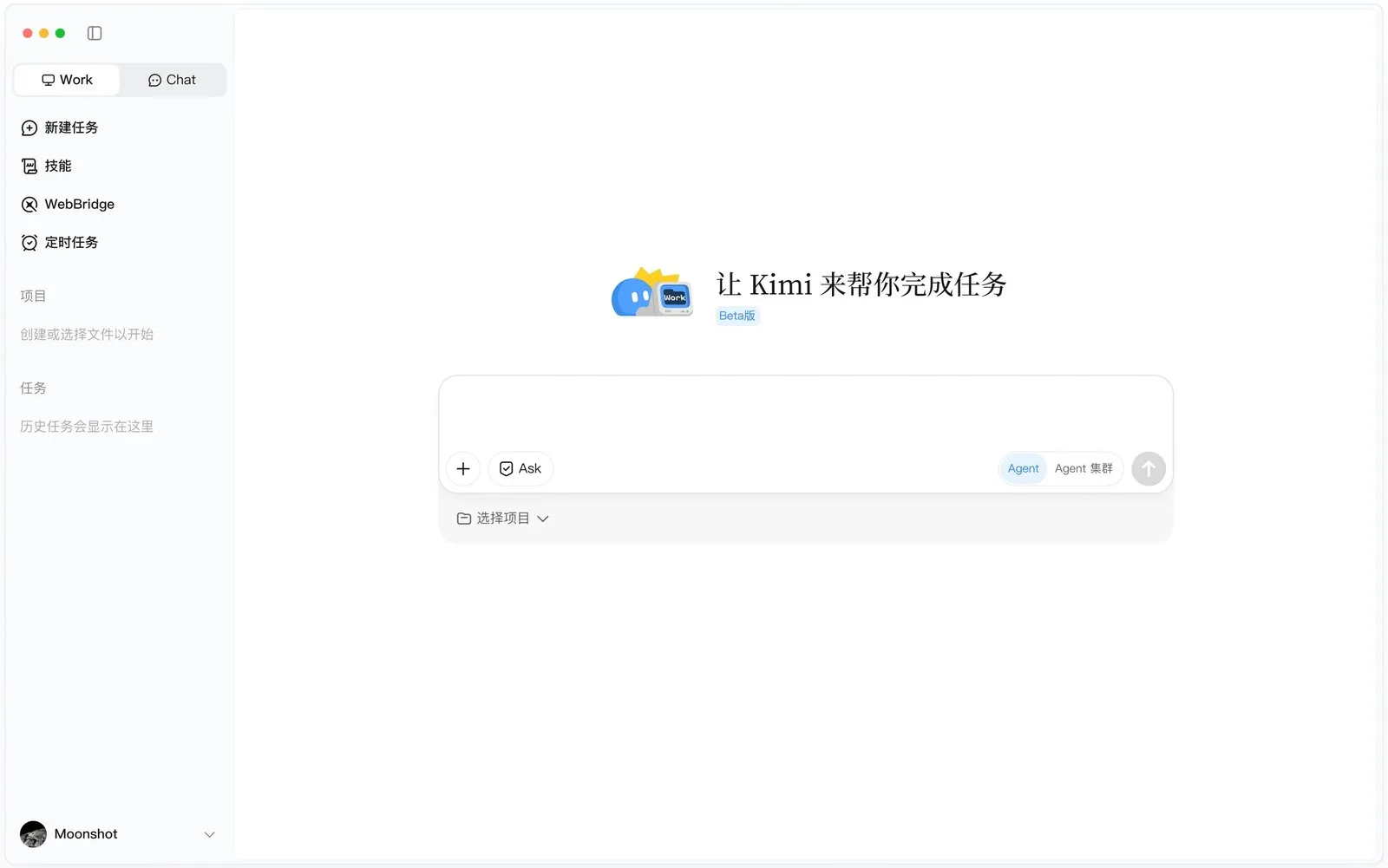
Kimi on the web and in the mobile app has no access to your computer. To have it sort local files or work across desktop programs, install Kimi Work (Mac and Windows). It is built on Kimi Code and can install skills and plugins and run scheduled tasks.
It updates almost weekly. Worth knowing: since 19 August it has its own built-in browser that can click through sites and fill in forms for you (on the Mac it can import your Chrome logins; off by default); since 4 September you can steer its tasks from your phone; with the Kimi Computer Use plugin it clicks and types in the background without taking over your mouse. Permissions come in three levels, Default, Ask and All; avoid All.
Membership: one credit pool for everything
After K3 launched in July 2026, users poured in, and on 19 July Kimi stopped taking new subscribers, citing a shortage of computing power. It reopened about two months later with new plans. Current prices (help centre, captured 12 October):
| China plan | Monthly | Yearly | Agent credits, as Moonshot words it | Main differences |
|---|---|---|---|---|
| Go | ¥49 | ¥468 | “More” | Documents, slides, Deep Research, website hosting; no Kimi Code or Swarm |
| Plus | ¥99 | ¥948 | 2× | Adds Kimi Code and Agent Swarm; 2 tasks at once |
| Pro | ¥199 | ¥1,908 | 4× | Adds Goal mode and a dedicated Kimi Claw |
| Max | ¥699 | ¥6,708 | 14× | 4 tasks at once; 50 GB of project storage |
Moonshot does not say what “2×” or “14×” is measured against, or how many credits any plan includes.
Outside China (kimi.ai, in dollars) the names differ: Plus $19, Pro $39, Max $99 and Ultra $199 a month, all four with Kimi Code.
How credits work: chat (K2.6 included), research, slides, Kimi Code, Kimi Work and Kimi Claw all draw on one monthly pool, charged by tokens. It refreshes monthly from your subscription date, does not roll over and is not refundable. When it runs out you can switch on Extra Usage and pay as you go. To check: on the web, click your avatar at the bottom left → Settings → Subscription; in the app, Me → Membership Plan → Subscription. It shows the percentage left and recent charges.
Free use: you can sign up and chat, but Moonshot does not say how big the free allowance is. When K3 launched, a V2EX user said choosing K3 brought up a prompt to pay.
Which plan: for research and slides on the web and phone, the ¥49 Go plan is enough to try; coding needs at least ¥99 (or $19 abroad); only daily Swarm users or those who need the million-token context should consider ¥699. Paying yearly saves about 20%, but there are no refunds, so buy one month first and watch your usage.
Slow answers, throttling and opaque credits
- “Kimi is a bit tired”: peak-time throttling; the help centre says wait one or two minutes. Members get a priority lane, yet members on V2EX still call it “very, very slow at weekday peaks”.
- Opaque credits: prices are public, allowances are not. User reports collected by SMZDM include a ¥199 member whose credits were zeroed overnight, with support giving three different explanations, and someone who measured that the same credits buy several times more computing through Kimi Code than through Kimi Work. These are one-sided accounts, but they are reason enough to keep an eye on the Subscription page yourself.
- Hidden charges: a deployed Kimi Claw cloud host takes about 0.6% of the month’s credits every day at 4 p.m., used or not. If you are not using it, save its files locally and delete the host.
- K3.1: reports in late September said K3.1 would arrive in October with low, high and max reasoning levels. As of 17 October it has not been released.
Privacy: opting out of training takes an email
The Chinese privacy policy (effective 31 August 2026) says personal information is stored in China and that chat content, once de-identified, may be used to train models. There is no switch in settings: you email customer service, and after identity checks the opt-out takes effect in 5–7 working days, for the whole account only. The international policy (kimi.ai) also says your inputs are used for training, and that data may be stored on servers outside your country.
- Memory: say “remember…” and it saves an instruction, up to 50; view and delete them under your profile → Settings → Memory instructions. Moonshot says memory is not used for training.
- Deleting: deleting a chat also kills its share link; close the account in the app under Settings → Account security → Delete account.
- Business version: Kimi Business promises company data stays out of training.
Company, product, model
| Name | What it is | Where you meet it |
|---|---|---|
| Moonshot AI (月之暗面) | Beijing company founded in 2023; Alibaba and Tencent are shareholders | — |
| Kimi | The web and mobile assistant this page is mainly about | kimi.com (China), kimi.ai (international), apps |
| Kimi Work | Desktop app that can work with local files and your computer | Mac and Windows |
| Kimi Code | Coding tools | Terminal, VS Code, desktop |
| Kimi Claw | Always-on cloud automation, can connect to Feishu and WeChat | Deployed from the web |
| Kimi K2.6 / K2.7 Code / K3 | Models with open weights | All Kimi products, the API, or your own servers |
“Open” needs a caveat: K3’s licence requires any company with more than $20 million in annual revenue to sign a contract with Moonshot before selling it to customers as a service. The model is also contested. In July a White House official alleged that K3 was distilled from Anthropic’s model, and on 10 September an Anthropic report accused Moonshot of using thousands of accounts to harvest Claude’s answers for training. These are allegations; Moonshot has not publicly responded. For ordinary users the practical effect is mostly abroad, where some employers and institutions may not allow AI services from Chinese companies.
First steps: three things to try
- Go to kimi.ai (kimi.com in China), or search “Kimi” in your app store; the app is in both the Chinese and US App Stores.
- After signing in, check Settings → Subscription to see your credits before choosing a model.
- If training bothers you, email customer service to opt out first.
(Upload two contracts) Compare these two contracts clause by clause on payment, breach and termination. Put the differences in a table and give the page number in each original.
Research how prices of grid-scale battery storage moved in 2026 and who the main manufacturers are. Write a report with a source for every number; where you can't find a reliable source, say "not found".
Turn this report into a 10-slide deck for senior management. Put the conclusion on the first slide and make the charts editable in Excel.
Recent changes
- Moonshot says it trained down its new Kimi model's hacking skill, but its own test shows a small cutOur coverage
- Nvidia-backed Reflection releases its first open model, but its own scores still trail DeepSeek and other Chinese modelsOur coverage
- Kimi Work can open and edit Notion and Feishu documents
- Plans renamed Go, Plus, Pro and Max at the same prices; the ¥49 Go plan no longer includes Kimi Code
- Kimi Work tasks can be controlled remotely from a phone
- Kimi Work gets a built-in browser the agent can click through
- Full K3 weights released; large companies need a contract to sell it as a service
- New subscriptions paused for about two months as K3 demand outran computing power
- Kimi K3 released: 2.8 trillion parameters, 1-million-token context
Compared with similar products
| Product | Price | What it is |
|---|---|---|
| ChatGPTOpenAI · handbook | Unlimited text chat, other features capped, ads in some countries; Go $8 / Plus $20 / Pro $100–$500 a month | OpenAI's AI assistant and the most used one in the world. Chat, search, pictures and voice are free; paid plans let you hand over whole jobs such as slides, spreadsheets, websites and code. Not offered in mainland China or Hong Kong. |
| ClaudeAnthropic · handbook | Sonnet and Haiku, smaller allowance; Pro $20, Max $100 / $200 a month | Anthropic's AI assistant on the web, desktop and phone: it writes, reads long files and researches, hands back Word, PowerPoint and Excel files, and on paid plans can work your computer and browser. |
| Microsoft CopilotMicrosoft · handbook | Chat and images, with a daily cap; Microsoft 365 Personal $9.99, Premium $19.99, Pro $99.99 a month | Microsoft's AI assistant: chat and make images on the web, phone or PC, and with a Microsoft 365 subscription it writes and crunches numbers inside Word and Excel. |
| DeepSeekDeepSeek · handbook | App and web completely free, no subscription; No subscription; API pay per use, off-peak output $0.60 per million tokens | Hangzhou DeepSeek's free AI assistant: one chat box with two switches (DeepThink and Search), good at maths, reasoning and long files, and able to read pictures since this year. It cannot make images and has no paid plan. |
| Doubao 豆包ByteDance · handbook | Most features free; ¥68 / ¥200 / ¥500 a month | ByteDance's AI assistant and the most used one in China: it takes voice calls, answers questions about photos, makes slides, edits pictures and video, and can operate your computer. |
| GeminiGoogle · handbook | Auto model selection (mostly Flash-Lite), limits refresh every 5 hours; $4.99 / $19.99 / from $99.99 a month | Google's AI assistant, wired into Gmail, Calendar, Drive, Maps and YouTube, and now the assistant on Android phones in place of Google Assistant. It chats, researches and writes reports, makes pictures and video, and on paid plans runs multi-step tasks for you. |
| GrokSpaceXAI · handbook | Limited daily use, mainly Fast mode; Plus $8 / Premium $30 / Super $100 / Ultra $200 a month | The AI assistant from Musk's SpaceXAI, built into the X social network: it reads live discussion on X, answers questions with web search, makes pictures and video, talks by voice, and on paid plans can send agents to do work for you. |
| KimiMoonshot AI · handbook | Sign-up and chat; free allowance not published; China ¥49 / 99 / 199 / 699 a month; international $19 / 39 / 99 / 199 a month | Moonshot AI's assistant: it reads long files, does deep research, makes slides and websites and writes code, running on Kimi K3, the largest open-weight model. |
| Mistral Vibe (Le Chat)Mistral AI · handbook | Yes, with limited messages and web searches; Pro $14.99/month (students $5.99), Team $24.99 per user/month | The assistant from France's Mistral AI, called Le Chat until it was renamed Vibe in May 2026: chat, web search, multi-step tasks on your behalf, and coding. |
| Qwen 通义千问Alibaba · handbook | Chat and errands free; office and video have daily quotas; ¥19 / ¥49 / ¥128 a month; video credits extra | Alibaba's AI assistant, called Qianwen (千问) in China and Qwen abroad. Besides chat, slides and video, the Chinese app can use Taobao, Alipay, Amap and Fliggy to order food, book travel and run errands for you. |
Sources
- Kimi Help Centre · Membership pricing and benefits (prices captured 2026-10-12)
- Kimi Help Centre · Membership benefits overview (China)
- Kimi Help Centre · Membership plans overview (international)
- Kimi Help Centre · Credit update and usage rules
- Kimi Help Centre · Agent credits and billing
- Kimi Help Centre · Choosing K2.6 / K3 / K3 Swarm, thinking effort and Agent
- Kimi Help Centre · Kimi, Kimi Work, Kimi Code and Kimi Claw compared
- Kimi Help Centre · What Kimi can do
- Kimi Help Centre · Chat FAQ
- Kimi Help Centre · Getting started with Kimi
- Kimi Help Centre · Deep Research overview
- Kimi Help Centre · Memory
- Kimi Help Centre · Data use and sharing
- Kimi Help Centre · Moon Companion referral programme (rules from 2026-09-20)
- Kimi Help Centre · Kimi Work release notes (to 3.2.17, 2026-10-15)
- Kimi · Kimi K3 tech blog (2026-07-16)
- Kimi API Platform · Kimi K3 quick start
- Kimi · Privacy policy, China (effective 2026-08-31)
- Kimi · Privacy Policy, international (updated 2026-08-13)
- App Store · Kimi (version 3.1.4, 2026-10-14)
- The Paper (AIX Caijing) · Testing Kimi K3: surprisingly strong, frustratingly slow (2026-07-18)
- Lizhi News · Kimi pauses new subscriptions two days after its new model (2026-07-20)
- SMZDM · Kimi's new membership rules (2026-09-24)
- Sina Tech (IT Home) · Kimi K3.1 said to arrive next month (2026-09-24)
- V2EX · K3 is out, but members can't use the full version (2026-07-16)
- V2EX · Bought the ¥199 plan for K3 (2026-07-17)
- V2EX · The real total is the Agent credit pool (2026-07-31)
- V2EX · Kimi ¥199 vs Ollama Pro: K3 allowance test (2026-08-28)
- Wikipedia · Kimi (AI)
- Wikipedia · Moonshot AI
- Wikipedia: Kimi
- LMArena