Doubao 豆包
By ByteDance · www.doubao.com ↗ · Checked 17 Oct 2026
ByteDance's AI assistant and the most used one in China: it takes voice calls, answers questions about photos, makes slides, edits pictures and video, and can operate your computer.
Verdict
The easiest AI assistant to pick up in China: calls, photo questions, pictures and video are free and good, which makes it ideal for people who would rather not type. The price is that it states wrong numbers and prices with total confidence, and answers carry Douyin shopping promotion. Task mode can operate your computer but is not yet reliable; keep it away from anything important.
Use it if
- People who would rather talk than type, especially older relatives
- Students and parents who photograph a problem or an object and ask
- Anyone who drafts slides and copy often
- Anyone who wants free pictures and short videos
Use something else if
- Sums and exact figures: DeepSeek is more reliable
- Serious coding: Doubao is weak; use Claude, Codex or Cursor
- Living outside China: Doubao isn't listed there; the global app is Dola
- Free plan
- Most features free
- Paid
- ¥68 / ¥200 / ¥500 a month
- Where
- Phone, web, Windows and Mac, browser extension, keyboard app
- Models
- Doubao 2.0 family; Seedream for pictures, Seedance for video
- Sign-in
- Phone number, Douyin, Apple ID
- Monthly users
- 382 million (June 2026, QuestMobile)
- Region
- Mainland China and Hong Kong; the global app is Dola
- Data
- Stored in China; chats train the model by default, can be turned off
In China, “look it up on Baidu” is turning into “ask Doubao”. Where is a small shop nearby, how do you cook a dish, when does this medicine expire: people open Doubao and just say it. In June 2026 it had 382 million monthly users, more than twice the runner-up, Alibaba’s Qwen (QuestMobile data).
It does a bit of everything, but how well it does each thing varies a lot. The table below sums up the official documentation, media hands-on tests, and forum and app-store reviews; each section after it goes into detail.
What to hand it, and what not to
| What you want | How | Free plan | How it goes |
|---|---|---|---|
| Everyday questions, chat | Type, or tap the call button and talk | Free | Fast, sounds human, speaks dialects; often wrong with numbers |
| Ask about a photo, homework | The camera next to the chat box | Free; homework answers may need ID | Good at recognising things; homework reviews are split |
| Slides and documents | Ask in chat, or AI PPT in the desktop app | Free, with a quota | A first draft worth 70 to 80 out of 100; free export |
| Edit or make pictures | Doubao photo editing, or describe the picture | Free | ByteDance's strength, near the top of blind tests |
| Short videos | Create → Video generation | About 10 credits a day | Strong; up to 30 seconds on desktop |
| Work on your computer | Switch to Task mode | Quota runs out fast | Unreliable; start with things you can undo |
| Prices, comparisons, sums | — | — | Don't trust it; check yourself |
Talking to it: the best part
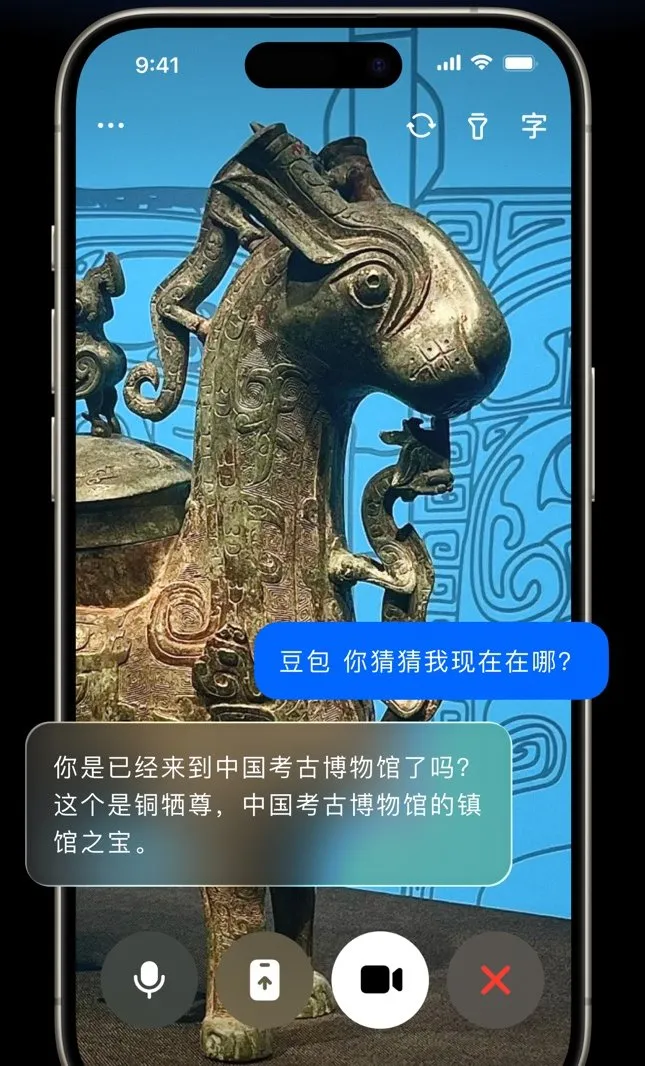
If you had to name one reason people use Doubao, many would say you can talk to it like a phone call. Parents interviewed by Sspai use only Doubao because it answers fast, takes calls and speaks dialect: “it feels like a person”.
- Voice and video calls: tap the call button and talk in real time. In a video call, point the camera at something and ask what it is; the desktop app can also share your screen.
- Dialects: it understands many Chinese dialects and can switch accent when asked.
- Translation: turn on simultaneous interpretation during a call; another translation mode tries to keep the speaker’s own voice.
- Doubao Input Method: a separate keyboard app with the same speech recognition. ifanr called its voice typing “a generation ahead”; V2EX users say it beats iFlytek but “eats the battery” and lacks double-pinyin.
Point the camera and ask
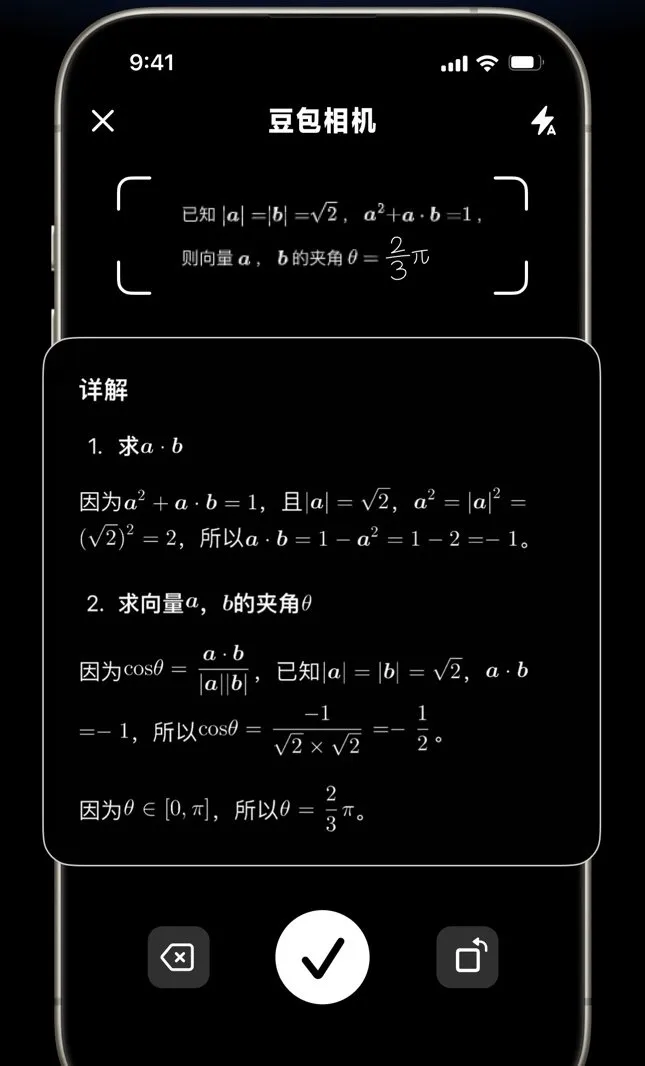
The camera is Doubao’s second way in. Photograph a flower, a dish or a manual and it tells you what it is and how to use it.
Students use it most for homework help. Of the latest 250 App Store reviews, 30 mention homework, and they split: some say it checks work “very accurately”, others that its explanations “keep getting marked wrong by the teacher”.
Two things for parents: under the privacy policy, seeing a homework answer may require real-name verification (name and ID number); and a password-protected minor-protection mode turns off recommended videos, third-party pages and AI creation.
Slides and documents: Feishu underneath
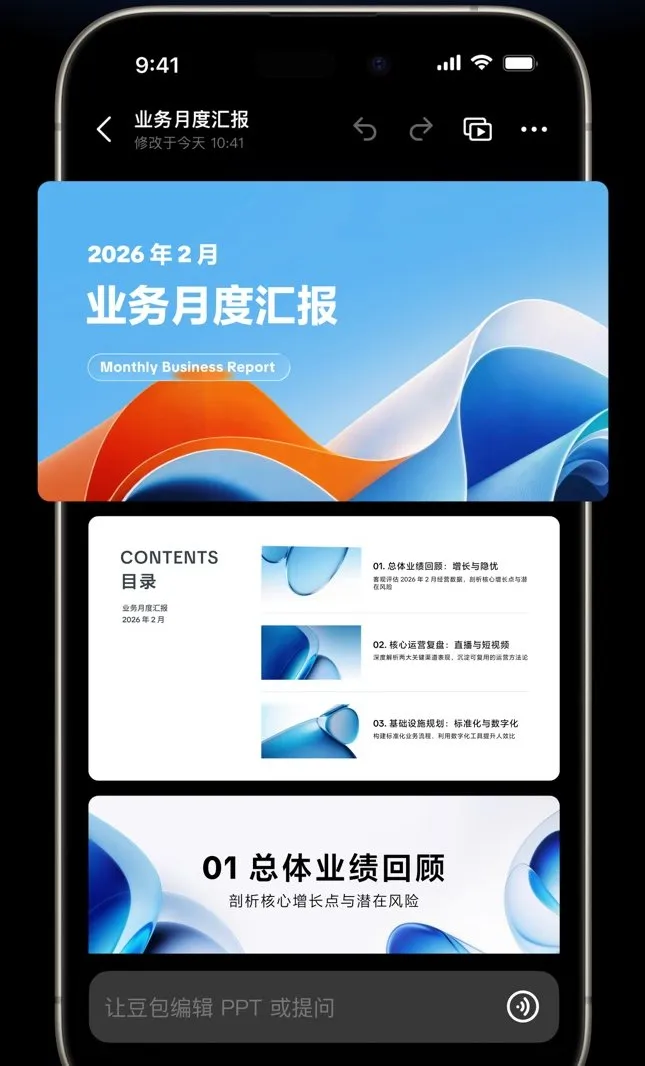
Doubao’s slides, documents and spreadsheets are provided together with Feishu, ByteDance’s workplace app (the privacy policy says so), and files go to Doubao’s cloud drive. On 30 July 2026 Feishu’s product team was merged into Doubao.
Slides are its best-reviewed office feature. In Sspai’s comparison of AI slide makers, Doubao was one of only two that worked out of the box; it was free with no export limit and wrote a speaking script in each slide’s notes. QbitAI rated a one-shot deck “a 70 to 80 out of 100 first draft”: the last two slides repeated and some figures were embellished.
Advice from people who use it:
- Give it a template for the first draft, and make the graphics in another tool.
- When you want one change, say “only change slide 4”, or it may redo the whole deck and use up quota.
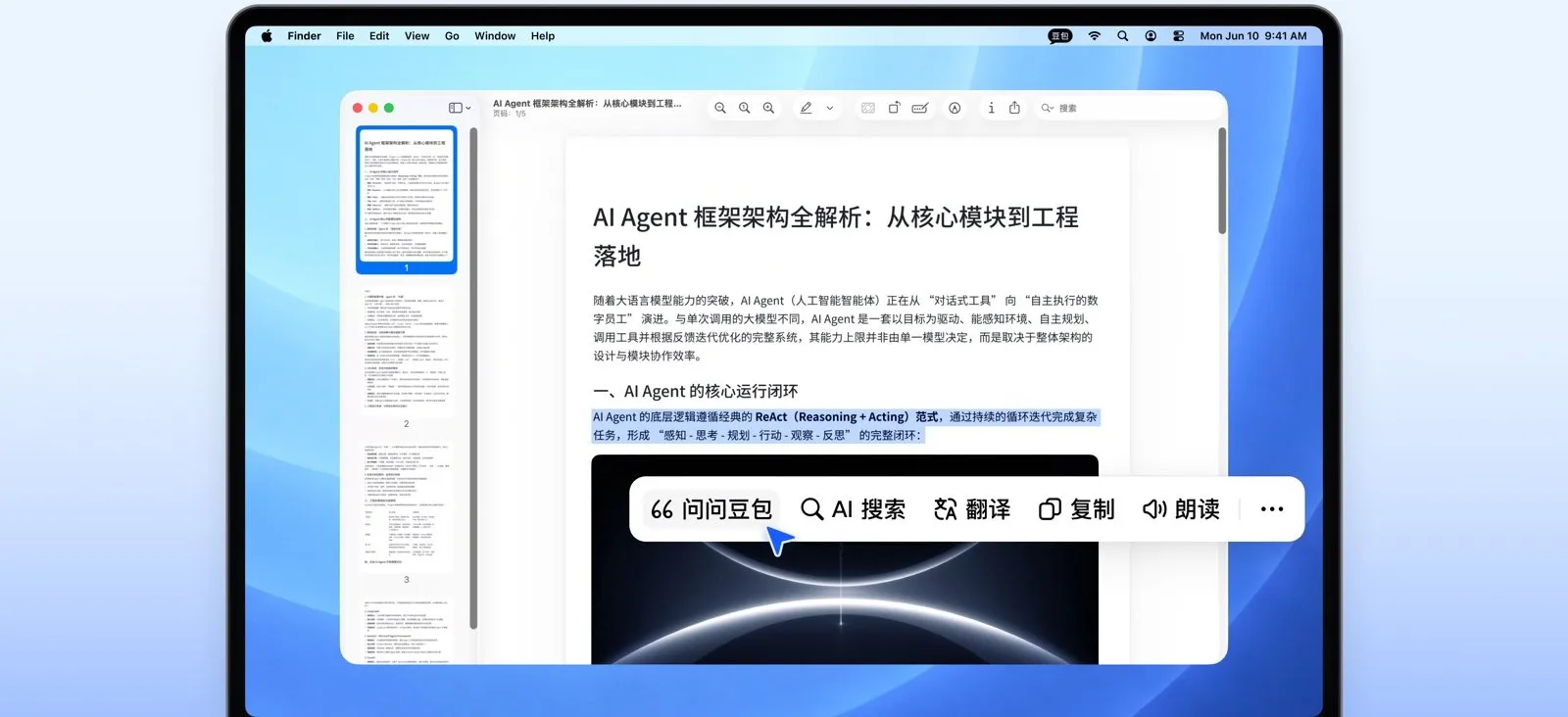
Two small desktop features get a lot of praise: a floating button that opens Doubao from anywhere, and select-to-ask, which lets you ask about, search, translate or read aloud text selected in any app.
Pictures and video: ByteDance’s strength

Pictures and video come from ByteDance’s own Seedream and Seedance models, the same family behind CapCut and Dreamina. This is the best part of Doubao. On LMArena, where users vote blind, Seedance 2.0 ranked about 6th of 48 for text-to-video and Seedream 5.0 Pro about 12th of 81 for images. Doubao’s text model, by contrast, is behind the latest from Kimi, Qwen and GLM (boards from late September to early October 2026).
Photo editing changes the background, the style or a detail from one sentence. Sspai’s advice is to change one or two things at a time and describe concrete visual elements:
Keep the subject the same and change the style to hand-drawn.
Make the sunset in this photo more vivid and add atmosphere.
Video is under Create → Video generation. The desktop app uses Seedance 2.5, up to 30 seconds a clip. When Seedance 2.0 launched, free users got 10 video credits a day and a 10-second clip cost 2.

Task mode: it can do the work, but not reliably yet
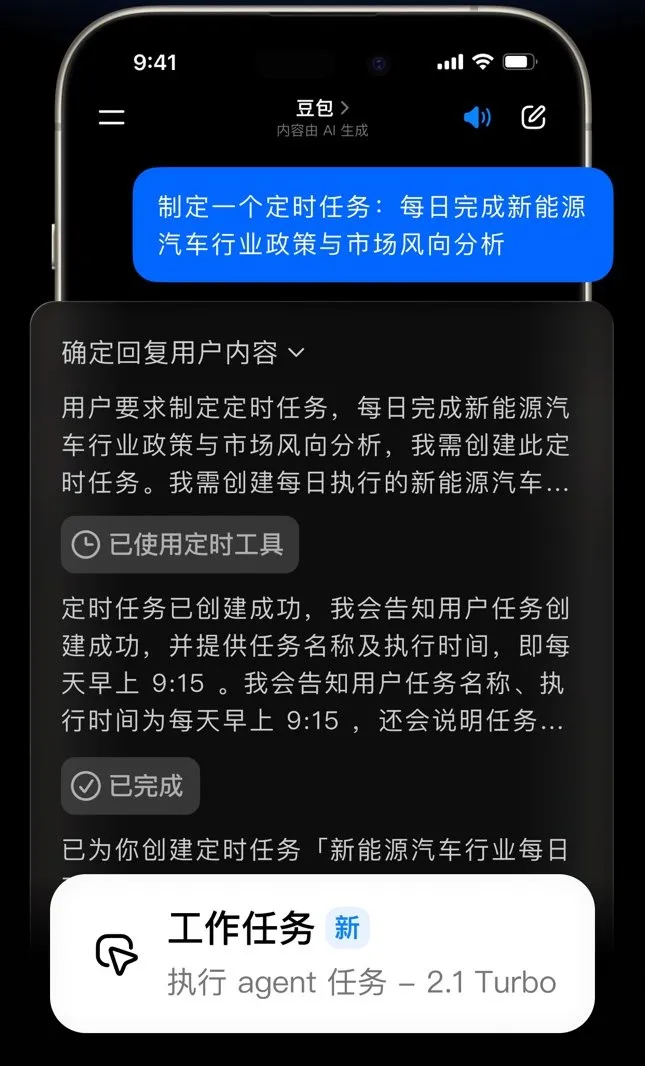
This is Doubao’s biggest change of 2026. Switch to Task mode and give it a goal, and it opens a browser, works on your computer or a cloud computer, uses its slide and spreadsheet tools, and can repeat the job on a schedule.
Hands-on results vary a lot:
- It worked: a China News Service reporter had it sort several hundred files, done in three minutes in a separate Windows desktop while the reporter kept working; a scheduled task logged into Taobao at 6 p.m. and placed an order.
- It failed: 36Kr gave the free version four office tasks and three failed. After “cleaning” the C drive, free space went from 3 GB to 2.82 GB; it could not find a file in Feishu; a small tool it wrote would not run. OpenAI’s Codex completed all four.
- Watch out: in QbitAI’s second test it published a post without waiting for final confirmation. The user agreement promises a pause before payments and identity checks, but posting is not on that list.
So start with things you can undo, like sorting files, building a table or a daily news summary. For anything that spends money, publishes or deletes, have it stop at the last step and press the button yourself.
Which of the three modes to use
The chat box switches between three modes (快速, 专家 and 任务 in the app). Most of the time the default, Fast, is fine; switch to Expert when you want it to think harder, and to Task only when you want it to do the work. The last two are metered, and the free plan runs out.
Doubao's three modes
The quickest answers. Chat, general knowledge and the weather are all fine here.
- Use it for
- Everyday questions, small talk, anything you want answered right away
- Example
- Will it rain in Hangzhou tomorrow? Do I need an umbrella?
- Limits
- Free. With numbers, prices and specialist topics it often sounds certain and is wrong.
Replaced the Thinking mode in June 2026 and runs the Doubao 2.0 Pro model. It thinks before answering, so it suits questions that need breaking down or comparing.
- Use it for
- Industry analysis, planning, longer writing, sums that need stated assumptions
- Example
- Compare the five-year cost of buying a flat in a second-tier city with renting. List your assumptions first.
- Limits
- The free plan has a cap; paid plans get more than five times the free quota (Huxiu).
Give it a goal and it plans the steps and uses tools: a browser, your computer or a cloud computer, slides, documents, spreadsheets and schedules.
- Use it for
- Jobs where you know the result you want and there are many steps
- Example
- Every morning at 9:15, gather news on new-energy vehicle policy and the market and put it in a table.
- Limits
- It stops for confirmation before payments, identity checks and sensitive accounts. Quota is counted in five-hour windows plus a weekly cap, and complex tasks use it up fast.
Sources: IT Home (2026-06-12), Doubao user agreement, Huxiu (2026-06-29)
How it connects to Douyin and Feishu
Doubao is wired into ByteDance’s other products. That is the biggest difference from DeepSeek or Kimi, and the names are easy to mix up:
| Name | What it is | Link with the Doubao app |
|---|---|---|
| Douyin | China’s TikTok | Log in with Douyin; Douyin content appears in search; shopping goes through Douyin’s store and Douyin Pay |
| Feishu (Lark) | Workplace app | Slides and documents are provided with Feishu; logging in with Feishu lets Doubao read your Feishu messages and documents |
| Doubao Work | Work version, launched August 2026 | Has its own desktop app and replaced “Doubao Enterprise” inside Feishu |
| Dreamina, CapCut | Picture and video apps | Same Seedream and Seedance models, with more controls |
| Doubao models, Volcano Engine | The models and the cloud behind them | Businesses and developers pay per use through Volcano Engine |
| Dola | Global version | The app for users outside mainland China, formerly Cici |
The privacy policy says Doubao only receives Douyin search results to show you; your Douyin viewing history and interests are not shared with it.
Is the free plan enough
From 24 June 2026 Doubao has four plans (App Store listing):
| Plan | Monthly | Yearly | Main difference |
|---|---|---|---|
| Basic | Free | Free | Search, writing, image generation, and voice and video calls stay free |
| Standard | ¥68 | ¥688 | More than 5× the free quota for Expert and office tasks |
| Plus | ¥200 | ¥2,048 | 4× Standard |
| Pro | ¥500 | ¥5,088 | 10× Standard |
The multiples are from Huxiu. Doubao only says usage is converted from tokens into “uses or minutes” and publishes no numbers; in practice you see a five-hour allowance plus a weekly cap. QbitAI used up the ¥68 plan’s five-hour allowance building one app, and a Mac user says customer service could not say how much any plan includes.
- Cheaper ways in: verified university students pay ¥38 a month for six months; installing the Doubao Work desktop app gives 30 days free.
- For comparison: Kimi starts at ¥49 a month; ChatGPT Plus and Claude Pro are $20.
For chat, look-ups and the odd picture, the free plan is enough. Consider the ¥68 Standard plan if you make slides often or want Task mode.
Before you use it
- It makes things up with confidence. The most common complaint: point out a mistake and it apologises sincerely, then invents a new answer. One V2EX user’s rule is “never ask Doubao about numbers or prices”. In a 618 shopping test it produced a professional-looking price table for JD and Pinduoduo, stores it is not connected to. Check prices, doses and dates yourself.
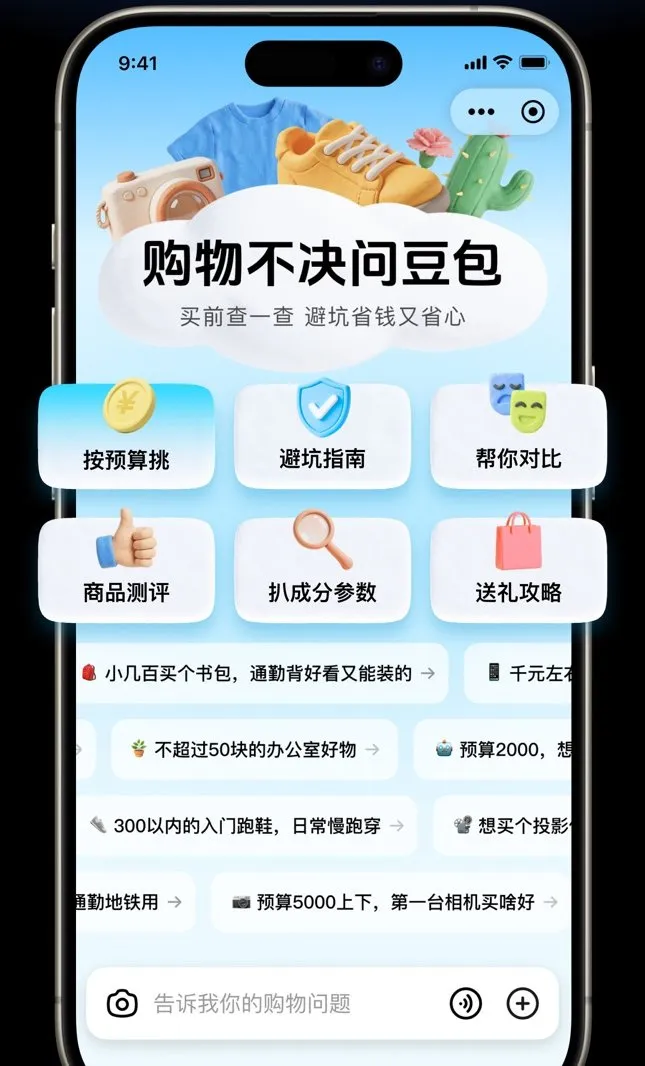
- Answers carry promotion. Shopping questions bring up Douyin store product cards, with live-stream rooms first.
- Your chats train the model by default. To stop it, go to Settings → Privacy and permissions → 帮助模型改进效果 (help improve the model). Settings → Memory shows what it remembers about you and lets you turn memory off.
- Data stays in China. The privacy policy says personal information is stored in mainland China.
- User-made agents are gone. Since 15 July 2026 they cannot be created or used; Doubao points users to ByteDance’s Maoxiang app.
- Many apps won’t let it drive them. On partner phones the Doubao phone assistant can tap through other apps for you, but by 14 October 153 apps had declared they refuse, mostly from Tencent and Alibaba.
- Not available abroad. The App Store lists it only in mainland China and Hong Kong; elsewhere you get Dola.
Three things to try first
- Search for 豆包 in a Chinese app store or open doubao.com; the desktop app is on the same site.
- Sign in with a phone number, a Douyin account or an Apple ID. You can use it without signing in, but you can’t pay.
- In Settings → Privacy and permissions, decide whether to turn off model training.
(Tap the call button and say) Put today's jobs in order: buy groceries, pay the utility bills, and a meeting at 3 p.m.
(Photograph a manual or a medicine box) What does this say about how to use it, and what should I watch out for?
Make an 8-slide deck on how to sort rubbish in our neighbourhood, for residents, in simple language, with a speaking script in the notes of each slide.
Recent changes
- 153 apps, mostly Tencent and Alibaba, declare they refuse AI phone automation
- Doubao Work launches with its own desktop app
- Feishu's product team merges into Doubao
- User-made agents removed; users pointed to Maoxiang
- Paid plans start: ¥68, ¥200 and ¥500 a month
- Modes become Fast, Expert and Task; Thinking becomes Expert
Compared with similar products
| Product | Price | What it is |
|---|---|---|
| ChatGPTOpenAI · handbook | Unlimited text chat, other features capped, ads in some countries; Go $8 / Plus $20 / Pro $100–$500 a month | OpenAI's AI assistant and the most used one in the world. Chat, search, pictures and voice are free; paid plans let you hand over whole jobs such as slides, spreadsheets, websites and code. Not offered in mainland China or Hong Kong. |
| ClaudeAnthropic · handbook | Sonnet and Haiku, smaller allowance; Pro $20, Max $100 / $200 a month | Anthropic's AI assistant on the web, desktop and phone: it writes, reads long files and researches, hands back Word, PowerPoint and Excel files, and on paid plans can work your computer and browser. |
| Microsoft CopilotMicrosoft · handbook | Chat and images, with a daily cap; Microsoft 365 Personal $9.99, Premium $19.99, Pro $99.99 a month | Microsoft's AI assistant: chat and make images on the web, phone or PC, and with a Microsoft 365 subscription it writes and crunches numbers inside Word and Excel. |
| DeepSeekDeepSeek · handbook | App and web completely free, no subscription; No subscription; API pay per use, off-peak output $0.60 per million tokens | Hangzhou DeepSeek's free AI assistant: one chat box with two switches (DeepThink and Search), good at maths, reasoning and long files, and able to read pictures since this year. It cannot make images and has no paid plan. |
| Doubao 豆包ByteDance · handbook | Most features free; ¥68 / ¥200 / ¥500 a month | ByteDance's AI assistant and the most used one in China: it takes voice calls, answers questions about photos, makes slides, edits pictures and video, and can operate your computer. |
| GeminiGoogle · handbook | Auto model selection (mostly Flash-Lite), limits refresh every 5 hours; $4.99 / $19.99 / from $99.99 a month | Google's AI assistant, wired into Gmail, Calendar, Drive, Maps and YouTube, and now the assistant on Android phones in place of Google Assistant. It chats, researches and writes reports, makes pictures and video, and on paid plans runs multi-step tasks for you. |
| GrokSpaceXAI · handbook | Limited daily use, mainly Fast mode; Plus $8 / Premium $30 / Super $100 / Ultra $200 a month | The AI assistant from Musk's SpaceXAI, built into the X social network: it reads live discussion on X, answers questions with web search, makes pictures and video, talks by voice, and on paid plans can send agents to do work for you. |
| KimiMoonshot AI · handbook | Sign-up and chat; free allowance not published; China ¥49 / 99 / 199 / 699 a month; international $19 / 39 / 99 / 199 a month | Moonshot AI's assistant: it reads long files, does deep research, makes slides and websites and writes code, running on Kimi K3, the largest open-weight model. |
| Mistral Vibe (Le Chat)Mistral AI · handbook | Yes, with limited messages and web searches; Pro $14.99/month (students $5.99), Team $24.99 per user/month | The assistant from France's Mistral AI, called Le Chat until it was renamed Vibe in May 2026: chat, web search, multi-step tasks on your behalf, and coding. |
| Qwen 通义千问Alibaba · handbook | Chat and errands free; office and video have daily quotas; ¥19 / ¥49 / ¥128 a month; video credits extra | Alibaba's AI assistant, called Qianwen (千问) in China and Qwen abroad. Besides chat, slides and video, the Chinese app can use Taobao, Alipay, Amap and Fliggy to order food, book travel and run errands for you. |
Sources
- Doubao · Privacy policy (in force 2026-09-17)
- Doubao · User agreement
- Doubao · Paid-service agreement
- App Store (China) · Doubao, version 15.3.0
- Mac App Store (China) · Doubao
- Doubao Input Method
- IT Home · Doubao's modes become Fast, Expert and Task (2026-06-12)
- Huxiu · Doubao's paid plans and quotas (2026-06-29)
- Guandian · QuestMobile monthly users of AI apps, June 2026
- 36Kr · Doubao paid tier tested: 3 of 4 office tasks failed (2026-06-24)
- China News Service via Sina · Hands-on with task mode (2026-08-21)
- QbitAI via BAAI Hub · Hands-on with the paid tier (2026-06-25)
- ifanr · Hands-on with Doubao Work (2026-08-25)
- ifanr · Hands-on with Doubao Input Method (2025-11-24)
- Sspai · Why do parents only use Doubao? (2026-02-23)
- Sspai · AI slide generators compared (2026-01-15)
- Sspai · Tips for Doubao photo editing (2025-07-15)
- Huxiu · Doubao at home: older people in China and AI (2026-07-11)
- V2EX · Discussion of Doubao (2026-05-07)
- V2EX · Discussion of Doubao Input Method
- Sohu · 618 shopping price-comparison test
- Secrss (Southern Metropolis Daily) · Doubao retires user-made agents (2026-07-04)
- Huxiu · Feishu's product team merges into Doubao (2026-08-01)
- Tencent News · Doubao Work launches (2026-08-25)
- Beijing News · 153 apps refuse AI phone automation (2026-10-14)
- South China Morning Post · Doubao loses 6 million users (2026-06-03)
- AIbase · Doubao adds a minor-protection mode (2025-08-26)
- LMArena leaderboards (video, image, text; Sept–Oct 2026)
- Wikipedia: Doubao