Microsoft Copilot
By Microsoft · copilot.microsoft.com ↗ · Checked 18 Oct 2026
Microsoft's AI assistant: chat and make images on the web, phone or PC, and with a Microsoft 365 subscription it writes and crunches numbers inside Word and Excel.
Verdict
If you already pay for Microsoft 365, Copilot is the convenient choice: it is right there in Word, Excel and Outlook, and you can switch between GPT and Claude. As a free chatbot it is no longer a good pick: since August 2026 it has been rebuilt as "the AI built for work", the free tier has a daily cap, and Deep Research, group chats and podcasts are gone. The biggest trap is the name: at least five different things are called Copilot, each with its own price and data rules.
Use it if
- People who already subscribe to Microsoft 365 and want AI inside Word, Excel and PowerPoint
- Daily Edge users who want AI to read the current page and compare open tabs
- Office workers who want one app signed in to both a personal and a work account
- Premium subscribers who want to switch between GPT and Claude without paying twice
Use something else if
- Free, unlimited chat: the free tiers of ChatGPT or Gemini are more generous
- Coding: use GitHub Copilot, Claude Code or Cursor
- Mainland China: not available; use Doubao, DeepSeek or Qwen
- Research reports without paying for Premium: use deep research in ChatGPT or Gemini
- Free plan
- Chat and images, with a daily cap
- Paid
- Microsoft 365 Personal $9.99, Premium $19.99, Pro $99.99 a month
- Where
- Web, Windows and Mac apps, iOS and Android, the Edge sidebar
- Models
- Auto routing by default; you can pick OpenAI's GPT or Anthropic's Claude; Microsoft's own MAI models are also in use
- Sign-in
- Microsoft account, or sign up with a Google or Apple email; a work account can sit alongside, with data kept apart
- Region
- 170+ markets; not mainland China (Hong Kong is fine)
- Data
- New app's chats are not used to train foundation models; memory can be turned off; non-subscribers may see ads
- Rating
- 4.7 on the App Store (about 1.36 million ratings, mostly earned as the Office app before the rename)
Microsoft’s Copilot has always been hard to pin down, because so many things carry the name: there is one on the Windows taskbar, one in the Edge sidebar, one in Word, another that companies buy, and GitHub Copilot for programmers, which comes from a different Microsoft subsidiary. This page is about the one ordinary people use: copilot.microsoft.com, the “Microsoft Copilot” app on phones and computers, and its reach into Edge and Office.
It changed a lot in 2026. From August, the consumer Copilot app and the business Microsoft 365 Copilot app were merged into one, and the app-store description now opens with “the AI built for work”. The free tier survives, but with a daily cap; Deep Research, group chats, podcasts and the Mico character have all gone. The table below sums up Microsoft’s help pages and price list, press coverage and app-store reviews.
What to hand it, and what not to
| What you want | How | Free plan | How it goes |
|---|---|---|---|
| Everyday questions and look-ups | Ask on the web or in the app; Auto by default | Free, with a daily cap | Fine, but the free allowance is tighter and recent reviews are harsh |
| Choose GPT or Claude for an answer | The "Auto" menu at the top | Depends on account and plan | Microsoft doesn't say which plan gets which models |
| Drafting and analysis in Word, Excel, PowerPoint | Open a file and click Copilot on the ribbon | Needs Personal or above | Convenient; only the subscription owner gets it |
| Have it write emails, build files, run scheduled jobs | The "Cowork" icon next to Chat, top left | Premium and Pro only | Preview, US and Canada only |
| Summarise pages, compare open tabs | The Copilot icon at top right in Edge | Free | The most useful part of Copilot in Edge |
| Talk to it, show it your screen or camera | The voice button by the input box | Free, with limits | Many can't find the microphone in the new phone app |
| Write research reports | Researcher, in Premium | Removed from the free tier | If you won't pay, use ChatGPT or Gemini |
| Write code | Use GitHub Copilot instead | — | A completely separate product |
Five things called Copilot
Work out which one you need before you pay. Even Microsoft’s own FAQ has a question explaining the difference between “the Copilot app” and “Copilot in the Microsoft 365 apps”.
| Name | What it is | How you get it |
|---|---|---|
| Microsoft Copilot app | The chat assistant on web, Windows, Mac and phones; merged with the Microsoft 365 Copilot app from August 2026 | Free with a Microsoft account |
| Copilot in Microsoft 365 | The AI button in Word, Excel, PowerPoint, Outlook and OneNote | A personal Microsoft 365 Personal, Family, Premium or Pro subscription |
| Microsoft 365 Copilot (business) | The work version that reads company email, files and meetings, under the admin’s data controls | Bought by your employer; the small-business add-on starts at $21 per user a month, billed yearly |
| GitHub Copilot | A coding assistant inside VS Code and other editors | A separate GitHub subscription; doesn’t carry over to the others |
| Copilot+ PC | A 2024 hardware standard for AI PCs (an NPU of at least 45 TOPS) | Buy a PC; since September 2026 even Microsoft’s new Surfaces no longer use the name |
The Copilot in the Edge sidebar and the Copilot key on newer keyboards are both doorways into the first of these.
Since August 2026, it is “the AI built for work”
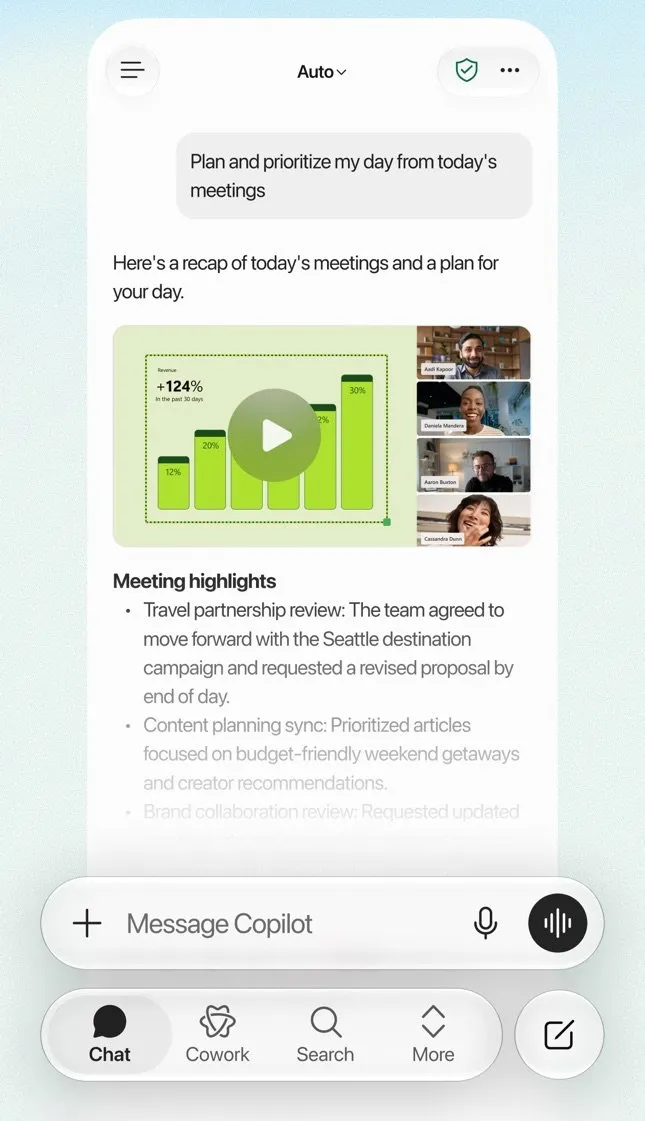
On 13 August 2026 Microsoft began folding the consumer Copilot app into the Microsoft 365 Copilot app (the old Office app). Phones and the web went first; Windows and Mac followed from mid-September. You can sign in with a personal and a work account in the same app, and Microsoft says data does not flow between them.
A batch of features was cut in the merger, taking effect in waves from 18 August:
- Deep Research: consumers can no longer start new reports. Premium and Pro subscribers use Researcher instead; Personal and Family subscribers can only open old reports.
- Group chat: the history does not carry over; copy out anything you want to keep.
- Podcasts: gone entirely; old episodes must be downloaded one at a time.
- Mico: the blob that pulled faces during voice chats has gone, surviving only in the Learn Live tutoring feature.
- Copilot Labs: the experiments ended on 29 September.
- Files you uploaded or generated in the old app move to OneDrive and count against the same storage. Office Watch points out that free OneDrive is only 5 GB, so check you have room.
TechCrunch read this as an admission that Copilot “has lost its way”. Jacob Andreou, the executive vice president in charge of Copilot, wrote in a July memo that the app had to “earn the right to exist”. On 25 September Microsoft unveiled the next version: a Home screen that combines chat with Cowork, Word, Excel and PowerPoint built into the app, Code for building small tools by describing them, and Autopilot, an agent that keeps working on its own. Charles Lamanna, who runs the core features, told Bloomberg: “We’re not going to build a Copilot that’s like your personal companion.” Code and Autopilot go first to Frontier, Microsoft’s early-access programme for businesses; Code is due to reach Premium and Pro subscribers in preview later in 2026.
Models: Auto by default, or pick GPT or Claude yourself
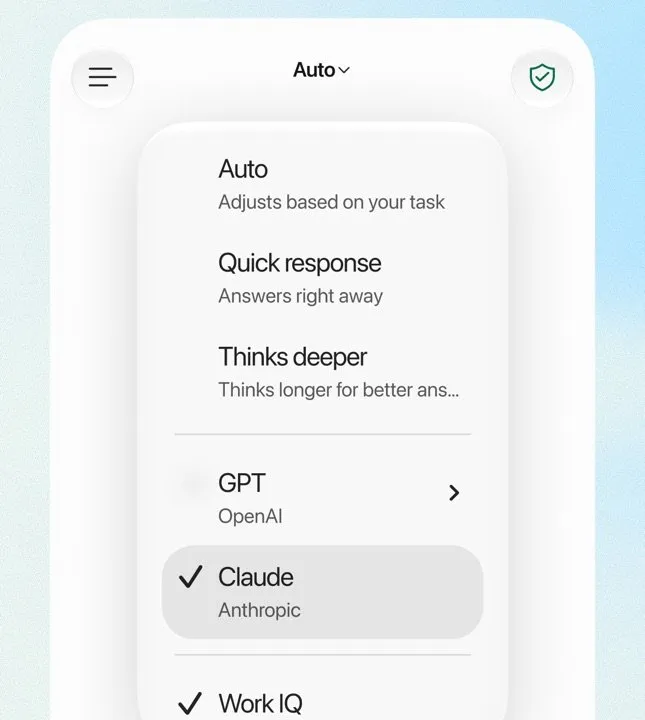
There is no single model behind Copilot. Tap “Auto” at the top of a chat and you get these options:
Copilot's model menu
Microsoft picks a model for each request and doesn't tell you which.
- Use it for
- Most everyday questions
- Example
- Make this email sound a bit friendlier.
- Limits
- Office Watch notes reports that Microsoft uses its own, largely untested MAI models under Auto.
Answers straight away with no extra thinking step.
- Use it for
- Rewrites, translation, simple questions
- Example
- Translate this paragraph into French.
Thinks for a while first: slower but more careful.
- Use it for
- Comparing options, sums, anything that needs reasoning
- Example
- Compare three ways of repaying a mortgage over five years. List your assumptions first.
- Limits
- Personal and above get "extensive" deep reasoning; the free allowance isn't published.
Forces an OpenAI model; a submenu picks the version.
- Use it for
- You like ChatGPT's style, or want charts
- Example
- Turn this table into a quarter-by-quarter chart.
Forces an Anthropic model.
- Use it for
- Long writing, editing, document analysis
- Example
- Read this contract and list the clauses that work against me.
- Limits
- Microsoft hasn't said which consumer plans can choose Claude.
Sources: App Store screenshots (Oct 2026), Office Watch (2026-07-13), Microsoft Copilot Blog (2026-09-22)
On 22 September Microsoft said Claude Opus 5.5 and GPT-6 Sol were rolling out to Word, Excel, PowerPoint, chat and Cowork, adding that “availability may vary by license, access, and region”. Office Watch’s advice is sensible: start with Auto or the lightest model and step up if the answer disappoints; choose by how hard the question is, not by how long it is.
One more piece of background: Microsoft released seven in-house MAI models at its Build conference in June 2026. The Decoder, citing Bloomberg, reports they are already replacing OpenAI and Anthropic models in Excel and Outlook. Mustafa Suleyman, head of Microsoft AI, has said: “We pay a lot of money to Anthropic—so our goal is to reduce and ultimately eliminate that cost.” So it will get harder to say what is behind Auto.
The free tier chats and draws, but has a daily cap
Microsoft’s wording is that chatting, making images and uploading files stay free “subject to available capacity and limits”; at the limit you can upgrade or come back later. It doesn’t say what the limit is.
User feedback is consistent:
- A daily cap. Unstar went through 722 negative Android reviews posted since 21 September; 121 complain about the new daily cap, with users reporting anything from 1 to 36 messages before a cutoff that resets at a fixed hour.
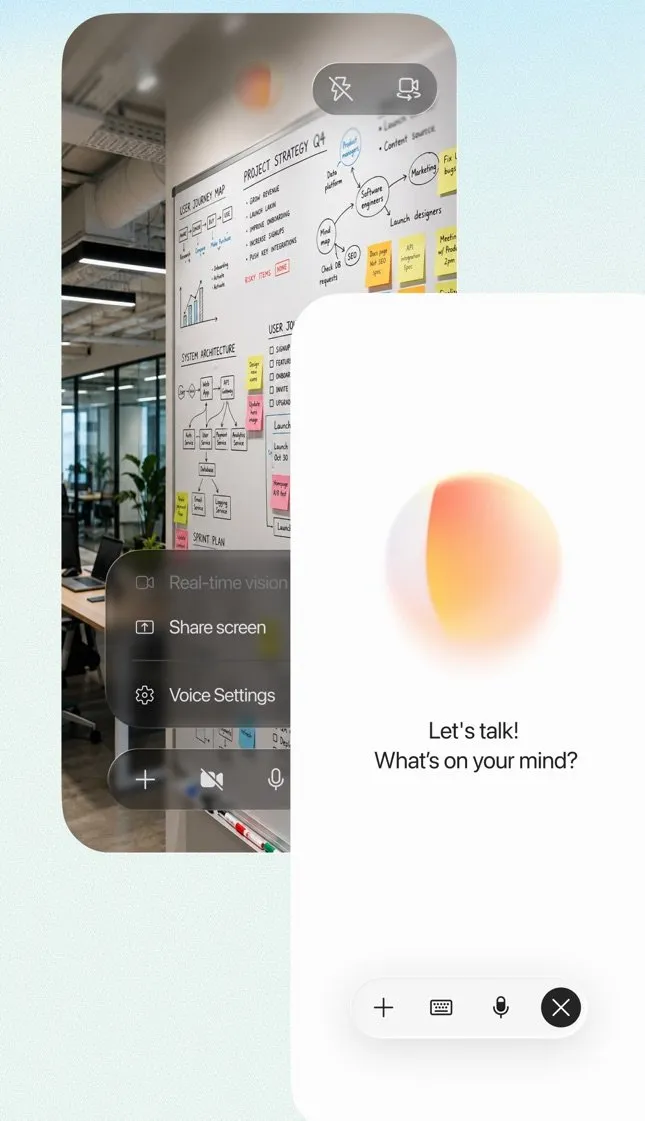
- The voice button has gone. 84 say the microphone button, read-aloud or voice choices have disappeared. Microsoft says voice continues and only Mico has been removed.
- Chat history didn’t arrive. 45 say old chats were not migrated. The good news is they usually still exist: keep the old “Copilot (Legacy)” app, or look on the web or desktop app.
- We read the 50 most recent US App Store reviews (6–8 October): 30 give one or two stars, 13 mention limits and 8 mention voice. One reads: “I had free voice chat and this alone made me use it quite more than chat GPT… now after updating I have to become a premium subscriber to use it.”
Also, users without a Microsoft 365 subscription may see ads in Copilot (Microsoft’s privacy page).
Copilot in Word and Excel: only for the paying account owner
With Microsoft 365 Personal, Family, Premium or Pro, a Copilot button appears in desktop and web Word, Excel, PowerPoint, Outlook and OneNote: draft a document, rewrite a paragraph, summarise a long email thread, build slides from a file, explain formulas and analyse data in Excel.
The traps:
- Only the subscription owner gets it. Share Family with five relatives and they get Office and OneDrive, but no Copilot.
- Excel needs AutoSave. The file must live in OneDrive for Copilot to work (footnote on Microsoft’s price page).
- The cheapest plan, Basic, has no AI. Microsoft’s price page says AI features are not available in Microsoft 365 Basic.
- Allowances are vague. Image generation, voice and vision are “standard usage” on Personal and Family, “extensive” on Premium and “highest” on Pro, with no numbers. Office Watch reported in March that Personal and Family get 60 AI credits a month; you can check what is left under “Services & subscriptions” in your Microsoft account.
Cowork: multi-step tasks, Premium and up only
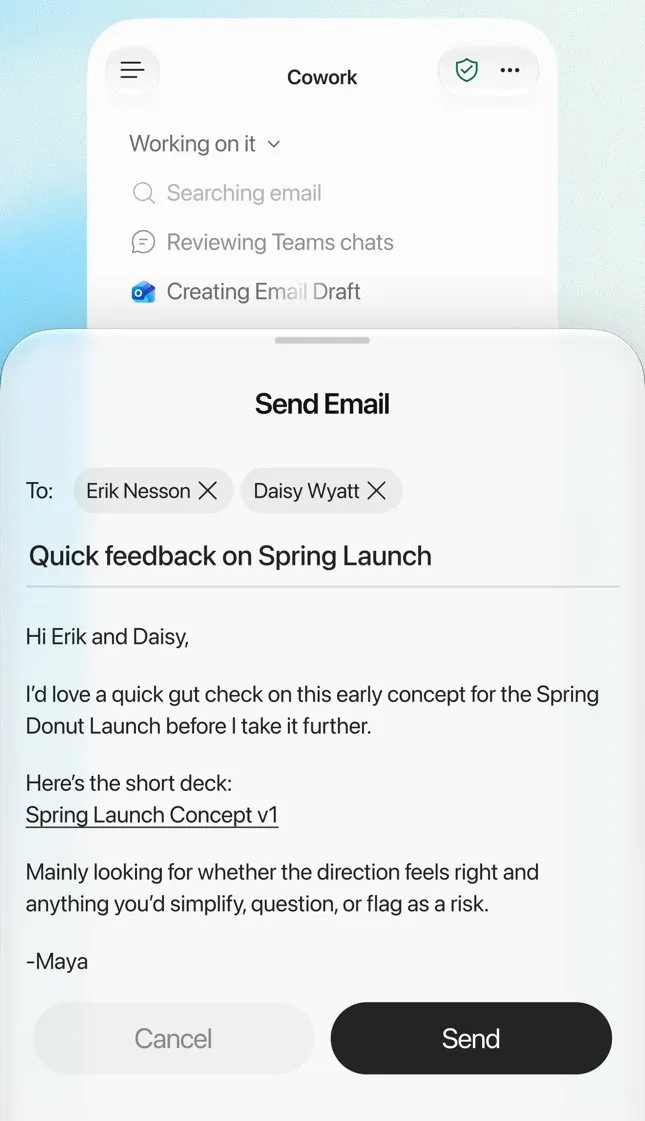
Cowork is Copilot’s agent: you describe the result and it goes off and makes Word, Excel, PowerPoint and PDF files, drafts and sends email, manages your calendar and OneDrive files, researches across several sources and runs prompts on a schedule. It lives behind the Cowork icon next to “Chat” in the top left of the app.
- Who gets it: for personal accounts it is a preview, Premium and Pro only, in the US and Canada only. Personal and Family subscribers who used the old “Copilot Tasks” can view their old tasks after the move but not run new ones.
- It stops to ask: Microsoft says anything involving payments, personal information, messages to other people, or changes to accounts or files will wait for your approval or hand control back. The help page also warns that “you are responsible for actions Copilot takes on your behalf”, and that it can be fooled by malicious instructions hidden in web pages.
- Clicking through websites in Edge: formerly Copilot Actions, renamed Browse with Copilot in May 2026, and only for US Premium subscribers.
In Edge and Windows: fewer ways in
Edge is where Copilot is most useful. Click the Copilot icon at the top right and it can read all your open tabs to compare them, draw on your browsing history and past chats (with your permission), and talk or look at your screen. In May 2026 Microsoft dropped the separate Copilot Mode and built these features into Edge itself. Journeys, which groups your browsing history into topic cards, is only in English-language markets. Turn off what you don’t want in Edge settings or at aka.ms/CopilotinEdge.
Windows is going the other way. In March 2026 Windows chief Pavan Davuluri promised to reduce “unnecessary Copilot entry points”; Notepad’s Copilot button is now a generic “Writing tools”. In August the “Ask Copilot” search box being tested on the taskbar was switched off for now. You can remap the Copilot key: ASUS’s guide says to go to Settings → Personalization → Text input.
The Copilot+ PC label is fading too. Microsoft’s Surface chief confirmed to Windows Central that the 2026 Surfaces are “not called Copilot+ PCs”, though they still meet the old hardware bar.
Plans: free or Personal is enough for most people
US prices (Microsoft’s site, October 2026):
| Plan | Monthly | Yearly | What changes for Copilot |
|---|---|---|---|
| Free | $0 | $0 | Chat, images and uploads with a daily cap; may show ads |
| Microsoft 365 Personal | $9.99 | $99.99 | Copilot in Office; chat and deep reasoning “extensive”, images, voice and vision “standard” |
| Microsoft 365 Family | $12.99 | $129.99 | As Personal, but Copilot only for the owner |
| Microsoft 365 Premium | $19.99 | $199.99 | More usage, plus Researcher, Analyst and Cowork |
| Microsoft 365 Pro | $99.99 | Monthly only | Highest usage, 5 TB storage |
How we got here: in January 2025 Microsoft put Copilot into Personal and Family and raised prices for the first time in 12 years, Personal going from $69.99 to $99.99 a year. In October 2025 Premium arrived, replacing the standalone $20 Copilot Pro. Pro is a 2026 addition; Office Watch calls it five times the price of Premium with “surprisingly thin” extras, since it adds only usage and storage, and the usage has no numbers attached. Office Watch also warns that Family and Premium storage moves from 1 TB per person to a shared 2 TB for the household, at renewals from May 2027.
Which to choose: for chat alone, use the free tier and see whether the cap bothers you. If you want Office anyway, Personal brings Copilot with it. Premium is only worth it for Researcher, Cowork or heavy image use. Skip Pro unless you keep hitting Premium’s limits. For comparison, ChatGPT Plus and Claude Pro are both $20 a month.
Settings worth changing
These paths are for the new app (from August), all under Settings → Personalization:
- Memory: the “Saved memories” switch controls whether Copilot remembers your habits and preferences; “Manage” next to it lets you delete items one by one or use “Delete all memories”. Turning the switch off doesn’t delete what is already saved.
- Cross-product personalisation: with “One shared experience” on, your activity in Bing, Edge and MSN shapes Copilot, and your Copilot chats shape what Bing and MSN show you.
- Ad personalisation: “Allow ads personalization”. With it off you may still see ads, just not ones based on your chats.
- Web search: “Web search” can be switched off.
- Chat history: delete a single chat from the “…” menu in the chat list on the left; to export or delete everything, use the Microsoft privacy dashboard.
On training: Microsoft says that in the new app, prompts, responses and uploaded files “aren’t used to train foundation models”, and makes the same promise for Copilot in Office. If you are still on the older app, it does use chats for training unless you opt out: go to Settings → Privacy and turn off “Training on conversation activity” and “Training on voice conversations”. The older app keeps chat history for 18 months.
Not available in mainland China
Microsoft’s supported-regions page (updated September 2026) says Copilot is available in more than 170 markets, with exceptions for “China (excluding Hong Kong SAR)” and embargoed markets. ASUS’s guide adds that users with a mainland Chinese IP address see a service-unavailable message. Hong Kong works normally.
One thing that confuses people: the China App Store does list “Microsoft Copilot”. That is the renamed Office app; Word and Excel work, but its AI features are not supported on the mainland. For an AI assistant inside China, look at Doubao, DeepSeek or Qwen.
First steps: try these three things
- Go to copilot.microsoft.com, or download “Microsoft Copilot” (developer: Microsoft Corporation) from your app store. If your phone still has the old “Copilot (Legacy)”, don’t delete it yet; your old chats may only be there.
- Sign in with a Microsoft account; very little works without one. If you have a work account, add it in the account switcher.
- Open Settings → Personalization and decide whether you want memory, shared experiences and ad personalisation on.
Remember: I'm planning a work trip to Tokyo next month, I like staying near a metro station, and my budget is under $150 a night.
I earn $6,000 a month and pay $1,800 in rent. Compare three ways to save: a monthly fixed deposit, a monthly index-fund purchase, and paying off my car loan early. List your assumptions first, then give a conclusion.
(Open three hotel pages in Edge, then click Copilot at the top right) Compare the hotels I have open: price, distance to the nearest metro station and whether they offer free cancellation. Put it in a table.
Recent changes
- Microsoft's new AI chip targets the datacentre power budgetOur coverage
- Google's business Gemini agent does staff work across more than 100 office appsOur coverage
- New Copilot unveiled with Home, Code and Autopilot; agent features billed by usage
- New 2026 Surface PCs are no longer called Copilot+ PCs; the brand is fading out
- Old Android app renamed "Copilot (Legacy)" and users pushed to the new app; complaints focus on a daily cap
- Deep Research, podcasts and group chat retired for consumers; the Mico character leaves voice mode
- Consumer Copilot and Microsoft 365 Copilot start merging into one app
- Edge retires Copilot Mode; Copilot Actions becomes Browse with Copilot, for US Premium subscribers only
- Microsoft promises to cut "unnecessary Copilot entry points" in Windows 11, starting with Notepad and Snipping Tool
- Fall update adds the Mico character, group chats of up to 32 people and long-term memory
Compared with similar products
| Product | Price | What it is |
|---|---|---|
| ChatGPTOpenAI · handbook | Unlimited text chat, other features capped, ads in some countries; Go $8 / Plus $20 / Pro $100–$500 a month | OpenAI's AI assistant and the most used one in the world. Chat, search, pictures and voice are free; paid plans let you hand over whole jobs such as slides, spreadsheets, websites and code. Not offered in mainland China or Hong Kong. |
| ClaudeAnthropic · handbook | Sonnet and Haiku, smaller allowance; Pro $20, Max $100 / $200 a month | Anthropic's AI assistant on the web, desktop and phone: it writes, reads long files and researches, hands back Word, PowerPoint and Excel files, and on paid plans can work your computer and browser. |
| Microsoft CopilotMicrosoft · handbook | Chat and images, with a daily cap; Microsoft 365 Personal $9.99, Premium $19.99, Pro $99.99 a month | Microsoft's AI assistant: chat and make images on the web, phone or PC, and with a Microsoft 365 subscription it writes and crunches numbers inside Word and Excel. |
| DeepSeekDeepSeek · handbook | App and web completely free, no subscription; No subscription; API pay per use, off-peak output $0.60 per million tokens | Hangzhou DeepSeek's free AI assistant: one chat box with two switches (DeepThink and Search), good at maths, reasoning and long files, and able to read pictures since this year. It cannot make images and has no paid plan. |
| Doubao 豆包ByteDance · handbook | Most features free; ¥68 / ¥200 / ¥500 a month | ByteDance's AI assistant and the most used one in China: it takes voice calls, answers questions about photos, makes slides, edits pictures and video, and can operate your computer. |
| GeminiGoogle · handbook | Auto model selection (mostly Flash-Lite), limits refresh every 5 hours; $4.99 / $19.99 / from $99.99 a month | Google's AI assistant, wired into Gmail, Calendar, Drive, Maps and YouTube, and now the assistant on Android phones in place of Google Assistant. It chats, researches and writes reports, makes pictures and video, and on paid plans runs multi-step tasks for you. |
| GrokSpaceXAI · handbook | Limited daily use, mainly Fast mode; Plus $8 / Premium $30 / Super $100 / Ultra $200 a month | The AI assistant from Musk's SpaceXAI, built into the X social network: it reads live discussion on X, answers questions with web search, makes pictures and video, talks by voice, and on paid plans can send agents to do work for you. |
| KimiMoonshot AI · handbook | Sign-up and chat; free allowance not published; China ¥49 / 99 / 199 / 699 a month; international $19 / 39 / 99 / 199 a month | Moonshot AI's assistant: it reads long files, does deep research, makes slides and websites and writes code, running on Kimi K3, the largest open-weight model. |
| Mistral Vibe (Le Chat)Mistral AI · handbook | Yes, with limited messages and web searches; Pro $14.99/month (students $5.99), Team $24.99 per user/month | The assistant from France's Mistral AI, called Le Chat until it was renamed Vibe in May 2026: chat, web search, multi-step tasks on your behalf, and coding. |
| Qwen 通义千问Alibaba · handbook | Chat and errands free; office and video have daily quotas; ¥19 / ¥49 / ¥128 a month; video credits extra | Alibaba's AI assistant, called Qianwen (千问) in China and Qwen abroad. Besides chat, slides and video, the Chinese app can use Taobao, Alipay, Amap and Fliggy to order food, book travel and run errands for you. |
Sources
- Microsoft Support · Copilot app updates for personal, work and school accounts (Aug 2026)
- Microsoft Support · FAQ about retiring Copilot features
- Microsoft Support · How AI usage works across Microsoft 365 subscriptions for individuals (updated Oct 2026)
- Microsoft Support · Get started with Copilot Cowork for personal accounts (Preview)
- Microsoft Support · Copilot for individuals: your privacy controls and choices (new app)
- Microsoft Support · Copilot for individuals: your activity history (new app)
- Microsoft Support · Microsoft Copilot privacy controls (older app)
- Microsoft Support · Copilot in Microsoft 365 apps for home: your data and privacy
- Microsoft Support · Supported regions and languages in Microsoft Copilot (updated Sept 2026)
- Microsoft · Copilot plans for individuals
- Microsoft · Microsoft 365 Copilot business pricing
- App Store · Microsoft Copilot (version 2.115, 2026-10-13)
- Microsoft Edge Blog · New updates to Edge across desktop and mobile (2026-05-13)
- Microsoft Copilot Blog · More Models, One Copilot (2026-09-22)
- Windows Central · Unified Copilot app rollout begins (2026-08-13)
- Windows Central · Ask Copilot on the taskbar temporarily disabled (2026-08-18)
- Windows Central · The Copilot+ PC brand is dead (2026-09-24)
- Windows Central · Home, Code and Autopilot in the new Copilot (2026-09-25)
- TechCrunch · Microsoft kills off unsuccessful AI features while merging its Copilot apps (2026-08-13)
- The Register · Microsoft's dueling Copilot apps have combined (2026-08-13)
- The Register · Windows 11 to lose some Copilot entry points (2026-03-23)
- The Next Web · Microsoft's new Copilot app adds coding and Autopilot (2026-09-25)
- Office Watch · Copilot merge eats your OneDrive space and cuts features (2026-08-26)
- Office Watch · Microsoft 365 Pro vs Premium (2026-10-08)
- Office Watch · Which Copilot model should you use in Word? (2026-07-13)
- The Decoder · Microsoft phases out OpenAI and Anthropic models in Copilot (2026-07-07)
- Unstar · 722 negative Android reviews of Copilot analysed (2026-10-05)
- App Store (US) · 50 most recent Microsoft Copilot reviews (2026-10-06 to 10-08)
- CNBC via NBC San Diego · Microsoft 365 consumer price rises for the first time in 12 years (2025-01-16)
- Thurrott · Microsoft 365 Premium launches, Copilot Pro discontinued (2025-10-01)
- The Verge · Meet Mico (2025-10-23)
- ASUS Support · Copilot key introduction (region limits and remapping)
- Wikipedia: Microsoft Copilot