Claude Code
By Anthropic · claude.com/product/claude-code ↗ · Checked 17 Oct 2026
Anthropic's coding agent: describe what you want in a sentence and it reads your project, edits many files, runs commands and tests, and commits and opens pull requests. It works in the terminal, your editor, a desktop app, the web and your phone.
Verdict
One of the most mature coding agents: it understands whole projects, gets the best reviews for front-end and large changes, and has the fullest set of extensions (CLAUDE.md, skills, hooks, MCP). The catch is usage limits: subscriptions are capped per five hours and per week, Anthropic publishes no numbers, the limits changed several times this year, and heavy users often run out within half a day. Mainland China is not a supported region and accounts there can be banned at any time.
Use it if
- Developers fixing bugs, adding features and writing tests in an existing project
- People who want to hand over a whole job and come back to the result
- Non-programmers who can describe a small tool in words
- Teams that want an AI to pick up work from GitHub or Slack
Use something else if
- Tight budget and heavy use: Codex usually gives more usage at the same price, or point Claude Code at DeepSeek or GLM
- In mainland China and unwilling to fight networks and bans: point Claude Code at DeepSeek, GLM or Kimi instead
- You want autocomplete and to control every line yourself: an editor such as Cursor suits you better
- Free plan
- Not on the free plan; API pay-as-you-go
- Paid
- Pro $20, Max $100 / $200 a month
- Where
- Terminal, VS Code and JetBrains, desktop app, claude.ai/code, Claude mobile app, GitHub Actions, Slack
- Models
- Claude Opus 5.5 by default; Sonnet 5.5, Haiku 5.5 or Fable 5.1 on request
- Sign-in
- Claude subscription or Console API key; also Amazon Bedrock, Google Cloud, Microsoft Foundry
- Region
- Mainland China, Hong Kong and Macau unsupported; Taiwan supported
- Data
- Consumer plans choose whether chats train models; Team and API never; local transcripts kept 30 days
- Scale
- Over $2.5bn run-rate revenue (February 2026, Anthropic's figure)
With an ordinary AI chat you ask a question, it hands back some code, and you copy and paste it. Claude Code is a coding agent: you open your project, say “add a captcha to the login page, write tests and make them pass”, and it goes through the code, edits five or six files, runs the tests, reads the errors, fixes them, and finally commits and opens a pull request. Your job shifts from writing code to reviewing what it did.
Anthropic launched it in February 2025 and made it generally available that May. In February 2026 Anthropic said its run-rate revenue had passed $2.5 billion and its weekly active users had doubled since the start of the year. The table below sums up the official docs, the pricing page, press coverage and discussion on Hacker News and V2EX.
What to hand it, and what not to
| What you want | How | Free plan | How it goes |
|---|---|---|---|
| Fix bugs and add features in an existing project | Run claude in the project folder and describe the change | Not on the free plan | Its strength; best reviewed for large changes and front-end |
| Stop approving every step | Shift+Tab to auto mode | — | Auto is now the default; switch to manual near production |
| Commit, open PRs, take jobs on GitHub | Say "commit and open a PR", or install the GitHub Action | The Action can bill the API | Works well; review the diff first |
| Keep working while you're away | claude.ai/code, or the Code tab in the mobile app | Not on the free plan | Good for long tasks; the cloud only speaks GitHub |
| Sort files, spreadsheets and notes | Run it in the folder with the files | Not on the free plan | It can, but never on files without a backup |
| Use it from mainland China | — | — | Unsupported region; high risk of bans |
In the terminal: reading, editing and testing
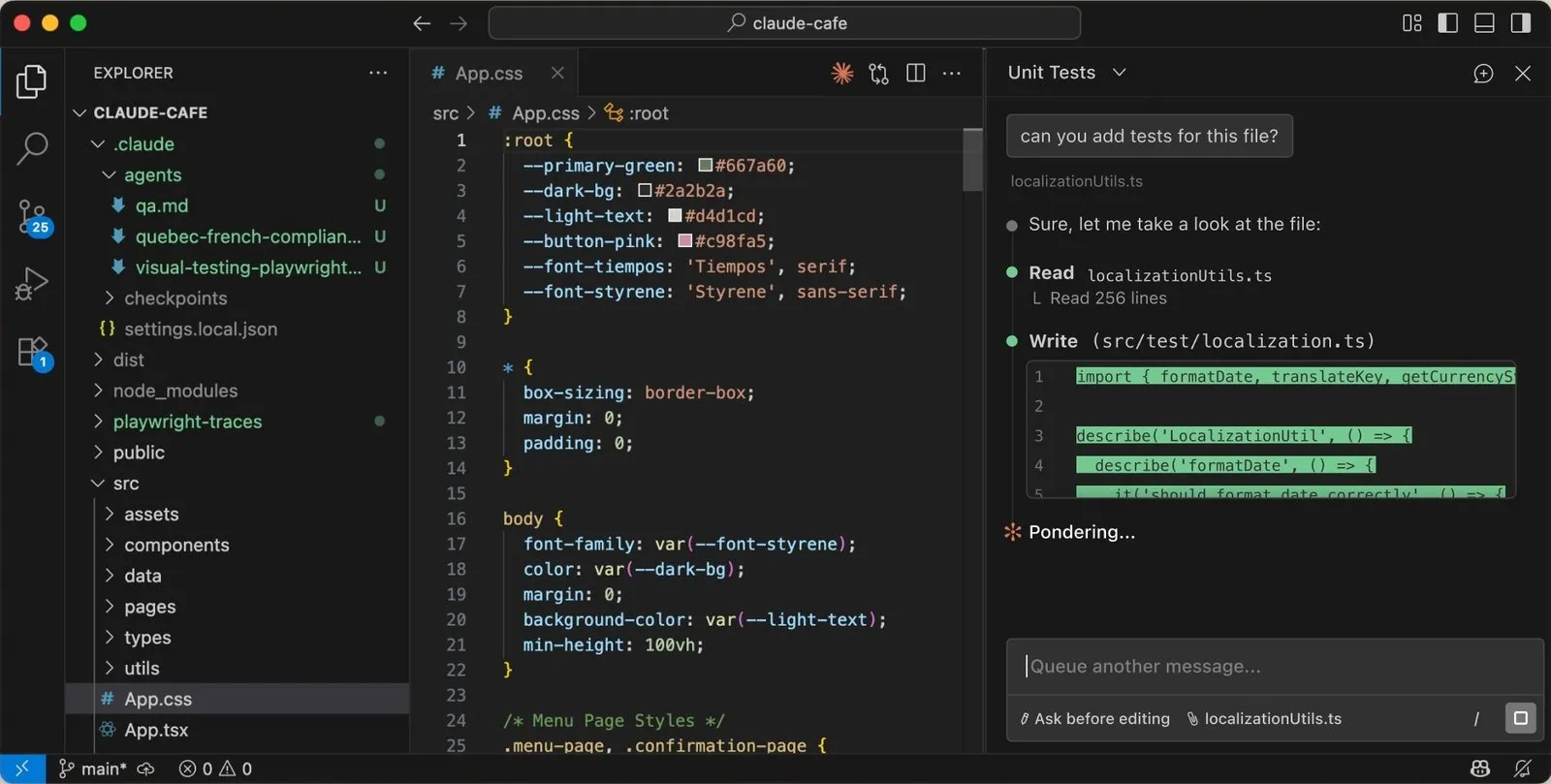
The original and most complete way to use it is the terminal. On macOS or Linux run curl -fsSL https://claude.ai/install.sh | bash; in Windows PowerShell run irm https://claude.ai/install.ps1 | iex; Homebrew and WinGet work too. Then cd into your project and type claude. It asks you to sign in the first time.
It works in loops: read the relevant files, propose a change, make it, run a command to check, and carry on from the result. A few habits keep it on track:
- Say what “done” means. Give it the test command, the expected output or the exact error, so it can check its own work.
/clearbetween tasks. Every request resends the whole conversation, so long sessions eat your allowance.- Use plan mode for big changes. Press Shift+Tab to reach plan mode: it only reads and proposes, and edits nothing until you approve.
- Press Esc when it drifts. Double Esc or
/rewindgoes back to an earlier checkpoint.
If you’d rather avoid the terminal, there are extensions for VS Code (which also install in Cursor) and JetBrains that show changes as diffs in the editor. The desktop app has a Code tab that needs no separate install, but requires a paid subscription.
Should it ask you first: permission modes and the sandbox
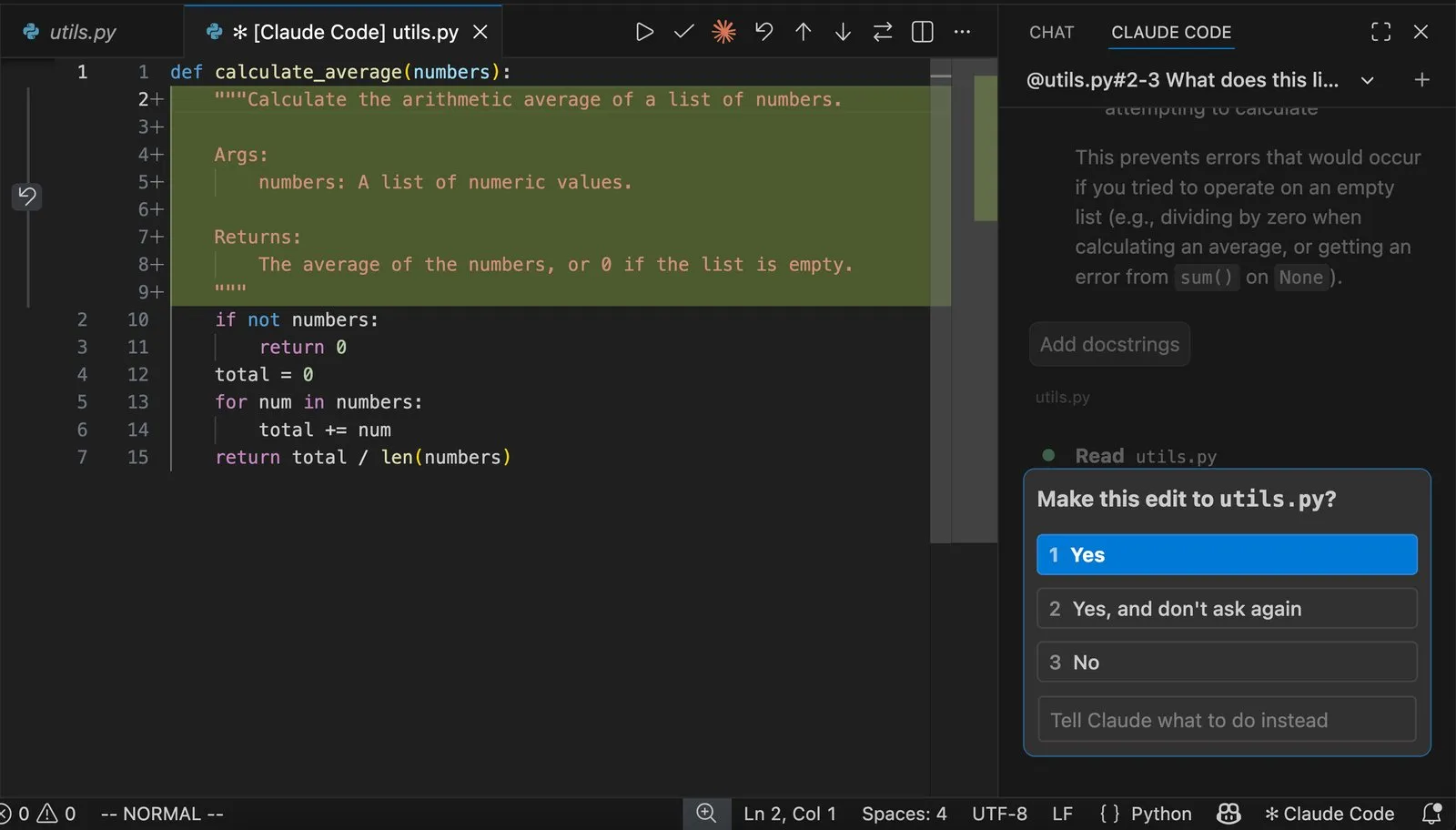
An agent that can run commands can also delete the wrong thing. Claude Code’s permission modes decide which actions need your approval. Press Shift+Tab in the terminal to cycle through them; the status bar shows the current one.
Claude Code's permission modes
It stops asking about each action. A second model, the classifier, reviews actions in the background and blocks anything beyond your request, aimed at unfamiliar infrastructure, or apparently prompted by content it read.
- Use it for
- Long tasks whose direction you trust
- Example
- Migrate the whole project from Jest to Vitest and get every test passing.
- Limits
- From v2.1.283 it is the starting mode for new terminal and VS Code sessions. In Anthropic's words, it reduces prompts but does not guarantee safety.
Only reading runs freely; edits, commands and network access all need your approval.
- Use it for
- Unfamiliar code, sensitive projects
- Example
- Explain how authentication works in this repository first.
- Limits
- Safest, but long tasks mean a lot of clicking.
File edits and filesystem commands such as mkdir and mv run freely; other commands still ask.
- Use it for
- You're watching it edit code
- Example
- Convert these three components to TypeScript.
- Limits
- Still asks before writing files that can run code.
Read-only: it produces a plan and starts editing only after you approve.
- Use it for
- Big or uncertain changes
- Example
- I want to split the monolith into two services. Give me a plan first.
- Limits
- Touches no code; good for agreeing an approach.
Asks about nothing.
- Use it for
- Only inside containers or VMs
- Example
- (In a CI container) run the tests and fix the failures.
- Limits
- Anthropic requires an isolated environment and a non-root user; a V2EX user notes it refuses to run as root.
Source: Claude Code docs · Choose a permission mode
Two more points. No mode auto-approves deleting critical paths such as / or ~. And the sandbox is a separate layer: run /sandbox to turn it on, and the operating system limits which folders its commands can touch and which sites they can reach. The sandbox works on macOS, Linux and WSL2; native Windows has none.
Commits and pull requests: it does them itself
Claude Code uses git directly. Say “commit my changes with a clear message” or “open a PR” and it creates the branch, writes the commit message and opens the pull request (with the gh command-line tool installed).
On GitHub there are two more ways in:
- GitHub Actions: run
/install-github-appin the terminal, then comment@claude fix this TypeErroron an issue or PR and it works on GitHub’s runners and replies there. It can bill an API key or use a token from your subscription. - Auto-fix for PRs: switch on Auto-fix in a web session and, when CI fails or a reviewer comments, it investigates and pushes a fix. It replies to comments under your GitHub account, labelled as Claude Code. If a comment can trigger a deployment in your repository, leave this off.
Web, phone and Slack: sending work off
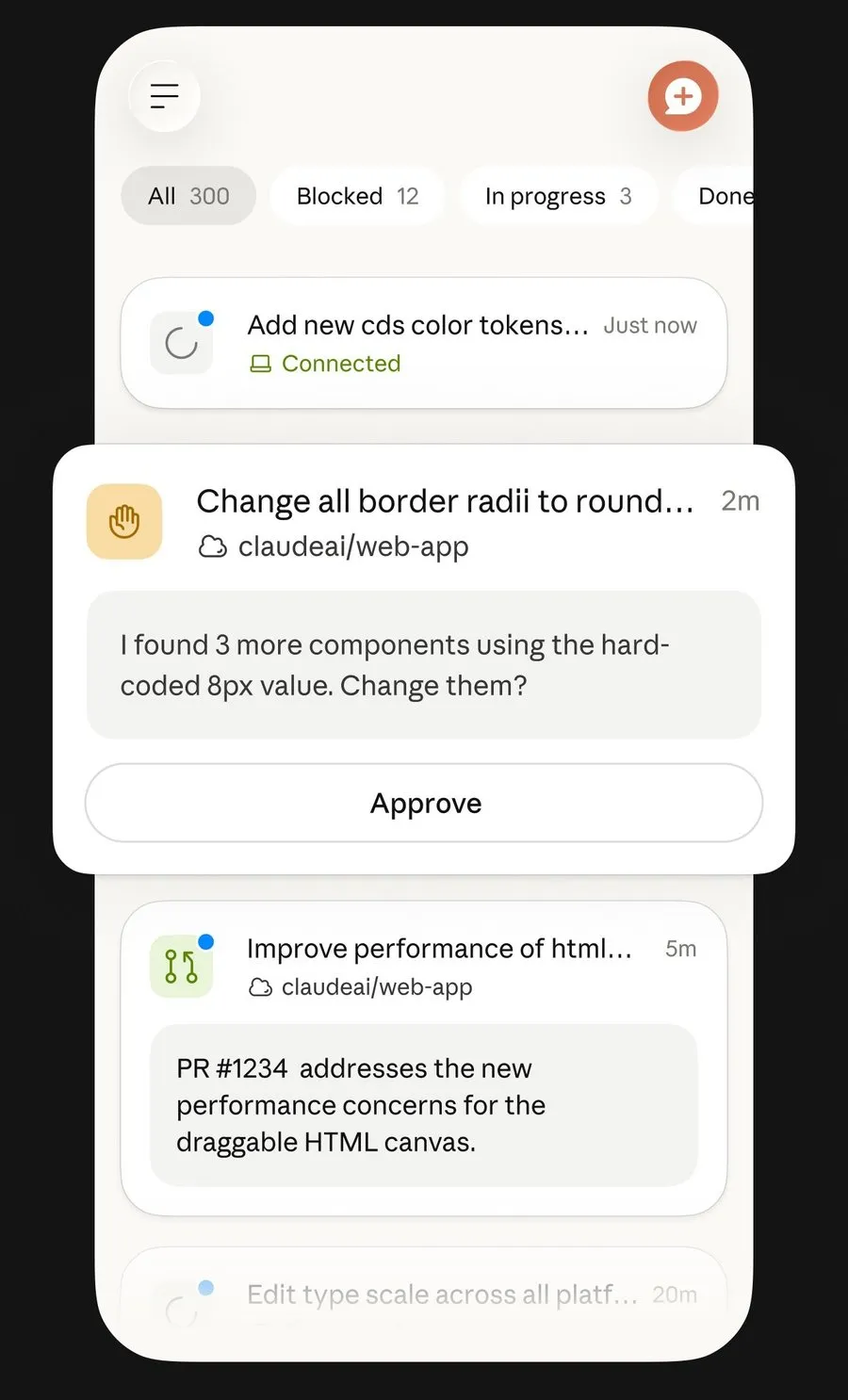
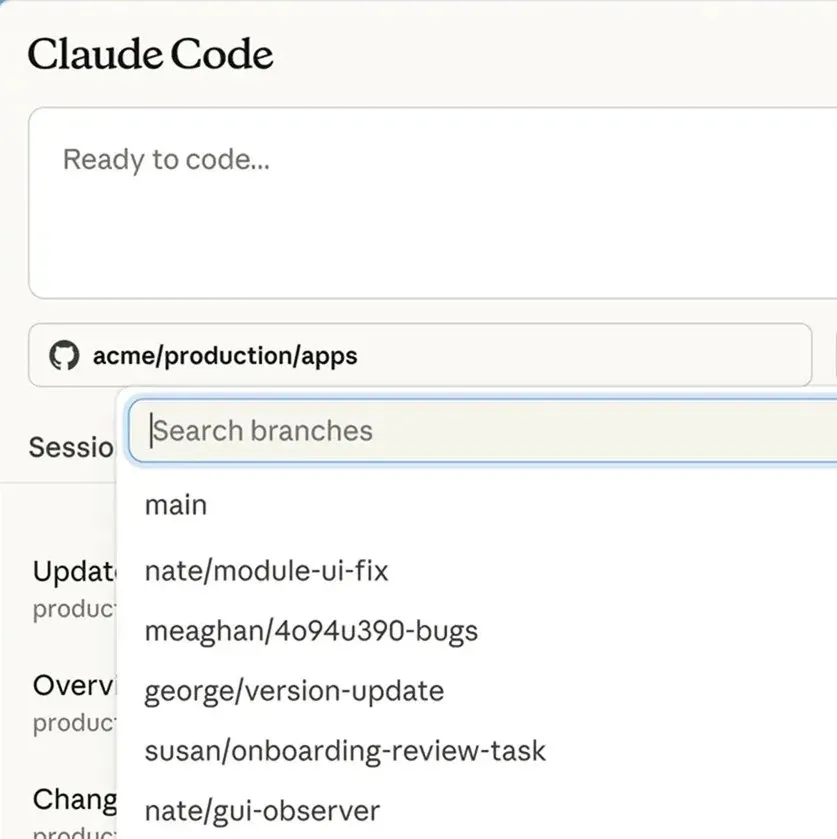
Sessions started at claude.ai/code or in the Code tab of the mobile app run on Anthropic’s cloud machines. It clones your GitHub repository there, keeps going after you close your laptop, and can open the PR when it’s finished. Pro, Max and Team all include it with no charge for the machine, but it draws on the same allowance as chat, and three parallel tasks use three times as much.
claude --cloud "Fix the flaky test in auth.spec.ts"sends a task from the terminal to the cloud;claude --teleportpulls a cloud session back to your machine.- To keep an eye on a local session from your phone, use
/remote-control. - The cloud can only clone from and open PRs on GitHub. GitLab and other repositories can be uploaded as a bundle, but results can’t be pushed back.
- Slack: Pro and Max users add the Claude app to a channel and
@Claudewith a bug report; it opens a cloud session and posts a Create PR button when done. Team and Enterprise move to Claude Tag; the old bot stopped answering on 5 October in workspaces connected to Claude Tag.
Teaching it the rules: CLAUDE.md, skills, hooks and MCP
Repeating “use pnpm, don’t touch the public API” every session gets old. These fix that:
- CLAUDE.md: a notes file in the project root that it reads at the start of every session. Put coding standards, common commands and no-go folders there. It can read an existing
AGENTS.mdinstead. Anthropic suggests keeping it under 200 lines, since it takes up context every time. - Skills: package a fixed routine as a command such as
/review-pr; it loads only when used. - Hooks: your scripts run automatically before or after its actions, such as formatting after every edit or linting before a commit.
- MCP: an open standard for connecting outside tools, so it can read a Google Drive document or update a Jira ticket. Anthropic’s tip: where a command-line tool exists (such as
gh), prefer it, as it costs less context. - Subagents: hand verbose jobs like running tests or reading logs to another Claude and get only the conclusion back. Each subagent still uses your allowance.
No code needed
At heart it is Claude that can read and write files and run commands on your computer, so it handles file chores too: bulk renaming, merging and cleaning dozens of spreadsheets, turning a pile of meeting notes into a table. A Sspai writer, Yurenzhe, says he is not a programmer and built a personal AI assistant on his server in an afternoon with Claude Code, “without writing a single line of code”. A V2EX beginner’s guide has a whole chapter on using it for operations and content work.
Our advice: run it in a dedicated folder, copy the originals first, and use manual mode so you see each step.
Which model: Opus 5.5 by default
Every subscription and the API default to Claude Opus 5.5. Type /model to switch: sonnet (Sonnet 5.5, half the price), haiku (Haiku 5.5, far cheaper) or fable (Fable 5.1, the strongest and dearest, not the default on any plan, so you choose it yourself). /effort sets how hard it thinks; Opus 5.5 defaults to medium.
Watch the Fable rules: on Pro it runs only on paid usage credits. For Max, the pricing page says Fable can use up to 50% of the weekly limit, and the help centre says it has its own weekly Fable cap.
Subscription or pay-as-you-go: how usage is counted
| Option | Price | How usage is counted |
|---|---|---|
| Free | $0 | Claude Code not included |
| Pro | $20 a month, or $17 a month billed yearly | Five-hour window plus a weekly cap, shared with Claude chat |
| Max 5x | $100 a month | Five times Pro’s usage per five hours |
| Max 20x | $200 a month | Twenty times Pro |
| Team | Standard seat $25, Premium seat $125 ($20 / $100 billed yearly) | Per-seat allowance; Premium is five times Standard |
| Enterprise | From $20 per seat a month (yearly, 20-seat minimum) plus usage at API rates | Admins set limits |
| API pay-as-you-go | Per million tokens: Opus 5.5 $4 in / $20 out; Sonnet 5.5 $2 / $10; Haiku 5.5 $0.10 / $0.50 | Pay for what you use, via the Console, Bedrock or Google Cloud |
What the pricing page doesn’t spell out:
- There are no numbers. Anthropic says only that Pro is at least five times Free and Max five or twenty times Pro, not how many messages that buys. Use
/usageto see what percentage you’ve used. - The limits moved several times this year. From 13 May to 13 September weekly limits were 50% higher as a promotion; from 14 September they are permanently 25% above the old level, which is about a sixth less than during the promotion.
- When you run out: wait for the window to reset, or turn on usage credits and continue at API rates. The $100 or $200 of monthly API credit that comes with Max cannot be spent in Claude Code.
- Rough pay-as-you-go cost: Anthropic says enterprise deployments average about $13 per developer per active day, or $150–250 a month.
Which to pick: a few sessions a week on small projects, Pro is enough; daily main tool, go straight to Max 5x; pay-as-you-go suits CI automation and occasional use.
The main complaint is usage limits
Limits are the most argued-about topic on Hacker News and V2EX. On 31 March 2026 The Register reported users running out “way faster than expected”; one said “I used up Max 5 in 1 hour of working, before I could work 8 hours”, and Anthropic said it was investigating. When the August promotion was ending, a Hacker News user wrote that his “$200 subscription” was “changing or threatening to change every 2 weeks or less”.
Just as many people say it is worth it. A V2EX user paying for both Codex and Claude Pro compared them in October: building the same Go encryption module at the highest effort used 65% of Codex’s five-hour allowance and 12% of Claude Code’s; for front-end UI “Claude Code wins outright”, while Codex made better images. Others complain that Opus 5.5 “quietly does things its own way without asking”.
Codex or Cursor instead?
| Claude Code | OpenAI Codex | Cursor | |
|---|---|---|---|
| What it is | Coding agent that began in the terminal | Coding agent included with ChatGPT | AI code editor, part of SpaceXAI since August 2026 |
| Entry price | Pro, $20 a month | Plus, $20 a month; Pro $100 / $200 / $500 | Premium from $30 a month; Claude and other third-party models billed separately at API prices |
| What users say | Strong on front-end and big projects; tight limits | Follows instructions strictly, more generous limits, accused of over-engineering | Suits people who want autocomplete and control |
A common pattern on V2EX is to pay for both: one as the main tool, the other to review its work.
Mainland China: not officially supported
Mainland China, Hong Kong and Macau are missing from Anthropic’s list of supported regions. Since September 2025 it has also barred companies more than 50% owned by entities in China and other unsupported regions. Under the consumer privacy policy in force from 8 July 2026, some users must verify their identity with a government ID and a selfie, and accounts created from unsupported locations can be banned.
Users in China have three routes, each with a cost:
- An official subscription over a proxy: needs a foreign payment method and a stable connection. Some V2EX users have gone months without trouble; another says “every account I open gets banned”, and one was refused a refund after a ban.
- An API relay: set the two environment variables
ANTHROPIC_BASE_URLandANTHROPIC_AUTH_TOKEN. Your code passes through a third party, so judge its trustworthiness yourself; many “zero bans” claims online come from relay sellers. - A Chinese model: DeepSeek, Zhipu’s GLM and Kimi offer Anthropic-compatible endpoints that Claude Code can use. Cheap and stable, but the model isn’t Claude and results differ.
Settings worth changing
- Training: on Pro and Max, decide at claude.ai/settings/data-privacy-controls whether your chats train models. If you allow it, data is kept for five years; if not, 30 days. Team, Enterprise and the API don’t train by default.
- Local history: sessions are stored in plain text in
~/.claude/projects/for 30 days by default; change this withcleanupPeriodDays. - Telemetry: set
DISABLE_TELEMETRY=1to stop usage metrics, orCLAUDE_CODE_DISABLE_NONESSENTIAL_TRAFFIC=1to stop all non-essential traffic. - Permission rules: add an “ask” rule for things like
git pushin settings.json and it will stop and ask even in auto mode.
How Claude Code relates to Claude and Anthropic
| Name | What it is | Relation to Claude Code |
|---|---|---|
| Anthropic | Company | Makes it |
| Claude | Chat assistant app and website | Same account, same subscription and allowance; the desktop and mobile apps have a Code tab |
| Opus 5.5, Sonnet 5.5, Haiku 5.5, Fable 5.1 | Models | What Claude Code runs on |
| Cowork | Claude feature that does office tasks on your computer | For non-coding work; on Team and Enterprise it shares one seat allowance with Claude Code |
| Agent SDK | Developer toolkit | Build your own agents with Claude Code’s tools |
Your first session
- Subscribe to Pro or above, or top up the Console for an API key.
- Install with the commands above, run
claudein a project folder and sign in. - Run
/initfirst so it reads the project and drafts a CLAUDE.md, then edit it.
Explain this project's structure: what each main folder does, where the program starts and how the tests run. Don't change any files yet.
Two cases in tests/date.test.ts fail when I run npm test. Find the cause and fix it, run the tests again, then tell me which files you changed and why.
This folder has 30 monthly sales spreadsheets. Merge them into one table, use one date format, remove duplicate rows and save it as summary.xlsx. Don't touch the originals.
Recent changes
- Anthropic mathematician and Claude prove the Riemann hypothesis in 17 million lines of LeanOur coverage
- DeepSeek updates V4.1 Flash with open weights and opens its search API at $0.75 per 1,000 callsOur coverage
- Claude submitted a real web form during testing; Anthropic cuts internet access from internal testsOur coverage
- Claude Haiku 5.5 cuts its developer price by 90% and beats the previous mid-range model at office workOur coverage
- Legacy Slack bot retired in workspaces connected to Claude Tag
- Claude Sonnet 5.5 comes close to the flagship Opus at the old priceOur coverage
- Claude Opus 5.5 becomes the default model, $4/$20 per million tokens on the API
- Claude Opus 5.5Our coverage
- Weekly limits set permanently 25% above pre-promotion levels, about a sixth below the promotion
- Claude Fable 5.1 and Mythos 5.1Our coverage
Compared with similar products
| Product | Price | What it is |
|---|---|---|
| Google AntigravityGoogle · handbook | Weekly quota; Gemini 3.8 Flash, Claude 4.6 until 2 November; Via Google AI Pro $19.99, Ultra $99.99 / $199.99 a month | Google's platform for coding agents: you say what you want, and agents write the code, run terminal commands and click through pages in a browser, then hand you plans, screenshots and recordings to review. Desktop app, command line and editor extensions. |
| Claude CodeAnthropic · handbook | Not on the free plan; API pay-as-you-go; Pro $20, Max $100 / $200 a month | Anthropic's coding agent: describe what you want in a sentence and it reads your project, edits many files, runs commands and tests, and commits and opens pull requests. It works in the terminal, your editor, a desktop app, the web and your phone. |
| OpenAI CodexOpenAI · handbook | Free and Go: GPT-6 Luna locally in the desktop app, no cloud; Plus $20; Pro $100 / $200 / $500 a month | OpenAI's agent: inside a folder, computer or cloud environment you authorise, it reads and edits files, runs commands and tests, changes code and produces spreadsheets and documents, and can operate apps and a browser when allowed. You sign in with a ChatGPT account and every plan includes it. |
| CursorAnysphere (SpaceXAI) · handbook | Limited free tier; $8 / $30 / $100 / $200 a month | An AI code editor built on VS Code: it completes code as you type, rewrites a selection from one sentence, and runs agents locally or in the cloud that edit many files, run tests and open pull requests. |
| GitHub CopilotGitHub (Microsoft) · handbook | 2,000 completions a month; very little chat and agent use; $10 / $39 / $100 a month; teams $19 or $39 a user | GitHub's AI coding assistant: it completes and edits code in VS Code, JetBrains, Xcode and other editors, takes issues and opens pull requests from the cloud, reviews PRs, and has a command-line tool and a desktop app. |
| LovableLovable · handbook | 5 credits a day, up to 30 a month; Pro from $25, Business from $50 a month | A Swedish web-app builder: describe the app you want in plain words and it writes the front end, database, login and payments, then publishes it to a URL with one click. No coding needed. |
Sources
- Claude Code docs · Overview
- Claude Code docs · Choose a permission mode
- Claude Code docs · Configure the sandboxed Bash tool
- Claude Code docs · Model configuration
- Claude Code docs · Manage costs effectively
- Claude Code docs · Data usage
- Claude Code docs · Use Claude Code in the cloud
- Claude Code docs · GitHub Actions
- Claude Code docs · Claude Code in Slack
- Claude Code docs · VS Code (screenshot source)
- Claude Code docs · What's new (2026 weeks 13–37)
- GitHub · Claude Code CHANGELOG (v2.1.302)
- Claude · Pricing
- Claude · Max plan
- Claude Help Center · Using Claude Code with your Pro or Max plan
- Claude Help Center · Claude Code weekly limits promotion, May–September 2026
- Claude Platform · API pricing
- Anthropic · Supported countries and regions
- Anthropic · Series G announcement (2026-02-12)
- App Store · Claude by Anthropic, version 1.261014.20
- The Register · Claude Code users hitting usage limits 'way faster than expected' (2026-03-31)
- MediaNama · Anthropic to widen data collection and ID checks from July 8 (2026-06-16)
- The Decoder · Anthropic bans companies majority-controlled from China and others (2025-09)
- Hacker News · Weekly limits promotion thread (2026-08-18)
- Hacker News · Weekly limit down 17% from today (2026-08-31)
- V2EX · Using Claude Code and Codex side by side (2026-10-16)
- V2EX · Are Claude bans still common? (2026-09-25)
- V2EX · Claude Code or Codex at $100? (2026-06-23)
- Sspai · Turning Claude Code into a personal assistant (2026-01-12)
- Alibaba Cloud Developer Community · Using Claude Code in China (2026-10-16; author works for a relay provider)
- DeepSeek API docs · Using the Anthropic API
- Zhipu · GLM Coding Plan overview
- OpenAI · Codex pricing
- Cursor · Pricing
- Claude Code