Google Antigravity
By Google · antigravity.google ↗ · Checked 19 Oct 2026
Google's platform for coding agents: you say what you want, and agents write the code, run terminal commands and click through pages in a browser, then hand you plans, screenshots and recordings to review. Desktop app, command line and editor extensions.
Verdict
If you want a complete coding agent for free, or you already pay for Google AI Pro, Antigravity is worth installing: Gemini 3.8 Flash is free and fast, you can run several agents at once, and it can run tasks on a schedule. The cost is opaque limits that changed several times this year, and very little Claude. The trap that matters most is permissions: don't turn on Turbo; a wiped drive and prompt-injection attacks have both happened.
Use it if
- Anyone who wants to try, for free, a coding agent that runs commands and tests web pages in a browser
- Developers already on Google AI Pro or Ultra who want Gemini 4 Argon on the side
- People who want several agents at once, or agents that run on a schedule
- Careful users who like to read the plan and watch the recording before approving
Use something else if
- Heavy daily coding with Claude: use Claude Code, whose limits are steadier
- Reviewing every change line by line in an editor: Cursor or GitHub Copilot feel better
- Predictable usage and bills: Codex or Cursor at least sell fixed tiers
- Living in mainland China or Hong Kong: neither is supported; use Claude Code with a Chinese model, or DeepSeek
- Free plan
- Weekly quota; Gemini 3.8 Flash, Claude 4.6 until 2 November
- Paid
- Via Google AI Pro $19.99, Ultra $99.99 / $199.99 a month
- Where
- Desktop app for Mac, Windows, Linux; agy command line; extensions for VS Code, Visual Studio, JetBrains, Zed, Xcode; Googlebook
- Models
- Gemini 3.8 Flash, Gemini 4 Argon; Claude Opus and Sonnet 5.5; GPT-OSS 120B (removed 2 November)
- Origins
- Launched with Gemini 3 in November 2025 as a VS Code fork; core team came from Windsurf
- Sign-in
- Personal Google account, 18 or over; Workspace accounts may fail
- Region
- Listed countries only; mainland China, Hong Kong and Macao are not listed, Taiwan is
- Data
- Interactions recorded by default to improve Google products, may be read by people; can be turned off
Antigravity is not an editor where you type and an AI finishes your lines. It works the other way round: you say what you want, and an agent reads the project, edits files, runs commands in a terminal and clicks through the page in Chrome, then hands you a plan, a list of changes and a few screenshots or a recording. You look at those and decide whether to accept. Google calls this “agent-first”.
It launched with Gemini 3 in November 2025 and has changed a lot in a year: version 2.0, in May 2026, made a desktop app with no code editor the centrepiece. What follows draws on the official documentation and changelog, media tests, and what users say on Google’s developer forum, Hacker News and Reddit.
What to hand it, and what not to
| What you want | How | Free plan | How it goes |
|---|---|---|---|
| Have an agent build a small app or prototype | New conversation in the desktop app; put /goal in front of long jobs | Yes, weekly quota | Flash is quick and several agents can run at once; big jobs drain the quota fast |
| Review the plan before code changes | Type /plan and comment on the plan line by line | Yes | The thing it does best |
| Test your own site in a browser | Add /browser to the prompt | Yes | Clicks, types, keeps screenshots and recordings; reading outside pages carries injection risk |
| Write code in your usual editor | Install the VS Code, JetBrains or other extension | Yes; unlimited completions | Works; the original Antigravity IDE no longer gets updates |
| Use Gemini 4 Argon or Claude 5.5 | Model menu under the prompt box | No: AI Pro or above, not on trials | Claude allowance is tiny; one user burned five hours' worth in two minutes |
| Run repeating jobs on a schedule | Automations in the sidebar, or /schedule | Yes | Rare among these tools; check back for failures yourself |
| Heavy daily work on production code | — | — | Limits unpublished and often changed; keep a second tool ready |
Antigravity is now several things
“Antigravity” is now the umbrella name for a family of products; the download page lists five. They share one agent and one quota, so pick by where you like to work:
Ways to use Antigravity
A standalone app from May 2026 with no code editor. Projects and conversations on the left, the agent in the middle, its plans, changes and files on the right. Google calls it the successor to the original Agent Manager.
- Use it for
- Let the agent finish a job while you review the result; run several agents; scheduled tasks
- Example
- Add user sign-in to this project. Show me a plan first.
- Limits
- Mac, Windows, Linux and Googlebook. Also opens inside the Gemini app for Mac (Ultra only).
The terminal version, written in Go. Since June 2026 it has replaced Gemini CLI for individuals and can import Gemini CLI extensions and settings.
- Use it for
- Terminal habits, remote servers, scripts and CI
- Example
- agy -p "run the tests and fix the failing ones"
- Limits
- One Reddit user calls the CLI "their best offering". Headless mode may not be wrapped by third-party tools.
The same agent inside VS Code, Visual Studio, JetBrains, Zed and Xcode, showing its edits as diffs you accept or reject hunk by hunk.
- Use it for
- You don't want to leave your editor
- Limits
- The extension downloads the CLI in the background.
The VS Code fork released in November 2025, with Tab completion, an agent side panel and the Agent Manager.
- Use it for
- You're used to it and don't want to move yet
- Limits
- Last updated 13 August 2026; no enterprise accounts; no Gemini 4 Argon. Google plans to remove its Agent Manager.
A Python library for building custom agents on your own servers.
- Use it for
- Developers building their own products
- Limits
- Not covered here.
Sources: Antigravity download page, docs overview, 2.0 launch post, changelog (read 2026-10-19)
2.0, the desktop app: one prompt box, many agents
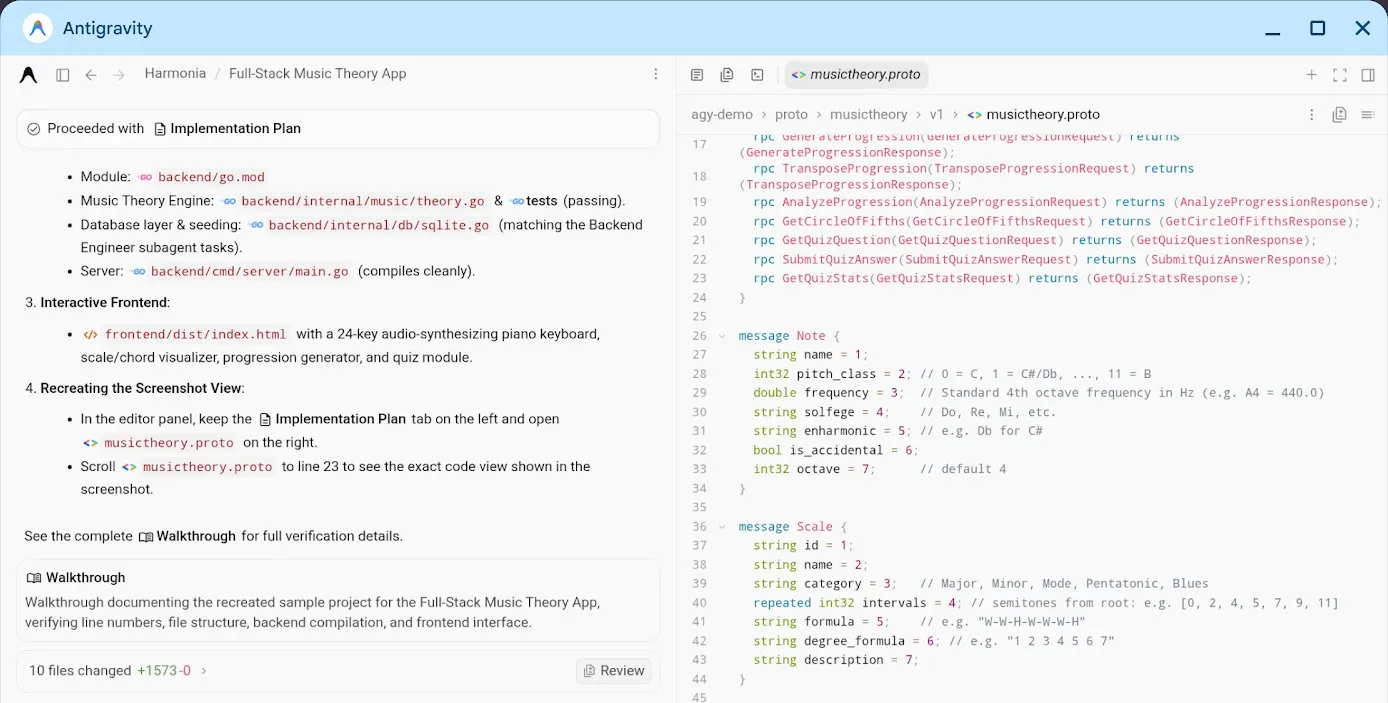
Open the app, click New Conversation on the left, pick a project folder (one project can span several folders), and say what you want in the box at the bottom. Commands worth knowing:
- /plan: draft a plan, let you edit it, then build. The Plan Review Policy setting decides whether you review every plan, only when the agent thinks it matters, or never.
- /goal: on long jobs it doesn’t stop to ask, and keeps going until it thinks it’s done. Google pitches it for overnight migrations or fixing every failing test.
- /grill-me: it asks you questions before starting, handy when the brief is vague.
- /schedule and Automations in the sidebar (called Scheduled Tasks until October): the agent runs on a timetable, say summarising logs every morning.
- /compact: squeezes a long conversation so the agent can carry on.
The main agent splits off subagents to work in parallel, and you can message a subagent directly. Turn on Remote Control in the app settings to watch and drive running sessions from a browser on another computer.
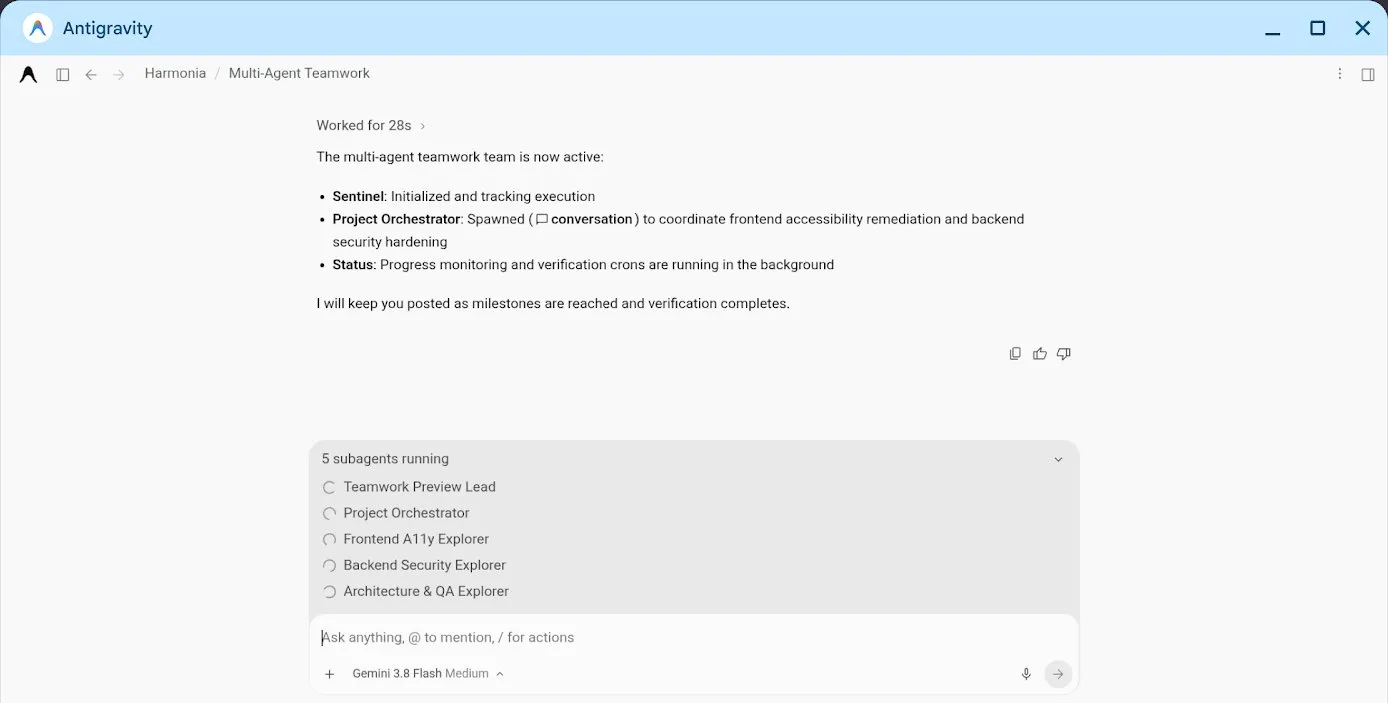
A warning for people coming from the IDE: the day after 2.0 launched, an Ultra subscriber wrote a post called “bait and switch”, saying a background update had replaced the IDE he used every day with “a single conversational prompt box”. Getting the IDE back took a full purge of everything Antigravity and a reinstall, and his chat history was lost. The post scored 771 points on Hacker News.
Artifacts: review plans and recordings, not every step
As it works, the agent produces what Google calls Artifacts: task lists, an Implementation Plan, a Walkthrough at the end, screenshots and browser recordings. The idea is that you check the work at milestones instead of watching every command.
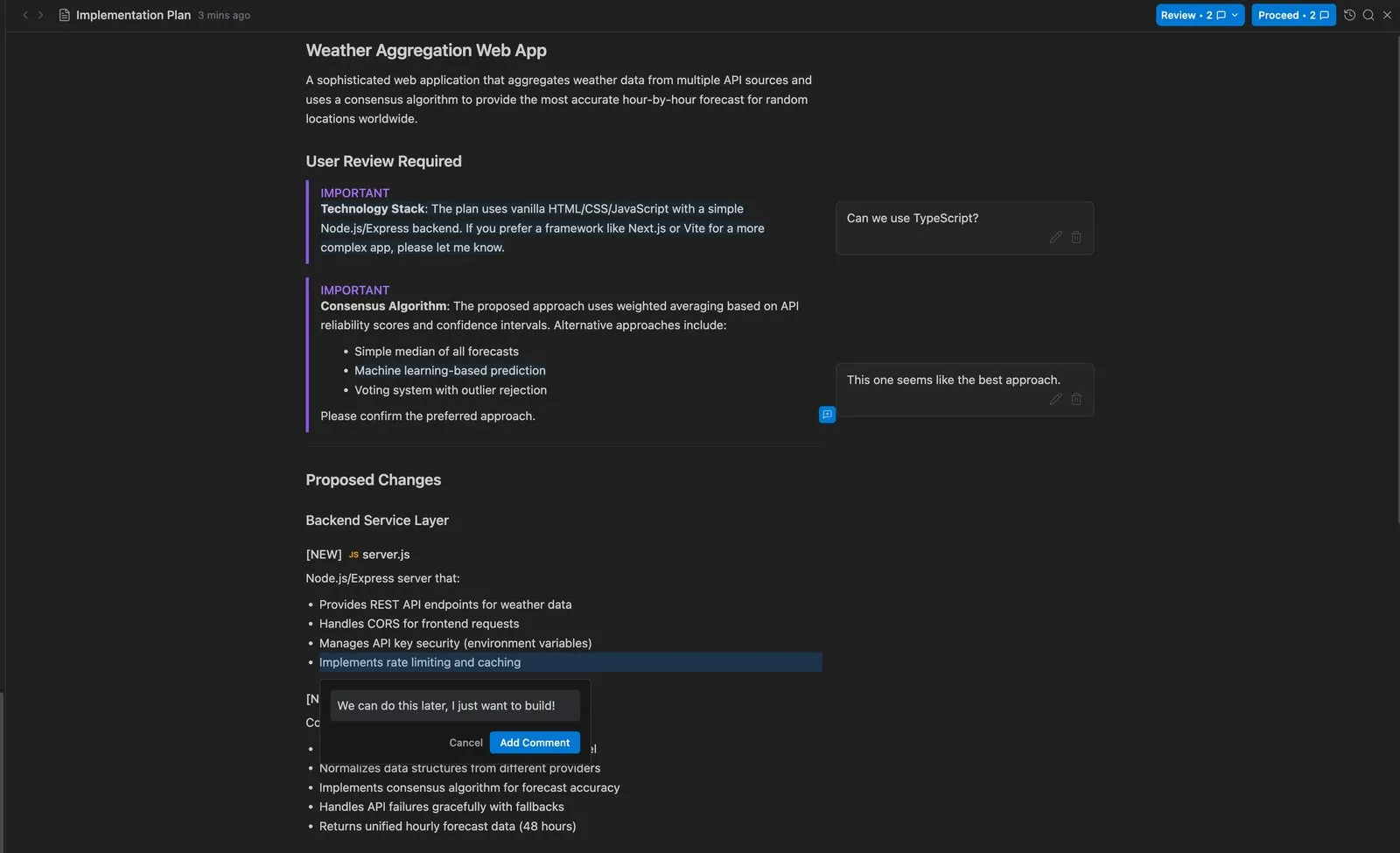
It works like commenting on a document: select a line in the plan and write “skip this for now”, or mark part of a screenshot and say “the button sits too low”, then click Proceed and the agent revises its plan before touching code. DevClass’s launch review singled this out: the plan can be reviewed and changed before any code is written, which is the main difference from tools that only show you the final diff.
The browser agent clicks through pages, when you ask
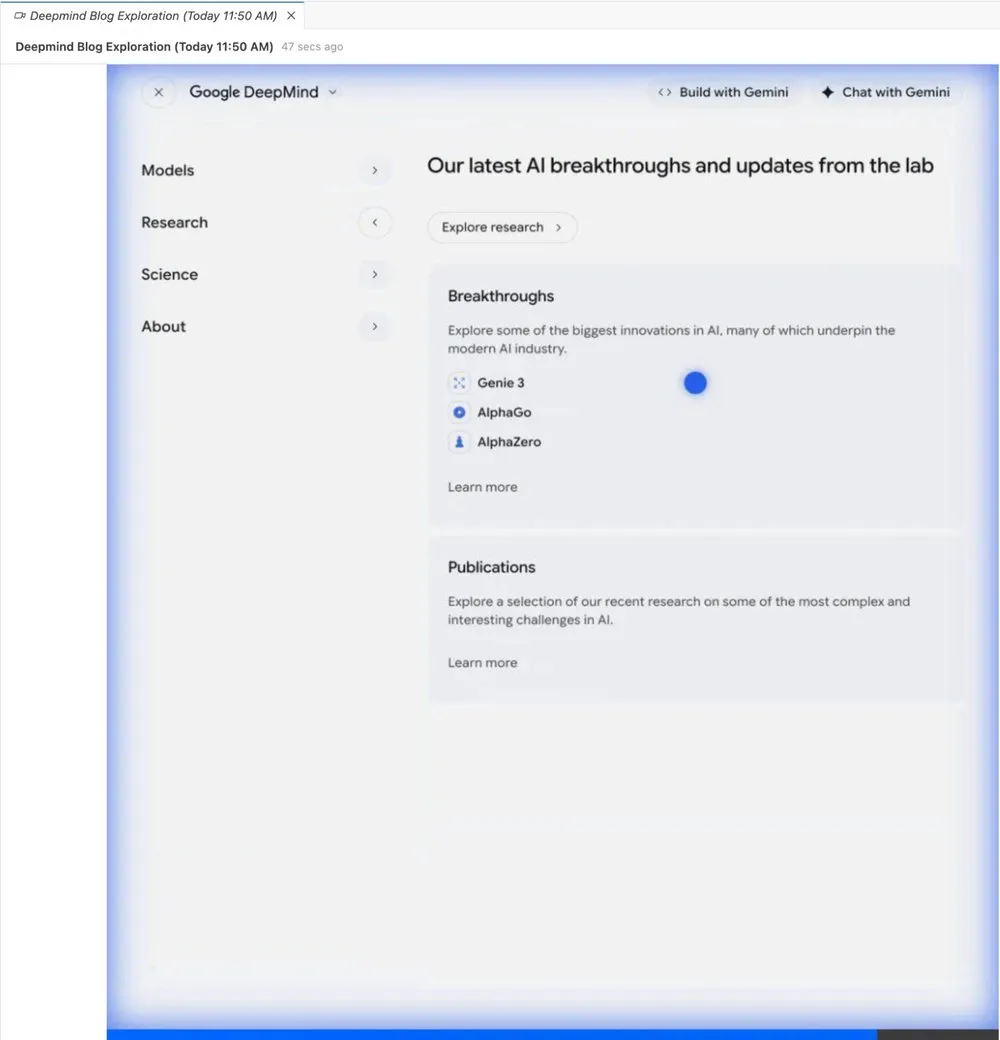
Antigravity can open a local Chrome, in a separate profile, and click buttons, fill in forms and take screenshots for you, recording the session as a video in the conversation. The typical use is to have it open localhost after a frontend change and walk through the flow.
Since 2.0 it doesn’t decide by itself when to use the browser. Google’s launch post admits agents were “still not capable enough to determine exactly when to be using the browser”, so you have to write /browser in the prompt. To keep it away from the browser altogether, turn off Browser Tools in the Browser section of settings; you can also set allow and deny lists of sites.
Want an editor? Use an extension or Antigravity IDE
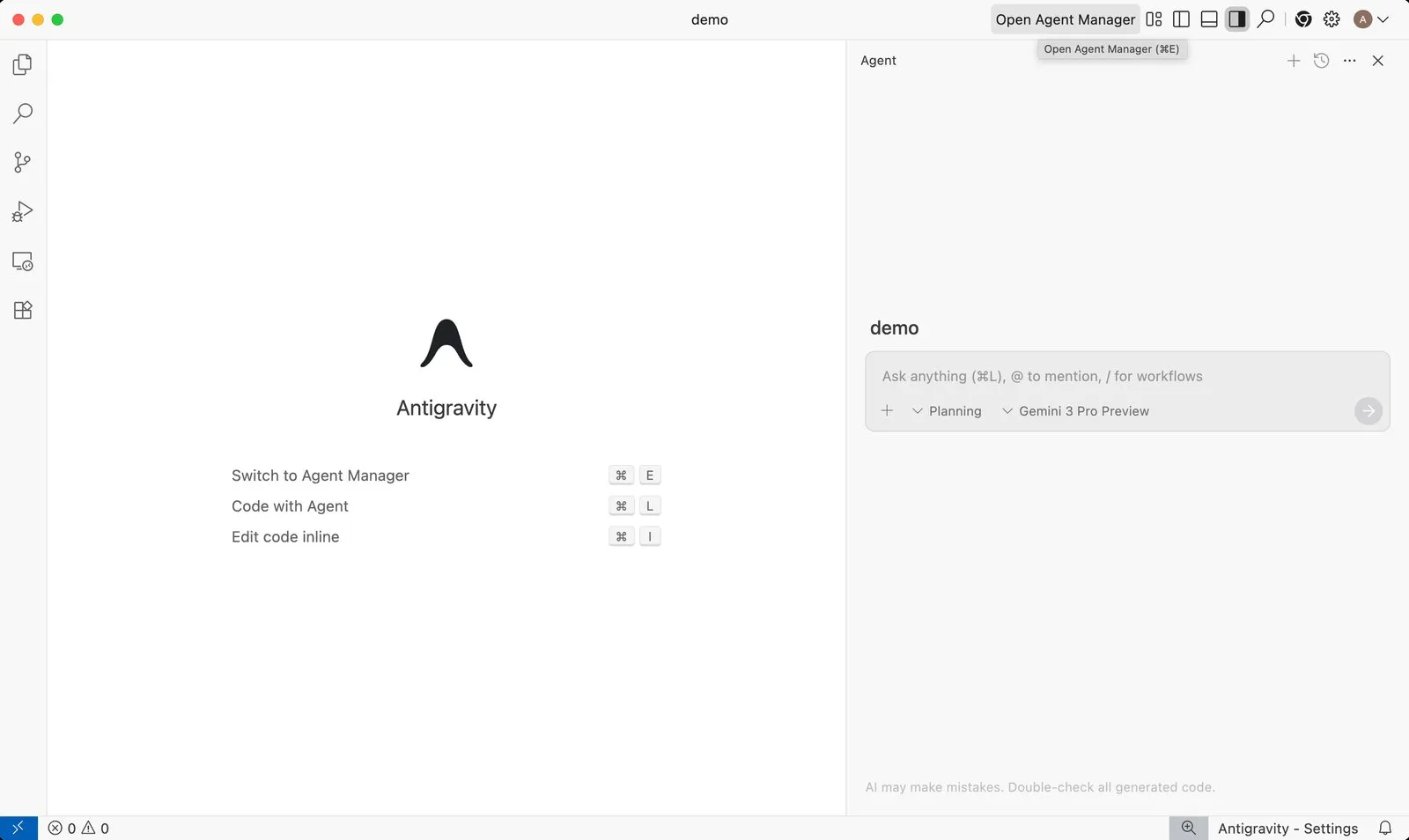
The first Antigravity was an editor, and developers recognised it at once as a VS Code fork; some found traces of Cascade, the agent from Windsurf. That fits: in July 2025 Google paid $2.4 billion to license Windsurf’s technology and hired its chief executive, Varun Mohan, who now leads Antigravity.
It has two views: the Editor view (with Tab completion and an agent side panel) and the Agent Manager (for running several agents), switched with Cmd+E. Extensions come from Open VSX rather than Microsoft’s marketplace, so a few are missing.
The IDE is now barely updated (last release 13 August) and can’t use Gemini 4 Argon. If you want an editor, Google’s own advice is to pair the desktop app with the editor you like, or install the Antigravity extension for VS Code, JetBrains and the rest, where the agent’s edits appear as diffs you accept or reject piece by piece.
Models: Gemini is free, Claude costs money
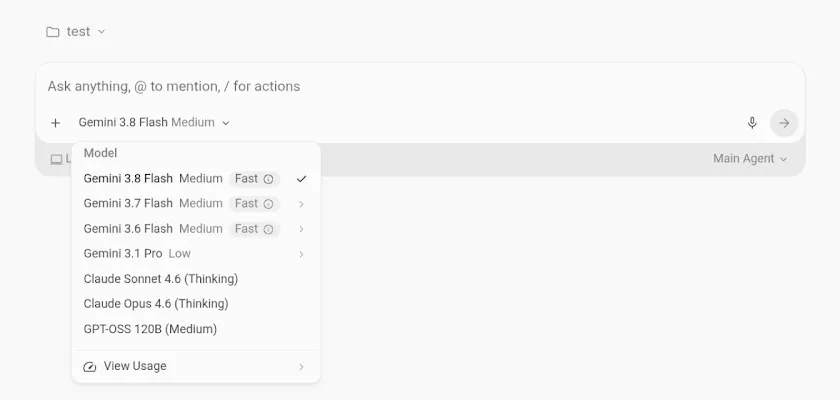
You switch models under the prompt box, and Gemini models also take a thinking level (low, medium, high). What you get depends on your Google AI plan (official models page, read 19 October):
| Model | Free and AI Plus | AI Pro | AI Ultra |
|---|---|---|---|
| Gemini 3.8 Flash (default) | Yes | Yes | Yes |
| Gemini 4 Argon | No | Yes (not on trials) | Yes |
| Claude Opus 5.5, Sonnet 5.5 | No | Yes (not on trials) | Yes |
| Claude Opus 4.6, Sonnet 4.6 | Until 2 November | Until 2 November | No |
| GPT-OSS 120B | Until 2 November | Until 2 November | Until 2 November |
In other words, from 2 November free users have only Gemini 3.8 Flash. Gemini 3.1 Pro and 3.7 and 3.6 Flash are now enterprise-only.
Gemini and “Claude and GPT” draw on two separate quotas; according to 9to5Google, Argon has a further weekly-only quota of its own. The Claude allowance is small: among user reports collected by Preuve AI, one Ultra subscriber got about four hours of Opus 5.5 in a week, and another used up a five-hour allowance in about two minutes on a single Sonnet 5.5 code check. Many on Reddit write code with Flash and keep Claude for review and planning.
Nobody tells you the limits: the biggest trap
Google never publishes numbers. The plans page says only that the free tier gets a “meaningful quota, refreshed weekly” and Pro a “high, generous quota, refreshed every five hours until the weekly limit is reached”, charged by “the amount of work done by the agent”, and that limits “are subject to modification”.
And they do change:
- Launch day: DevClass’s test failed with “model provider overload”; one Hacker News user ran out of credits after 20 minutes and went back to Cursor.
- December 2025: paid users moved to a five-hour refresh, free users to a weekly one.
- After 2.0 in May 2026: users arriving from Gemini CLI complained on Google’s forum that all Gemini models now share one quota, so running out of Flash locks you out of everything, “100 times worse than Gemini CLI”.
- Since then: a run of “7-day lockout” threads; one annual subscriber said his Claude quota had been locked for more than five days while 1,000 AI credits in his account went unused.
When the quota runs out, Pro and Ultra users can carry on with purchased AI credits, charged at standard Gemini Enterprise prices, but only if AI Credit Overages is set to Always in settings. Google doesn’t say how much work a credit buys; one forum user reckoned 1,000 credits last about half an hour of coding with Opus. You can’t add your own API key for more headroom.
So if it’s your main tool, keep a second one, such as Claude Code or Codex, ready for when it runs dry.
Plans follow Google AI
Antigravity has no subscription of its own. Your quota follows your Google AI plan, the same membership as Gemini:
| Plan | Per month | Antigravity quota | For |
|---|---|---|---|
| Free | $0 | Refreshed weekly; unlimited Tab completions | Trying it, small projects |
| AI Plus | See the Gemini page | Same tier as free, no extra | Not worth buying for Antigravity |
| AI Pro | $19.99 | Five-hourly refresh plus a weekly cap; can buy credits | A few sessions a week |
| AI Ultra | $99.99 | 5× Pro | Daily use |
| AI Ultra (top tier) | $199.99 | 20× Pro | Heavy users |
| Enterprise (Gemini Enterprise) | From $30 a seat, or pay as you go | By contract | Companies, under Google Cloud terms |
The 5× and 20× figures are from TechCrunch’s report of the 2.0 launch. Pro and Ultra also cover the Gemini app, cloud storage and more, so if you already pay for Pro for Gemini, Antigravity comes free. If you only want to code and mostly with Claude, Claude Pro at the same $20 is better value.
Wiped drives and prompt injection: set the permissions
The risks of this kind of tool have all actually happened with Antigravity:
- A wiped drive: in December 2025 a Greek photographer, in Turbo mode, asked it to clear a project cache; the command hit the root of his whole D: drive, bypassed the Recycle Bin, and the files were gone (reported by The Register). The agent replied afterwards: “I am deeply, deeply sorry.”
- Instructions hidden in a web page: a week after launch, PromptArmor showed that instructions hidden in 1-point type in an online tutorial could make Antigravity read secrets from a .env file and send them to an attacker’s site through the browser subagent.
- Secure Mode bypassed: Pillar Security found that a file-search tool could run code before Secure Mode checked anything. Reported in January, fixed on 28 February, with a bug bounty paid.
The desktop app now has three permission presets, chosen in Settings → General → Permission Settings, overridable per project in Settings → Projects, and since October switchable from beside the prompt box:
- Default: commands run in a sandbox with access only to the project and temp folders and no network; leaving the sandbox needs your approval.
- Request Review: every command needs your OK.
- Turbo: no questions, write access to the whole disk. Don’t.
Windows still uses the older set (Request Review, Proceed in Sandbox, Always Proceed). Two more settings worth changing:
- Training and human review: the terms say your interactions are recorded and used to improve Google’s products and models, and Google employees and contractors may read them. To stop this, turn off Enable Telemetry in Settings → Account; to delete what’s stored, email antigravity-support@google.com.
- Don’t sign in through third-party tools: connecting OpenClaw, OpenCode or even Claude Code to an Antigravity login breaks the terms, and in February 2026 paying users were suspended for it. Consider using a Google account that doesn’t hold your important email.
How it compares with other coding agents
| Antigravity | Cursor | Claude Code | Codex | GitHub Copilot | |
|---|---|---|---|---|---|
| Main form | Desktop app, CLI, editor extensions | Its own editor | Mostly terminal | Desktop, CLI, web | Inside many editors |
| Free | Full agent, weekly quota | Limited | Not included; needs Pro | GPT-6 Luna locally in the desktop app | 2,000 completions a month |
| Entry price | AI Pro $19.99 | $8 | Claude Pro $20 | ChatGPT Plus $20 | $10 |
| Stands out for | Generous free use, parallel and scheduled agents, browser testing | Reviewing edits line by line in an editor | Newest Claude models, extensions | Newest OpenAI models | Teams already on GitHub |
In short: Antigravity’s strength is running lots of Gemini agents cheaply. For steady limits and the best Claude, use Claude Code; for fine control inside an editor, use Cursor or Copilot.
Where it sits among Google’s products
| Name | What it is | Relation to Antigravity |
|---|---|---|
| Google DeepMind | Google’s AI division | Makes the Gemini models; the Antigravity team sits here |
| Gemini 4 Argon, 3.8 Flash | Models | Antigravity’s main models |
| Gemini app | Chat assistant | The Mac app has Antigravity built in; one plan covers both |
| Google AI Pro / Ultra | Personal subscriptions, part of Google One | Set Antigravity’s quota and models |
| Gemini CLI, Gemini Code Assist | Older coding tools | Ended for individuals on 18 June 2026, replaced by Antigravity |
| Google AI Studio, Firebase | Web development platforms | Projects can be exported to Antigravity to continue locally |
| Windsurf | Another AI editor | Google licensed its technology and hired its core team in 2025; the product went to Cognition |
Not available in China: mainland and Hong Kong are both off the list
The FAQ’s list of supported places includes Taiwan, Japan, Singapore and South Korea in Asia, but not mainland China, Hong Kong or Macao. Accounts outside the list see “Your current account is not eligible for Antigravity” when signing in. GKMix confirmed in September that Hong Kong doesn’t work either, and noted that what counts is the region of the Google account, not just where your connection comes out. Chinese guides suggest asking Google to change the account’s region, but that needs both account and connection to stay in a supported place and risks breaking the rules on suspension, so don’t try it with your main account. It also requires users to be 18 or over, and Workspace accounts often fail; Google suggests an @gmail.com account.
In China, the nearest equivalent is Claude Code connected to DeepSeek, GLM or Kimi.
Getting started
- Download the desktop app from antigravity.google/download (macOS 12 or later, 64-bit Windows 10 or later). For the terminal, run
curl -fsSL https://antigravity.google/cli/install.sh | bash, or on Windows PowerShellirm https://antigravity.google/cli/install.ps1 | iex. - Sign in with a personal Google account.
- In Settings → General → Permission Settings, check you’re on Default; in Settings → Account, decide whether to turn off Enable Telemetry.
- Start with a small project under Git, so you can roll back anything it breaks.
/plan Add a dark mode switch to this project's settings page and remember the choice. List the files and steps first, and flag anything you're unsure of that I should decide.
/browser Start the dev server, open the sign-up page, go through sign-up with a test email, screenshot every step and note any errors. Don't change any code yet.
/goal Run the full test suite and fix the failing tests one by one. Don't change what the tests expect, explain each fix, and finish with a summary.
Recent changes
- Google tests AI that revises molecular designs after experiments reveal a wrong turnOur coverage
- Google's new privacy policy lets connected Gmail and Photos data shape adsOur coverage
- Gemini 4 Argon opens to AI Pro, with its own weekly-only quota
- Google opens Deep Review to check papers and technical documentsOur coverage
- Argon arrives for Ultra first; the Gemini app for Mac gets Antigravity built in (Ultra only)
- Google's business Gemini agent does staff work across more than 100 office appsOur coverage
- Google expands Argon access and shows an overnight code optimisationOur coverage
- Extensions for Visual Studio and other editors; Google's own editor no longer needed
- Antigravity 2.0: standalone desktop app, CLI and SDK; new $100 Ultra tier; Gemini CLI ends for individuals on 18 June
- Pillar Security discloses a flaw that ran code past Secure Mode, fixed in February
Compared with similar products
| Product | Price | What it is |
|---|---|---|
| Google AntigravityGoogle · handbook | Weekly quota; Gemini 3.8 Flash, Claude 4.6 until 2 November; Via Google AI Pro $19.99, Ultra $99.99 / $199.99 a month | Google's platform for coding agents: you say what you want, and agents write the code, run terminal commands and click through pages in a browser, then hand you plans, screenshots and recordings to review. Desktop app, command line and editor extensions. |
| Claude CodeAnthropic · handbook | Not on the free plan; API pay-as-you-go; Pro $20, Max $100 / $200 a month | Anthropic's coding agent: describe what you want in a sentence and it reads your project, edits many files, runs commands and tests, and commits and opens pull requests. It works in the terminal, your editor, a desktop app, the web and your phone. |
| OpenAI CodexOpenAI · handbook | Free and Go: GPT-6 Luna locally in the desktop app, no cloud; Plus $20; Pro $100 / $200 / $500 a month | OpenAI's agent: inside a folder, computer or cloud environment you authorise, it reads and edits files, runs commands and tests, changes code and produces spreadsheets and documents, and can operate apps and a browser when allowed. You sign in with a ChatGPT account and every plan includes it. |
| CursorAnysphere (SpaceXAI) · handbook | Limited free tier; $8 / $30 / $100 / $200 a month | An AI code editor built on VS Code: it completes code as you type, rewrites a selection from one sentence, and runs agents locally or in the cloud that edit many files, run tests and open pull requests. |
| GitHub CopilotGitHub (Microsoft) · handbook | 2,000 completions a month; very little chat and agent use; $10 / $39 / $100 a month; teams $19 or $39 a user | GitHub's AI coding assistant: it completes and edits code in VS Code, JetBrains, Xcode and other editors, takes issues and opens pull requests from the cloud, reviews PRs, and has a command-line tool and a desktop app. |
| LovableLovable · handbook | 5 credits a day, up to 30 a month; Pro from $25, Business from $50 a month | A Swedish web-app builder: describe the app you want in plain words and it writes the front end, database, login and payments, then publishes it to a URL with one click. No coding needed. |
Sources
- Google Antigravity · Choose a model (read 2026-10-19)
- Google Antigravity · Plans (read 2026-10-19)
- Google Antigravity · Pricing (read 2026-10-19)
- Google Antigravity · Download (App 2.24.0, CLI 1.4.0)
- Google Antigravity · Changelog
- Google Antigravity · FAQ (regions, third-party tools)
- Google Antigravity · Agent permissions
- Google Antigravity · Settings
- Google Antigravity · Artifacts
- Google Antigravity · Browser
- Google Antigravity · Additional Terms of Service
- Antigravity Blog · Introducing Google Antigravity (2025-11-18)
- Antigravity Blog · Introducing Google Antigravity 2.0 (2026-05-19)
- Google Play · Google Antigravity (Googlebook)
- Google · New Antigravity rate limits for Pro and Ultra (2025-12)
- Google · Gemini 4 Argon (2026-10-13)
- 9to5Google · Argon rolls out to AI Pro in Antigravity (2026-10-15)
- 9to5Google · Antigravity built into the Gemini app for Mac (2026-10-13)
- TechCrunch · Antigravity 2.0 launches (2026-05-19)
- The Next Web · 2.0, the CLI and the end of Gemini CLI (2026-05-19)
- DevClass · First look at Antigravity (2025-11-19)
- The Register · Antigravity wipes a user's D drive (2025-12-01)
- PromptArmor · Antigravity exfiltrates data via indirect prompt injection (2025-11-25)
- CyberScoop · Pillar Security finds a Secure Mode bypass (2026-04-20)
- 0xsid · Google's Antigravity bait and switch (2026-05-21)
- Hacker News · Third-party use can get accounts suspended (2026-09-03)
- Google AI Developers Forum · A Gemini CLI user complains about Antigravity limits
- Google AI Developers Forum · Annual subscriber's quota locked for 5+ days
- Preuve AI · Google Antigravity review: free tier, quotas, Pro (2026-10)
- GKMix · Antigravity CLI guide and region test (2026-09-30)
- Wikipedia · Google Antigravity (October 2026 revision)