Lovable
By Lovable · lovable.dev ↗ · Checked 24 Oct 2026
A Swedish web-app builder: describe the app you want in plain words and it writes the front end, database, login and payments, then publishes it to a URL with one click. No coding needed.
Verdict
If you can't code and want to turn an idea into a web app that people can log in to, that stores data and takes money, Lovable is the easiest option today: you have a first version you can open within a quarter of an hour. The trouble comes later. As the logic gets more complex it tends to fix the same bug over and over, and that is where credits go. Apps built with it have exposed user data several times, so run the security scan before publishing, and have someone who knows security look at anything that holds real users' data.
Use it if
- Founders who want a working first version before deciding whether to hire developers
- Operations and product people building internal tools, forms and dashboards
- Landing pages, event pages and portfolios on your own domain
- Designers who want to turn an idea into a clickable prototype
Use something else if
- You already code and the project lives in your own repository: use Claude Code, Codex or Cursor
- Native apps for the App Store: Lovable only makes web apps
- Complex business logic or production systems handling sensitive data: hire an engineering team; Lovable is for prototypes
- You only want good-looking React components for an existing project: v0 fits better
- Free plan
- 5 credits a day, up to 30 a month
- Paid
- Pro from $25, Business from $50 a month
- Where
- Web; Mac and Windows apps; iPhone, iPad and Android apps
- Builds
- Web apps (React); no native mobile apps
- Back end
- Lovable Cloud (built on Supabase), or your own Supabase
- Models
- You don't choose; it routes work to Claude Opus 5.5 and others
- Data
- Since 9 September 2026, Free and Pro content is used for training by default; you can opt out
- Scale
- 60 million projects; $500 million annualised revenue (June 2026)
- Interface
- 11 languages including French, German, Japanese and Korean; no Chinese
“Build me a small site with login and paid memberships” really is a message you can send in Lovable. It writes the pages, sets up a database, wires up login and, a few minutes later, gives you an xxx.lovable.app address anyone can open. It all happens in the browser, with nothing to install.
This way of working is called vibe coding: you describe what you want and leave the code to AI. Lovable is the most valuable independent company doing it, valued at $13.3 billion in August 2026, and its users have created 60 million projects. A fast first version doesn’t mean the rest goes smoothly, though. The table below goes through what you might want to build and where it runs smoothly or gets stuck.
What to give it, and what not to
| What you want | How | Free plan | How it goes |
|---|---|---|---|
| Landing pages, portfolios, event pages | Describe it in the box on the home page, then click Publish | Can build and publish; custom domains need a paid plan | The smoothest use; results in minutes |
| Small apps with login and saved data | Just say “add sign-up and login” or “save this data” | Free plan has a monthly Cloud allowance | Works; check the access rules yourself |
| Taking payments | Ask it to connect Stripe or Paddle | Paid plans only | A test checkout works within minutes |
| Changing colours, text, layout | Use the toolbar above the preview: select an element, then say what to change | Free | More precise than describing it; text edits apply in seconds |
| Complex logic, stubborn bugs | Switch to Plan mode first | Runs out quickly | Where it most often loops without fixing anything |
| Handing over to a developer | Project settings → Git to connect GitHub | Sync works; downloading code needs a paid plan | Two-way sync; the code is yours |
| Security check before launch | Quick scan runs on publish; run Deep scan by hand | Free | Essential, but a clean scan is no guarantee |
From one sentence to a live URL
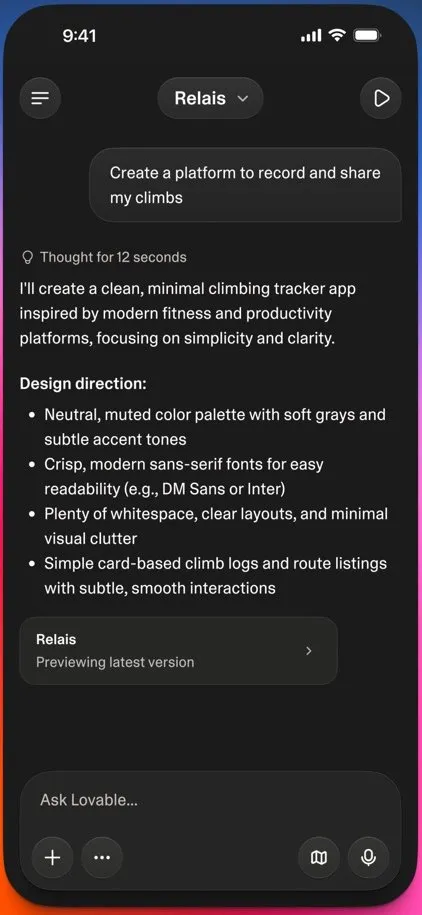
Sign in at lovable.dev and the home page is a single input box. The more specific you are, the better: who it’s for, which pages it has, what goes on each, what style. It writes code while showing a live preview on the right, and when it’s done you can click around in the preview.
When it’s ready, click Publish in the top right. The publish dialog gives you an address ending in lovable.app and runs a quick security check; confirm and it goes live. Free accounts can publish publicly or choose Invite only so that only people you invite can see it. Your own domain, and removing the “Edit with Lovable” badge in the corner, need a paid plan. On Free, an app may be taken down if nobody has visited it and you haven’t signed in for 12 months.
How fast is it in practice? A reviewer at Superblocks went from a blank project to a usable interface in under ten minutes, without setting up routing, layout or some of the back-end logic. There are Mac and Windows apps, and iOS and Android apps, all on the same account and credits.
Make a one-page site for a yoga studio: a large image and a tagline at the top, then three classes (name, length, price), then the teachers, and a booking form (name, phone, which class). Calm style, lots of white space, pale green as the main colour.
Three modes: chat, plan, then build
The chat box switches between three modes, and picking the right one saves credits. Since August 2026 there is also a /goal command that keeps it working until a job is finished.
Modes in a Lovable project
Talks without changing code. It reads your project and answers questions such as “why does this page need a login?”, helping you work out what to change.
- Use it for
- You're not sure what you want yet, or want to know how the app currently works
- Example
- The sign-up page asks for six things. Which can we drop for now?
- Limits
- A free daily chat allowance; after that each message is charged, usually under 1 credit.
Investigates the project and writes a step-by-step plan you can edit and approve; it doesn't touch code before you approve. The plan is saved in the project as .lovable/plan.md.
- Use it for
- Before big changes, risky changes, or another attempt at a stubborn bug
- Example
- I want membership tiers: free members can read 3 articles, paid members everything. Give me a plan, don't change code.
- Limits
- 1 credit per message, plus whatever its research sub-tasks cost.
Changes code directly and, when needed, opens a browser to test, take screenshots and read errors.
- Use it for
- The request is clear, or the plan is approved
- Example
- Implement that plan, then click through sign-up and login yourself.
- Limits
- Charged by the work done: about 0.5 credits to restyle a button, 1.2 to add login, 2 for a landing page with images.
Start a Build message with /goal and it keeps going until the goal is met, for up to 10 hours, without asking you questions.
- Use it for
- Big jobs with a clear goal that you don't want to supervise step by step
- Example
- /goal Build a complete booking system: pick a teacher, pick a time, confirmation email, admin view of bookings.
- Limits
- Lovable says the same work costs noticeably more. By default it stops to ask every 20 credits.
Sources: Lovable docs on Chat mode, Credits and usage, Changelog (2026-08-30)
Login, database, payments: Lovable Cloud
When you say “add sign-up and login” or “save the orders”, Lovable turns on Lovable Cloud, its built-in back end, which runs on the open-source Supabase: database, user accounts, file storage and scheduled jobs, with no other sites to sign up for. If you already have a Supabase account, you can connect your own.
Worth knowing before you start:
- The region is permanent. The first time it is switched on you choose whether data lives in the Americas, Europe or Asia-Pacific, and it can’t be moved later.
- You can take your data with you. Cloud → Overview → Advanced settings exports the whole database as an SQL file, once every 24 hours per project, up to 5 GB.
- Hosting isn’t free forever. Each account gets 20 Cloud credits a month, usually enough for a small app; heavier traffic comes out of your credits.
Payments have been built in since April 2026: ask it to connect Stripe or Paddle and it sets up products, prices, a checkout page and subscription records, and Lovable says you can go live the same day. Paid plans only. You can sell physical goods, but stock and shipping are up to you.
Add email sign-up and login to this site. Logged-in users see "My bookings". Add a membership page: a $29 monthly pass paid through Stripe; after payment the account is marked as a member. Use Plan mode and show me the plan first.
Editing the interface: point and change

“Make the second card’s heading a bit smaller” is easy to get wrong in words. The toolbar above the preview has four modes, on every plan:
- Select elements (press S): click one or more elements, then say what to change. Hold Cmd or Ctrl to select several.
- Edit text inline: change text directly in the preview; since October 2026 simple edits apply within seconds.
- Draw annotation: circle things and draw arrows, for “move this over there”.
- Add a comment: leave notes for yourself or colleagues.
If you care about the look, it asks about colours, fonts and layout before it starts. Since 8 October it no longer offers three design directions to choose from first; it builds straight from your description.
Stuck on a bug: where credits burn fastest
Almost every review praises the speed of the first version and complains about the same thing later: the bug-fix loop. It fixes A and breaks B; you ask again, it says it’s fixed when it isn’t, and each round costs credits. The Superblocks reviewer wrote that every mistake it makes has to be paid for again on top of the first failed attempt, and that login permissions and multi-step flows need the closest watching. Superblocks is a competitor, but user reviews on G2 also keep saying credits “disappear fast” when you go back and forth.
What experienced users suggest:
- Plan before you Build. Let it investigate and write a plan; approve it once you understand it. A plan message costs 1 credit.
- Rolling back is cheaper than forcing a fix. If something breaks, go back to the last working version in the history and try a different wording.
- Change one thing at a time, and paste the exact error message.
- Watch what each message costs. Open More options under a reply to see Credits used, including while it is still working.
- Set limits. By default a single message stops to ask every 20 credits (20 is the minimum; you can only raise it or switch it off). To cap total spending, paid plans can set limits per project or member under Workspace settings → Usage limits & alerts.
- If it won’t get fixed, hand it to a person. Sync the code to GitHub and have a developer fix it with Cursor or Claude Code.
Handing over to a developer: GitHub sync and export
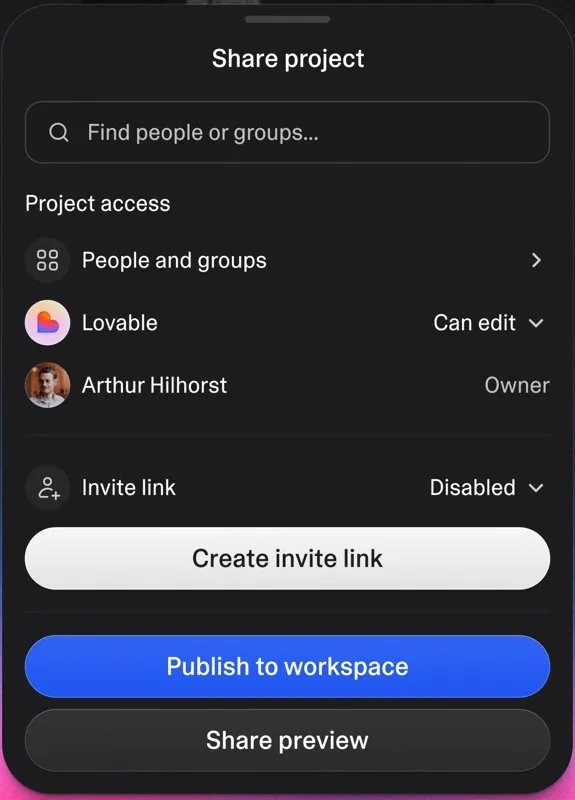
The code is yours. Project settings → Git connects GitHub, GitLab or Bitbucket on every plan, and the sync is two-way: Lovable’s changes are committed to your repository, and a developer’s pushes come back into Lovable. If someone’s push overwrites work Lovable just did, since October Lovable saves a backup first that you can restore.
Free accounts can’t edit or download code inside Lovable; both need Pro or above.
Keep two permissions apart: project visibility decides who can see your code and chat history, and site access decides who can open the published address. Publishing a site doesn’t make the project public.
Lovable only ever builds web apps. For the App Store, its suggested routes are making the site an installable PWA (“Add to Home Screen”) or wrapping it with Capacitor outside Lovable; it doesn’t generate React Native code.
Security before you publish
This is the section that matters most. An AI-built app that “looks like it works” isn’t necessarily keeping your data from strangers.
What has gone wrong:
- March 2025: researcher Matt Palmer scanned 1,645 apps built with Lovable and found 170 (about 10%) whose database access rules (row-level security) were misconfigured, letting strangers read user tables and transaction records. It was filed as CVE-2025-48757; Lovable disputed it, saying data security is each app owner’s responsibility.
- February 2026: The Register reported that an education app on Lovable’s showcase had 16 vulnerabilities, with 18,697 user records, 4,538 of them student accounts, readable by anyone not logged in. One cause was that the AI-written permission check was the wrong way round: it blocked logged-in users and let strangers through. Lovable’s security lead said the pre-publish scan had suggested fixes that the author didn’t apply, and that the affected database wasn’t hosted by Lovable.
- April 2026: this time the fault was Lovable’s own. From 3 February to 20 April, any Lovable user with a link could see the source code and chat history of other people’s public projects, and many people paste keys and error logs into chats. Researchers reported it several times through HackerOne and the reports were closed as expected behaviour. On 22 April Lovable admitted it, said the fix took two hours, and made all existing public projects private.
The tools today: every Publish runs a Quick scan automatically, checking database access rules, vulnerable dependencies and more. The fuller Deep scan doesn’t run on its own; start it from the project’s Security view. Deep scan looks at who can read or write data that isn’t theirs, which endpoints anyone can call, and whether paid features can be bypassed. Lovable’s documentation says the scans “do not replace a thorough security review”.
So: run Deep scan before publishing and deal with every Critical finding; don’t paste API keys into the chat, use the secrets form it offers; and if you collect real people’s personal information, especially children’s, have someone who knows security review it before launch.
Credits, and which plan to pick
Lovable charges by credits, not by seat: a workspace can invite as many people as it likes, and they share the credits.
| Plan | Monthly | Yearly | Credits a month | Main differences |
|---|---|---|---|---|
| Free | 0 | 0 | 5 a day, up to 30 a month | Can publish; can’t edit or download code or use your own domain |
| Pro | from $25 | from $250 | from 100, up to 10,000 | Custom domains, code editing and download, rollover, top-ups |
| Business | from $50 | from $500 | from 100, up to 10,000 | Adds single sign-on, security centre, internal publishing; data excluded from training by default |
| Enterprise | Custom | Custom | By volume | Audit logs, inference within the EU, scheduled security scans |
Pro tiers: 200 credits for $50, 400 for $100, 800 for $200, and so on. Business costs roughly twice as much for the same credits. Paying yearly is like getting two months free. On Pro and Business you also get 5 credits a day on top of the monthly credits.
- Unused monthly credits roll over but expire two months after they were issued; top-up packs last 12 months. Credits aren’t refundable.
- Lovable’s own examples: about 0.5 credits to restyle a button, 1.2 to add login, 2 for a landing page with images. Bug-fix loops often cost far more.
- Students and teachers: verify with a school email at lovable.dev/students for half price on the 100-credit monthly Pro, for up to 12 months.
Our advice: build something small on Free first and see how many credits a day you use. If you need your own domain or are editing every week, take the $25 Pro; you only need Business for single sign-on or to keep your data out of training without touching a setting.
Two settings to change
- Training. Since 9 September 2026, prompts, code and project files on Free and Pro may be used to train Lovable’s models by default (data your app’s users submit is not). Turn it off under Account settings → Preferences → AI model training by switching off “Use my Lovable content for model training”. The setting is per person, so every member of a shared project has to do it themselves.
- Credit check-ins. Long-running credit check-ins in account settings decides how many credits a message can spend before it stops to ask you. The default is also the minimum, 20; you can raise it or switch it off. Don’t switch it off.
Compared with Bolt, v0, Replit and coding agents
| Tool | Best for | Starting price |
|---|---|---|
| Lovable | Non-coders who want a complete web app they can launch | Pro $25/month |
| Bolt.new | People who want the fastest prototype and will take over the code | Pro $25/month |
| v0 (Vercel) | Developers who want polished React interfaces deployed on Vercel | Plus $30/user/month |
| Replit | Writing, running and hosting code in one online editor | Core $20/month |
| Claude Code, Codex, Cursor | People who can read code, with projects in their own repository | from about $20/month |
In March 2026 Clord ran four of them through the same tasks (landing page, login, database, custom domain) and concluded that Lovable was the most likely to actually ship, Bolt the fastest but leaving service configuration to you, and v0 strongest on interface components. Comparisons like this are mostly personal blogs and disagree a lot, so treat them as a rough guide.
The difference from Claude Code, Codex and Cursor is more basic: those are for programmers, the code sits on your computer or in your repository, and you need to understand what they change. Lovable bundles code, database and hosting together, and you never have to look at the code. A common path is to prove an idea with a first version in Lovable, then, once the logic gets complicated, sync it to GitHub and hand it to a coding agent or a developer.
Using Lovable from China
- No Chinese interface. The interface comes in 11 languages, including Japanese, Korean and Thai, but not Chinese.
- Network. Lovable has no business in China. GreatFire’s tests found interference on 5 of the 9
lovable.appaddresses tested, though the main domain opened in a test on 18 October. Sites you build may not load reliably for visitors in mainland China, so for that audience use your own domain and have a fallback. - Payment. Subscriptions go through Stripe and need a card that can pay in US dollars.
- The models behind it. Tencent invested in Lovable in August 2026, but Lovable mainly uses models from Anthropic, Google and OpenAI.
Company, product and models
| Name | What it is |
|---|---|
| Lovable | The company (Stockholm, Sweden; founded by Anton Osika and Fabian Hedin) and the product |
| GPT Engineer | The open-source tool Osika released on GitHub in 2023, Lovable’s predecessor |
| Lovable Cloud | Lovable’s built-in back end, based on Supabase |
| Lovable AI | Adds AI features to the apps you build, with models such as GPT-6 and Gemini preset by use and swappable, charged in credits |
| Claude Opus 5.5 and others | The models Lovable itself uses to write code; it picks them, you can’t |
Lovable’s view is that “the model picker is a dead end”: it splits each job among different models by task. Since September 2026 Anthropic’s Opus 5.5 has been one of its main models, and Lovable’s own tests say it reaches the same result in a third to a half fewer steps. According to TechCrunch it also has a model of its own.
Getting started
- Sign up at lovable.dev; on a phone, search for “Lovable” in the App Store or Google Play.
- Go to Account settings → Preferences → AI model training first and decide whether to switch training off.
- Keep the first project small, such as a one-page site, and see roughly how many credits one change costs.
(In Chat mode) I want to build a site where residents of my building can swap second-hand things. Don't write code yet. Help me work out: what is the minimum set of pages? Do we need login? What are the security risks?
Make a team leave register: staff enter name, dates and type (annual, sick, personal), and it's saved to the database; an admin who logs in can see every entry and export a CSV. Only logged-in people can see the data.
Recent changes
- Growth tools: plan growth and run Google and Meta ads from the same chat
- Chat now has a free daily allowance; questions that don't change code no longer use credits
- Privacy policy update: Free and Pro content may be used to train models by default; opt out in account settings
- New /goal command: one message keeps working for up to 10 hours until done, at a higher credit cost
- $400 million Series C at a $13.3 billion valuation; Tencent took part
- iOS and Android apps launched; Wiz security scanning added
- Built-in payments (Paddle or Stripe); Mac app launched
- Admitted that code and chats in public projects were readable by any user from 3 February to 20 April; fixed
Compared with similar products
| Product | Price | What it is |
|---|---|---|
| Google AntigravityGoogle · handbook | Weekly quota; Gemini 3.8 Flash, Claude 4.6 until 2 November; Via Google AI Pro $19.99, Ultra $99.99 / $199.99 a month | Google's platform for coding agents: you say what you want, and agents write the code, run terminal commands and click through pages in a browser, then hand you plans, screenshots and recordings to review. Desktop app, command line and editor extensions. |
| Claude CodeAnthropic · handbook | Not on the free plan; API pay-as-you-go; Pro $20, Max $100 / $200 a month | Anthropic's coding agent: describe what you want in a sentence and it reads your project, edits many files, runs commands and tests, and commits and opens pull requests. It works in the terminal, your editor, a desktop app, the web and your phone. |
| OpenAI CodexOpenAI · handbook | Free and Go: GPT-6 Luna locally in the desktop app, no cloud; Plus $20; Pro $100 / $200 / $500 a month | OpenAI's agent: inside a folder, computer or cloud environment you authorise, it reads and edits files, runs commands and tests, changes code and produces spreadsheets and documents, and can operate apps and a browser when allowed. You sign in with a ChatGPT account and every plan includes it. |
| CursorAnysphere (SpaceXAI) · handbook | Limited free tier; $8 / $30 / $100 / $200 a month | An AI code editor built on VS Code: it completes code as you type, rewrites a selection from one sentence, and runs agents locally or in the cloud that edit many files, run tests and open pull requests. |
| GitHub CopilotGitHub (Microsoft) · handbook | 2,000 completions a month; very little chat and agent use; $10 / $39 / $100 a month; teams $19 or $39 a user | GitHub's AI coding assistant: it completes and edits code in VS Code, JetBrains, Xcode and other editors, takes issues and opens pull requests from the cloud, reviews PRs, and has a command-line tool and a desktop app. |
| LovableLovable · handbook | 5 credits a day, up to 30 a month; Pro from $25, Business from $50 a month | A Swedish web-app builder: describe the app you want in plain words and it writes the front end, database, login and payments, then publishes it to a URL with one click. No coding needed. |
Sources
- Lovable · Pricing
- Lovable docs · Subscription plans
- Lovable docs · Credits and usage
- Lovable docs · Chat mode
- Lovable docs · Lovable Cloud
- Lovable docs · Publish
- Lovable docs · Edit from the preview
- Lovable docs · Git sync
- Lovable docs · Security overview
- Lovable docs · Manage training data and privacy
- Lovable docs · Changelog
- Lovable blog · Opus 5.5 now in Lovable (2026-09-22)
- Lovable blog · The model picker is a dead end (2026-08-11)
- Lovable blog · Series C (2026-08-12)
- Lovable blog · Our response to the April 2026 incident (2026-04-22)
- Lovable blog · Introducing growth tools (2026-10-14)
- Lovable blog · You can now chat with Lovable for free (2026-09-24)
- App Store · Lovable: Build Apps with AI
- TechCrunch · Lovable confirms new $13.3B valuation, raises another $400M (2026-08-12)
- The Register · Lovable-hosted app littered with basic flaws exposed 18K users (2026-02-27)
- The Stack · Lovable says chats were meant to be publicly accessible (2026-04-21)
- Matt Palmer · Statement on CVE-2025-48757 (2025-05-29)
- NVD · CVE-2025-48757
- Superblocks · Lovable AI Review 2026 (2026-08-11)
- Clord · Bolt vs v0 vs Lovable vs Replit Agent (2026-03-17)
- Huxiu · Tencent invests in Lovable (Chinese) (2026-08-13)
- GreatFire · lovable.app access tests in mainland China (2026-10-18)
- Bolt · Pricing
- v0 · Pricing
- Replit · Pricing
- Wikipedia: Lovable