Cursor
By Anysphere (SpaceXAI) · cursor.com ↗ · Checked 17 Oct 2026
An AI code editor built on VS Code: it completes code as you type, rewrites a selection from one sentence, and runs agents locally or in the cloud that edit many files, run tests and open pull requests.
Verdict
Completing as you type, then watching an agent edit and reviewing each change line by line, is still the smoothest editor experience of its kind. But SpaceX bought Cursor in August 2026, and from October new subscriptions are bundled with X and Grok: the monthly fee covers only Cursor's own Grok and Composer models, while Claude and GPT bill at API list price from the first request. If you are still on the old $20 Pro, don't rush to switch, because switching can't be undone.
Use it if
- Developers used to VS Code who want AI inside the editor
- Anyone who wants to review every diff and roll back easily
- Heavy users happy to work mostly with cheaper models such as Grok and Composer
- Teams that hand tasks to the cloud and check progress from a phone
Use something else if
- Writing code mainly with Claude: Claude Pro with Claude Code is better value
- Wanting OpenAI's newest models: Cursor doesn't get the GPT-6 family; use Codex
- Organisations that live on GitHub or need JetBrains and other editors: GitHub Copilot
- Mainland China without reliable network access: Claude and GPT simply aren't available in Cursor
- Free plan
- Limited free tier
- Paid
- $8 / $30 / $100 / $200 a month
- Where
- Editor for Mac, Windows and Linux; command line; web at cursor.com/agents; iPhone and iPad
- Models
- Own Grok 4.7, 4.6, 4.5 and Composer 2.5; Claude, GPT and Gemini at API price on top
- Built on
- A fork of VS Code; imports VS Code settings in one click; extensions come from Open VSX
- Account and billing
- New subscriptions are The X Subscription, managed at grok.com
- Data
- With Privacy Mode on, code isn't used for training; on by default for teams
- Revenue
- $3 billion annualised (May 2026, Bloomberg)
Cursor is a code editor with AI built in. It is a fork of Microsoft’s open-source VS Code, so the layout, shortcuts and extensions are mostly familiar, and on first launch you can import your VS Code set-up in one click. The difference is that AI sits at every level: as you type it guesses your next edit, you can select code and change it with one sentence, and the agent in the side panel reads the whole project, edits several files and runs commands.
2026 changed it a lot. In April came Cursor 3, built around agents; in August SpaceX bought it for $60 billion; and from 12 October new subscriptions are bundled with X and Grok, with Claude and GPT no longer covered by the monthly fee. First, what it is good for; then each part, and the prices.
What to hand it, and what not to
| What you want | How | Free plan | How it goes |
|---|---|---|---|
| Completion as you type | Just type; press Tab on the grey suggestion | On the free tier; limit not published | The feature Cursor made its name with |
| Change a selected block | Select, press Cmd/Ctrl+K, describe the change | Limited on free | Fastest way to make small edits |
| Edit several files and run tests | Cmd/Ctrl+I for the side panel, Agent mode | Limited on free | The main way to use it; every diff reviewable and reversible |
| Plan a big change first | Shift+Tab to Plan | Limited on free | Less rework than diving in |
| Long jobs in the cloud | Agents Window or cursor.com/agents | Not on Free or Plus | Good for migrations and batches of small fixes |
| Automatic pull-request review | Connect GitHub or another host in the dashboard | Premium and up | Finds real bugs; billed per run |
| Work in the terminal | Install, then type agent | Follows your plan | Same modes as the editor |
| Code with Claude or GPT | Pick it in the model menu | Not on Free or Plus | API list price from prepaid credit; not cheap |
While you type: Tab and inline edit
Neither needs a mode switch: open a file and they work. They are a big part of why people stay.
Tab completion. As you type, Cursor shows a grey suggestion after the cursor, based on your recent edits, the surrounding code and linter errors. Tab accepts it all, Esc or carrying on typing ignores it, and Cmd+→ on a Mac (Ctrl+→ on Windows) accepts it a word at a time. It can change several lines at once and add a missing import. After accepting, press Tab again and the cursor jumps to where it predicts your next edit will be; if that is in another file, a small window appears at the bottom of the editor. If it gets in the way, click the Tab indicator at the bottom right to snooze it, or switch it off only for files such as Markdown or JSON.
Inline edit. Select some code, press Cmd+K (Ctrl+K on Windows), write a request such as “convert this to an async function”, and press Enter; the change is made in place. To ask rather than edit, press Opt+Enter (Alt+Enter on Windows) after Cmd+K. If the change spans several files, press Cmd+L to take the selection into the agent in the side panel.
Letting the agent work: Plan first, then Agent
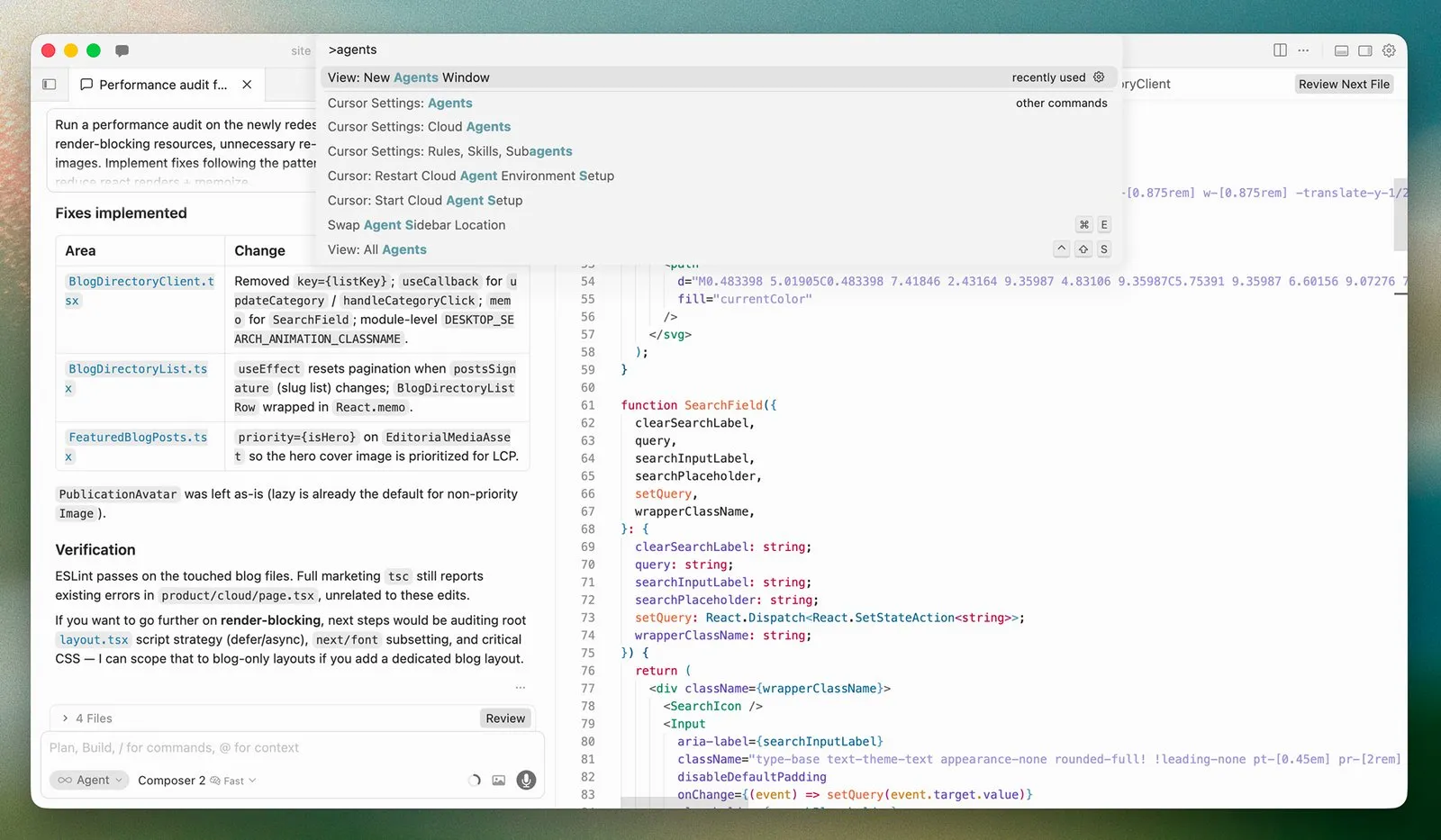
Cmd+I (Ctrl+I on Windows) opens the agent in the side panel. It can search the codebase, read and edit files, run terminal commands, search the web, and even drive a browser to screenshot and check a page. Below the input box is a mode menu; Shift+Tab cycles through the modes:
Cursor's agent modes
Reads, edits and runs commands, breaking the job into steps itself.
- Use it for
- Clear changes: add a feature, fix a bug, write tests
- Example
- Write unit tests for every function in utils/date.ts, run them until they pass, and tell me which edge cases they cover.
- Limits
- It changes your files. It saves checkpoints before big edits, so you can click one in the chat to restore, but checkpoints are no substitute for Git.
Asks you questions, reads the code and writes an editable implementation plan; it only starts coding when you approve.
- Use it for
- Changes touching many files, several possible approaches, or requirements you haven't pinned down
- Example
- I want to move login from sessions to JWT. Don't write code yet: list the files to change, the migration steps and the risks.
- Limits
- Plans are saved in your home directory unless you click Save to workspace.
Read-only: explains code and answers questions without touching any file.
- Use it for
- Taking over an unfamiliar project, understanding a piece of logic
- Example
- Where does this project check permissions? Which files does a request pass through before it reaches the database?
- Limits
- Switch back to Agent to make changes.
Forms several hypotheses, adds logging, asks you to reproduce the bug step by step, then fixes it from real runtime data.
- Use it for
- Bugs you can reproduce but can't explain, timing problems, memory leaks
- Example
- Clicking Save twice sometimes stores two identical records. Find out why.
- Limits
- You have to reproduce the bug yourself; it removes the logging once the fix is confirmed.
Sources: Cursor docs pages on Agent, Plan Mode and Debug Mode, and the help centre's Ask mode page (read 2026-10-17)
Cursor’s own advice: plan big changes first, and if the agent goes astray, don’t chase it with corrections; revert, sharpen the plan and run it again, which is usually quicker. You can keep typing while it works: Enter queues a message for after the current turn, Cmd+Enter sends it straight away.
Cursor 3 (2 April 2026) added a separate Agents Window: press Cmd+Shift+P and choose Open Agents Window. It manages several projects and many parallel agents at once, each task in its own Git worktree so they don’t collide. To get back to the familiar editor, choose Open IDE from the same palette.
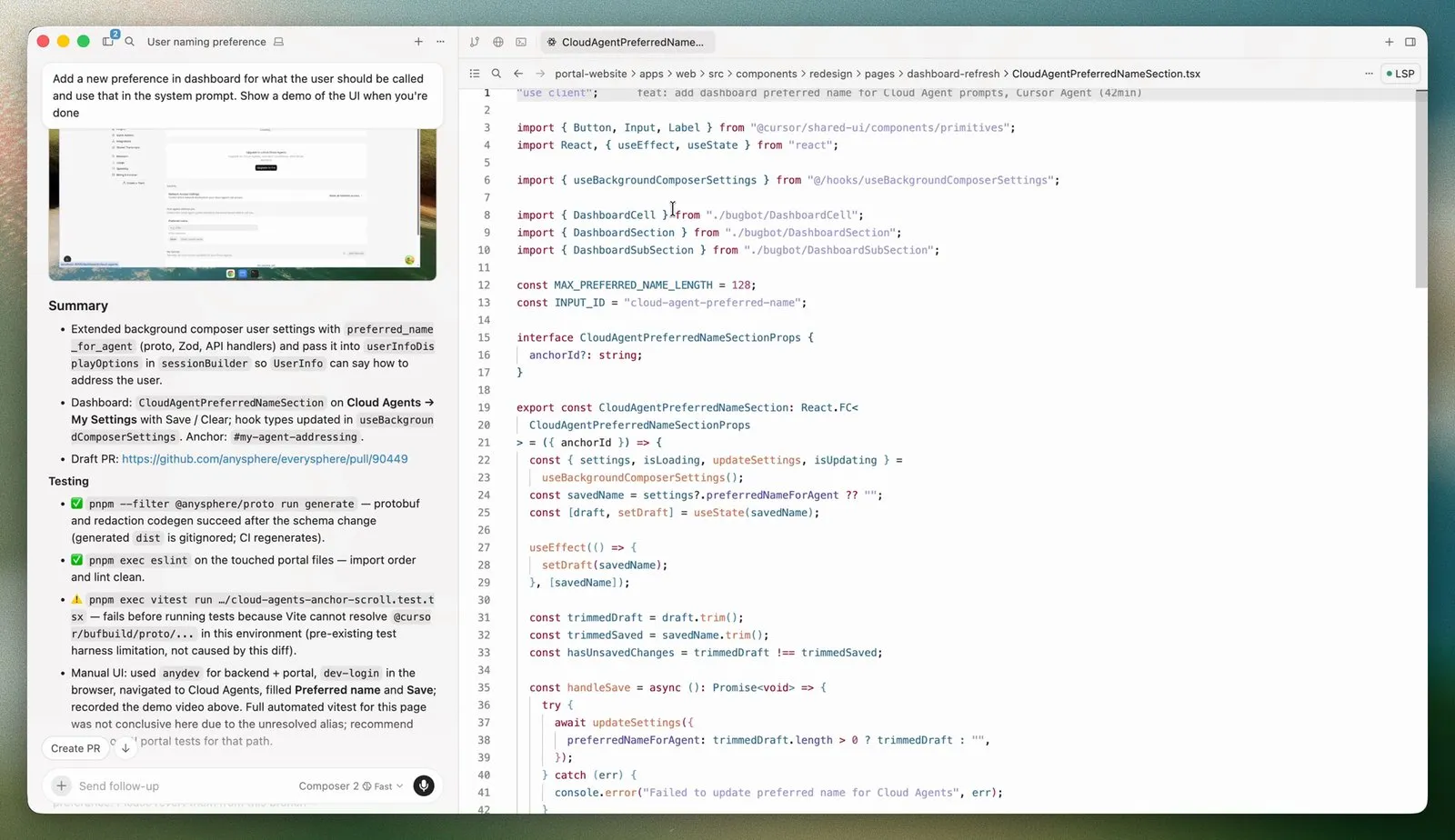
One Hacker News commenter whose company uses Cursor said he hardly touches the editor itself, but the review screen for everything the agents change is “incredibly helpful”. That is the biggest difference from terminal tools: each change appears as a diff in the editor, to accept or reject one by one.
Work that runs with the laptop shut: cloud agents and Projects
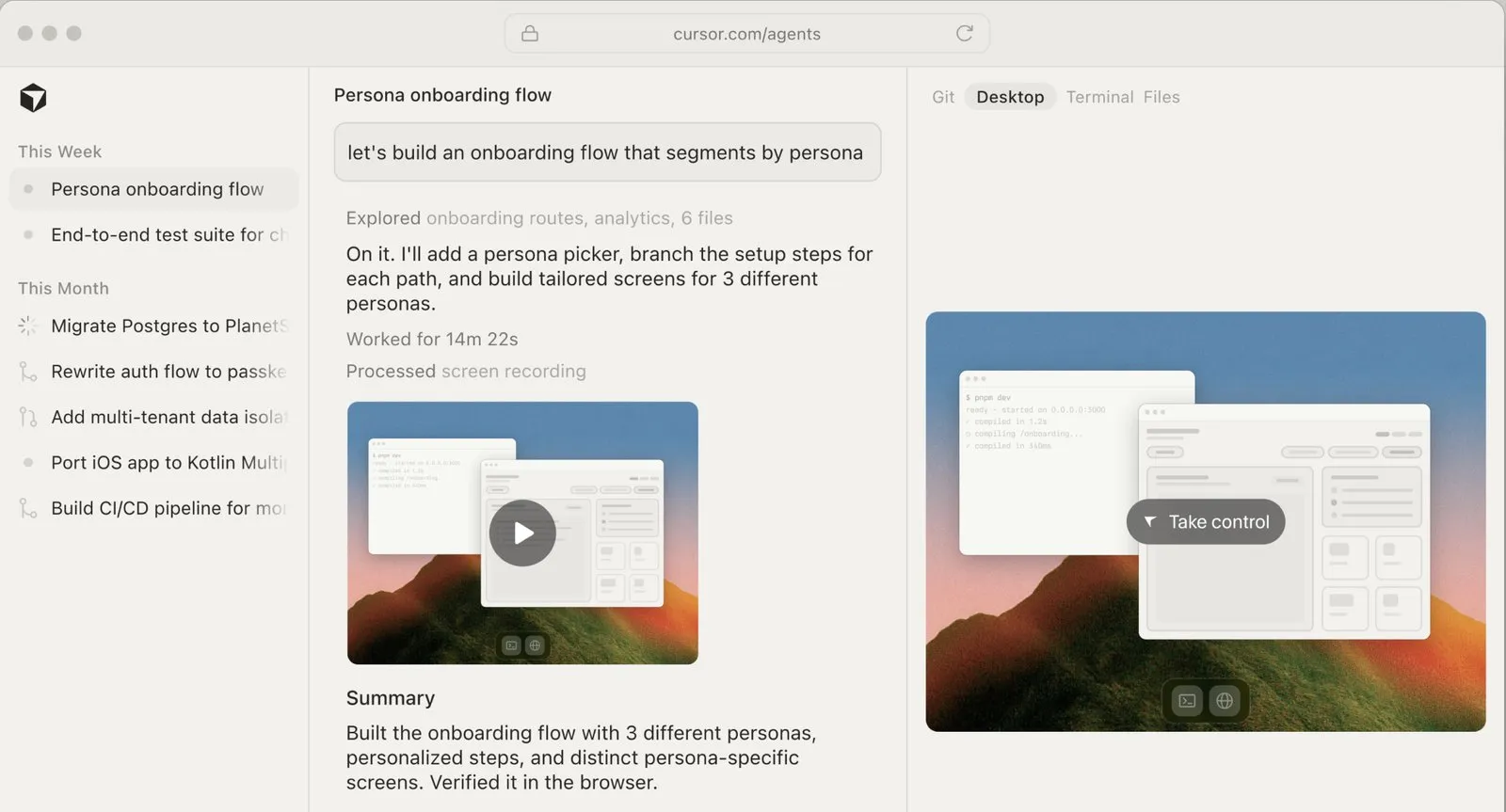
Cloud agents run on Cursor’s servers, so closing your laptop doesn’t stop them; when done they open a branch or pull request with a recording and a summary. You can start them from the Agents Window, the web at cursor.com/agents, the iPhone app, or from Slack, GitHub and Linear. In the CLI, starting a message with & hands the conversation to the cloud.
- Projects (10 September 2026, beta): create a Project from the left-hand navigation and describe the work. Its coordinator agent writes no code itself; it plans, hands work to many subagents and brings the results back to you. It can also watch a Slack channel or run on a schedule. Cursor says it uses Projects internally for migrations of a few hundred pull requests; that is the vendor’s claim, and we have seen no independent test yet.
- Remote control (6 October): use the iPhone app to watch and reply to local agents running on your computer, which has to stay on and online.
Cloud features need Premium ($30) or above; Free and the $8 Plus don’t include them.
Bugbot reviews pull requests, charged per run
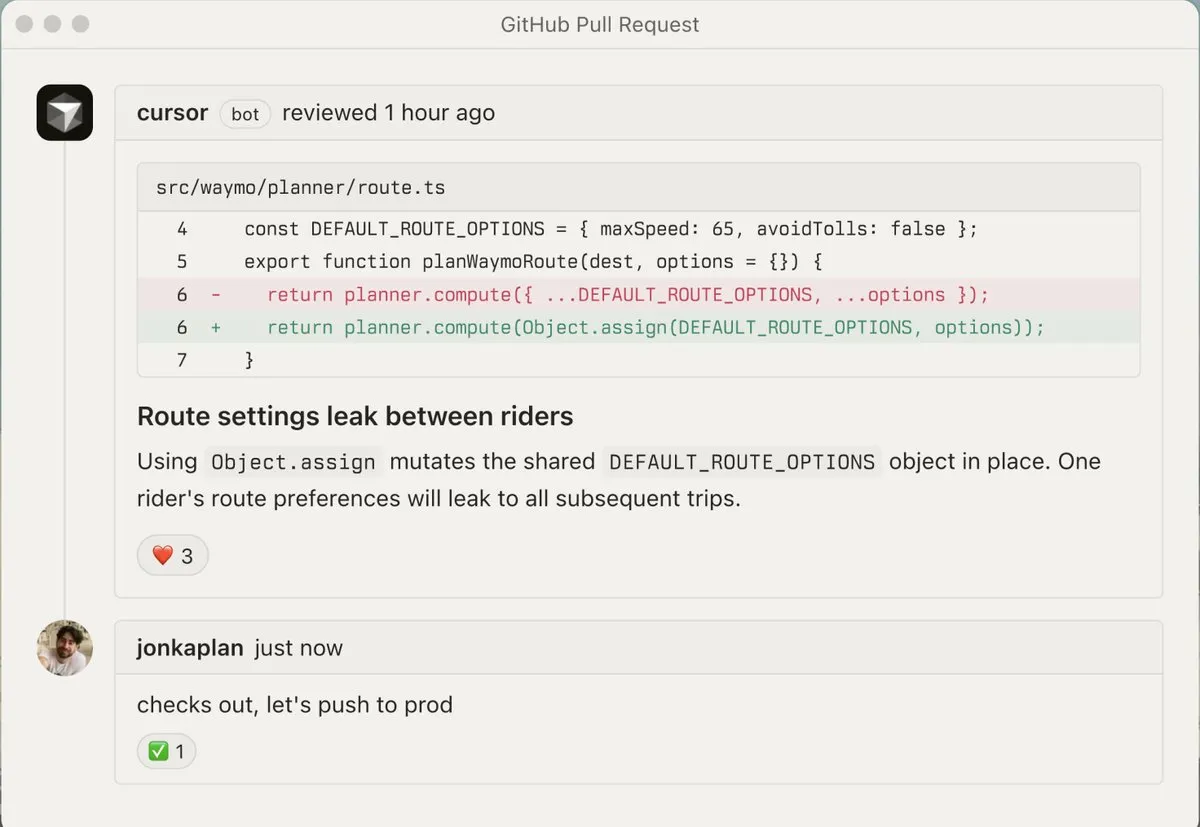
Bugbot is Cursor’s automatic code review. Connect GitHub, GitLab, Bitbucket or Azure DevOps under Integrations at cursor.com/dashboard, and every new or updated pull request is reviewed, with comments on the lines concerned and suggested fixes. To trigger it by hand, comment cursor review or bugbot run. Project guidelines go in .cursor/BUGBOT.md; note that the editor’s .cursor/rules don’t apply to Bugbot.
Billing moved to per run in June 2026: Cursor says the average review costs $1.00 to $1.50, depending on the size of the pull request. You can set low, default or high effort; high costs more but may find more problems. In September, team plans also got Security Review, which looks only for exploitable vulnerabilities.
The CLI, rules and MCP
The CLI. On Mac and Linux, install with curl https://cursor.com/install -fsS | bash, then type agent to start. It has the same modes as the editor, switched with /plan and /ask; agent -p "…" is the non-interactive print mode for scripts and CI.
Rules. Project conventions the agent should always follow go in .mdc files under .cursor/rules/, set to apply always, to matching file paths, or only when @-mentioned; if that is too fiddly, put an AGENTS.md at the project root. Personal preferences go in User Rules in settings, and team plans add Team Rules pushed from the dashboard. The current docs have no separate “memories” page; long-lived context comes from rules and from the shared files in Projects.
MCP. An open protocol that connects Cursor to outside tools and data such as databases or ticket systems. Install servers from the Customize page in settings, or list them in mcp.json.
Read through this project and write .cursor/rules/project.mdc for me: the framework, folder structure, test commands and code style conventions, set to Always Apply.
Models: Grok is included, Claude and GPT cost extra
This is the thing to get straight. Cursor’s models fall into two groups:
| Group | Which | How it’s billed (new subscription) |
|---|---|---|
| Cursor’s own models | Grok 4.7, 4.6, 4.5, Composer 2.5 | From the weekly allowance |
| Third-party models | Claude Opus 5.5, Sonnet 5.5, Fable 5.1; GPT-5.6 Sol and others; Gemini 4 Argon and others | Not in the monthly fee; from Premium up, API list price from prepaid credit |
- Grok 4.7 (21 September) is the official flagship, trained with SpaceXAI, with a 256k context window that can be raised to 500k (input beyond 256k costs double) and four effort levels: low, medium, high and extra high.
- Composer 2.5 is Cursor’s own fast, cheap model at $0.50 per million input tokens and $2.50 per million output, about a quarter of Grok 4.7’s $2 and $6. Users discovered that its predecessor, Composer 2, was built on Moonshot AI’s Kimi 2.5; Cursor admitted afterwards that it should have said so.
- Auto. If you don’t want to choose, pick Auto and Cursor Router sends each request to a model according to how hard it is. Individual plans get only the Cost mode, billed as Cursor-model usage; the Balance and Intelligence modes are for Teams and Enterprise.
Opinions on Grok 4.7 are split. Cursor’s forum feedback thread has 126 replies. One user called it a “sidegrade”: a bit smarter but using almost twice as many tokens per task. Another ran the same job, six interface bugs, on both: Grok 4.7 at medium effort used 180,000 tokens and missed two, while Composer 2.5 used 80,000. Others found it much easier to talk to than 4.6. Several said what they really want is Composer 3.
The other unknown is OpenAI. On 29 August OpenAI said it was ending the partnership because of the SpaceX purchase, proposed cutting Cursor’s direct access to its models on 12 November, and said it would not supply future models. Cursor co-founder Michael Truell replied that OpenAI models serve about 5% of Cursor user traffic and that the two companies were talking. As of 17 October Cursor’s docs still list GPT-5.6, while OpenAI’s own Codex already runs GPT-6.1.
The October 2026 prices: one bundle with X and Grok
Since 12 October, new customers buy “The X Subscription”: one plan covering Cursor, Grok chat and image generation, Grok Bot and X Premium benefits.
| Plan | Monthly | Yearly | What you get in Cursor |
|---|---|---|---|
| Free | $0 | $0 | Limited Agent and chat requests |
| Plus | $8 | $80 | Own models only, fixed at medium effort with Fast off; no Auto, cloud agents, Bugbot or third-party models |
| Premium | $30 | $300 | 4× Plus usage; adds cloud agents, automations, Bugbot and third-party models (paid separately) |
| Super | $100 | $1,000 | 15× Plus usage; priority at peak times |
| Ultra | $200 | $2,000 | 50× Plus usage; earliest access to new features |
| Teams | $30 / $100 / $200 per seat | Matches Premium / Super / Ultra, adds SSO and central billing; third-party models carry an extra $0.25 per million tokens |
Things to watch:
- The allowance resets weekly and is shared with the Grok apps and Grok Bot. Generate a lot of images in Grok and you have less left for code. Cursor publishes only multiples, not token amounts; check what’s left in the editor settings or at grok.com/dashboard.
- Third-party models cost money from the first request. You top up a prepaid balance, with optional automatic top-ups and a monthly cap. For scale: Claude Opus 5.5 is $4 per million input tokens and $20 per million output.
- Old plans carry on: Hobby (free), Pro $20, Pro+ $60, Ultra $200, Teams $40 per user. They have two monthly pools, one of them for third-party models. Cursor says each new plan gives at least twice the in-house model usage of the old plan it replaces, but no third-party allowance. Switching is permanent and can’t be undone.
The forum thread under the announcement was heated. A long-time Ultra subscriber said Cursor earned its place next to Codex and Claude Code by being “one editor where you can use the best models”, and the new plans take that away; another user who had paid $20 a month since the beginning complained that no one had emailed to warn him.
Which to pick. If you mostly use Composer and Grok, Premium at $30 is enough and includes the cloud features and Bugbot. If you can’t do without Claude, stay on an old Pro or Pro+ for now; if you are new, do the sums, because paying API price for Claude inside Cursor often costs more than a $20 Claude Pro plan with Claude Code.
Cursor, Claude Code, Codex or Copilot
| Cursor | Claude Code | OpenAI Codex | GitHub Copilot | |
|---|---|---|---|---|
| Shape | Its own editor, plus CLI and cloud | Mainly the terminal, also desktop and editor extensions | Web, CLI, editor extension, desktop and iOS | Plugs into VS Code, JetBrains and other editors |
| Included models | Grok, Composer; others extra | Claude | OpenAI’s latest GPT-6 family | Several vendors, drawn from AI credits |
| Entry paid plan | $8 (own models only); $30 | Claude Pro $20 | ChatGPT Go $8, Plus $20 | Pro $10, unlimited completions |
In short: if you like watching AI edit inside an editor and reviewing it line by line, Cursor is still the smoothest. But whichever vendor’s model you most want, that vendor’s own tool is usually cheaper. One Hacker News commenter said he had “never seen a product blow another product out of the water so hard as Claude Code did to Cursor”; another replied that Cursor has a surprising amount of inertia where he works. If your team is all-in on GitHub, or uses JetBrains, Copilot is less hassle.
Privacy mode: check it yourself
Open settings (Cmd/Ctrl+Shift+J) → General → Privacy Mode. With it on, neither Cursor nor the model providers train on your code, and Cursor has zero-data-retention agreements with its providers. With it off, Cursor’s data-use page says it may store and use your code, prompts and editor actions to train its own models. Teams have it on by default, and admins can force it on for everyone.
Two exceptions. Zero retention doesn’t apply when you use your own API key; your provider’s policy applies instead. And Claude Fable 5.1 requires Anthropic to keep inputs and outputs for safety review, so accounts with Privacy Mode on must approve that in the dashboard before using it. Even with your own key, requests still pass through Cursor’s servers.
Using it from mainland China
The editor itself downloads and runs, but the models are subject to each provider’s regional rules. Since July 2025, users in China calling Claude or GPT have seen “This model provider doesn’t serve your region”, and those models disappear from the menu. Cursor’s suggestions are to use Auto, pick another model, or add your own API key (which still fails if the provider doesn’t serve your region). The workaround passed around Chinese developer sites is changing proxy settings, which breaks the providers’ terms and can stop working at any time. Cursor doesn’t say whether Grok and Composer work reliably from the mainland. Payment is by credit or debit card only, and Cursor says it authorises no resellers; accounts bought elsewhere can be shut down at any time.
Who’s who: company, product, models
| Name | What it is | How it connects |
|---|---|---|
| Anysphere | The company that makes Cursor, founded in 2022 by MIT students | A wholly owned SpaceX subsidiary since 14 August 2026 |
| SpaceXAI | SpaceX’s AI unit, which makes Grok | Cursor has been folded into it; Grok 4.6 and 4.7 were trained jointly |
| Cursor | The name for the editor, CLI, cloud agents and Bugbot | The product on this page |
| Grok, Composer | Cursor’s own models | Covered by the subscription allowance |
| The X Subscription | One plan bundling Cursor, Grok and X Premium | New customers pay and manage it at grok.com |
| Graphite | Code-review company Cursor bought in December 2025 | Same area as Bugbot |
Getting started
- Download from cursor.com/download (Mac, Windows and Linux) and sign up.
- If you use VS Code, go to settings → General → Account and click VS Code Import to bring over extensions, themes and shortcuts. Extensions come from the Open VSX registry, so a few VS Code extensions are missing.
- Turn on Privacy Mode under settings → General.
- Open a project, get to know it in Ask mode, then let the agent make changes.
In a few paragraphs, explain this project: what it does, where the entry point is, how the main modules divide the work, and how to run it and its tests locally.
I want to add a dark mode switch to the settings page that remembers its state. Don't write code yet: ask me what you need to confirm, then list the files and steps.
Run npm test, find the failing tests and fix them. Explain why you changed each file, and don't change the tests' expected results.
Recent changes
- New subscription bundled with X and Grok: $8 / $30 / $100 / $200, weekly allowance, third-party models no longer included
- Grok 4.7 launches as Cursor's flagship in-house model
- Projects launches in beta: a coordinator agent hands batches of work to cloud subagents
- OpenAI ends the partnership and proposes cutting Cursor's direct model access on 12 November
- SpaceX completes its $60 billion all-stock purchase; Cursor joins SpaceXAI
- Auto relaunched as Cursor Router with Cost, Balance and Intelligence modes
- Bugbot moves from per-seat to per-run billing, about $1–1.50 a run on average
- Cursor 3 ships with the agent-first Agents Window
Compared with similar products
| Product | Price | What it is |
|---|---|---|
| Google AntigravityGoogle · handbook | Weekly quota; Gemini 3.8 Flash, Claude 4.6 until 2 November; Via Google AI Pro $19.99, Ultra $99.99 / $199.99 a month | Google's platform for coding agents: you say what you want, and agents write the code, run terminal commands and click through pages in a browser, then hand you plans, screenshots and recordings to review. Desktop app, command line and editor extensions. |
| Claude CodeAnthropic · handbook | Not on the free plan; API pay-as-you-go; Pro $20, Max $100 / $200 a month | Anthropic's coding agent: describe what you want in a sentence and it reads your project, edits many files, runs commands and tests, and commits and opens pull requests. It works in the terminal, your editor, a desktop app, the web and your phone. |
| OpenAI CodexOpenAI · handbook | Free and Go: GPT-6 Luna locally in the desktop app, no cloud; Plus $20; Pro $100 / $200 / $500 a month | OpenAI's agent: inside a folder, computer or cloud environment you authorise, it reads and edits files, runs commands and tests, changes code and produces spreadsheets and documents, and can operate apps and a browser when allowed. You sign in with a ChatGPT account and every plan includes it. |
| CursorAnysphere (SpaceXAI) · handbook | Limited free tier; $8 / $30 / $100 / $200 a month | An AI code editor built on VS Code: it completes code as you type, rewrites a selection from one sentence, and runs agents locally or in the cloud that edit many files, run tests and open pull requests. |
| GitHub CopilotGitHub (Microsoft) · handbook | 2,000 completions a month; very little chat and agent use; $10 / $39 / $100 a month; teams $19 or $39 a user | GitHub's AI coding assistant: it completes and edits code in VS Code, JetBrains, Xcode and other editors, takes issues and opens pull requests from the cloud, reviews PRs, and has a command-line tool and a desktop app. |
| LovableLovable · handbook | 5 credits a day, up to 30 a month; Pro from $25, Business from $50 a month | A Swedish web-app builder: describe the app you want in plain words and it writes the front end, database, login and payments, then publishes it to a URL with one click. No coding needed. |
Sources
- Cursor · Pricing (read 2026-10-17)
- Cursor Docs · Models & Pricing
- Cursor Docs · Legacy Cursor plans
- Cursor Help · Usage and limits
- Cursor Help · What is The X Subscription?
- Cursor Help · Cursor Router
- Cursor Help · Available models
- Cursor Help · Grok 4.7
- Cursor Help · Tab completion
- Cursor Help · Inline edit
- Cursor Help · Ask mode
- Cursor Docs · Agent, Plan Mode, Debug Mode, Agents Window
- Cursor Docs · CLI
- Cursor Docs · Rules
- Cursor Docs · MCP
- Cursor Help · Bugbot
- Cursor Help · Bugbot usage-based billing
- Cursor Help · Privacy and data
- Cursor · Data Use
- Cursor Docs · Privacy and Data Governance
- Cursor Help · Regions and model availability
- Cursor Help · Migrate from VS Code
- Cursor Help · Student discount (closed to new sign-ups 2026-06-25)
- Cursor Changelog (Projects, remote control of local agents and more)
- Cursor Blog · Introducing Projects (2026-09-10)
- Cursor Blog · Cursor is now a part of SpaceX (2026-08-14)
- Cursor Blog · How Cursor Router chooses the right model (2026-08-06)
- Cursor Blog · Clarifying our pricing (2025-07-04)
- SpaceXAI · Introducing The X Subscription (2026-10-12)
- Cursor Forum · Introducing The X Subscription thread (from 2026-10-12)
- Cursor Forum · Share your Thoughts on Grok 4.7 (from 2026-09-21)
- Business Insider via Yahoo Finance · OpenAI ends its deal with Cursor (2026-08-29)
- OpenAI · Statement on X (2026-08-29)
- Hacker News · Discussion of OpenAI cutting off Cursor (2026-08-29)
- TechCrunch · Cursor apologizes for unclear pricing changes (2025-07-07)
- Wikipedia · Cursor (company) (revision of 2026-10-13)
- Tencent Cloud Developer Community · Cursor blocks Claude and GPT in China (first published 2025-07-20)
- Anthropic · Claude pricing
- OpenAI · Codex pricing
- GitHub Docs · Plans for GitHub Copilot
- Wikipedia: Cursor