OpenAI Codex
By OpenAI · chatgpt.com/codex ↗ · Checked 17 Oct 2026
OpenAI's agent: inside a folder, computer or cloud environment you authorise, it reads and edits files, runs commands and tests, changes code and produces spreadsheets and documents, and can operate apps and a browser when allowed. You sign in with a ChatGPT account and every plan includes it.
Verdict
Writing and reviewing code is what it does best: multi-file changes, running tests, reviewing PRs and carrying on in the cloud after you close the laptop, all from the $20 Plus plan. With plugins and computer use switched on it can also clean data, sort files and produce deliverables, though OpenAI now steers that kind of work to ChatGPT Work in the same app. The biggest trap is the allowance: it is counted in tokens, OpenAI only publishes ranges, and the same task can cost 5% one time and 20% the next. Forums are full of complaints.
Use it if
- Developers who need multi-file changes, tests run and PRs opened
- Teams that want AI review of pull requests on GitHub
- People already paying for ChatGPT Plus or Pro who want a coding agent on top
- Anyone sorting local files or cleaning spreadsheet data in bulk (if they will read the permission settings first)
Use something else if
- Living in mainland China or Hong Kong: ChatGPT does not support these regions; use local tools such as Trae, Tongyi Lingma or Kimi Code
- Mostly slides, reports and research: ChatGPT Work in the same app is the better fit
- Autocomplete while you type in an editor: Cursor is smoother
- Heavy use on a predictable budget: an API key billed per token gives a clearer bill
- Free plan
- Free and Go: GPT-6 Luna locally in the desktop app, no cloud
- Paid
- Plus $20; Pro $100 / $200 / $500 a month
- Where
- ChatGPT desktop app (macOS, Windows, Linux preview), Codex CLI, VS Code-style editor extension, cloud on the web, remote control from a phone
- Models
- GPT-6.1 Sol, GPT-6 Astra, GPT-6 Sol, GPT-6 Luna; GPT-5.6 family still selectable during the rollout
- Sign-in
- ChatGPT account, or an OpenAI API key (no cloud features)
- Users
- Over 5 million a week for Codex alone (June 2026); 10 million combined with ChatGPT Work in July (OpenAI's figures)
- Region
- Wherever ChatGPT is supported, which excludes mainland China and Hong Kong; computer use has further regional limits
- Data
- Personal plans may be used for training by default, can be turned off; Business and above not by default
Codex is usually called “OpenAI’s coding tool”, which is only half right. A better description: it is an agent that does work inside an environment you authorise. Give it a folder, a computer or a cloud environment and it reads files, edits them, runs commands and tests, then hands you the changes to review. Code is where it is strongest, but the same abilities clean a spreadsheet or sort a pile of files, and with plugins and computer use switched on it can also click through other apps and a browser.
It has grown fast: 3 million people a week in April 2026, more than 5 million in June, about a fifth of them not programmers (OpenAI’s figures). Since 9 July it no longer has its own app; it lives in the new ChatGPT desktop app. The table below sums up the official documentation, media tests and forum discussion.
What to hand it, and what not to
| What you want | How | Free plan | How it goes |
|---|---|---|---|
| Change code, fix bugs, add features | Switch the desktop app to Codex, pick a project folder and say what you want; or run codex in a terminal | Free/Go: local GPT-6 Luna only | Its strength: multi-file changes, runs tests, checks its own work |
| Review pull requests on GitHub | Mention @codex in a PR, or turn on automatic reviews | Plus and up | Well regarded; Duolingo and Ramp praise it publicly (quoted on OpenAI's site) |
| Clean spreadsheets, sort files | Drag files in or @-mention them; say what is messy and what you want | Locally, yes | Works; ask for a cleaned copy and leave the original alone |
| Operate other apps and a browser | Install the Computer Use plugin; write @Computer or @AppName in the prompt | Region-limited | Works but slowly; on Windows it takes over your mouse |
| Keep going with the laptop shut | Set Work in to Cloud after publishing a cloud environment | Plus and up | Good for long tasks; the cloud can't see your local files or sign-ins |
| Check progress and approve from a phone | Pair with a QR code from Settings → Connections in the desktop app | ChatGPT sign-in | Handy; the computer must stay on and online |
| Slides, reports, research | Switch to ChatGPT Work in the same app | — | Codex can, but OpenAI now routes this work to Work |
One app, four ways in
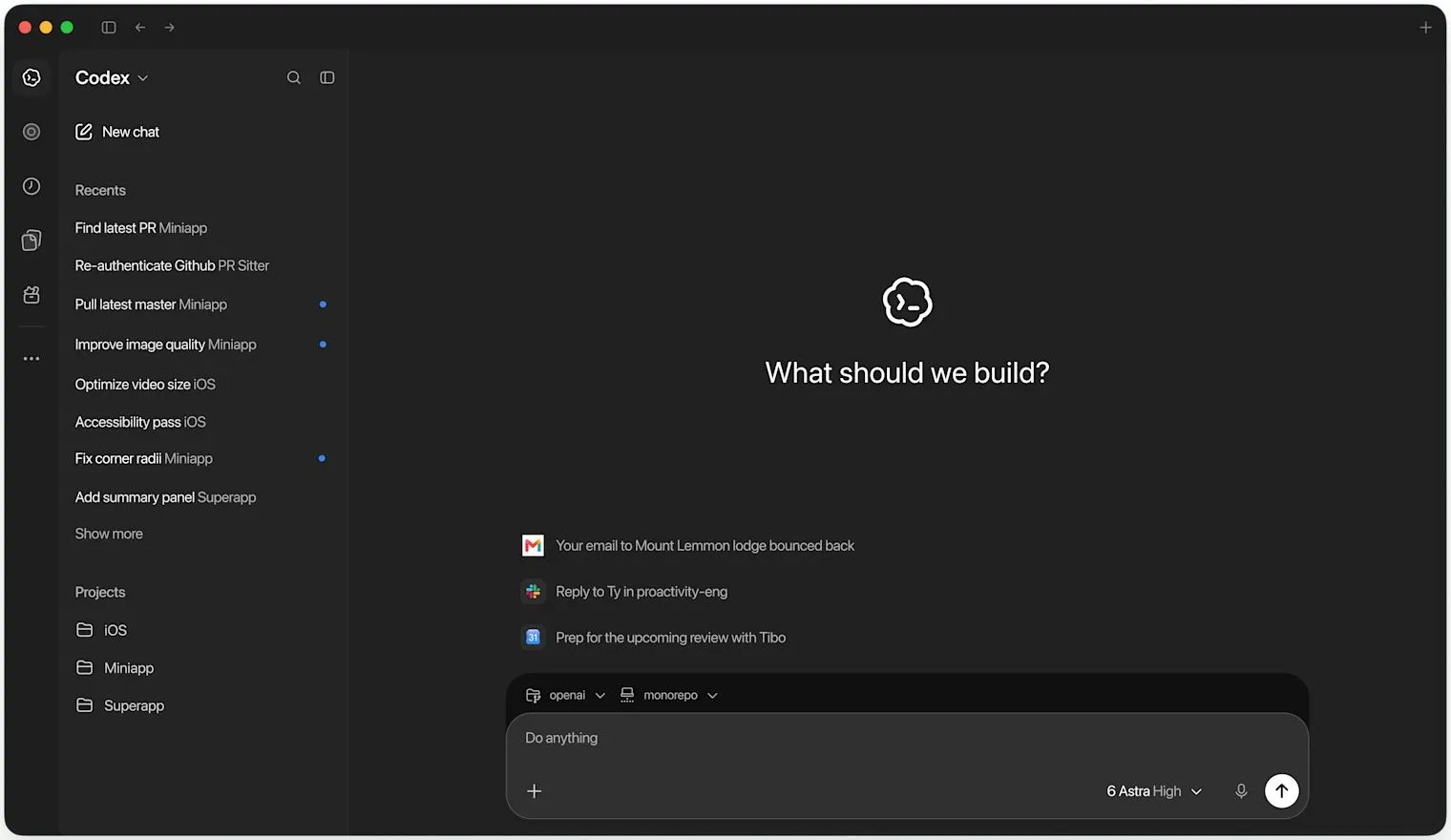
Codex is one agent, running on OpenAI’s GPT models, with several front ends that share a ChatGPT account and one allowance:
- The ChatGPT desktop app (macOS and Windows, Linux in preview), from chatgpt.com/download. Choose Codex in the top-left menu to open the Codex view; its history is kept apart from ordinary ChatGPT chats. Until 9 July 2026 this was a separate “Codex app”; existing users kept their projects and settings after updating and can make Codex the default view.
- Codex CLI: the open-source terminal version, installed with
npm install -g @openai/codex(0.163.0 as of 15 October). Typecodexin a project folder and sign in with ChatGPT. - Editor extension: VS Code and compatible editors (Cursor, Windsurf), as a side panel.
- Cloud and web: chatgpt.com/codex, where tasks run on OpenAI’s machines. Plus and above only.
- Phone: Codex in the ChatGPT mobile app starts cloud tasks or steers the computer back home.
The same desktop app also holds Chat (ordinary chat) and Work (an agent for documents, spreadsheets and slides). OpenAI says Work is for finished deliverables while Codex “remains dedicated to software development and technical work”; both draw on one allowance. Addigy, a Mac device-management firm, warns administrators that the new app reuses the old Codex bundle identifier and that OpenAI’s migration notes are “a little confusing”.
Coding: from one sentence to a change you can merge
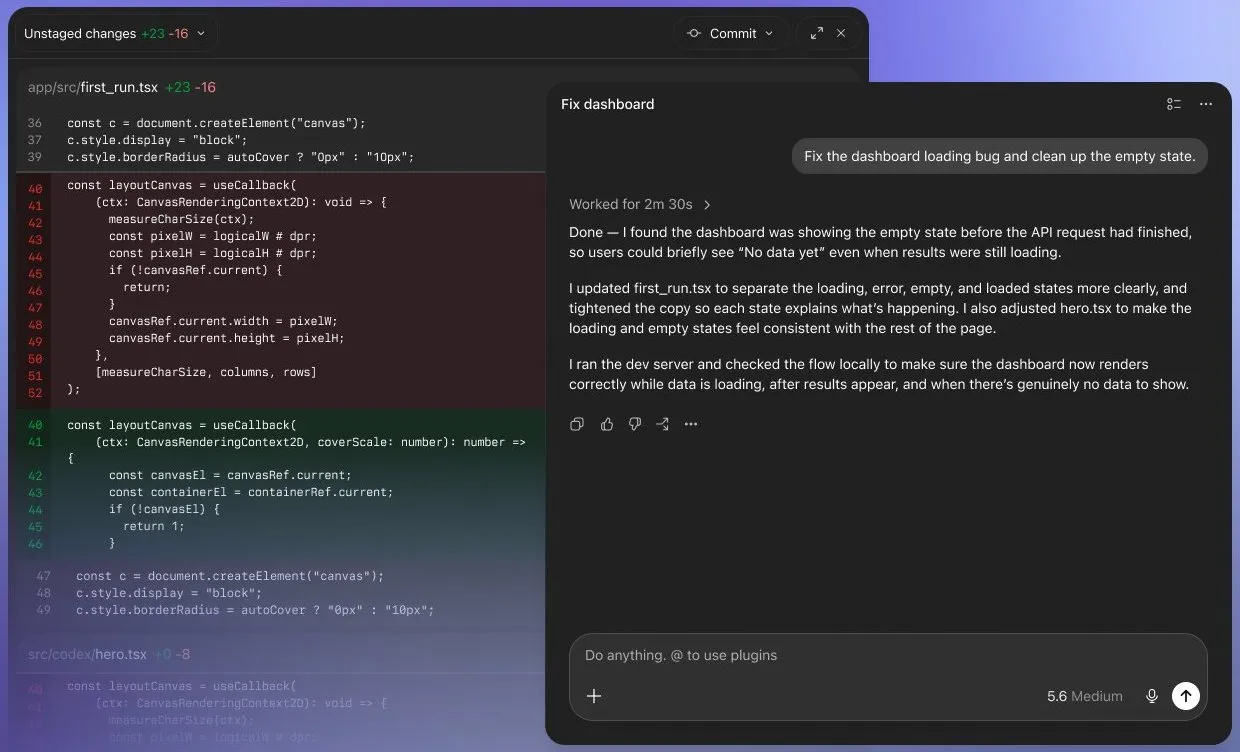
The usual loop: pick a project folder, say what you want, it reads the code, edits files and runs tests, then you check the diff in the side panel and commit or open a PR, or keep talking.
- Local, Worktree, Cloud: chosen when you start a chat. Local edits your working directory; Worktree works in a Git worktree so your current branch is untouched, which suits several tasks at once; Cloud sends it to OpenAI’s machines.
- Code review: type
/reviewto review local changes; once GitHub is connected, mention @codex in a PR or turn on automatic reviews. The desktop app also shows PRs in a side panel where you can answer comments. A Duolingo engineer, quoted on OpenAI’s page, says that in their back-end Python review benchmark Codex “was the only one to catch tricky backward compatibility issues”; that is a quote OpenAI chose. - Project instructions: an
AGENTS.mdfile in the repository, saying how to run tests and what style to follow, is read every time./initdrafts one for you. - Moving from elsewhere: since August the desktop app imports settings, skills and recent work from Claude Code and Cursor; in the CLI, use
/import.
In a June comparison 36Kr asked Codex to build a tool that records a livestream and transcribes it. Codex “didn’t get it right in one go”; it took several rounds of requests, but ended with a working tool. That is a fair summary: it rarely heads in the wrong direction, but complex requirements need you to keep adding detail.
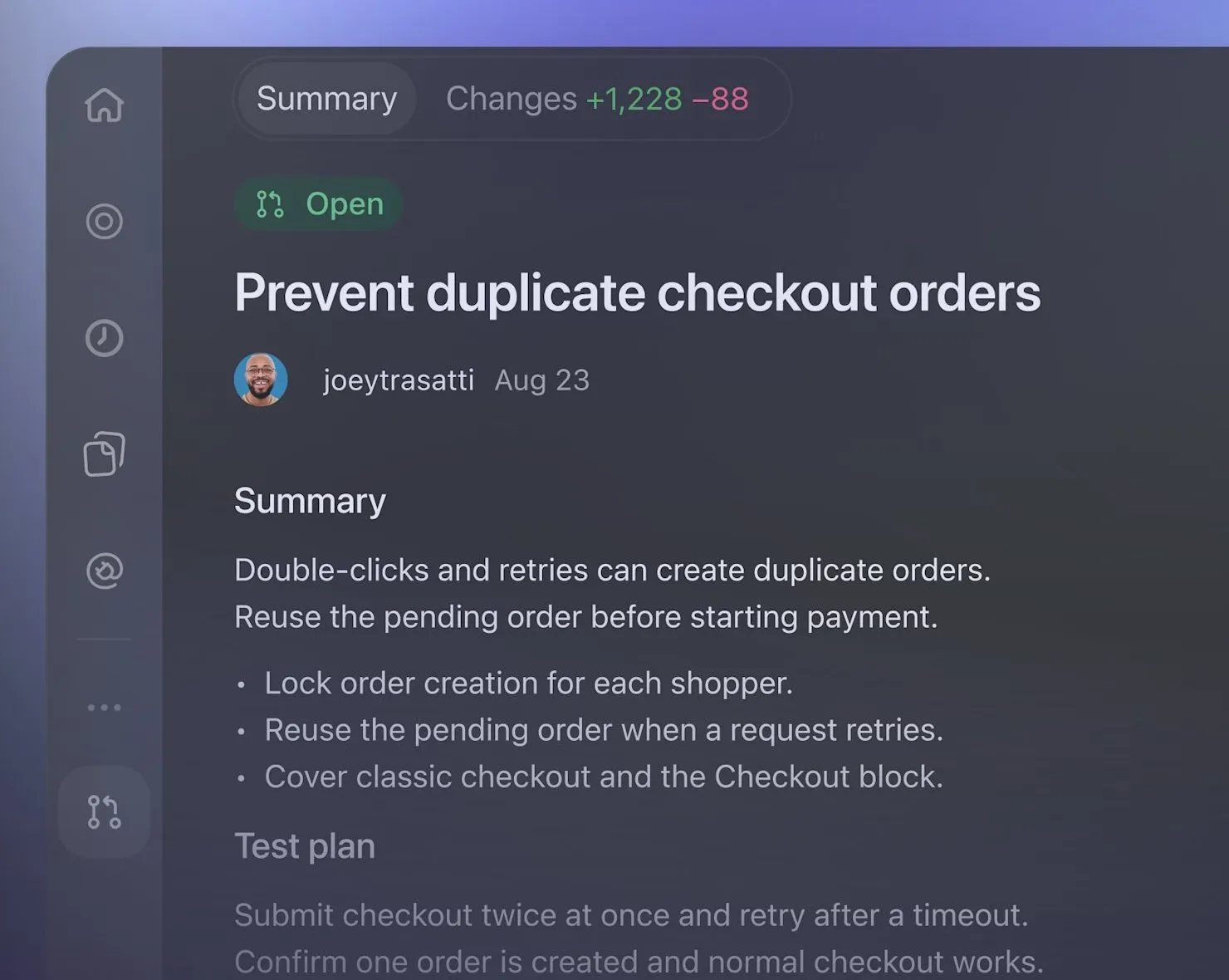
Work that isn’t code: possible, if you give it the tools
On 16 April 2026 OpenAI published “Codex for (almost) everything”, and the “almost” matters. What Codex can do outside code depends on what you give it:
- Just a folder: it can read and write the files in it, so cleaning a CSV, merging spreadsheets, renaming files in bulk or turning notes into a report all work. OpenAI’s own use case is worth copying: list the problems you see (mixed date formats, commas in amounts, duplicate rows), ask for “a cleaned CSV, keep the original file unchanged”, and ask for a note listing rows it changed, removed or wasn’t sure about.
- Plus plugins: there are more than 90, connecting Gmail, Slack, Notion, Google Drive and others. In the screenshot above, the Codex home screen is pointing out that an email to a lodge bounced. Every plugin adds context to each message and eats allowance faster, so switch off the ones you don’t need.
- Plus computer use: once the plugin is installed it can see the screen, click and type, operating apps that have no command line. macOS needs Screen Recording and Accessibility permission; on Windows it takes over the foreground, so you can’t use the same computer at the same time. Availability depends on region.
- A browser: the desktop app has a built-in browser for local or public pages where you can annotate the page directly, plus a Chrome extension.
How does it go in practice? In 36Kr’s test Codex took a PC whose C: drive had 0.46 GB free up to 7.47 GB; it copied one sheet to another inside the Feishu desktop client, taking more than ten minutes but succeeding; and it collected more than ten real comments from a signed-in Xiaohongshu account. Slow, but it got there.
One change to know about: on 9 July OpenAI launched ChatGPT Work, built on Codex technology, for documents, spreadsheets, slides and sites. If the result you want is a report or a deck, OpenAI now points you to Work; if it has to land in a repository or a local folder, use Codex.
Cloud and phone: it keeps going when the lid is shut
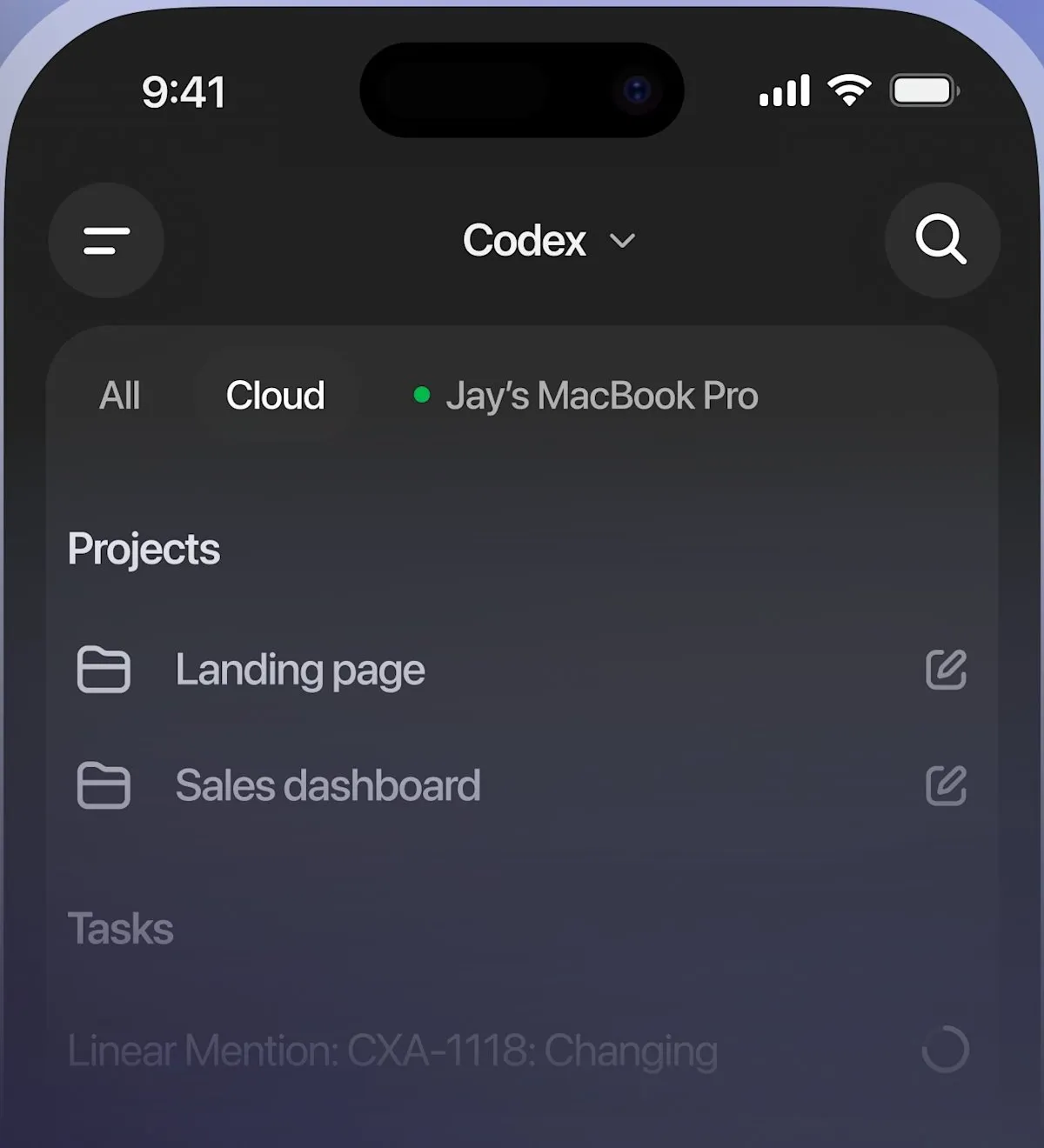
Cloud (Codex Cloud): on the web or in the desktop app choose Work in → Cloud → Select environment → Create environment and pick GitHub repositories. Codex installs the dependencies and runs the tests itself; you check and press Publish. Each task then runs in its own cloud workspace, carries on while your computer sleeps and can end in a PR. The cloud can’t see your local files, browser sign-ins or company VPN. GitLab has been supported in beta since August. Free and Go have no cloud.
Remote from a phone: in the desktop app on your computer, open Settings → Connections → Control this Mac or PC and scan the QR code with your phone. Codex in the ChatGPT mobile app then shows that computer’s tasks; you can approve the commands it wants to run and see which files changed. The computer has to stay on and online; because the work runs there, its local files and credentials are available.
Permissions: you decide what it can touch
Local tasks have two gates, and OpenAI’s docs keep them separate:
- The sandbox decides what it can technically touch. The default,
workspace-write, lets it read files, edit within the current project and run ordinary commands, but not use the network or write outside the project. The other settings areread-onlyand the unrestricteddanger-full-access. - Approvals decide when it stops to ask. In the desktop app and editor extension, pick below the composer: Ask for approval (asks before crossing the boundary; OpenAI suggests starting here), Approve for me (boundary requests go to a separate reviewer model first, which doesn’t count towards your allowance with ChatGPT sign-in) and Full access (no sandbox, no questions). In the CLI, type
/permissions.
In practice: use Full access only in a virtual machine or an environment you don’t mind losing; when it needs several repositories, use worktrees or separate projects rather than opening up the whole disk; plugin actions that declare themselves destructive (deleting, say) always ask first. If an old config contains approval_policy = "untrusted", new versions refuse to start; delete the line.
Choosing a model: Sol by default, Astra for the hard parts
Pick the model at the bottom right of the composer, or with /model in the CLI. These models are only in Work and Codex, not in ordinary chat.
Models available in Codex (October 2026)
Released on 29 September; OpenAI says it comes close to Astra for much less. 500,000-token context window in Work and Codex.
- Use it for
- Everyday complex coding and long tasks
- Example
- Work out this repository's sign-in flow, find why tokens aren't refreshed after they expire, fix it and add a test.
- Limits
- Plus: roughly 15–160 local messages per five hours. Not on Free or Go.
OpenAI's strongest model, also recommended for computer use and other tasks that rely on judging screenshots.
- Use it for
- The hardest end-to-end work across several tools
- Example
- This bug only shows up in the iOS simulator. Reproduce it with Computer Use, fix it, then run the same flow again.
- Limits
- Uses the most: Plus gets roughly 5–45 per five hours, and only limited Astra usage overall.
The most economical model, for clear, repeatable jobs. It is what Free and Go get in the desktop app.
- Use it for
- Cleaning data, bulk renaming, small edits
- Example
- Convert every date in the CSVs in this folder to YYYY-MM-DD and save copies; don't touch the originals.
- Limits
- Plus: roughly 350–3,000 per five hours.
Source: OpenAI docs, “Models” and “Pricing”, read 2026-10-17
Reasoning effort runs from Light to Ultra; Ultra splits the work across several sub-agents and costs more. GPT-5.5 left Codex for ChatGPT sign-in on 14 October, so scripts and configs that name gpt-5.5 need changing.
Paying: plan allowance and API are separate bills
Sign in with ChatGPT and you use your plan’s allowance; sign in with an API key and you pay API prices per token, but lose the cloud, GitHub review and Slack features.
| Plan | Per month | What you get in Codex |
|---|---|---|
| Free | $0 | Local tasks in the desktop app with GPT-6 Luna, rolling out; no cloud, no image generation |
| Go | $8 | Same as Free; OpenAI pitches it for “lightweight coding tasks” |
| Plus | $20 | Every surface, cloud and GitHub review; GPT-6.1 Sol and Luna, limited Astra |
| Pro | $100 / $200 / $500 | Larger allowances, currently no five-hour limit; Ultrafast on the $500 tier |
| Business | $20 per user (annual) or $25 (monthly) | Plus-level allowance, admin controls, no training on data by default |
| Enterprise / Edu | Contact sales | Audit logs, data residency; Codex Security is only here |
The allowance is the biggest source of complaints. OpenAI publishes only ranges (the figures in the model cards above) and says similar-looking tasks can use very different amounts, depending on model, context length, reasoning effort and tool use. Limits run in five-hour windows with a weekly cap on top; check them at chatgpt.com/codex/settings/usage, or type /status in the CLI. Fast mode uses 2.5 times the standard rate and image generation 3–5 times. When you run out you can buy credits, valid for 12 months and shared between Codex, Work and the Excel and PowerPoint add-ins.
What users say: on OpenAI’s developer forum one user said asking what a single method does used 6% of the five-hour allowance; on GitHub a Pro user reported 9% of a weekly allowance gone in one 4.5-hour session (collected by ProPakistani, which stresses this does not prove OpenAI quietly cut limits). On V2EX a user cited a third-party tracker showing Pro weekly allowances shrinking; one reply said “Claude Code feels more durable than Codex now”, another that “Codex keeps resetting limits and handing out resets”. It’s true that OpenAI reset everyone’s limits each time it passed another million users.
One settled fact: new $200 Pro subscriptions after 29 September get a smaller allowance, and earlier subscribers keep the old one until 29 October. A long-standing subscriber posted OpenAI’s email on the forum, saying it drops from 20 times Plus to 10 times.
Which plan: try Plus for a month and watch /status; for the odd script, local Luna on Free or Go is enough. Daily heavy coding is when Pro starts to make sense. For CI, an API key gives the clearest bill.
Against Claude Code and Cursor
| Codex | Claude Code | Cursor | |
|---|---|---|---|
| What it is | OpenAI’s agent, in the ChatGPT desktop app, terminal and editors | Anthropic’s agent, in terminal, editors, desktop and web | An AI code editor with its own agent |
| Models | OpenAI’s GPT family only | Anthropic’s Claude only | Several vendors’ models, OpenAI’s included |
| Entry price | Included in $20 ChatGPT Plus | Included in Claude Pro / Max | Individual plan $20 |
| Strong at | Parallel cloud tasks, automatic GitHub review, one account with ChatGPT | Its Claude models lead the overall benchmarks | Autocomplete and rewrites as you type |
A few judgements: if you already pay for ChatGPT, Codex is effectively free, so start there. On Artificial Analysis’s overall index GPT-6.1 Sol scores 52 and Claude Opus 5.5 scores 58 (Artificial Analysis, YLEM news of 29 September), so Claude still has the edge on the hardest work. Many people subscribe to both and switch by task. Codex imports Claude Code and Cursor setups, so moving over is cheap.
Settings to change first
- Training data: on personal plans (Free, Go, Plus, Pro) your Codex tasks may be used to train models by default. Turn off “Improve the model for everyone” in ChatGPT under Settings → Data controls; it covers Codex too. Codex settings have a separate “Include environments” switch for cloud environment context, which must be turned off on its own.
- Permissions: choose Ask for approval below the composer; for fewer interruptions, turn on Settings → Permissions → Auto-review.
- Allowance: check the usage page weekly and switch off MCP servers and plugins you don’t use.
- Region: mainland China and Hong Kong are not on ChatGPT’s list of supported regions, and using it from an unsupported region can get the account blocked.
First steps: try these three things
- Download the ChatGPT desktop app from chatgpt.com/download, sign in with your ChatGPT account and switch to Codex at the top left. Developers can instead run
npm install -g @openai/codexand then typecodex. - Start a chat in a folder that doesn’t matter, and leave permissions on Ask for approval.
- Have it read before it writes:
Don't change any files yet. Read through this project and tell me what it does, how to run it, how to run the tests, and the three places you think are most likely to break.
Clean @export.csv. Problems: dates are mixed between MM/DD/YYYY and YYYY-MM-DD; amounts contain $ signs and commas; some customer rows are duplicated. I want: a cleaned CSV saved as a new file, the original unchanged, one date format, blank amounts left blank, and a short note listing rows you changed, removed or weren't sure about.
Users say they are sometimes sent back to the sign-in page after logging in. Find the cause, fix it with the smallest change you can, add a test that reproduces the problem, run all the tests, then tell me what you changed.
Recent changes
- OpenAI shuts down GPT-4, o1 and other old models in its API; GPT-4o follows on 14 JanuaryOur coverage
- OpenAI now trains its strongest models offline after one slipped onto the internet in SeptemberOur coverage
- ChatGPT ads reach 89 countries as OpenAI passes 100,000 advertisersOur coverage
- GPT-5.5 retired from Codex with ChatGPT sign-in; paid plans move to GPT-6.1 Sol, Free and Go to GPT-6 Luna
- US states sue OpenAI over chatbot safety and seek testing restrictionsOur coverage
- OpenAI publishes hundreds of maths papers claiming solutions to decades-old problemsOur coverage
- OpenAI will watermark ChatGPT text in the EU; with a quarter of the words changed, only 17% is detectedOur coverage
- GPT-6.1 Sol arrives in Codex; a $500 Pro tier is added and new $200 Pro subscriptions get a smaller allowance
- OpenAI launches dots, always-on agents that work for you in the cloudOur coverage
- Australia: an OpenAI agent breached a Medicare portalOur coverage
Compared with similar products
| Product | Price | What it is |
|---|---|---|
| Google AntigravityGoogle · handbook | Weekly quota; Gemini 3.8 Flash, Claude 4.6 until 2 November; Via Google AI Pro $19.99, Ultra $99.99 / $199.99 a month | Google's platform for coding agents: you say what you want, and agents write the code, run terminal commands and click through pages in a browser, then hand you plans, screenshots and recordings to review. Desktop app, command line and editor extensions. |
| Claude CodeAnthropic · handbook | Not on the free plan; API pay-as-you-go; Pro $20, Max $100 / $200 a month | Anthropic's coding agent: describe what you want in a sentence and it reads your project, edits many files, runs commands and tests, and commits and opens pull requests. It works in the terminal, your editor, a desktop app, the web and your phone. |
| OpenAI CodexOpenAI · handbook | Free and Go: GPT-6 Luna locally in the desktop app, no cloud; Plus $20; Pro $100 / $200 / $500 a month | OpenAI's agent: inside a folder, computer or cloud environment you authorise, it reads and edits files, runs commands and tests, changes code and produces spreadsheets and documents, and can operate apps and a browser when allowed. You sign in with a ChatGPT account and every plan includes it. |
| CursorAnysphere (SpaceXAI) · handbook | Limited free tier; $8 / $30 / $100 / $200 a month | An AI code editor built on VS Code: it completes code as you type, rewrites a selection from one sentence, and runs agents locally or in the cloud that edit many files, run tests and open pull requests. |
| GitHub CopilotGitHub (Microsoft) · handbook | 2,000 completions a month; very little chat and agent use; $10 / $39 / $100 a month; teams $19 or $39 a user | GitHub's AI coding assistant: it completes and edits code in VS Code, JetBrains, Xcode and other editors, takes issues and opens pull requests from the cloud, reviews PRs, and has a command-line tool and a desktop app. |
| LovableLovable · handbook | 5 credits a day, up to 30 a month; Pro from $25, Business from $50 a month | A Swedish web-app builder: describe the app you want in plain words and it writes the front end, database, login and payments, then publishes it to a URL with one click. No coding needed. |
Sources
- OpenAI · Codex for (almost) everything (2026-04-16)
- OpenAI · Codex product page
- OpenAI docs · Codex pricing and limits
- OpenAI docs · Models
- OpenAI docs · Permission modes
- OpenAI docs · Sandbox
- OpenAI docs · Computer Use
- OpenAI docs · Codex environments
- OpenAI docs · Codex on mobile
- OpenAI docs · Use case: clean and prepare messy data
- OpenAI docs · ChatGPT and Codex changelog
- OpenAI Help Center · Using Codex with your ChatGPT plan
- OpenAI Help Center · ChatGPT Work and Codex
- OpenAI Help Center · About ChatGPT Pro tiers
- OpenAI Help Center · Credits on personal plans
- OpenAI Help Center · Data controls FAQ
- OpenAI Help Center · ChatGPT supported countries
- The Next Web · OpenAI launches ChatGPT Work (2026-07-10)
- Unite.AI · Codex and ChatGPT Work hit 10 million users (2026-07-21)
- Let's Data Science · Codex expands into research, reports, spreadsheets (2026-06-02)
- Business Today · Codex passes 3 million weekly users (2026-04-08)
- Developers Digest · ChatGPT Work and Codex share one desktop app (2026-07-09, updated 10-16)
- Addigy · ChatGPT and Codex desktop app merger for managed fleets
- 36Kr · Doubao Pro tested side by side with Codex (2026-06-24)
- ProPakistani · Users claim OpenAI secretly cut Codex limits by half (2026-08-21)
- OpenAI Developer Community · Is Pro 200 Codex usage being reduced before October 30? (2026-10-11)
- V2EX · Codex Pro 20x weekly limit cut below $2,000 (2026-07-08)
- Artificial Analysis · GPT-6.1 Sol replaces GPT-6 Sol after 7 days
- Wikipedia · OpenAI Codex (AI agent)
- Wikipedia: OpenAI Codex
- TechCrunch