Dreamina 即梦
By ByteDance · dreamina.capcut.com ↗ · Checked 18 Oct 2026
ByteDance's AI image and video maker: turn a sentence or a few reference pictures into images, videos up to 30 seconds and talking avatars. In China it is called Jimeng (即梦); elsewhere, Dreamina.
Verdict
For short videos with people and sound, the Seedance models behind it are among the highest-scoring Chinese video models in blind tests, and it handles Chinese prompts better than anything else. The catch: prices rose several times in 2026, peak-time queues run to hours, and credits are not refunded when you dislike the result. Learn it on the free daily credits before buying a year.
Use it if
- AI short dramas, comics and product clips that need 15–30-second shots
- Posters and shop images with Chinese text on them
- Making a digital double of yourself for talking-head videos
- People already on CapCut or Douyin who want to edit and post straight away
Use something else if
- A few free clips now and then: Doubao gives free video credits every day with the same models
- Reliable delivery without queues: Kling's per-second cost is lower, and abroad there are Veo and Sora
- Artistic still images: Midjourney is still stronger
- Seedance 2.5 in the US: the US was not on the launch list
- Free plan
- Daily credits in China, about one 8-second video; watermarked
- Paid
- China ¥69 / ¥199 / ¥499 a month; Dreamina Basic about $15 a month
- Where
- China: jimeng.jianying.com, iOS, Android; elsewhere: dreamina.capcut.com and the Dreamina app
- Models
- Video: Seedance 2.5 / 2.0 / 2.0 Fast / Mini; images: Seedream 5.0 Pro / Lite; Dreamina also offers Veo, Sora, Nano Banana and GPT Image
- Clip length
- Seedance 2.5 up to 30 seconds; 2.0 up to 15 seconds
- Operator
- China: Shenzhen Lianmeng (part of CapCut's Chinese twin, Jianying); US: TikTok USDS Joint Venture, CapCut account required
- Users
- About 16.3 million monthly in China (June 2026, QuestMobile)
- Data
- Your inputs and outputs may be used to improve models by default; in China you can opt out by email
Around Chinese New Year 2026, Chinese social media filled with short films that did not look AI-made. They came from ByteDance’s video model Seedance 2.0, and the first place you could use it was Jimeng (即梦). Its daily users then peaked above two million; by June 2026 it had about 16.3 million monthly users, more than ten times Kling’s Chinese mobile audience (QuestMobile figures quoted by Woshipm).
The other side of that popularity is queues and price rises. On the day Seedance 2.0 opened to everyone the wait was eight to ten hours, and between March and April prices changed three times in a month. Users nicknamed it “Jigui” (即贵, “instantly expensive”). The table below says which jobs are worth giving it and how far the free tier goes.
What to hand it
| What you want | How | Free plan | How it goes |
|---|---|---|---|
| Video from a sentence | Video generation, pick Seedance 2.5, write a prompt, pick a length | Daily free credits cover about one 8-second clip | Top-tier picture and sound; peak queues last hours |
| Animate a picture, fix first and last frames | Upload an image or start and end frames, or @-mention reference files | As above | Keeps characters consistent; good for storyboards |
| Posters, shop images, photo edits | Image generation with Image 5.0, or redraw, extend and erase on the Smart Canvas | Images cost far fewer credits; free is enough to play | Steady with Chinese text and layout; less artistic than Midjourney |
| Talking avatars, lip-sync | Record yourself to make a digital double, or tap Lip-sync on a video | Yes, but credit-hungry | Only your own face or one you are licensed to use |
| Have it plan shots and write prompts | Switch to Agent mode at the bottom left of the web prompt box | Yes | Good for beginners; saves prompt writing |
| Steady volume production | Membership or credit packs | Not enough | Pay monthly and work out the cost per second first |
Two products: Jimeng in China, Dreamina everywhere else
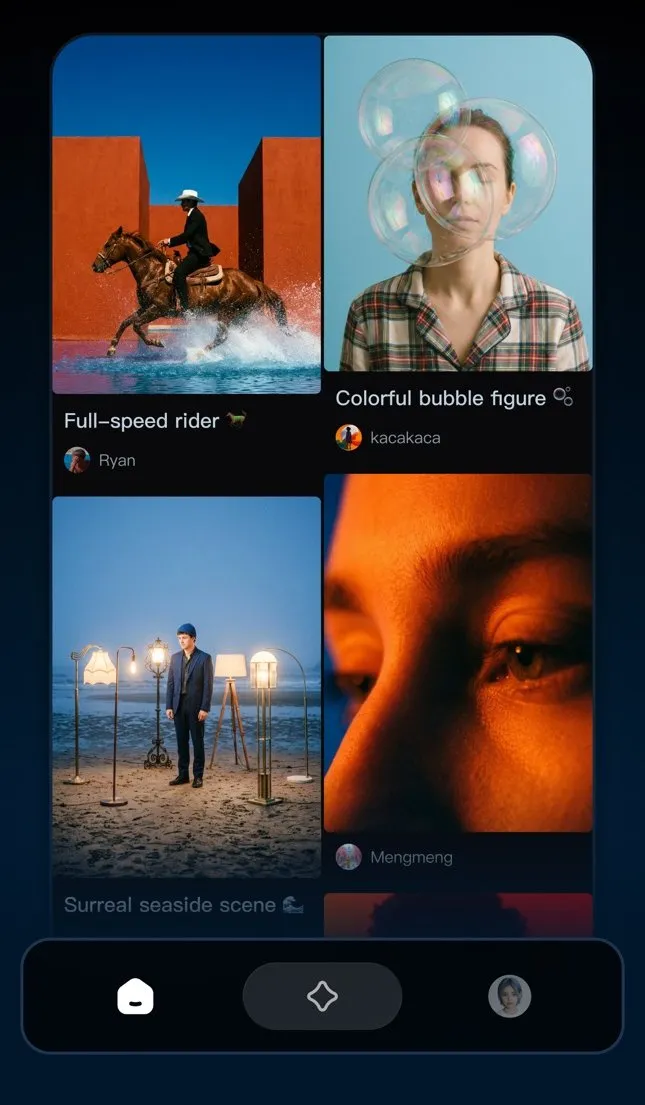
The names are easy to mix up:
| Name | What it is | Notes |
|---|---|---|
| Jimeng AI (即梦) | The Chinese product: jimeng.jianying.com and app | Made by the Jianying (Chinese CapCut) team, run by Shenzhen Lianmeng; priced in yuan |
| Dreamina | The international product: dreamina.capcut.com and app | Listed by ByteDance’s Singapore company; the US service is run by TikTok USDS Joint Venture and needs a CapCut account |
| Seedance | ByteDance Seed’s video models | Also in Doubao, Jianying/CapCut and Xiaoyunque; businesses buy them through Volcano Engine |
| Seedream | ByteDance’s image models | Also behind Doubao’s photo editing, Jianying and CapCut |
Accounts, credits and prices do not carry over between the two. Dreamina also offers other companies’ models: its pricing page lists Veo 3.1, Sora 2, Nano Banana Pro and GPT Image 2.5.
Both work the same way. The home page is a feed of other people’s work, and “remake” copies a piece’s prompt and settings. Creation is split into image and video, with the model picker under the prompt box. Finished videos go to Jianying/CapCut for editing or straight to Douyin in one tap.
Video: Seedance 2.5 gives you 30 seconds, after a queue
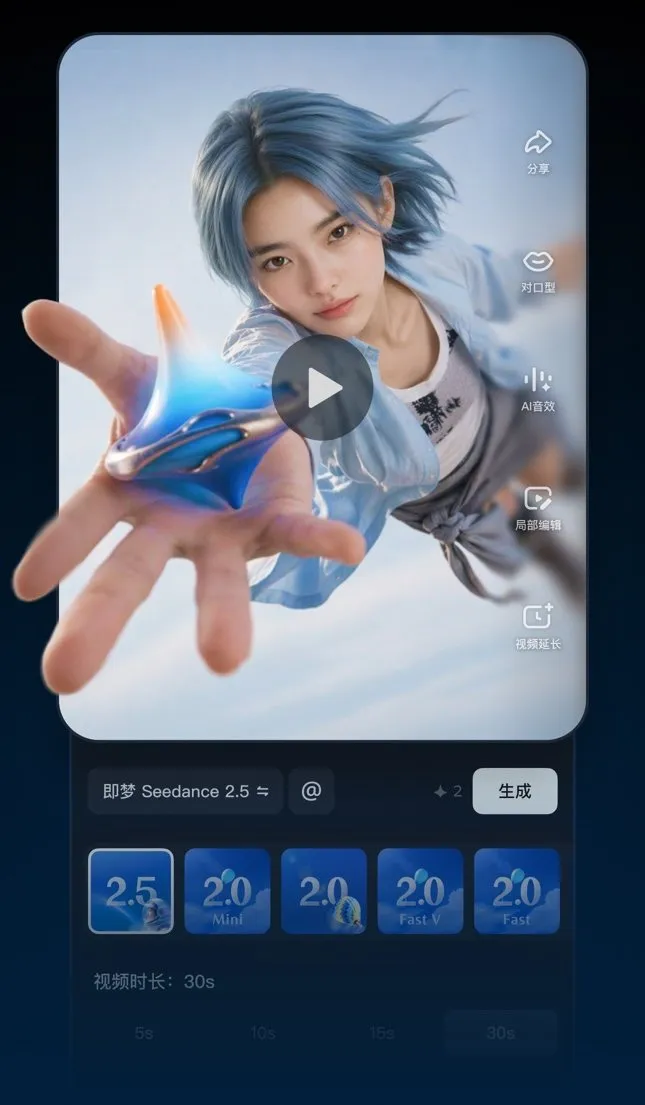
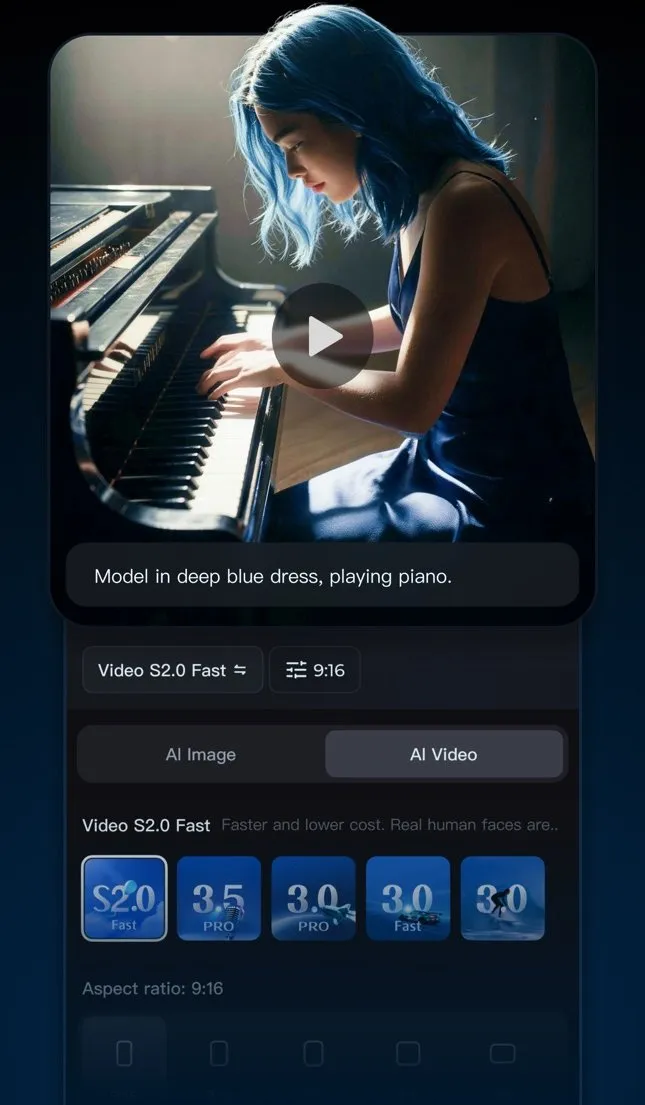
This is Jimeng’s main job. In video generation, pick a model, write a sentence or upload pictures, then choose 5, 10, 15 or 30 seconds. The credit cost of that clip shows next to the Generate button. Once it is done, four buttons on the right do most follow-up work: Lip-sync, AI sound, Local edit and Extend.
Seedance 2.5 launched first on Dreamina on 31 July and reached the Jimeng app in early August. ByteDance names three upgrades: clips up to 30 seconds (2.0 stops at 15), up to 50 reference files per clip (images, video, audio and text), and the ability to change just one moment or one character. Jiemian reported that Jimeng added Maya and Blender plug-ins and a Smart Edit mode at the same time, for people working on bigger projects.
How good is it? On LMArena’s blind-voting text-to-video board (18 October data), Seedance 2.0 is 5th and 2.5 is 7th, with MiniMax’s (Hailuo) H3 8th; Kling is not in the top ten. 2.5 does not outscore 2.0. What it adds is length and control, not a better-looking single shot.
Video models in Jimeng
Up to 30 seconds per clip, up to 50 reference files, local edits and extension.
- Use it for
- A shot that has to tell a whole beat: an ad, a short-drama scene, a single take
- Example
- A girl walks out of a metro exit; the camera follows her through a morning market and stops at a bun stall, where she says "two pork buns".
- Limits
- Most expensive; at launch abroad, paying users only, and not in the US
Released February 2026; makes picture and sound together, up to 15 seconds. Blind-test scores match 2.5.
- Use it for
- Shots under 15 seconds where quality matters but 2.5's price doesn't fit
- Limits
- Longest queues at peak times
Faster, cheaper versions; on Dreamina's price page they cost about half as much per second as 2.0.
- Use it for
- Testing prompts and camera moves, drafts
- Limits
- Weaker detail and consistency; switch back to 2.0 or 2.5 for the final cut
Sources: Dreamina launch post (2026-07-31), Dreamina price page (2026-10-08), Jimeng App Store screenshots
What users complain about most is not quality but waiting. STAR Market Daily tested it on 26 February: over 1,000 people ahead, an estimated three hours. One premium member posted a screenshot showing place 13,148 and an 11-hour wait; others sat at 99% for hours and then failed moderation. In April Jimeng added a “VIP fast lane” with no queue, at 210 credits for a 15-second clip. An annual subscriber wrote on the App Store that a 5-second clip used to cost 12 credits and arrive next day, but once the fast lane appeared the normal lane “takes three days”. Another paid about ¥42 for a 15-second clip, got two unusable results and found that “the credits are not refunded”.
Ways to spend less: draft on Fast or Mini and use 2.5 only for the final; change one thing at a time; and, as The Paper reported, some AI-drama studios now start work at 3 a.m. or 6–7 a.m. to dodge the peak.
Pictures and edits: Seedream 5.0 is good with Chinese text and layouts

Images come from Seedream. Seedream 5.0, released in February, can look things up online before drawing; it outputs 2K directly and 4K through AI upscaling, and a Pro version arrived on Dreamina at the end of July. Its strength is Chinese: text on posters, infographics and shop-image layouts come out more reliably than with Western models. Dreamina’s launch post says Pro writes and translates text in more than ten languages, and lets you draw an arrow or circle an area to edit, or split elements into layers you can drag.
Don’t expect too much. IT Home quoted Zhidx’s comparison: 5.0 understood an abstract brief like “quiet tech feel”, but compared with 4.5 it was “hard to call a leap”, and its design sense trails Google’s Nano Banana Pro. On LMArena, Seedream 5.0 Pro is 10th for image editing and outside the top ten for text-to-image, where OpenAI’s models lead.
Editing lives on the Smart Canvas: local redraw, one-click extend, erasing passers-by, cutting out, and layered compositing. Be specific and change one thing at a time:
Keep the person and clothes the same, change the background to a beach at dusk, add a little backlight
Digital humans and lip-sync: only with your own face
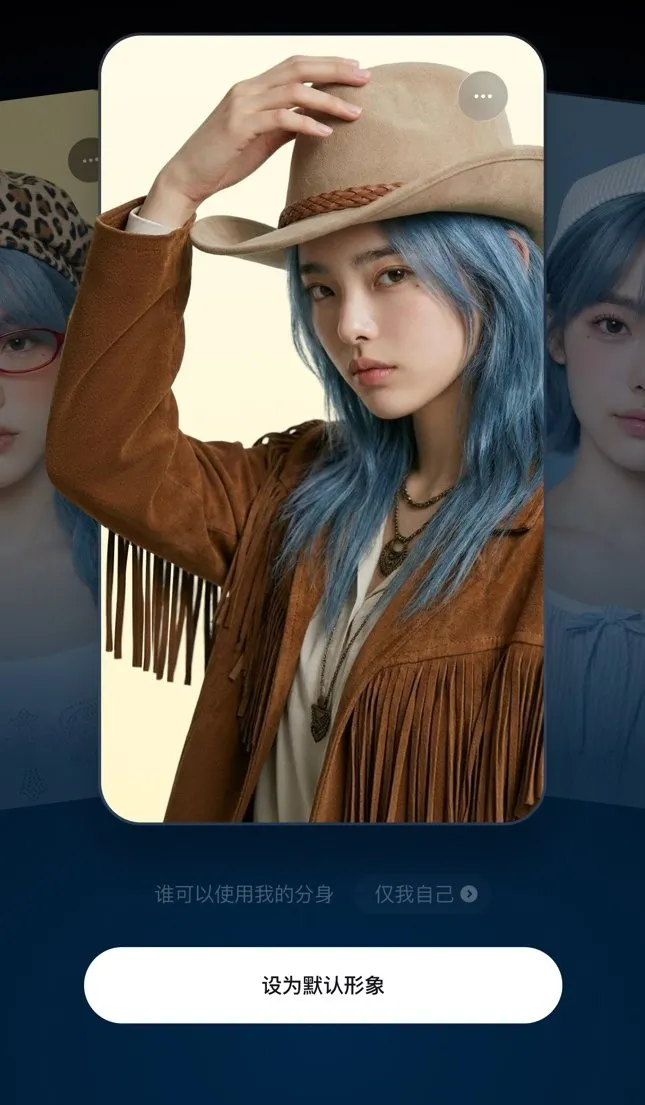
Seedance 2.0’s people looked so real in testing that on 9 February Jimeng’s staff told its creator groups that real-person photos and videos could no longer be used as subject references (Beijing News). The route now is to record your own face and voice in the app, pass a liveness check and get a “double”, which can then appear in videos. Its page has a “who can use my double” setting, “only me” by default; you can also @ a friend to invite their double into a scene.
There are two ways to make a talking video:
- Digital human: upload or generate a clean, front-facing portrait, add an audio track, and get a talking clip with expressions and gestures.
- Lip-sync: on a finished video, tap Lip-sync and type lines or upload a voice-over; the mouth movements follow.
Leave celebrities and other people’s photos alone. The user agreement forbids infringing likeness and voice rights, and Dreamina says it blocks “the unauthorized use of likeness”.
Agent mode and Octo: let it plan the shots
If you can’t write prompts, switch the web prompt box to Agent mode (bottom left). Say what you want and it writes the prompts and chains image and video generation. In QbitAI’s test, one request, “make six illustrated images of famous Chinese landmarks and combine them into a looping poster with smart multi-frame”, produced a finished clip in under three minutes, and it chose a phone-friendly 3:4 portrait format on its own.
Octo (小章鱼), opened as a beta on 8 April, goes further: you chat while it works, from story outline and character and set assets to storyboards and the finished short. It is web-only and by application, so not everyone has it.
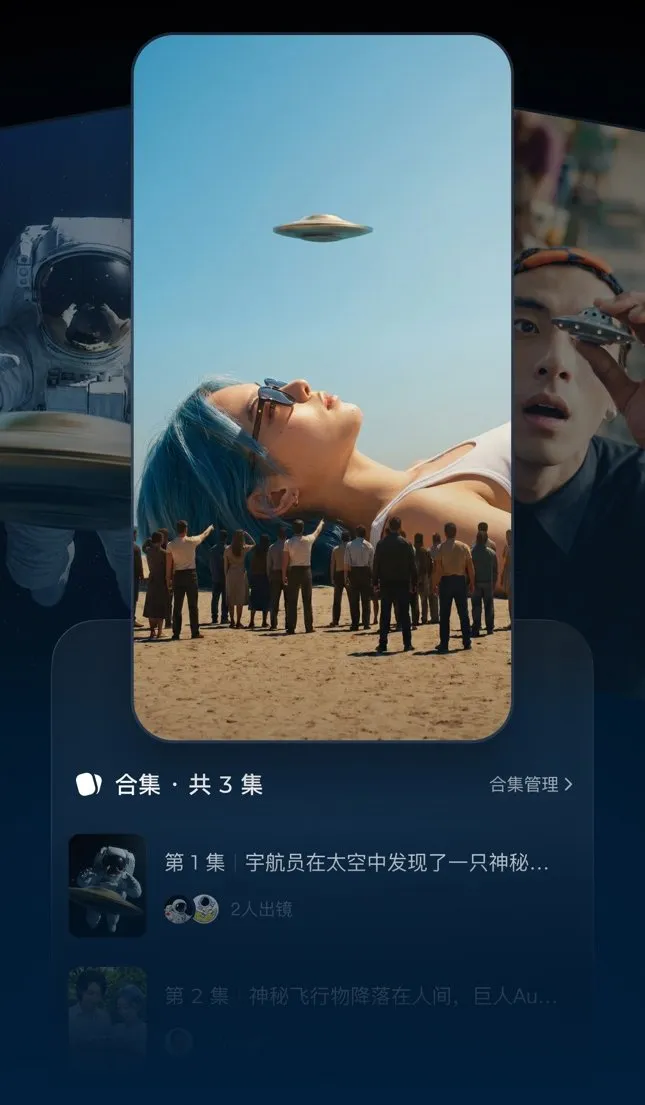
The app has lighter features too: “Continue” extends a clip into the next part of the story, building a collection of episodes, and “@ a friend” puts a friend’s double in the scene.
Credits: several price rises in 2026
Everything in Jimeng costs credits: images little, video a lot, depending on model, length and resolution. Credits come from three places: a free daily allowance, your membership’s monthly grant, and packs you buy.
| Tier (China) | Monthly, auto-renew | Annual list price | Credits a month |
|---|---|---|---|
| Free | 0 | — | about 66 a day |
| Basic | ¥69 | ¥659 | 725 |
| Standard | ¥199 | ¥1,899 | 2,210 |
| Premium | ¥499 | ¥5,199 | 6,160 |
Monthly prices come from the App Store’s in-app purchase list and media reports; annual prices and credits from ChinaVenture, after the 8 April repricing. The first year is usually 40% off, and sales such as 618 go lower. Membership also removes watermarks, extends videos and gets priority. The free figure is from Newrank’s April test: 66 credits make roughly one 8-second 720p Seedance 2.0 clip.
How much did prices move? Newrank worked it out: before April, a Premium year cost ¥2,599 with 15,000 credits a month, and a 15-second clip cost about ¥0.65. After the change the same clip cost about ¥5, or about ¥1.38 a second in the VIP lane. At the same time Kling 3.0 Omni came to about ¥0.43 a second, and Hailuo’s own Hailuo 2.3 about ¥0.93.
Dreamina has four tiers, Basic, Standard, Advanced and Super, priced per country. The UK App Store lists Basic at £11.90 a month and Advanced at £55. The US autumn offer of $1.50 for the first month was 90% off, so Basic is about $15 normally. Dreamina’s site said in August that free users get 120 credits a day. The US terms give a full refund within 14 days only if you haven’t used the subscription at all.
Advice: spend a week on the free credits, decide what kind of video you need, then pay monthly. Don’t buy a year up front; Jimeng changed prices and credit grants several times this year, and an annual plan doesn’t lock in what you get.
Doubao, CapCut or Kling: which to use
- Doubao: same company, same Seedance and Seedream models, with free video credits every day, and its desktop app runs Seedance 2.5. For the occasional clip, Doubao is simpler; you need Jimeng for model choice, length control, references and local edits.
- Jianying / CapCut: the editors, which also include Seedream and Seedance. Jimeng makes the footage, CapCut cuts it, and the two hand files back and forth in one tap.
- Kling: Kuaishou’s video tool scores a little lower in blind tests but has more controls (keyframes, longer clips) and a lower cost per second for members. See the Kling handbook.
- Hailuo (MiniMax): H3 is within about 15 points of Seedance 2.5 on LMArena, a sound second option.
- Midjourney: better style and artistry for still images, but it charges in dollars and wants English prompts. See the Midjourney handbook.
Watermarks, rights and your uploads
- Watermarks: free output carries a watermark, and members can remove the visible one. But under China’s AI content labelling rules Jimeng marks AI content, and its agreement forbids hiding or deleting those marks. Dreamina adds invisible watermarks, C2PA Content Credentials and visible AI labels.
- Who owns it: Jimeng’s agreement says rights in your inputs and outputs are yours, and Dreamina’s US terms say you own inputs and outputs. But anything you publish on Jimeng can be used by the platform, free, for promotion.
- Training on your material: by default Jimeng may use your inputs and outputs to “improve products and models”. To refuse, say so through in-app feedback or email jimeng.ai@bytedance.com.
- Moderation: prompts involving real people, celebrities or film characters are often blocked. Dreamina’s launch post says it actively blocks unauthorised IP and works with rights holders; STAR Market Daily recorded hours-long waits that ended in a moderation failure.
- Permissions: a UK App Store reviewer complained that Dreamina demands access to the whole photo library and won’t accept limited access.
First steps: three things to try
- In China, open jimeng.jianying.com or search 即梦 in your app store; elsewhere, use dreamina.capcut.com or the Dreamina app.
- Check today’s free credits and the cost shown next to Generate, then make your first clip with Fast or Mini.
- When you like it, switch to 2.0 or 2.5 for the final, note what each clip cost, and only then pick a plan.
An old street on a rainy night. A child in a yellow raincoat runs through puddles; the camera follows low to the ground; neon signs reflect in the water; you can hear the rain and footsteps. 10 seconds.
A portrait poster titled "Weekend Market", subtitle "25 October · Community Square", hand-drawn illustration style, warm colours, text clearly legible.
Break this story into four shots and make the video: a ginger cat waits all morning outside a breakfast shop, and in the end the owner gives it a bun.
Recent changes
- Seedance 2.5 arrives in the Jimeng app, with clips up to 30 seconds
- Dreamina launches Seedance 2.5 and Seedream 5.0 Pro worldwide, first for paying users over 16
- Membership repriced: first-year discount cut from 50% to 40% off, monthly credits sharply reduced
- Octo, a story-to-film agent, opens as a web beta
- Seedance 2.0 "VIP fast lane" added: no queue, more credits
- Seedance 2.0 enters testing; real-person photo references paused
- Seedream 5.0 image model starts rolling out in Jimeng
Compared with similar products
| Product | Price | What it is |
|---|---|---|
| Dreamina 即梦ByteDance · handbook | Daily credits in China, about one 8-second video; watermarked; China ¥69 / ¥199 / ¥499 a month; Dreamina Basic about $15 a month | ByteDance's AI image and video maker: turn a sentence or a few reference pictures into images, videos up to 30 seconds and talking avatars. In China it is called Jimeng (即梦); elsewhere, Dreamina. |
| Hailuo 海螺 AIMiniMax · handbook | One-off trial credits for new accounts (about 150), watermarked, one task at a time; International $10.50 / $38 / $89 / $216 a month; China ¥65 / ¥243 / ¥1,399 a month | MiniMax's AI video tool: from a sentence, a picture, or a pile of images, clips and audio, it makes 2K videos of up to 15 seconds with stereo sound, and it also makes and edits pictures. |
| Kling 可灵Kuaishou · handbook | No fixed monthly credits, daily login bonus; watermarked, no commercial use; China ¥66 / ¥268 a month; international $8.80–$159.99 a month | Kuaishou's AI video generator: turn a paragraph or a few pictures into video with dialogue and sound; the newest model, Kling 4.0, makes up to 30 seconds in one go. |
| RunwayRunway · handbook | 125 one-off credits, watermarked; $15 / $35 / $95 a month ($12 / $28 / $76 billed yearly); Team $69 per seat | The New York company's AI video tool: it turns text and images into video, edits footage you already have from a single sentence, and puts Kling, Veo, Seedance and other companies' models in the same account. |
| Google Veo and FlowGoogle DeepMind · handbook | 50 Flow credits a day without a plan; video may be unavailable at peak times; Google AI Plus $4.99 / Pro $19.99 / Ultra $99.99 or $199.99 a month | Google's AI video tools: in the Flow web studio you generate short clips with sound using Veo 3.1 or the newer Gemini Omni, then string them into scenes; the same models also sit in the Gemini app, YouTube Shorts and the API. |
Sources
- App Store (China) · Jimeng AI, version 2.3.8, with version history, in-app prices and reviews
- App Store (UK) · Dreamina AI: Image&Video Maker
- Jimeng AI · User agreement (in force 2025-09-01)
- Dreamina · Terms of Service, US (2026-01-22)
- Dreamina · Seedance 2.5 and Seedream 5.0 Pro launch (2026-07-31)
- Dreamina · Seedance prices and September–October offer (2026-10-08)
- Dreamina · Free credits and paid plans explained (2026-08)
- Beijing News · Jimeng restricts real-face uploads (2026-02-10)
- IT Home · Seedream 5.0 launches (2026-02-10)
- STAR Market Daily · Behind Seedance 2.0: queues, resold memberships and doubled renewals (2026-02-26)
- Beijing News · Jimeng launches Octo (2026-04-09)
- The Paper · Why Jimeng dared to raise prices three times in a month (2026-04-10)
- Newrank · Cost per second of seven AI video tools, tested (2026-04-25)
- IT Home · CapCut-family 618 membership prices (2026-06-09)
- ChinaVenture · Price rises and price cuts in AI video (2026-07-27)
- Jiemian (via Eastmoney) · Jimeng adds Seedance 2.5 pro tools (2026-08-05)
- aitoollab · Complete Jimeng guide and membership prices (2026-08-14)
- Woshipm · Jimeng and the new content ecosystem (2026-10-11)
- QbitAI (via BAAI Hub) · Jimeng Agent mode tested (2025-09)
- LMArena leaderboards (text-to-video, text-to-image, image editing; data of 2026-10-18)
- Dreamina
- LMArena video leaderboard