Google Veo and Flow
By Google DeepMind · labs.google/flow ↗ · Checked 18 Oct 2026
Google's AI video tools: in the Flow web studio you generate short clips with sound using Veo 3.1 or the newer Gemini Omni, then string them into scenes; the same models also sit in the Gemini app, YouTube Shorts and the API.
Verdict
If you already pay for a Google AI plan, Flow is one of the best-value AI video studios around: an 8-second 720p Omni Flash clip costs 12 credits, Omni can edit video through conversation, and Veo 3.1 gives you 4K and longer shots. The price is a thicket of rules: some things only Veo can do and others only Omni, credits are charged per result, and editing uploaded video is off in the EU and UK. The biggest trap is the naming: video in the Gemini app is no longer Veo, it is Omni.
Use it if
- People already on Google AI Pro or Ultra who want short videos and storyboards on the side
- Editors who want to change existing footage (sky, outfit, a line of text): Omni's conversational editing is its strength
- Anyone who needs 4K output or a shot extended past a minute: use Veo 3.1
- Developers paying per second at volume: Veo 3.1 Lite costs $0.05 a second at 720p
Use something else if
- Single shots over 10 seconds with sustained acting: Kling 4.0 makes 30 seconds in one go
- Mainland China: Flow isn't offered there; use Dreamina's Chinese version Jimeng, or Kling
- Many vendors' models under one subscription: Runway includes Kling, Seedance and Wan
- Free plan
- 50 Flow credits a day without a plan; video may be unavailable at peak times
- Paid
- Google AI Plus $4.99 / Pro $19.99 / Ultra $99.99 or $199.99 a month
- Where
- Flow on the web (Chrome recommended), Flow apps for iPhone and Android; Gemini app; YouTube Shorts; Gemini API
- Models
- Video: Veo 3.1 (Lite, Fast, Quality) and Gemini Omni Flash 1.1; images: Nano Banana
- Clip length
- Veo 4, 6 or 8 s per clip, extendable; Omni 4–10 s
- Resolution
- Veo 720p, 1080p, 4K; Omni native 720p (plus a 360p draft), 1080p and 4K by upscaling
- Region
- Flow in 155 countries and territories, including Hong Kong, Macau and Taiwan, not mainland China; 18+
- Data
- Used to improve products by default, can be turned off; records sent for human review kept up to 18 months
Veo is Google DeepMind’s video model. Veo 3, in May 2025, was the first to generate dialogue, sound effects and picture together. Flow is a web tool from Google Labs that wraps Veo in a film studio: generate shots, manage assets, assemble scenes. By October 2026 things have become more tangled. In May Google launched a new video model, Gemini Omni; video in the Gemini app is now Omni only, while Flow offers Veo 3.1 and Omni side by side.
So this page covers Google’s AI video as a whole: which model, which entrance, how many credits. The table below sums up the Flow and Gemini help centres, the API docs, media tests and the developer forum.
What to hand it, and what not to
| What you want | How | Free plan | How it goes |
|---|---|---|---|
| A quick short video with sound | Create video in the Gemini app sidebar, or the Flow prompt box | Gemini app needs Plus or above; Flow gives 50 credits a day | Works well, sound and picture together; the Gemini app uses Omni |
| Join several shots into a scene | Scenebuilder in Flow | Part of Flow | Reorder, trim heads and tails, download the whole scene; not an editor |
| Keep a character or product the same in every shot | Ingredients in Flow, or @name | Credits per model | Steadier than text alone, but drifting characters are a common forum complaint |
| Edit an existing video | Pick Omni Flash in Flow and upload | 40 credits per edit | Omni's strength; not for uploads in the EU, UK or Switzerland |
| Make a shot longer | Extend, below the clip | 10 credits with Lite | Only for Veo clips; Omni clips can't be extended yet |
| Remix someone's Short | Remix in YouTube Shorts | Free | The cheapest way into Omni, limited to remixable Shorts |
| Generate in bulk from code | Gemini API | No free tier | From $0.05 a second with Veo 3.1 Lite; clear pricing |
Veo, Omni, Flow: three names, one system
Get the names straight first. Veo and Omni are models; Flow, the Gemini app and YouTube are places that use them; Google AI Plus, Pro and Ultra are the paid plans.
| Name | What it is | Where you can use it now |
|---|---|---|
| Veo 3.1 | DeepMind’s dedicated video model, released October 2025, in Lite, Fast and Quality tiers | Flow, Gemini API, Google Cloud; no longer in the Gemini app |
| Gemini Omni Flash | New model from May 2026, part of the Gemini family: “anything in, starting with video out” | Gemini app (its only video model), Flow, YouTube Shorts Remix and YouTube Create (free), Gemini API |
| Flow | Google Labs’ film studio, on the web and as phone apps | 155 countries and territories, 18+ |
| Gemini app | Google’s AI assistant | Create video in the sidebar; see the Gemini handbook |
| Nano Banana | Google’s image model | Makes first frames and ingredient images in Flow |
The Gemini help centre is blunt about it: video in the Gemini app uses Gemini Omni. How Omni relates to Veo, Google hasn’t said. DeepMind gives them separate model pages. Some third-party blogs say Veo still renders the picture underneath Omni; others say Omni is a new unified model. Neither claim is backed by anything Google has published, so ignore both. What is certain: there is no Veo 4, Veo’s latest version is still 3.1, and Google’s new video features (conversational editing, voices) went to Omni first.
YouTube is the cheapest route. Since I/O, Omni is free in YouTube Shorts Remix and the YouTube Create app: add your own prompt and images to a remixable Short. The results carry a watermark and metadata and link back to the original, and creators can opt their Shorts out of visual remixing.
Making a film in Flow: from prompt to scene
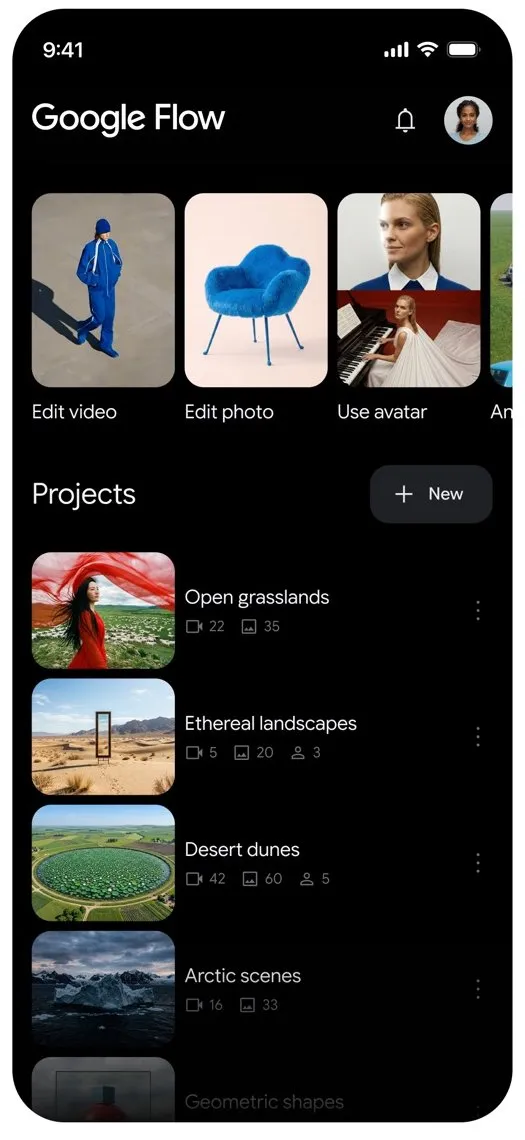
Flow is organised in projects. Open labs.google/flow, start a project, and the prompt box sits at the bottom. Watch one default: the prompt box starts on the image model Nano Banana Pro. For video, click the model name, switch to Video, then choose the model, landscape or portrait, how many outputs and how many seconds.
Finished clips go into Scenebuilder via More → Add to Scene. There you reorder clips, drag handles to trim each one’s start and end, preview the sequence and download it in one piece. It is a basic timeline; captions, grading and music still need a real editor.
The prompt box has an Agent switch. With it on, you can talk through a storyboard, ask for “5 variations of this video with different lighting”, or have it tidy your assets. Chatting with the Agent costs no credits (there is a daily cap on queries), but whatever it generates does. By default it asks before spending credits; leave “Confirm before generating” on Always, or it will keep spending on your behalf.
Flow on the web wants a Chromium browser such as Chrome or Edge; Google says other browsers and phones are “not yet fully optimized”. The phone app reached the iPhone in September 2026 and is mainly for uploading material, watching progress and downloading; it is rated 3.8 on the App Store (99 ratings).
The four video models in Flow
The new model. 4, 6, 8 or 10 seconds, at 720p or a 360p draft that costs half. Edits uploaded video and supports custom voices.
- Use it for
- Most new shots; editing existing footage; cheap rounds of drafts
- Example
- A ginger cat knocks a glass of water off a kitchen counter, slow motion, water splashing, natural morning light.
- Limits
- 12 credits for 8 s at 720p; 40 credits per edit; can't be extended in Flow yet.
Veo's cheapest tier, 4, 6 or 8 seconds.
- Use it for
- Bulk drafts; extending Veo shots (extension only runs on Lite)
- Example
- Extend: the camera keeps pushing forward as the figure walks out of frame.
- Limits
- 10 credits a clip (5 on Ultra); no video editing.
Middle ground on speed and quality; takes ingredient images.
- Use it for
- Keeping a character consistent with reference images
- Example
- @Jay rides a bicycle through an old street on a rainy night, tracking shot.
- Limits
- 20 credits a clip (10 on Ultra); no extension, no video editing.
The highest-quality tier.
- Use it for
- Final shots
- Example
- A lighthouse at dawn, slow aerial orbit, light mist, sound of waves.
- Limits
- 100 credits a clip; no ingredients, no extension, no video editing.
Source: Google Flow help centre, models & supported features and credits pages (read 2026-10-18)
Ingredients, frames and extend: three ways to control the picture
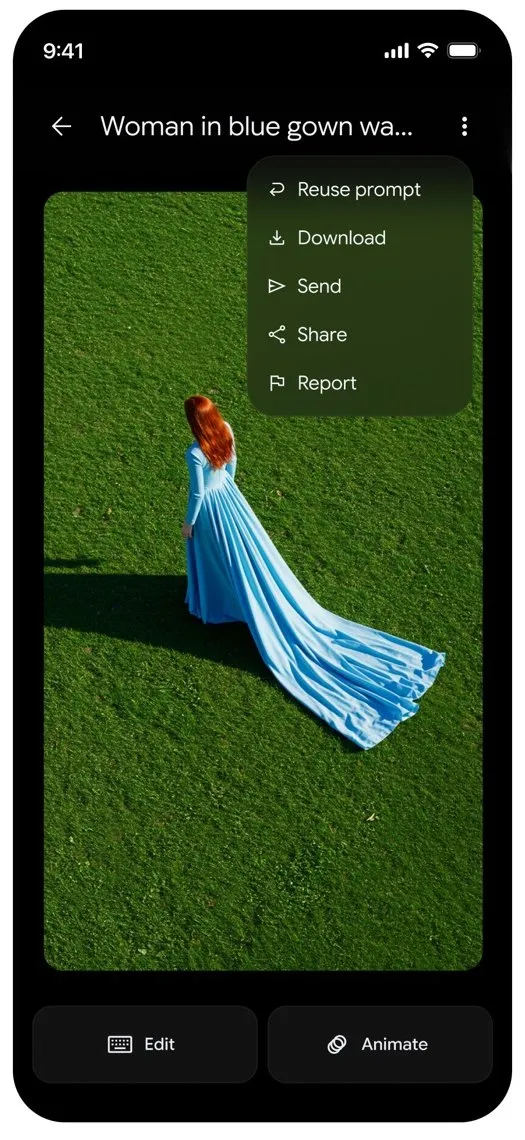
With text alone, the person on screen changes every time. Flow has three ways to make the picture do what you want:
- Ingredients: in the model menu choose Video → Ingredients, drag in images of people, products or places, and say how to use them. Google’s example combines a woman, a lava lamp and a foggy street: “The woman, whose torso is the lava lamp, walks down the foggy street.” Subjects on a plain background work best. Type
@to call up a project asset by name; once you have created your own avatar,@meputs you in the shot (avatars aren’t available in the EU, UK or Switzerland). - Frames: choose Video → Frames, drag images onto “+ Add start frame” and “+ Add end frame”, and describe what happens in between. Good for transitions and bringing a still to life.
- Extend: open a clip, click Extend at the bottom and describe how the action continues. For now only Veo-generated 8-second clips can be extended, and only with Veo 3.1 Lite. An extended clip can’t take further edits such as insert or remove.
Editing video is Omni’s alone. Choose Omni Flash, upload a video of up to 60 seconds and 1 GB (anything over 30 seconds must be trimmed first), select a segment of up to 10 seconds and type “change the lighting to a cinematic sunset” or “add a text overlay that says ‘Coming Soon’”. You get up to three rounds of follow-up, and the History panel keeps every version.
Results are less steady than the marketing. In a Google AI Developers Forum thread running from May into June, a user making serialised story content complained that ordinary scenes (walking, entering a room, friends talking) were refused as policy violations, that reference images were ignored and characters and settings changed anyway, and that the Agent kept altering characters. Another was harsher: “It just take/rob your credit.” Failed generations are not charged; if you think you were, Google One support handles it.
Sound: Veo writes dialogue, Omni can change the voice
Since Veo 3, Google’s video comes with sound generated alongside the picture: dialogue, ambience and effects, with nothing to add afterwards. The API docs suggest putting lines in quotes, for example: “This must be the key,” he murmured.
Omni adds voices. In Flow, pick Omni Flash, generate with Ingredients, click Add Voices and choose a preset; write @Voice: Andrew in the prompt and the character keeps that voice across clips. Create New Voice lets you reshape a preset by description, such as “slightly raspy with a New York accent”. Voices only work with Ingredients; other generation types return an error.
Two known problems. Veo sometimes drops a whole clip because the audio it generated was too poor; Flow shows “Audio Generation Failed” and refunds the credits. And Omni’s API can’t take audio references or edit voices yet. In GlobalGPT’s eight-prompt test in July, Veo 3.1 Fast produced better sound than Omni.
Credits: what an 8-second clip costs
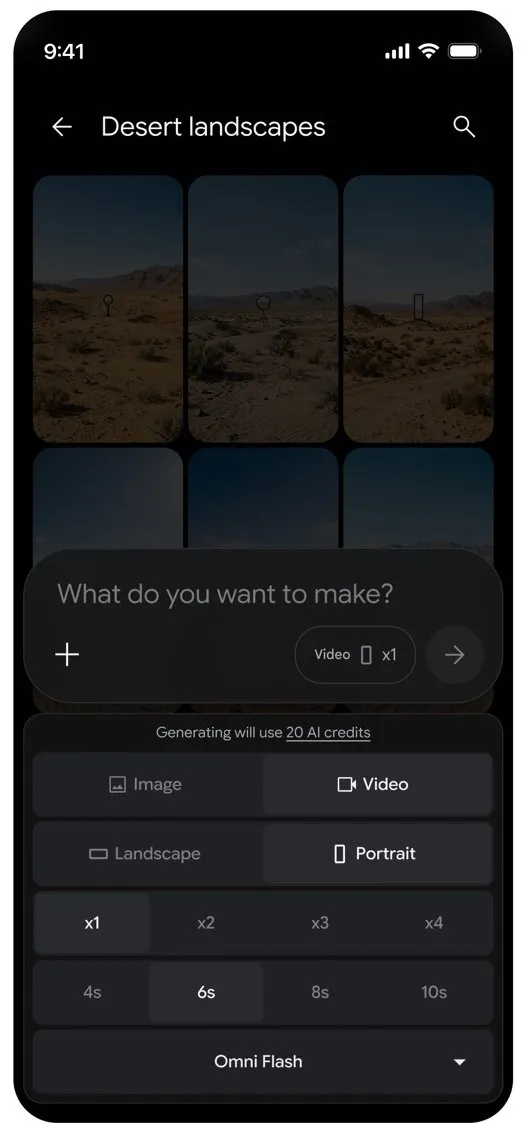
Flow charges in credits, and the monthly allowance comes with your Google AI plan (prices and other benefits are in the Gemini handbook):
| You have | Price a month (US) | Flow credits |
|---|---|---|
| No plan | Free | 50 a day; video may be unavailable 2–5 pm UTC |
| Google AI Plus | $4.99 | 50 a day plus 200 a month |
| Google AI Pro | $19.99 | 50 a day plus 1,000 a month |
| Google AI Ultra | $99.99 | 50 a day plus 10,000 a month |
| Google AI Ultra (higher tier) | $199.99 | 50 a day plus 25,000 a month |
| Workspace business plans | With the plan | 50 a day |
Daily credits don’t accumulate; monthly ones refresh on your billing date and don’t roll over. You can buy AI credits when you run out, except in Japan. The help centre contradicts itself here: the getting-started page says you need Plus or above, while the credits page says non-subscribers get 50 credits a day.
In clips (8 seconds each, against Pro’s 1,000 monthly credits):
| Model | Credits a clip | Clips a month on Pro |
|---|---|---|
| Omni Flash 360p | 6 | about 160 |
| Omni Flash 720p | 12 | about 80 |
| Veo 3.1 Lite | 10 (5 on Ultra) | 100 |
| Veo 3.1 Fast | 20 (10 on Ultra) | 50 |
| Veo 3.1 Quality | 100 | 10 |
| Omni video edit | 40 per edit | 25 |
Two easy things to miss. Credits are charged per result, so asking for four versions costs four times as much. Upscaling to 1080p is free for subscribers; 4K upscaling is Ultra-only at 50 credits. Video in the Gemini app doesn’t use Flow credits but the Gemini usage allowance, and eats a lot of it; see the Gemini handbook.
Which plan: for the occasional clip, Plus plus the daily free credits is enough; stick to Omni at 720p. If you make video every week, Pro is the entry point. Ultra gives more than ten times the credits: Veo Lite and Fast cost half, and a lower-priority Veo 3.1 Lite queue costs nothing at all.
Developers: an API priced per second
The Gemini API offers both Veo and Omni, with no free tier, priced per second generated (pricing page, 18 October 2026):
| Model | 720p | 1080p | 4K | One 8 s clip at 720p |
|---|---|---|---|---|
| Veo 3.1 | $0.40/s | $0.40/s | $0.60/s | $3.20 |
| Veo 3.1 Fast | $0.10 | $0.12 | $0.30 | $0.80 |
| Veo 3.1 Lite | $0.05 | $0.08 | Not supported | $0.40 |
| Gemini Omni 1.1 Flash | about $0.10 | Upscaled | Upscaled | about $0.80 |
Omni is billed in tokens: each second of 720p counts as 5,792 output tokens at $17.50 per million, which works out at about $0.10 a second. Paid API content isn’t used to improve Google’s products.
Veo API details: clips are 4, 6 or 8 seconds, and 1080p, 4K, reference images and extension all require 8; each extension adds 7 seconds, up to 20 times and 148 seconds in total, at 720p only; up to three reference images; generated videos stay on the server for only two days, so download them promptly. Omni’s API makes 3–10 second clips through the new Interactions API and can be edited over several turns. The old Veo 2 and Veo 3.0 models were shut down on 30 June 2026.
Against Kling, Runway and Dreamina
- Kling: Kling 4.0 makes 30 seconds and 10 keyframes in one go, and acting and character consistency across shots are its strengths; Google tops out at 10 seconds a clip and relies on extension or assembly. International plans cost $8.80–$159.99 a month.
- Runway: more of a multi-model editing desk. Standard costs $12 a month billed yearly ($15 monthly) for 625 credits, roughly 52 seconds of its own Gen-4.5; plans also include other vendors’ models such as Kling 3.0, Seedance 2.5 and Wan 3.0. If you only want Google’s models, Flow is much cheaper.
- Dreamina: ByteDance’s Dreamina (Jimeng in China) runs on Seedance, works inside mainland China, and on Artificial Analysis’ blind-test board Seedance 2.5 ranks above Kling 3.0. If you are in China, it is far more practical than Flow.
- Sora: gone. OpenAI announced the shutdown on 24 March 2026; the app closed on 26 April and the API on 24 September.
Quality rankings move fast. GlobalGPT cites an Artificial Analysis snapshot from 15 July: Omni Flash first on the text-to-video-with-audio board, Veo 3.1 eleventh. In its own test with eight identical prompts, Omni beat Veo 3.1 Fast 5–3: Omni followed the brief more closely and came back faster, while Veo had the more polished picture, steadier subjects and better audio. DeepMind’s claim that Omni “leads other models” comes from Google’s own evaluations.
Watermarks, privacy and where it works
- Watermarks: everything Veo, Omni and Nano Banana make in Flow carries an invisible SynthID watermark, which the API docs say can be checked on the SynthID verification platform. A visible watermark is controlled by the Visible watermarking switch in the menu under your profile picture, but in India, South Korea and Vietnam it is added automatically unless you are on the top Ultra plan.
- Training and human review: by default Flow uses your prompts, uploads and results to improve Google’s products. At labs.google/fx/flow, click More at the top and turn off Help improve Google Flow. Records sent for human review have emails and phone numbers stripped, are stored apart from your Google account and are kept for up to 18 months. Don’t put confidential material in.
- Deleting: the same More menu has Delete all projects. Deleting a Tool asks for no confirmation.
- Regions: Flow is available in 155 countries and territories, including Hong Kong, Macau and Taiwan but not mainland China, and Google says a VPN won’t help. In the European Economic Area, the UK and Switzerland you can’t edit uploaded video or use avatars; the Gemini app also blocks uploaded-video edits in some US states. Nowhere can you generate video of prominent people.
- Commercial use: Google doesn’t claim ownership of what you generate; the terms of service govern the rest.
Your first hour in Flow
- Check your country is on the supported list and your account is age-verified as 18+, then open labs.google/flow in Chrome and sign in with your Google account.
- Go to More and decide whether to turn off Help improve Google Flow.
- Start a project, click the model name in the prompt box, switch to Video and try Omni Flash at 360p first, at half the cost; go to 720p when you like the result.
A ginger cat jumps onto a kitchen counter and knocks over a glass of water, slow motion, water splashing everywhere. Early morning side light, shallow depth of field, locked-off camera. Ambient sound: the hum of a fridge, the glass hitting the floor.
An old street on a rainy night. A man in a trench coat stops under a streetlight, turns to the camera and murmurs, "This must be the key." Medium shot, slow push-in, rain and distant traffic.
Change the lighting to warm dusk tones and replace the sky with a sunset. Keep everything else the same.
Recent changes
- Google tests AI that revises molecular designs after experiments reveal a wrong turnOur coverage
- Google's new privacy policy lets connected Gmail and Photos data shape adsOur coverage
- Google opens Deep Review to check papers and technical documentsOur coverage
- Google's business Gemini agent does staff work across more than 100 office appsOur coverage
- Google expands Argon access and shows an overnight code optimisationOur coverage
- Flow iPhone app released; it shares projects and credits with the web version
- Gemini Omni 1.1 Flash generally available in the API, adding extension, first and last frames, and 1080p/4K upscaling
- Omni Flash enters public preview in the Gemini API; the Veo 2 and Veo 3.0 API models shut down the same day
- Gemini Omni Flash launches at I/O in the Gemini app and Flow, free in YouTube Shorts; the Gemini app switches video to Omni
- Veo 3.1 Lite arrives in the API at $0.05 a second for 720p
Compared with similar products
| Product | Price | What it is |
|---|---|---|
| Dreamina 即梦ByteDance · handbook | Daily credits in China, about one 8-second video; watermarked; China ¥69 / ¥199 / ¥499 a month; Dreamina Basic about $15 a month | ByteDance's AI image and video maker: turn a sentence or a few reference pictures into images, videos up to 30 seconds and talking avatars. In China it is called Jimeng (即梦); elsewhere, Dreamina. |
| Hailuo 海螺 AIMiniMax · handbook | One-off trial credits for new accounts (about 150), watermarked, one task at a time; International $10.50 / $38 / $89 / $216 a month; China ¥65 / ¥243 / ¥1,399 a month | MiniMax's AI video tool: from a sentence, a picture, or a pile of images, clips and audio, it makes 2K videos of up to 15 seconds with stereo sound, and it also makes and edits pictures. |
| Kling 可灵Kuaishou · handbook | No fixed monthly credits, daily login bonus; watermarked, no commercial use; China ¥66 / ¥268 a month; international $8.80–$159.99 a month | Kuaishou's AI video generator: turn a paragraph or a few pictures into video with dialogue and sound; the newest model, Kling 4.0, makes up to 30 seconds in one go. |
| RunwayRunway · handbook | 125 one-off credits, watermarked; $15 / $35 / $95 a month ($12 / $28 / $76 billed yearly); Team $69 per seat | The New York company's AI video tool: it turns text and images into video, edits footage you already have from a single sentence, and puts Kling, Veo, Seedance and other companies' models in the same account. |
| Google Veo and FlowGoogle DeepMind · handbook | 50 Flow credits a day without a plan; video may be unavailable at peak times; Google AI Plus $4.99 / Pro $19.99 / Ultra $99.99 or $199.99 a month | Google's AI video tools: in the Flow web studio you generate short clips with sound using Veo 3.1 or the newer Gemini Omni, then string them into scenes; the same models also sit in the Gemini app, YouTube Shorts and the API. |
Sources
- Google Flow Help · Get started with Google Flow (read 2026-10-18)
- Google Flow Help · Learn about Google Flow models & supported features
- Google Flow Help · Manage your Google Flow credits
- Google Flow Help · Create videos in Google Flow
- Google Flow Help · Edit videos & build scenes in Google Flow
- Google Flow Help · Use the Google Flow Agent
- Google Flow Help · Create & use your avatar
- Google Flow Help · Where you can use Google Flow
- Google Flow Help · Access & manage your data
- Gemini Help · Generate videos with Gemini Apps
- Google AI for Developers · Gemini API pricing (read 2026-10-18)
- Google AI for Developers · Generate videos with Veo 3.1
- Google AI for Developers · Generate and edit videos with Gemini Omni Flash
- Google AI for Developers · Gemini API changelog
- Google DeepMind · Gemini Omni model page
- Google DeepMind · Veo 3.1 model page
- Google blog · 12 major I/O 2026 moments (2026-05)
- YouTube Official Blog · All the YouTube news from Google I/O 2026 (2026-05-19)
- Google blog · Flow updates, February 2026 (2026-02-25)
- App Store · Google Flow (version 1.585.2, 2026-10-15)
- GlobalGPT · Gemini Omni Flash vs Veo 3.1 hands-on test (2026-07-16)
- Google AI Developers Forum · Veo / Flow failed generations, lost credits, inconsistency (from 2026-05-22)
- 9to5Google · OpenAI shutting down the Sora app (2026-03-24)
- The Decoder · Two-stage Sora shutdown (2026-03-28)
- Runway · Pricing (read 2026-10-18)
- Wikipedia: Veo
- Google AI plans