Kling 可灵
By Kuaishou · klingai.com ↗ · Checked 18 Oct 2026
Kuaishou's AI video generator: turn a paragraph or a few pictures into video with dialogue and sound; the newest model, Kling 4.0, makes up to 30 seconds in one go.
Verdict
Kling is one of the best tools for scenes with people who act and talk: faces are expressive, characters stay consistent across shots, and 4.0 stretches a single take to 30 seconds. The price is cost you can't easily predict: credits are charged per second and per resolution, monthly credits expire, and a usable clip often takes several attempts. Free accounts wait a long time in the queue; use them to get a feel, not to deliver work.
Use it if
- AI short dramas, animated series and narrative shorts that need one character across several scenes
- Ad and e-commerce teams who already have product shots and storyboards
- Creators who need Chinese dialects, Cantonese or accented English with matching lip movement
- Users outside China: the international site kling.ai works normally and bills in US dollars
Use something else if
- The occasional free clip: the free queue is often full; Doubao gives free video credits every day
- Pure blind-test quality: on Artificial Analysis, Dreamina Seedance 2.5 and MiniMax H3 rank above Kling 3.0 (4.0 isn't listed yet)
- Calling 4.0 through an API at scale: the API isn't open yet; use 3.0 or another vendor
- Free plan
- No fixed monthly credits, daily login bonus; watermarked, no commercial use
- Paid
- China ¥66 / ¥268 a month; international $8.80–$159.99 a month
- Where
- Web, iOS, Android; app.klingai.com/cn in China, kling.ai elsewhere
- Models
- Video: Kling 4.0, 4.0 Flash, 3.0, 3.0 Omni; images: Image 3.0
- Clip length
- 4.0 up to 30 s, Flash up to 20 s, 3.0 up to 15 s
- Users
- Over 100 million worldwide, about 50,000 business customers (June 2026)
- Region
- Chinese app run by Beijing Kwai Technology; international app by a Singapore company
- Data
- Chinese users' data stays in China; de-identified data may train models, opt out by email
Kling is the AI video tool made by Kuaishou, the Chinese short-video company, and it launched in June 2024. Two years on it is Kuaishou’s fastest-growing new business: revenue in the second quarter of 2026 passed ¥850 million, up more than 200% on a year earlier, it has over 100 million users, and about 70% of its revenue comes from outside China. On 15 October its new model, Kling 4.0, became available to everyone, and it makes 30 seconds of video in one go.
Its strength is acting: faces, eye lines and lips that move with the words. Version 4.0 adds fights, chases and big camera moves. But it charges by the second, good results take many attempts, and bills often run higher than expected. The table sums up what the official material, media tests and user reviews say.
Which jobs to give it
| What you want | How | Free plan | How it goes |
|---|---|---|---|
| A video from a sentence | Create → Video Generation, pick 4.0 | Works, but long queue and a watermark | 30-second takes hold together; complex action gets simplified |
| Animate a picture, make it dance | Upload an image; use Motion Control for dance | Works; 1080p and up need a plan | An old strength; first-to-last-frame transitions are smooth |
| One character in several scenes | Omni Reference with character images and keyframes | Free credits rarely stretch this far | Kling's most valuable feature; the more precise the keyframes, the steadier |
| Make a character speak lines | Write the lines and the accent in the prompt | You can try it | Dialects and Cantonese lip-sync are accurate; background sound still needs post |
| Change an existing clip | Upload the video and say what to change | Uses credits | Can change just one part; many changes at once look rough |
| Make pictures | Image Generation, pick Image 3.0 | Works | 4K stills; good for character sheets and storyboards first |
Thirty seconds from one paragraph
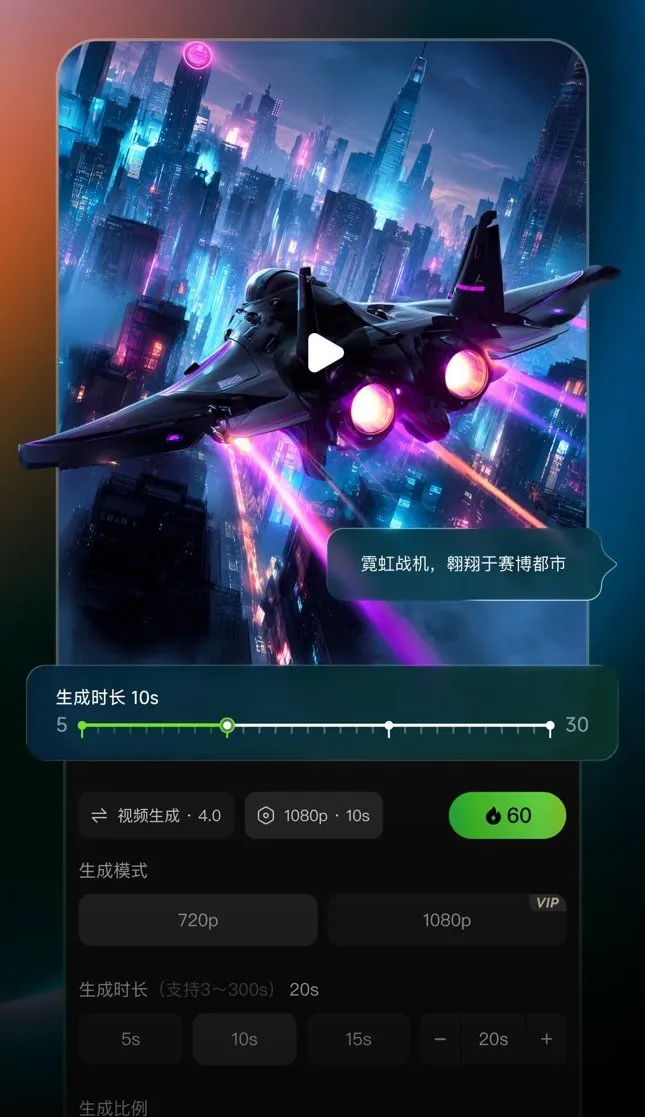
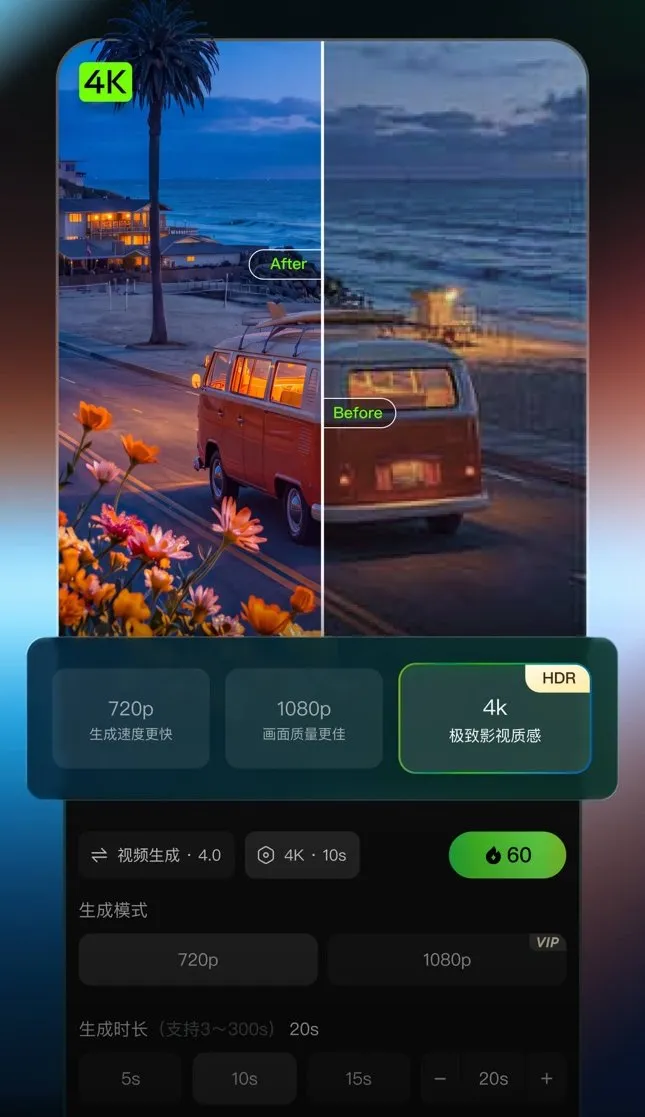
On the app’s home screen tap Create (or Video Generation in the web app’s left bar) and switch the model to Video Generation 4.0. The panel then offers resolution (720p or 1080p; 1080p is marked VIP), length and aspect ratio, and the green button at the bottom right shows how many credits the clip will cost.
The headline change in 4.0 is length: 3.0 tops out at 15 seconds, 4.0 makes up to 30 natively (adjustable from 3 to 30). A one-minute film used to mean stitching four clips and matching light and positions at every seam; now two will do. The prompt limit rises to 8,000 tokens, enough for a full page of shot notes.
What testers found:
- Guangzi Xingqiu shot a 30-second chase through snowy back streets. The lead’s hair, clothes and face stayed the same throughout; nobody turned into someone else halfway. But actions were simplified: vaulting a bicycle became stepping over it, and bursting through a gate became walking through an open one. Their reading: the model protects the continuity of the scene rather than executing every verb.
- A writer on SMZDM who “burned tens of thousands of credits” testing it noticed a cardboard box deform when a running man landed on it, and said of a fight in a lift that “you can tell what each person is doing and why they do the next thing”.
- Sina Finance tested a sports car escaping an exploding street and a man fighting a robot, and found that “the punches finally have weight”.
Prompting advice from ifanr’s APPSO team: use camera terms such as “single continuous tracking shot” or “jump cut”; name a director or film stock for the look; give one action per sentence, in order.
Animating a picture, or pinning the first and last frame
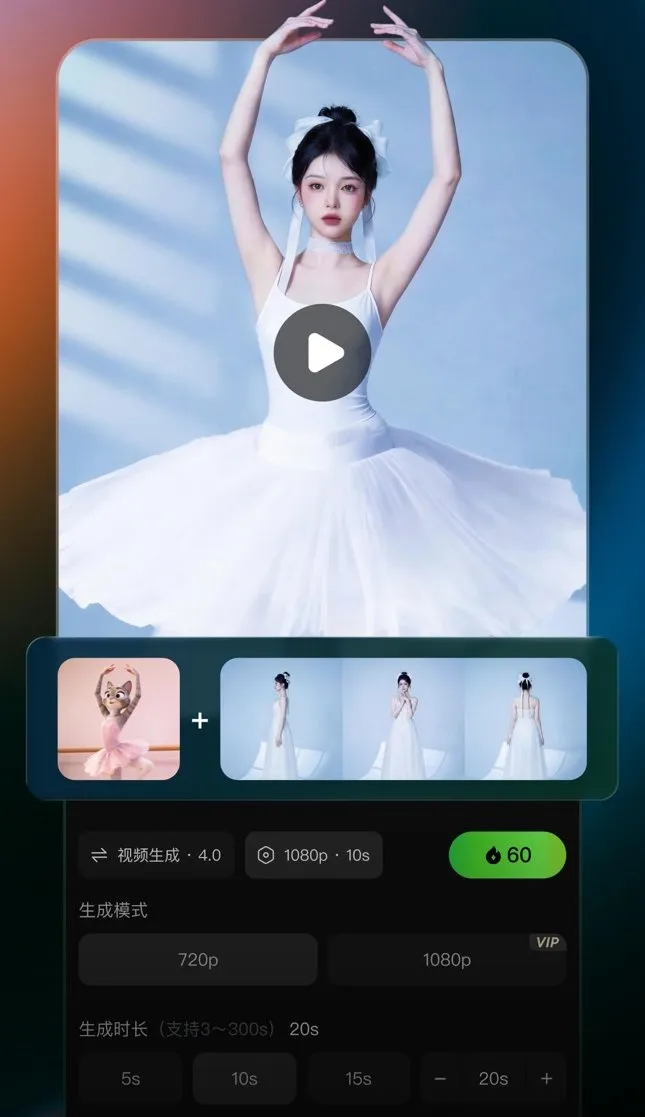
Image-to-video is where Kling started and still what many people use most: upload a picture, write “she turns towards the camera as the wind lifts her hair”, and it moves.
- First and last frame: give the opening and closing frames and let the model fill in between. 4.0 widens this into multiple keyframes, up to 10 (see the next section).
- Motion Control: a character image plus a 3–30-second reference video, and the character copies the body movement, gestures and expressions. Many of the AI dance videos online are made this way.
- Motion Brush: introduced with version 1.5 in September 2024, it lets you draw the path an object should move along. In 4.0’s new creation page the main controls are keyframes and reference assets, and we could not confirm whether Motion Brush works with 4.0.
- Extend: continue a clip. The App Store description says extending can reach 3 minutes; 4.0’s two-minute extension is marked “coming soon”.
One character across several scenes: Omni Reference and keyframes
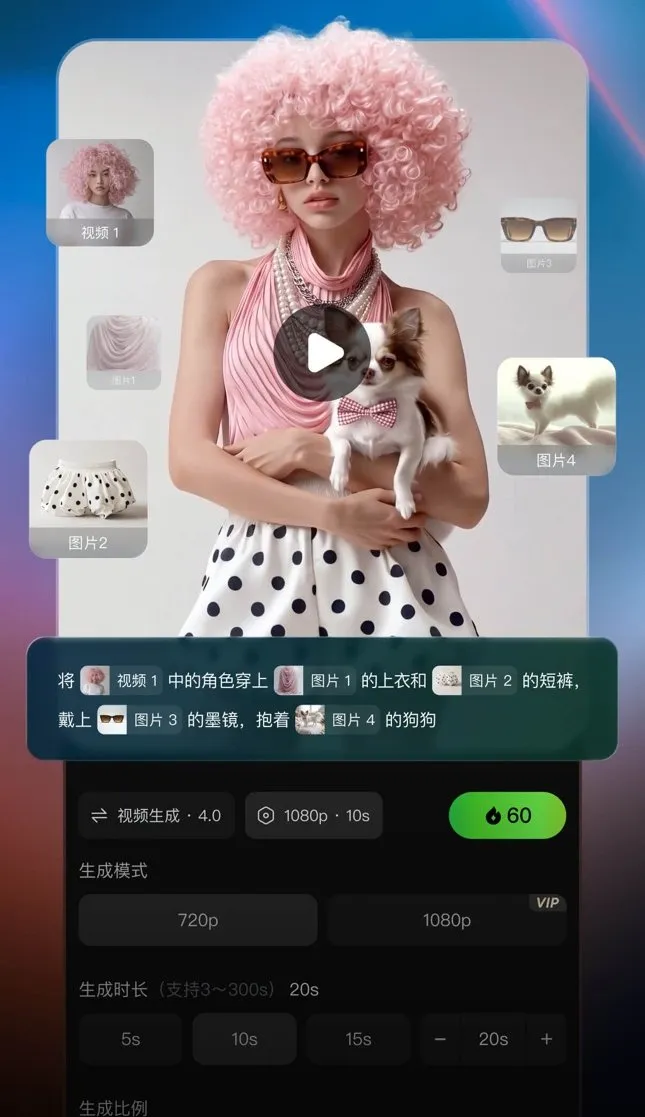
The hardest part of an AI drama is keeping a face the same when the scene changes. Kling’s answer is Omni Reference: up to 15 assets per task, of which up to 10 images, 5 videos and 7 subjects. You refer to them by name in the prompt, for example “dress the person in Video 1 in the top from Image 1 and the shorts from Image 2”.
You can feed it character turnarounds, grid sheets, storyboard sketches, untextured 3D (“white model”) videos and depth-map videos. Reference video sets movement and camera; reference images set faces and costumes. ifanr’s advice is to spell out that division: say a reference clip “only supplies physical movement and camera rhythm”, and that faces and clothes “must come strictly from a given image”, or unwanted things from the source clip creep in.
Keyframes make the biggest difference. Guangzi Xingqiu tested a woman ageing from 16 to 80. With ten keyframes, one per age, the model used them all in order and moved smoothly between them. With only a picture of her at 16, the early stages changed little but clothes, and then she jumped abruptly to old age. The practical lesson: fix the key moments yourself and let the model fill the gaps.
Dialogue, dialects and lip-sync
Since version 2.6 in December 2025, Kling makes picture and sound together: dialogue, narration, effects and ambience. 4.0 speaks Chinese, English, Japanese, Korean, Spanish, Portuguese, German, French and Hindi among others, plus Beijing, Taiwanese, Northeastern and Sichuan accents, Cantonese, and American, British and Indian English.
- Dialogue: Guangzi Xingqiu generated the same lines in Northeastern dialect and in Cantonese; “lines and lips matched word for word, with no swallowed, wrong or mixed-up words”. ifanr’s Cantonese test also found the lip-sync “extremely accurate”.
- Ambient sound: in the same test, a bathhouse attendant shouting on the left and a television on the right barely came through, and the left-right placement was unclear. If the sound is the point, generate it separately and mix it afterwards.
- Avatars: if you only need a person to speak or sing to an audio track, the avatar feature is more direct. Avatar 2.0 (December 2025) turns one portrait and an audio file into up to five minutes of video.
Write the speaker, tone and accent together with the line, e.g. “the father, tired, says in Cantonese: …”.
Editing a clip you already have
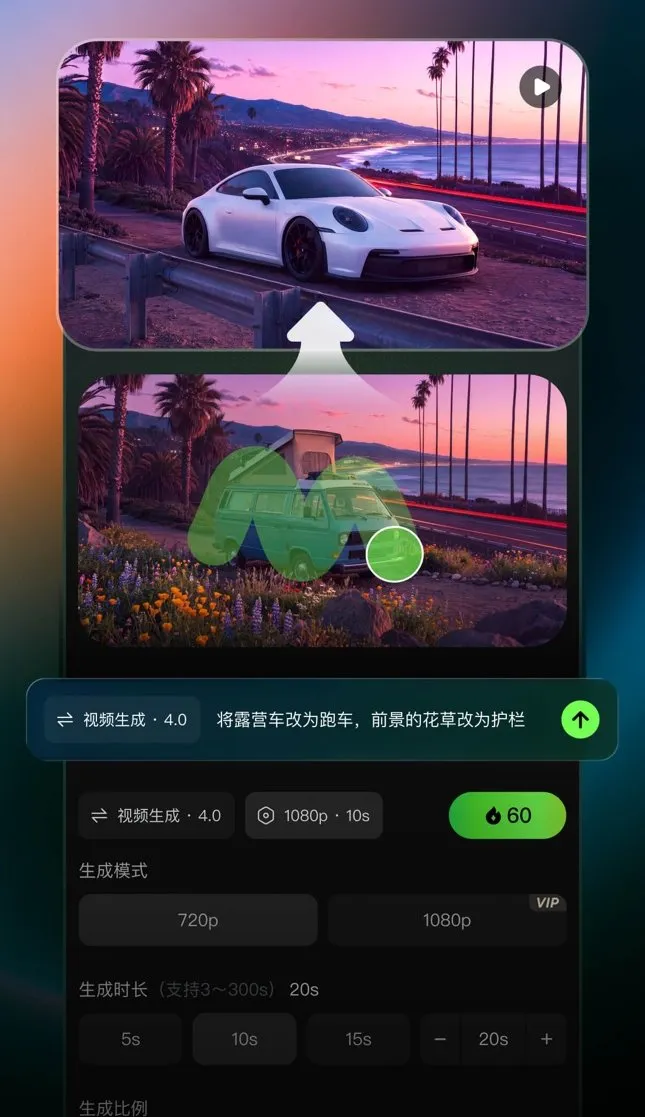
It used to be that a clip you didn’t like had to be generated again from scratch. Now you can upload a video and ask in words to add, replace or remove people and objects, or change the weather, colour, materials or overall style, leaving the rest as it was. This began with the O1 model in December 2025; in 4.0 it is called precise editing.
Guangzi Xingqiu stress-tested it on an 11-second drama clip with four requests at once: remove a watermark and English subtitles but keep the Chinese ones, add a customer reading a newspaper, replace an actress, and turn day into a rainy cyberpunk night. All four were carried out; the watermark and English subtitles vanished cleanly and the Chinese subtitles were untouched. But the added customer looked pasted in and the background jumped during the style change. Their advice: split the edits, people and text first, then background and grade.
“Creative remix” is the other use: take a successful video as reference, borrow its pacing and shots, and swap in your own product or character.
Which model: expensive for finals, cheap for drafts
Kling’s model list is long because old models stay available. These are the ones that matter:
Kling's main models
The current flagship. 3–30 seconds per clip, up to 10 keyframes and 15 reference assets, stereo sound, precise editing. Kling says 10-bit HDR at 4K and 1080p is coming soon.
- Use it for
- Final shots for delivery, long takes, scenes with several characters
- Example
- The character from Image 1 is chased through the old street in Image 2, knocks over a fruit stall; the camera tracks him all the way.
- Limits
- Kling hasn't published 4.0's credit cost per second; no API yet.
Faster and cheaper: 3–20 seconds at 720p in standard dynamic range (8-bit SDR). Text-to-video, image-to-video and Omni Reference.
- Use it for
- Trying out action, framing and pacing before committing to 4.0
- Example
- Run five versions of the opening shot in Flash, pick one, then remake it in 4.0.
- Limits
- Since 28 September only for Ultra (China: Black Gold) annual subscribers. Early users report about 6 credits a second at 720p, an unofficial figure. A Bilibili tester said it 'still sometimes gets positions wrong, and the sound isn't very stable'.
The previous workhorse. 3–15 seconds, native audio, storyboards of up to 6 shots, 4K. Omni can use video as reference and bind a voice to a character.
- Use it for
- API users, or when you need a published price to budget against
- Example
- Three shots: a wide of the city, a medium of her walking into a café, a close-up as she looks up and smiles.
- Limits
- International: 6 credits a second (720p, silent) up to 30 (4K).
Text-to-image and image-to-image, native 4K, and sets of pictures in a consistent style.
- Use it for
- Character sheets, turnarounds and storyboard frames before you animate
- Example
- Front, side and back views of the same girl in a cyberpunk jacket on a white background.
- Limits
- Cheap per image, so iterate here before spending video credits.
Sources: Kuaishou press release (2026-10-16), Sina Finance (2026-10-16), Kling AI llms.txt, SMZDM (2026-10-04)
A thrifty workflow several testers use: lock characters and key frames in Image 3.0, test motion in Flash, then make the final in 4.0.
How credits work and what they cost
Everything on Kling costs credits (called 灵感值, “inspiration points”, in China). How many depends on model, resolution, length and whether sound is on. Taking 3.0 on the international site: 6 credits a second at 720p without sound, 12 at 1080p with sound, 30 at 4K, so a 10-second 1080p clip with sound costs 120. Kling’s llms.txt says failed generations don’t use credits.
| Plan | China (App Store price) | International (renewal / yearly) | International credits a month |
|---|---|---|---|
| Free | ¥0 | $0 | No fixed monthly credits; daily login bonus |
| Gold / Standard | ¥66 a month; week pass ¥8–10 | $8.80 ($6.99 first month) / $79.20 | 660 |
| Platinum / Pro | ¥268 a month | $32.56 / $293.04 | 3,000 |
| Diamond / Premier | See the app | $80.96 / $728.64 | 8,000 |
| Black Gold / Ultra | See the app | $159.99 / $1,429.99 | 26,000 |
Rules that catch people out (paid-service agreement and Kling’s own notes):
- Plan credits expire after a month and don’t roll over; credits bought separately last two years. In China 100 credits cost ¥10; internationally $5 buys 330.
- Free accounts: Kling doesn’t publish the daily amount; several reviews and users report 66 a day, reset every 24 hours. Free output is watermarked and not for commercial use; on the international site it makes one video per generation (paid plans make four) and has no 1080p or 4K.
- 4.0 Flash is currently for the top annual tier only: the international membership page says to upgrade to Ultra annual for early access; in China it is the Black Gold annual card.
- Internationally there’s a $1.19 one-week Standard pass with 80 credits, watermark removal and commercial use, a cheap way to test properly.
Which to choose: if you’re curious, use the free credits to finish one idea. A few short videos a month: Gold/Standard. Client work or daily output: Platinum/Pro and up. Yearly billing is a third cheaper, but spend a month learning your own reject rate first.
Queues, failures and rejects: the real cost
Users complain less about quality than about waiting and cost.
- The free queue: eesel’s round-up of Reddit and Trustpilot reviews says free users can wait hours for one five-second clip; one user on X wrote that whatever time they tried, the free queue was “busy”. Paid plans get fast-track generation, usually a few minutes.
- Stuck at 99%: several users describe jobs reaching 99% and then failing. Kling says failures don’t cost credits, but the wait is wasted. A one-star review on the Chinese App Store says videos “never get born… unless you pay”.
- Reject rate: SMZDM collected bills posted on Xiaohongshu: “30 seconds cost me over ¥300”, “one 20-second video, ¥38”. The author’s formula is price per second × length × number of retakes, with three to five retakes common for narrative work.
- Expiring credits: posts like “20,000 Black Gold credits left and they reset in five days” come up regularly. Don’t stockpile at the start of the month.
Against Dreamina, Hailuo and Veo
The best like-for-like data is Artificial Analysis’s blind-vote leaderboard (October 2026, text-to-video with audio). 4.0 isn’t listed yet; Kling 3.0 Omni is 15th and 3.0 is 16th, while ByteDance’s Dreamina Seedance 2.5 is 3rd, MiniMax (Hailuo) H3 4th and Google’s Veo 3.1 19th. On the image-to-video board, MiniMax H3 and Seedance 2.5 are also the top two and Kling 3.0 Omni is 17th. Before 4.0, then, Kling already trailed the newest models from Dreamina and Hailuo in blind tests.
Blind tests judge single short clips, though, and Kling sells control: 10 keyframes, 15 references, 30 seconds and precise editing are what save retakes in a continuous story. The Bilibili comparisons SMZDM quotes go both ways, from “Kling wins outright” to doubts that it can replace Seedance.
On price, international Standard is $8.80 a month for 660 credits; Runway’s Standard is $15 a month for 625 credits, about 52 seconds of Gen-4.5 (Creatify, checked in August). Kling is cheaper to start, but at 4K and on 4.0 a direct comparison isn’t possible yet because 4.0’s price hasn’t been published.
Content rules and where your data goes
- Censorship: the Chinese user agreement bans political propaganda, pornography, violence and more. TechCrunch’s 2024 test of the international sign-up found that prompts naming Chinese leaders or sensitive events simply return an error.
- AI labels and watermarks: under the agreement, non-members may not remove the Kling AI watermark, and AI-generated content must carry the required labels, which you may not strip.
- Storage: the Chinese privacy policy says personal information is stored in China. Uploaded material (including faces) and outputs are kept so you can reuse them from your history; delete them in the generation history and they are no longer stored.
- Training: the policy says de-identified data and outputs “may” be used to improve the models. It mentions no in-app switch; to withdraw consent, email kling@kuaishou.com.
- Fakes: in May 2025 fake Kling Facebook ads and websites spread information-stealing malware. Download only from the official site and app stores.
Kuaishou, Kling and the model names
| Name | What it is |
|---|---|
| Kuaishou | The company, listed in Hong Kong; Kling’s controlling owner |
| Kling AI (可灵) | The product: website and apps. Raised nearly $3 billion on its own in July 2026, at a valuation of about $18 billion |
| Chinese and international versions | The Chinese app is run by Beijing Kwai Technology; the international app, “Kling AI: AI Image&Video Maker”, by KLING AI PTE. LTD. in Singapore. Accounts and prices are separate |
| Kling 4.0, 3.0, O1 | Model names. “Omni” means a version that takes image, video and audio references together |
| Omni Reference, Motion Control, Avatar, Canvas | Feature names. Canvas includes an agent that helps write scripts and storyboards |
| Kling API, MCP / CLI | For developers and AI agents, billed per second, separate from plan credits |
Kling’s models are also sold through third-party platforms such as fal, and Adobe says Kling 4.0 and 4.0 Flash are coming to Firefly. The AI gift effects in Kuaishou’s live streams are built on Kling too.
Getting started
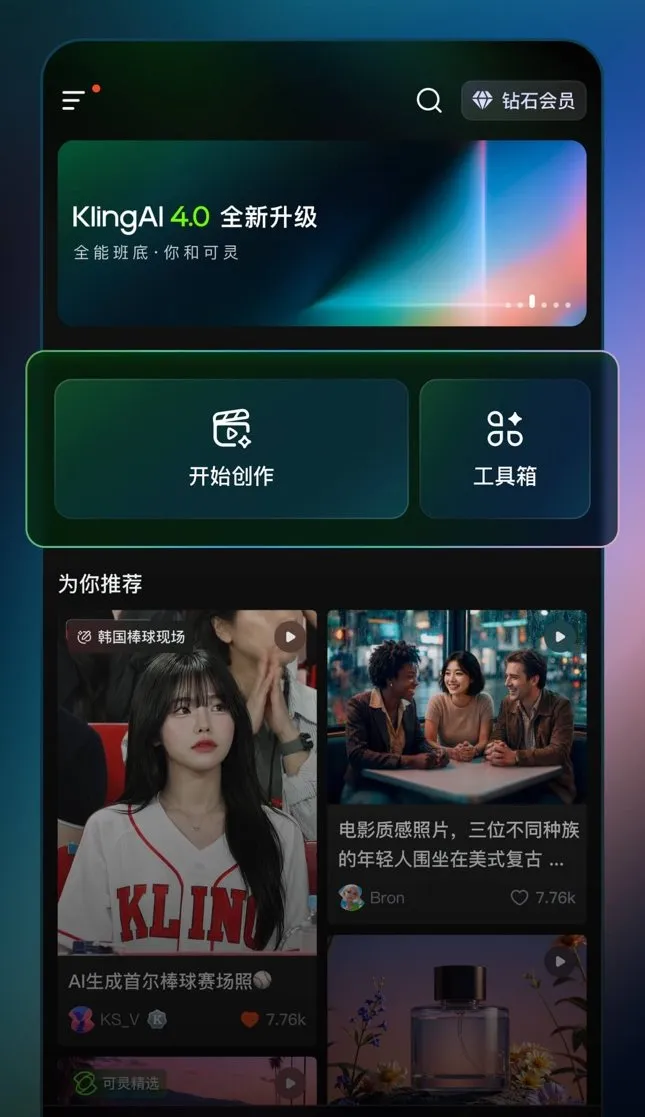
- In China, search for 可灵AI in your app store or open app.klingai.com/cn; elsewhere, use kling.ai or the “Kling AI” app.
- After signing in, check your credit balance and whether today’s bonus has arrived.
- Test prompts at 720p, 5 seconds, on a cheaper model; switch to 4.0 and 1080p once you’re happy.
- If you don’t want your data used for training, email kling@kuaishou.com.
A rooftop basketball court at dusk. A player beats his defender with a few moves and hits a step-back jumper. As he shoots, the camera swings behind him and follows the ball's high arc into the net, which flicks up. Low sun behind, city skyline in the background.
An old Hong Kong diner, warm yellow light, film grain. A fifty-year-old father puts down his chopsticks and says wearily in Cantonese: "Ten-odd years, and they shut it just like that." The mother stops and runs a finger round the rim of her bowl. Static camera, medium shot.
Use the person in Image 1 and the street in Image 2: he looks back over his shoulder on the rainy street at night, then hurries into an alley. The images set only his face, clothes and the location; take the action and camera from this text.
Recent changes
- Kling 4.0 fully available: 30-second clips, 10 keyframes, 15 reference assets
- Kling 4.0 Flash opens to a small group, starting with Ultra annual subscribers
- Kuaishou results: Kling revenue above ¥850 million in Q2; nearly $3 billion raised in July
- Kling 3.0 generates native 4K video
- Kling 3.0 family: 15-second clips, multilingual native audio, multi-shot storyboards
- Kling 2.6 generates picture and sound together for the first time
- O1 multimodal model lets you edit an existing video with text
Compared with similar products
| Product | Price | What it is |
|---|---|---|
| Dreamina 即梦ByteDance · handbook | Daily credits in China, about one 8-second video; watermarked; China ¥69 / ¥199 / ¥499 a month; Dreamina Basic about $15 a month | ByteDance's AI image and video maker: turn a sentence or a few reference pictures into images, videos up to 30 seconds and talking avatars. In China it is called Jimeng (即梦); elsewhere, Dreamina. |
| Hailuo 海螺 AIMiniMax · handbook | One-off trial credits for new accounts (about 150), watermarked, one task at a time; International $10.50 / $38 / $89 / $216 a month; China ¥65 / ¥243 / ¥1,399 a month | MiniMax's AI video tool: from a sentence, a picture, or a pile of images, clips and audio, it makes 2K videos of up to 15 seconds with stereo sound, and it also makes and edits pictures. |
| Kling 可灵Kuaishou · handbook | No fixed monthly credits, daily login bonus; watermarked, no commercial use; China ¥66 / ¥268 a month; international $8.80–$159.99 a month | Kuaishou's AI video generator: turn a paragraph or a few pictures into video with dialogue and sound; the newest model, Kling 4.0, makes up to 30 seconds in one go. |
| RunwayRunway · handbook | 125 one-off credits, watermarked; $15 / $35 / $95 a month ($12 / $28 / $76 billed yearly); Team $69 per seat | The New York company's AI video tool: it turns text and images into video, edits footage you already have from a single sentence, and puts Kling, Veo, Seedance and other companies' models in the same account. |
| Google Veo and FlowGoogle DeepMind · handbook | 50 Flow credits a day without a plan; video may be unavailable at peak times; Google AI Plus $4.99 / Pro $19.99 / Ultra $99.99 or $199.99 a month | Google's AI video tools: in the Flow web studio you generate short clips with sound using Veo 3.1 or the newer Gemini Omni, then string them into scenes; the same models also sit in the Gemini app, YouTube Shorts and the API. |
Sources
- Kling AI · llms.txt (plans, API prices, model notes)
- Kling AI · International home page
- App Store (China) · 可灵AI, version 3.9.10, with in-app prices
- App Store (US) · Kling AI: AI Image&Video Maker
- Kling AI (China) · Privacy policy (in force 2026-03-11)
- Kling AI (China) · User agreement (2026-06-24)
- Kling AI (China) · Paid-service agreement (in force 2025-12-05)
- Kuaishou via Yahoo Finance (GlobeNewswire) · Kling 4.0 officially launches (2026-10-16)
- Kling AI via Manila Times (GlobeNewswire) · Kling 4.0 launches globally (2026-10-16)
- ScriptByAI · Kling AI timeline (2026-10-15)
- fal · What is Kling 4.0 (2026-09-29)
- ifanr · First hands-on with Kling 4.0 (2026-09-29)
- Guangzi Xingqiu via NetEase · Kling 4.0 tested: long takes hold, but the AI director hasn't graduated (2026-10-16)
- Sina Finance · Kling 4.0 goes after professional users (2026-10-16)
- SMZDM · Kling 4.0 launches with 30-second single takes (2026-10-16)
- SMZDM · Kling 4.0 in October: the real cost of AI video isn't the per-second price (2026-10-04)
- Beijing Daily (bjd.com.cn) · Kling revenue up more than 200% (2026-08-19)
- Artificial Analysis · Text-to-video and image-to-video leaderboards (October 2026)
- CamClo · Kling AI pricing 2026 (2026-09-29)
- AIREITER · Kling AI Free Tier 2026 (2026-07-08)
- eesel · Kling AI reviews (updated 2026-10-06)
- TechCrunch · A new Chinese video-generating model appears to be censoring politically sensitive topics (2024-07-24)
- Creatify · Runway pricing 2026 (checked August 2026)
- Wikipedia · Kling AI
- Kling AI