Hailuo 海螺 AI
By MiniMax · hailuoai.video ↗ · Checked 18 Oct 2026
MiniMax's AI video tool: from a sentence, a picture, or a pile of images, clips and audio, it makes 2K videos of up to 15 seconds with stereo sound, and it also makes and edits pictures.
Verdict
Hailuo's main model, MiniMax H3, ranks near the top of blind-vote leaderboards and is among the cheapest per second of 2K video; Omni Reference lets you feed in a person, a movement and a voice at once, which suits ads, animated posters and shots with text in them. It stops at 15 seconds with no 4K, complex camera instructions sometimes go astray, and while failed renders are free, a clip that moves the wrong way still costs you. The biggest traps are in the billing: free credits come once, plan prices keep changing, and the international terms give MiniMax a perpetual licence to your work.
Use it if
- Anyone making short e-commerce or brand ads who wants a poster or product shot to move, with text and sound
- Creators who need the same character to look the same across shots and have reference images or clips
- Small teams who budget by the second and need lots of 2K footage
- Developers who want to run an open video model themselves (H3 has open weights)
Use something else if
- Single takes over 15 seconds, or 4K: use Kling 4.0 (30 seconds, 4K) or Dreamina's Seedance 2.5
- A few free clips every day: Hailuo no longer gives daily credits; Doubao and Dreamina do
- Precise complex camera work and long stories: Seedance 2.0/2.5 follows instructions more reliably, and Kling has keyframes and multi-shot
- iPhone users outside China: the international app can't be found on the US, UK, Singapore or Japan App Store; use the web or Android
- Free plan
- One-off trial credits for new accounts (about 150), watermarked, one task at a time
- Paid
- International $10.50 / $38 / $89 / $216 a month; China ¥65 / ¥243 / ¥1,399 a month
- Where
- Web at hailuoai.video (international) and hailuoai.com (China); iOS and Android apps in China, Android app abroad
- Models
- Video: MiniMax H3 (Hailuo 3.0), H3 Max, Hailuo 2.3; also third-party models such as Seedance 2.0, Veo 3.1 and Nano Banana Pro
- One clip
- H3: 4–15 seconds, 768p or 2K, 24 fps, native stereo; Hailuo 2.3: 6 or 10 seconds, up to 1080p
- Operator
- China: Shanghai Jizhi Wujie Technology; abroad: Nanonoble Pte. Ltd., Singapore; both MiniMax
- Data
- Chinese data stays in China and may train models once de-identified; the international terms grant the platform a perpetual licence to your work
- Ratings
- China App Store 4.8 (18,000 ratings); international Google Play 3.2 (87,500 reviews)
Hailuo AI is the video generator from MiniMax, a Shanghai AI company. On user numbers it has always trailed Kling and Dreamina, but MiniMax H3, released at the end of July 2026, put it back among the best on picture quality: up to 15 seconds, 2K, picture and stereo sound generated together, and cheaper per second than most rivals.
It is good for ads, product clips and animated posters, less so for long stories. The table below sums up the official material, media tests, forums and app-store reviews; each row links to its section.
What to give it, and what not to
| What you want | How | Free plan | How it goes |
|---|---|---|---|
| A short video from a sentence or a picture | Home → Create Video, pick H3 | One-off trial credits, about two 5-second 2K clips | Near the top of blind tests; every run differs, so expect retries |
| Keep a character, movement or voice consistent across shots | Home → Omni Reference, up to 12 files | Trial credits work | H3's strongest feature; complex instructions sometimes drift |
| Set the camera move | Camera button under the prompt box, or write it in the prompt | Yes | Presets work well; written complex moves are less reliable than Seedance |
| Edit photos, use templates | Create Image, AI magic tools | Partly | Handy, but images aren't its strength |
| Over 15 seconds, 4K, long stories | — | — | Can't; use Kling or Dreamina |
| Run it yourself | Download the H3 base weights from Hugging Face | Free download | 768p only; the 2K module isn't open |
MiniMax, Hailuo and H3: three different things
The names get mixed up. MiniMax is the company, Hailuo AI is its video and image app and website, and H3 is the main model inside Hailuo today.
| Name | What it is | How it relates to Hailuo |
|---|---|---|
| MiniMax | Shanghai AI company, listed in Hong Kong in January 2026 | Makes Hailuo |
| Hailuo AI / 海螺 AI | Video and image app and website | China at hailuoai.com, international at hailuoai.video; separate accounts and prices |
| MiniMax H3 (Hailuo 3.0) | Video model from July 2026 | Hailuo’s main model; also on the API and as open weights |
| H3 Max | A version post-trained from H3’s open weights by fal, an AI inference company | Hailuo’s cheap draft model |
| Hailuo 02, 2.3 | The previous video models | Still selectable, priced per clip |
| MiniMax M3, Speech 2.8, Music 3.0 | Text, speech and music models | Speech and music are under Audio on the Hailuo website, with separate allowances |
| Talkie / Xingye, MiniMax Agent | Companion chat app, general agent app | Other MiniMax products; not shared with Hailuo |
Something many people miss: Hailuo doesn’t only run MiniMax’s models. The Chinese app’s own screenshots show ByteDance’s Seedance 2.0 Fast, and site banners have promoted Google’s Veo 3.1, Nano Banana Pro and OpenAI’s image models. These spend the same Hailuo credits, and the line-up changes often.
From a sentence or a picture: H3 does the heavy lifting
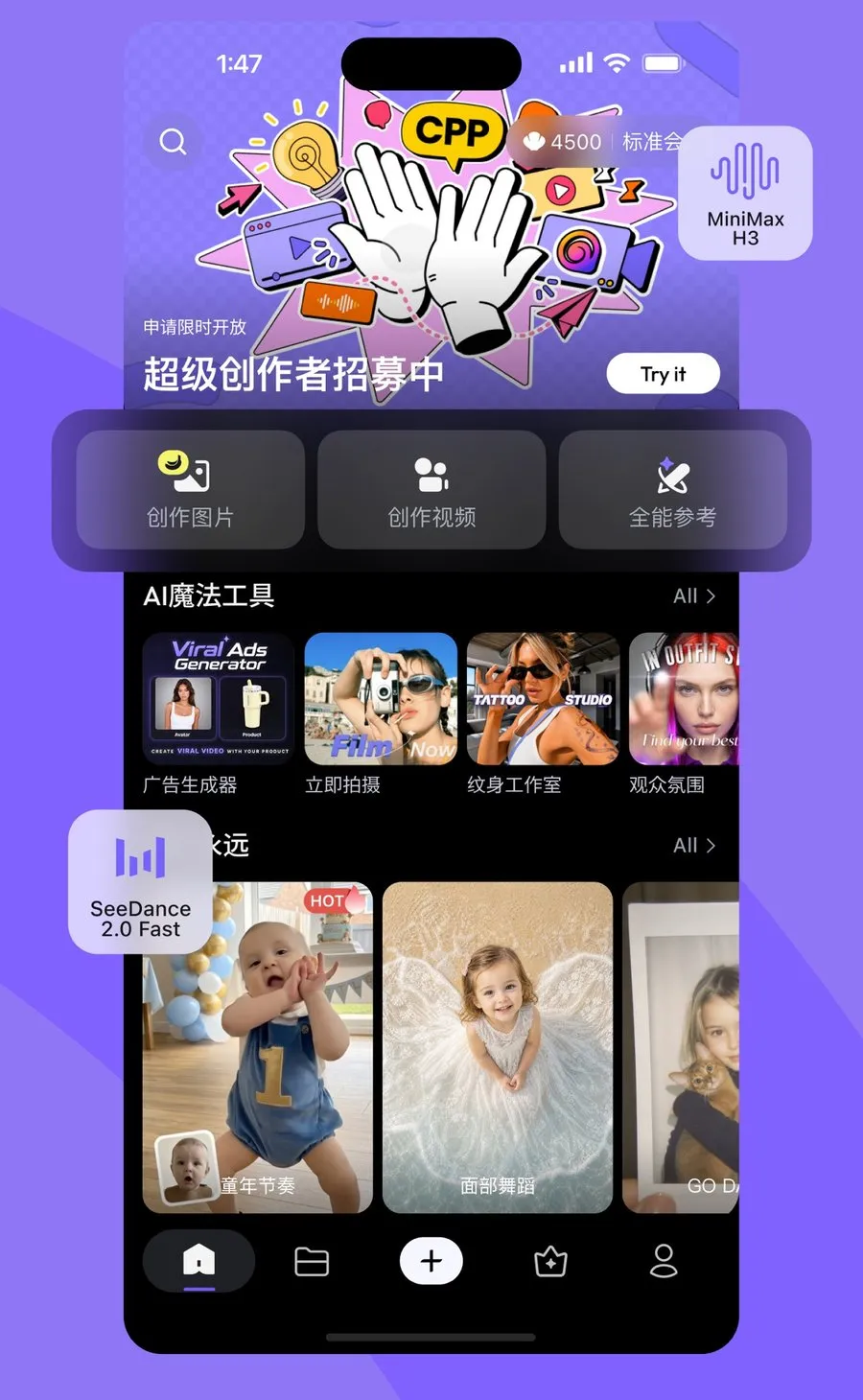
Tap Create Video on the home screen, choose MiniMax H3, write a description or upload an image as the first frame (you can give a first and a last frame), set length and resolution, and generate.
The official model card gives these specs:
- Length: 4 to 15 seconds, 5 by default.
- Resolution: 768 pixels on the short side by default. At 2K the model first makes 768p, then redraws it at 2K using the original inputs, so small text and detail come out cleaner than a plain upscale.
- Sound: stereo audio generated with the picture; dialogue is stable in 11 languages, including English, Chinese and Japanese.
- Aspect ratios: 21:9, 16:9, 4:3, 1:1, 3:4, 9:16 and more.
How does it do? A tester at Woshipm, a Chinese product-management site, fed in a still product poster with “have the model put on sunglasses and walk out of frame, slow push-in, electronic music beat”. The result was a 15-second 2K clip where “the reflections on the sunglasses, the model’s walk and the beat all lined up”; 2K renders took one to three minutes. He sees H3’s strength in text, logos and “visual packaging”, and quotes the blogger 数字生命卡兹克 that shots needing real intensity are weaker than Seedance.
AIVario’s October test adds a caution: the same prompt gives different motion and detail each time. “A generation is a draw, not a guarantee.”
On blind-vote leaderboards H3 is among the strongest. On Artificial Analysis’s October text-to-video-with-audio board it is 4th, just behind Dreamina’s Seedance 2.5, and the two share the top two places on image-to-video. On LMArena’s text-to-video board (18 October) H3 is 8th.
H3 Max only does 480p and 768p and takes no reference video, but it costs much less, so use it to test prompts. AIVario’s workflow: draft on H3 Max at 480p, then render the keeper on H3 at 2K.
Omni Reference: hand it faces, moves and voices at once
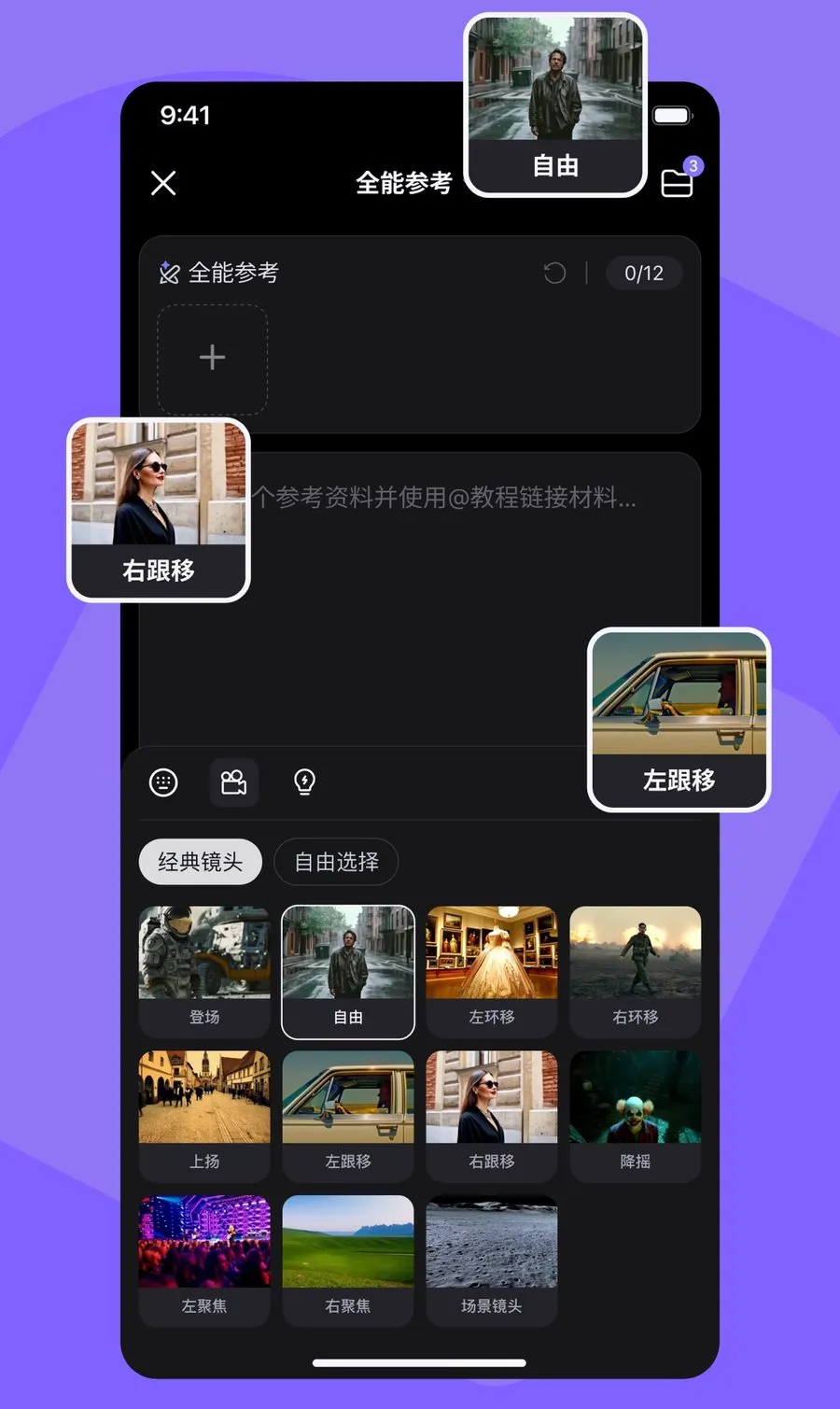
This is where H3 pulls away from other models. Tap Omni Reference on the home screen and upload up to 12 files: up to 9 images, 3 video clips (2–15 seconds each) and 3 audio clips. Then describe in words how they relate.
MiniMax’s launch post gives the example “Reference the Hitchcock camera movement from Video 1, have the character in Image 2 sing, with the vocals matching Audio 3.” No fixed upload slots; one sentence explaining the relationships is enough.
Tips from people who use it:
- Give it more than one image. The Woshipm tester found that adding the product shot, brand colour card, a reference clip and music together gave far more consistent results than a single picture.
- Edit before you regenerate. If a shot is 90% right but the background colour is wrong, write “change the background to warm grey, keep the person the same”. It costs less than a new run.
- Write picture and sound separately. Describe the shot, then a separate line such as “Audio: light electronic drums”.
The weak spot: a V2EX comparison post finds H3’s instruction following “a notch below” Seedance 2.0, with complex camera directions drifting (the author runs a Seedance reseller site, so weigh that).
Camera moves: pick a preset or just write it
On the Omni Reference or Create Video screen, a camera button under the prompt box opens Classic shots: entrance, orbit left and right, track left and right, rise, tilt down, focus left and right, establishing shot and more, each with a preview. Free selection lets you combine your own.
Older Hailuo had a dedicated camera model (T2V-01-Director) that took bracketed camera commands inside the text. Switch to a model that doesn’t support them and the page warns that the commands will be removed. With H3 the usual approach is to describe the move in words, or to upload a clip with the move you want in Omni Reference.
Photo edits and templates: the side business
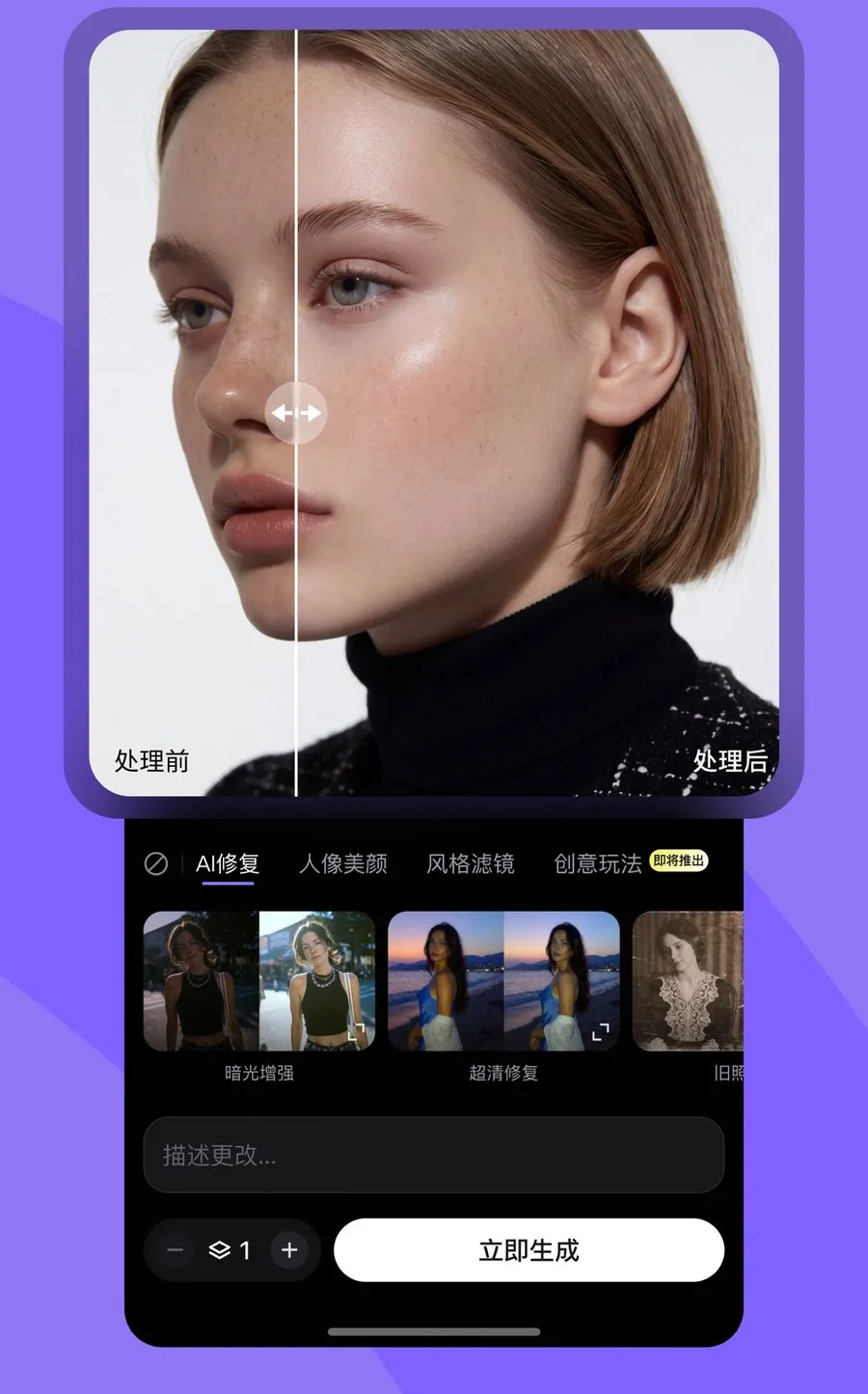
Create Image does text-to-image and edits, with ready-made effects such as low-light boost, sharpening and old-photo repair, or you type the change. Hailuo also offers third-party image models such as Nano Banana Pro and GPT Image, and annual members have at times been given unlimited use.
The AI magic tools and trending templates on the home screen are one-tap effects: upload a photo and apply an ad generator, a baby-dance clip or a family portrait. Fine for social posts, not for real production.

Dreamina and Doubao are stronger at pictures. In Hailuo, images are mainly for making first frames and references for video.
How credits go: charged by the second, retries included
Hailuo’s credits are called “shells” (贝壳) in China. H3 charges by the second, older models by the clip:
| Model | Cost | Example |
|---|---|---|
| H3 2K | about 12 credits a second | 60 credits for 5 seconds |
| H3 768p | about 7 credits a second | 70 credits for 10 seconds |
| H3 Max 480p | about 4 credits a second | 40 credits for 10 seconds |
| Hailuo 2.3 | per clip | 25 credits for 6 s at 768p, 80 for 6 s at 1080p, 50 for 10 s at 768p |
| Hailuo 2.3 Fast | per clip | 15 credits for 6 s at 768p |
The H3 rates are worked out from the seconds each plan is said to cover on the official pages; the older models’ costs come from the official FAQ as compiled by FrameSurfer.
Rules worth knowing:
- Failures are free; bad takes aren’t. The FAQ says failed generations cost nothing, but a clip that renders and moves the wrong way is charged in full.
- Plan credits expire. The Chinese purchase terms say unused plan credits are cleared when the membership period ends; bought credits last a year.
- No refunds. The Chinese terms say virtual goods are non-refundable; AIVario notes international subscriptions aren’t refundable either.
Plans abroad and in China: same credits, different prices
International (hailuoai.video, US dollars, checked by AIVario on 6 October and FrameSurfer on 24 September):
| Plan | Monthly | Yearly (per month) | Credits a month | About this much H3 at 2K |
|---|---|---|---|---|
| Free | 0 | 0 | about 150, once | two 5-second clips |
| Standard | $10.50 | $8.40 | 1,000 | 84 seconds |
| Pro | $38 | $30.40 | 4,500 | 375 seconds |
| Master | $89 | $71.20 | 10,500 | 875 seconds |
| Max | $216 | $184 | 27,000 | 2,250 seconds |
These are marked as discounts from $14.99, $54.99 and $119.99, and in mid-October the site was advertising plans “from $9.99”, so check the checkout page. Free and Standard run one task at a time, Pro and up two; paid plans remove the watermark, and Max includes unlimited Hailuo 2.0 and 2.3.
China (App Store in-app prices): Basic ¥65 a month or ¥619 a year, Standard ¥243 a month, Premium ¥1,399 a month. The per-second allowances on the Chinese site match the international 1,000, 4,500 and 27,000 credits. Extra shells cost ¥35 for 500 or ¥699 for 10,000.
Which one: spend the free credits on two clips first to see whether H3 suits your subject. For a few clips a month, Standard or Basic is enough; for dozens of 2K clips a week, look at Pro. Don’t pay for the third-party models bundled with a plan, because they can vanish: Hailuo’s plans still listed Sora 2 before OpenAI shut the Sora 2 API on 24 September.
The open H3: you can run it, but only at 768p
MiniMax put H3’s weights on Hugging Face (MiniMaxAI/MiniMax-H3), which is rare for a top video model. Huxiu reports more than 24 million downloads in three weeks and over 300 derived models, and Bilibili quickly filled with “runs on 8 GB of VRAM” bundles.
But an article on Tencent Cloud’s developer community says the “open” part needs unpacking:
- Only the H3 base model is open, and it outputs 768p. The module that redraws to 2K is “not yet open-sourced”, per the model card, so 2K means the API.
- The official serving example uses 4 GPUs; consumer cards work only with offloading and speed-up tricks, and slowly.
- The licence is MiniMax’s own community licence. According to FrameSurfer, commercial products with over $20 million in annual revenue need written permission and must show “MiniMax H3” in their interface.
Developers are better off with the API: H3 at 768p is $0.08 a second, at 2K $0.13 a second.
Against Kling, Dreamina and Veo
- Kling (Kuaishou): Kling 4.0 does 30 seconds per take, 4K and lots of keyframes, which suits continuous stories. On Artificial Analysis the Kling 3.0 models sit below 15th; 4.0 isn’t listed yet. AIVario says many creators use both: “Hailuo for faces, Kling for action.”
- Dreamina (ByteDance, 即梦 in China): Seedance 2.5 does 30 seconds per take with blind-test scores close to H3’s, and the Chinese version gives daily credits. Woshipm’s review puts it as Seedance for “shooting”, H3 for “post-production packaging”.
- Veo (Google): Veo 3.1 is 19th on Artificial Analysis; it makes sense if you already pay for a Google AI plan.
In short: on single-clip quality and price per second Hailuo competes well; for length, 4K or precise control, choose Kling or Dreamina.
Rights, data and billing: traps to know first
- You license your work to the platform. The international terms give MiniMax and its affiliates a “royalty-free, perpetual, irrevocable, worldwide” licence to use, modify, sublicense and earn from what you upload and generate. Keep unreleased commercial material out if that bothers you.
- Commercial use. The FAQ says any video you can download without a watermark can be used commercially, which means paying. Before removing a watermark you must confirm the content isn’t a deepfake.
- Training and data. The Chinese privacy policy (June 2025) stores data in China and allows inputs and outputs to be used for training once de-identified; there is no switch, and withdrawing consent means contacting support. The international service is run by a Singapore company and is closed to under-16s; for face photos uploaded in the mobile app, it promises to delete the photo and facial data after generation.
- Billing complaints. The international app has 3.2 stars on Google Play, with recent bad reviews about paid plans not activating, charges after cancelling and first prompts being rejected. On Trustpilot, one buyer of a yearly plan that came with 100 daily credits says the daily credits were removed mid-subscription. Screenshot the plan terms before you subscribe.
- No international iPhone app. It can’t be found on the US, UK, Singapore or Japan App Store, and an app called “Hailo AI” there is someone else’s lookalike. Use the website, or “Hailuo AI: Image&Video Maker” on Android.
The company: fast growth, still burning cash
MiniMax listed in Hong Kong on 9 January 2026 (code 00100) at HK$165 a share and closed its first day at HK$345. Revenue in the first half of 2026 was $116.6m, up 283%; consumer products such as Hailuo and Talkie brought in $42.6m, with Hailuo the main source of growth. The adjusted net loss was $293m, wider than a year earlier.
Investors have cooled: Huxiu counts the market value falling from a March peak of about HK$430bn to about HK$109.8bn after the August results, down 76% in five months. Huxiu also notes Hailuo’s monthly users remain “clearly behind” Kling and Dreamina. For users, that means prices and plans will keep moving.
Getting started
- In China, open hailuoai.com or search 海螺AI in the App Store or an Android store; elsewhere, open hailuoai.video. Sign in with a phone number or Google account.
- Use the free credits to test prompts on H3 Max at 480p, then switch to H3 for 2K.
- Before paying, read the price and renewal date on the checkout page.
(Upload a product poster as the first frame) Slow push-in, keep the text on the poster sharp, the product turns once in the centre of the frame, soft bokeh appears in the background. Audio: light electronic drums, with a crisp chime when the product faces the camera.
(Upload a portrait as Image 1 and a walking clip as Video 1) Have the person in Image 1 walk down a rain-soaked street with the movement from Video 1, camera tracking from the side, keeping their face and clothes unchanged.
Change the background to warm grey, keep the person and the movement the same.
Recent changes
- fal releases H3 Max, post-trained from the open weights; it later arrives in Hailuo as the cheap draft model
- MiniMax interim results: consumer products earn $42.6m, up 101%, with Hailuo the main driver
- International terms updated: users carry responsibility for AI-generated content
- MiniMax H3 launches: 15 seconds, 2K, native stereo, Omni Reference, with open base weights
- MiniMax lists in Hong Kong (00100); shares close 109% up on day one
- Hailuo 2.3 and 2.3 Fast released, with better body movement and expressions
Compared with similar products
| Product | Price | What it is |
|---|---|---|
| Dreamina 即梦ByteDance · handbook | Daily credits in China, about one 8-second video; watermarked; China ¥69 / ¥199 / ¥499 a month; Dreamina Basic about $15 a month | ByteDance's AI image and video maker: turn a sentence or a few reference pictures into images, videos up to 30 seconds and talking avatars. In China it is called Jimeng (即梦); elsewhere, Dreamina. |
| Hailuo 海螺 AIMiniMax · handbook | One-off trial credits for new accounts (about 150), watermarked, one task at a time; International $10.50 / $38 / $89 / $216 a month; China ¥65 / ¥243 / ¥1,399 a month | MiniMax's AI video tool: from a sentence, a picture, or a pile of images, clips and audio, it makes 2K videos of up to 15 seconds with stereo sound, and it also makes and edits pictures. |
| Kling 可灵Kuaishou · handbook | No fixed monthly credits, daily login bonus; watermarked, no commercial use; China ¥66 / ¥268 a month; international $8.80–$159.99 a month | Kuaishou's AI video generator: turn a paragraph or a few pictures into video with dialogue and sound; the newest model, Kling 4.0, makes up to 30 seconds in one go. |
| RunwayRunway · handbook | 125 one-off credits, watermarked; $15 / $35 / $95 a month ($12 / $28 / $76 billed yearly); Team $69 per seat | The New York company's AI video tool: it turns text and images into video, edits footage you already have from a single sentence, and puts Kling, Veo, Seedance and other companies' models in the same account. |
| Google Veo and FlowGoogle DeepMind · handbook | 50 Flow credits a day without a plan; video may be unavailable at peak times; Google AI Plus $4.99 / Pro $19.99 / Ultra $99.99 or $199.99 a month | Google's AI video tools: in the Flow web studio you generate short clips with sound using Veo 3.1 or the newer Gemini Omni, then string them into scenes; the same models also sit in the Gemini app, YouTube Shorts and the API. |
Sources
- MiniMax · MiniMax H3 launch post (2026-07-31)
- Hugging Face · MiniMaxAI/MiniMax-H3 model card
- MiniMax Open Platform · Release notes
- Hailuo AI · Subscription page (international)
- Hailuo AI · Subscription page (China)
- Hailuo AI · H3 open-source hub
- App Store · 海螺AI (version 2.18.0, with in-app prices)
- Google Play · Hailuo AI: Image&Video Maker
- Hailuo AI · Chinese privacy policy (updated 2025-06-18)
- Hailuo AI · Privacy Policy (updated 2026-09-07)
- Hailuo AI · Terms of Use (updated 2026-08-19)
- fal · Introducing H3 Max by fal (2026-08-27)
- AIVario · Hailuo AI review and pricing (2026-10-18)
- FrameSurfer · Hailuo AI Video in 2026 (2026-09-24, updated 10-13)
- Woshipm · MiniMax H3 hands-on (2026-08-01)
- Tencent Cloud Developer Community · What H3's open-sourcing really covers (2026-08-10)
- V2EX · Seedance 2.5 / H3 / Kling 3.0 notes (2026-08-06)
- Huxiu · MiniMax loses 76% of its market value in five months (2026-08)
- PR Newswire · MiniMax 2026 interim results (2026-08-26)
- eWeek · MiniMax's Hong Kong debut (2026-01-09)
- Trustpilot · Hailuo AI reviews
- Artificial Analysis · Video arena leaderboard (October 2026)
- LMArena leaderboard (text-to-video, 2026-10-18 data)
- Wikipedia: MiniMax