Midjourney
By Midjourney · www.midjourney.com ↗ · Checked 18 Oct 2026
A paid image generator that turns written descriptions into pictures with its signature polish; it can also edit images, copy a style from references and turn pictures into short video clips.
Verdict
If you want images that look good rather than merely correct, Midjourney is still the first choice: the same prompt comes out with more atmosphere, and style references, style codes and personalisation give the finest style control anywhere. The cost is no free trial, a $10 a month minimum, and weaker handling of complex instructions and lettering than GPT Image or Nano Banana. The big trap: your images are public by default, and only the $60-plus plans can hide them.
Use it if
- Designers and illustrators making concept art, poster backgrounds and mood boards
- Anyone who needs one consistent look across many images (style codes, personalisation, moodboards)
- Hobbyists happy to tweak parameters and pick from grids
- People who want a still image to move for a few seconds
Use something else if
- Legible text in the image or exact layouts: use GPT Image in ChatGPT or Nano Banana in Gemini
- A few free images now and then: Nano Banana and Dreamina have free allowances
- Companies that need clean commercial provenance: Adobe Firefly sells itself as commercially safe
- Users in mainland China without a foreign payment method: Jimeng (Dreamina) is easier
- Free plan
- No free trial
- Paid
- $10 / $30 / $60 / $120 a month; 20% off yearly
- Where
- Web (midjourney.com) and Discord; no official phone app apart from the anime-focused niji·journey
- Models
- Images: V8.2 by default (since July 2026); video: V1; anime: Niji 7
- Sign-in
- Discord or Google account
- Visibility
- Public by default; Stealth mode only on Pro and Mega
- Data
- Stored on US servers; delete from the account page, reversible for 7 days
- Region
- No official version for mainland China; billed in US dollars only
Midjourney is an image generator made by an independent American lab with no outside investors. You write a description of a scene and it gives you four images at once; you pick, upscale and change from there. It won’t chat with you the way ChatGPT does, and it is not great at exact instructions such as “put the red cup to the left of the blue box”. What it does well is give the same sentence better light, composition and texture.
In 2026 it went through two model versions (V8.1 and V8.2) and added an edit model you control with plain instructions. The summary below draws on the official help centre, the update log, press tests and court reporting; each section goes into detail.
Which jobs to give it
| What you want | How | Free plan | How it goes |
|---|---|---|---|
| Atmospheric concept art and poster backgrounds | Type a scene description in the 'What will you imagine?' box | No free plan | Its strength; the most polished look in the field |
| Keep one look across many images | Style reference --sref, personalisation --p, moodboards | — | The finest control anywhere, and its moat |
| Edit an image with instructions | Click 'Edit' on an image, or drag one to 'Attach to prompt' | — | V8.2 edit model is new and still being fixed weekly |
| Turn a picture into a short clip | Click 'Animate' on an image | — | Works, but only 480p/720p and 21 seconds max |
| Text in images, complex layouts | Put the words in double quotes | — | Better than before; still behind GPT Image and Nano Banana |
| Keep your images private | Turn on 'Stealth' in settings | — | Only on the $60-plus plans |
Web or Discord: one account, and the website is home
Midjourney began as a bot in the chat app Discord, where you typed /imagine. Today the main way in is the website, midjourney.com, where you sign in with a Discord or Google account. One subscription covers both, and settings are synced: switch to Relax on the web and Discord switches too.
The help centre’s comparison table makes it clear that most new things land on the web first:
- Web only: the editor, making images public or private after the fact, managing personalisation profiles, dragging in images as references.
- Easier on Discord: making images with others and chatting; custom Option Sets can only be created in Discord.
- Reference images: on the web you drag them in; on Discord you first upload the image to get a link, then paste it into the prompt.
The website’s social feature, Rooms, was removed in February 2026; Midjourney now points people to Discord for events and help. There is also an alpha site, alpha.midjourney.com, where new interfaces and features (shared folders, the ‘thinking’ rerun) are tried first.
There is no official Midjourney phone app, a point TechCrunch made when reporting the Co–Star purchase in July. On a phone, use the website in a browser.
V8.2 is the default: faster and more obedient than V7, with a harder look
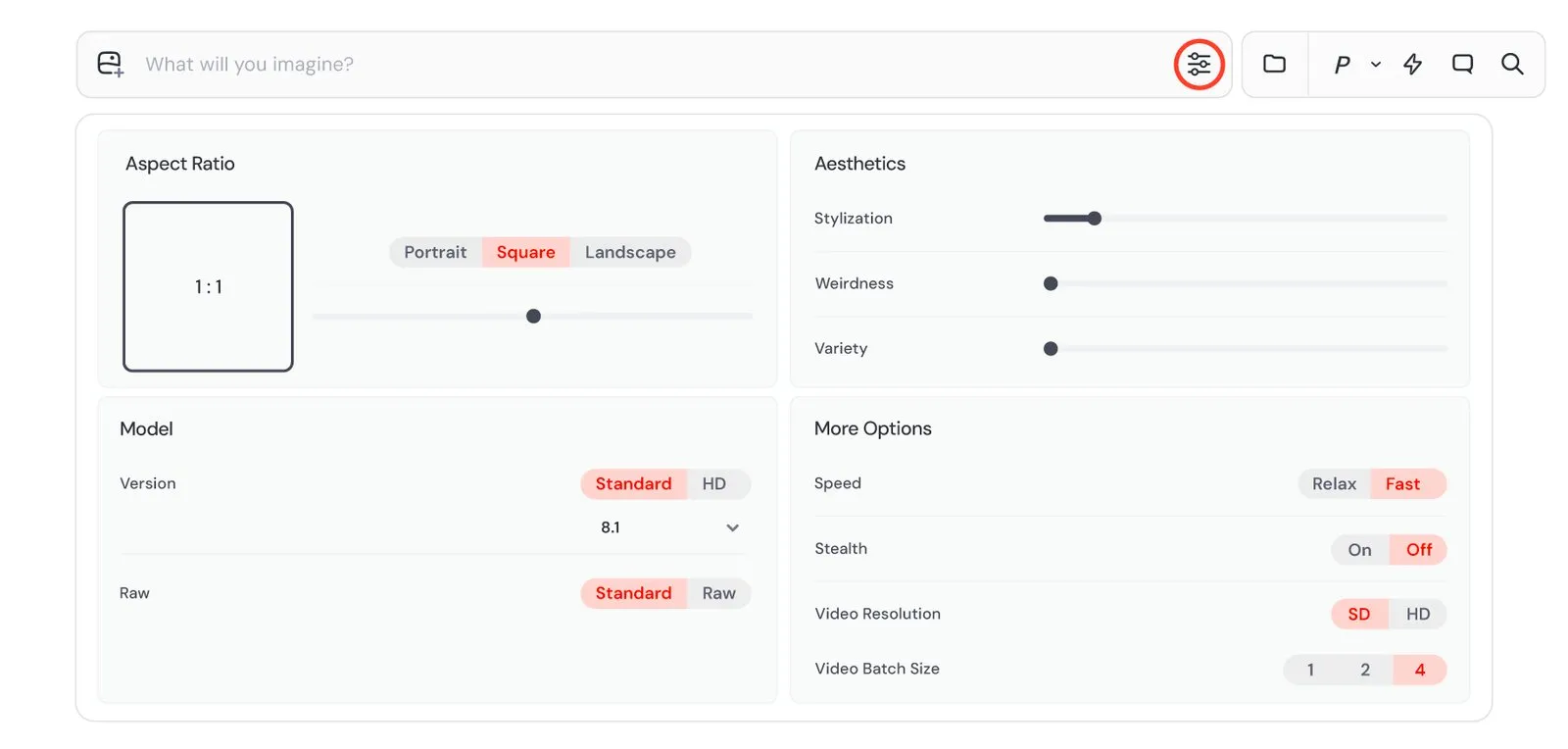
In Midjourney a “version” is the model. The help centre states that the current default is V8.2 (since 24 July 2026). The timeline:
- V8: launched on the alpha site on 17 March. Midjourney said it was about five times faster, followed detailed descriptions better and rendered text more reliably (if you put the words in quotes).
- V8.1: released in April and made the default on 10 June, replacing V7. It added HD mode, which renders 2K images directly without upscaling. Midjourney says standard images appear in 4 seconds and HD in 12.
- V8.2: the default since 24 July, focused on aesthetics and personalisation. Midjourney calls it “more creative, bold, sophisticated, edgy”, with far fewer random low-quality results.
Two things to know. First, the V8 family has a heavier default style than V7. When V8 launched, Midjourney itself advised switching to --raw straight away for photos or a more controlled look. Second, V8 is a pure diffusion model. The Decoder ran a tricky prompt (“a horse riding an astronaut”, not the other way round) and Midjourney did markedly worse than Nano Banana and GPT Image, which mix in autoregressive components; even Flux did slightly better.
Models you can pick
The current main model, with a stronger look and better personalisation. Supports the edit model and HD.
- Use it for
- Most of the time
- Example
- a lighthouse keeper's kitchen at dawn, steam rising from a kettle, film photo --ar 3:2
- Limits
- The default style is strong; add --raw to rein it in.
The previous default and the fastest; its look is closer to V7 than V8.2's.
- Use it for
- When V8.2 feels too loud, or for quickly trying many directions
- Example
- --v 8.1
- Limits
- Midjourney says Turbo mode doesn't support V8.1.
The default from June 2025 to June 2026. Omni Reference (--oref) and Retexture only work on V7 and earlier.
- Use it for
- Older projects that need a consistent look
- Example
- --v 7
- Limits
- Omni Reference costs twice the GPU time.
Makes 24 low-resolution images at once; click 'Vary' on the ones you like to render them properly.
- Use it for
- When you don't know the direction yet
- Example
- a ceramic tea set, product shot --draft --sref random
- Limits
- Costs half a standard job, but quality is low.
A model tuned for anime and East Asian styles, launched January 2026.
- Use it for
- Anime, manga-style illustration
- Example
- --niji 7
- Limits
- Has its own niji·journey phone app.
Sources: Midjourney Help Center (Version, Draft & Conversational Modes); update log, March to July 2026
Seven parameters people actually use
Parameters go at the end of the prompt, after a space, with two hyphens and no punctuation after them. The web settings panel has matching sliders; whatever you set there becomes your default, so you needn’t type them every time.
| Parameter | What it controls | Default and range | Example |
|---|---|---|---|
--ar |
Aspect ratio | 1:1 by default, up to 14:1 (4:1 in HD) | --ar 16:9 for a banner, --ar 9:16 for a phone screen |
--stylize / --s |
How much Midjourney adds its own flair | 100; 0–1000 | --s 50 sticks to the words; --s 600 gets artier |
--chaos / --c |
How different the four images are (called Variety on the web) | 0; 0–100 | --c 40 shows four directions at once |
--raw |
Turns off the automatic beautifying | off | Start with it for photo-like and product shots |
--sref |
Copies the style of an image or a style code | — | --sref 4041339372, or paste an image link |
--p |
Applies your personalisation profile | needs a profile first | --p for your default, --p profile-code for a specific one |
--no |
What to leave out | — | --no text, people |
Other common ones: --hd for 2K, --draft for draft mode, --stealth to keep one image private, --v 7 to go back a version.
The once-popular character reference --cref is now a legacy feature that only works on V6. Its V7 replacement, Omni Reference --oref, has in turn been replaced in V8.2 by the edit model (next section).
a quiet ramen shop in Kyoto at night, rain on the window, warm light, shot on 35mm film --ar 3:2 --s 250 --raw
Reference images: style, personalisation and the edit model
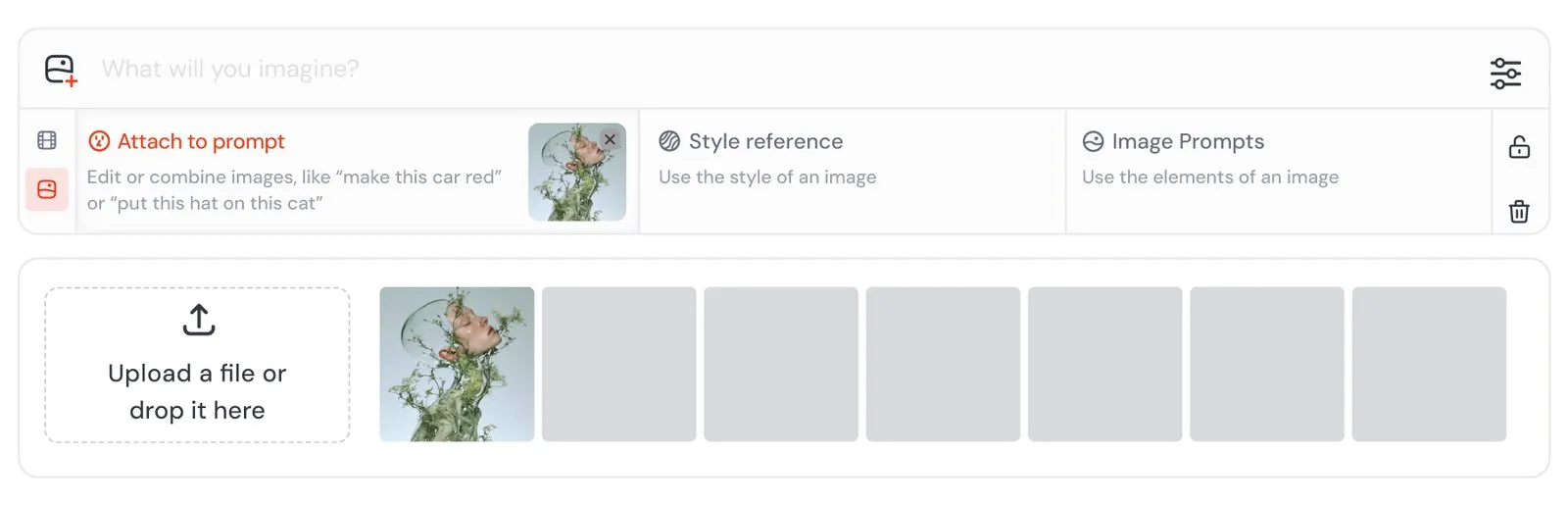
Midjourney’s biggest strength is precise control of style. Images dragged into the prompt box can do different jobs, and the wrong slot gives very different results:
- Attach to prompt (edit model): up to four images, with instructions such as “make this car red” or “put this hat on this cat”. From V8.2 it replaces Omni Reference and Character Reference for putting the same person or object in new scenes. If characters get mixed up, Midjourney suggests combining them into one reference image.
- Style reference: takes colour, medium, texture and light, not content. The help centre warns against prompts like “the look of this image but a dog”; just describe the content.
- Image Prompts: borrows elements and composition.
- Style codes: under Explore → Styles, click ‘Try Style’ on any style to use its numeric code. In draft mode,
--sref randomshows you 24 random styles at once.
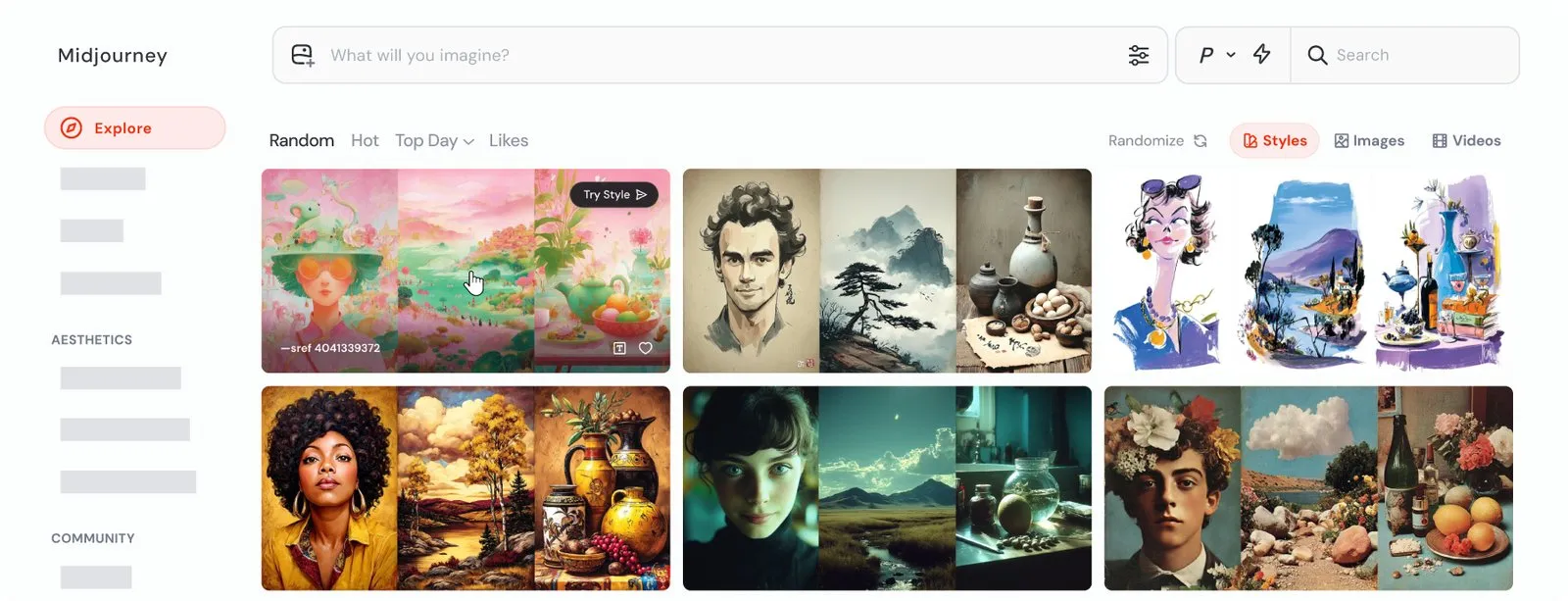
Personalisation teaches Midjourney your taste. On the Personalize page, keep picking images you like until the progress bar fills and your global profile is ready; then add --p to prompts. The help centre says there is no global V8 profile yet, but your global V7 profile works in V8.1 and V8.2. The V8.2 release notes say the more images you’ve picked, the better it understands you.
Moodboards are another form of personalisation: upload a set of images you chose and get a style code. They are broader than a style reference and good for describing a feeling.
Editing and video: the editor is solid, video is still V1
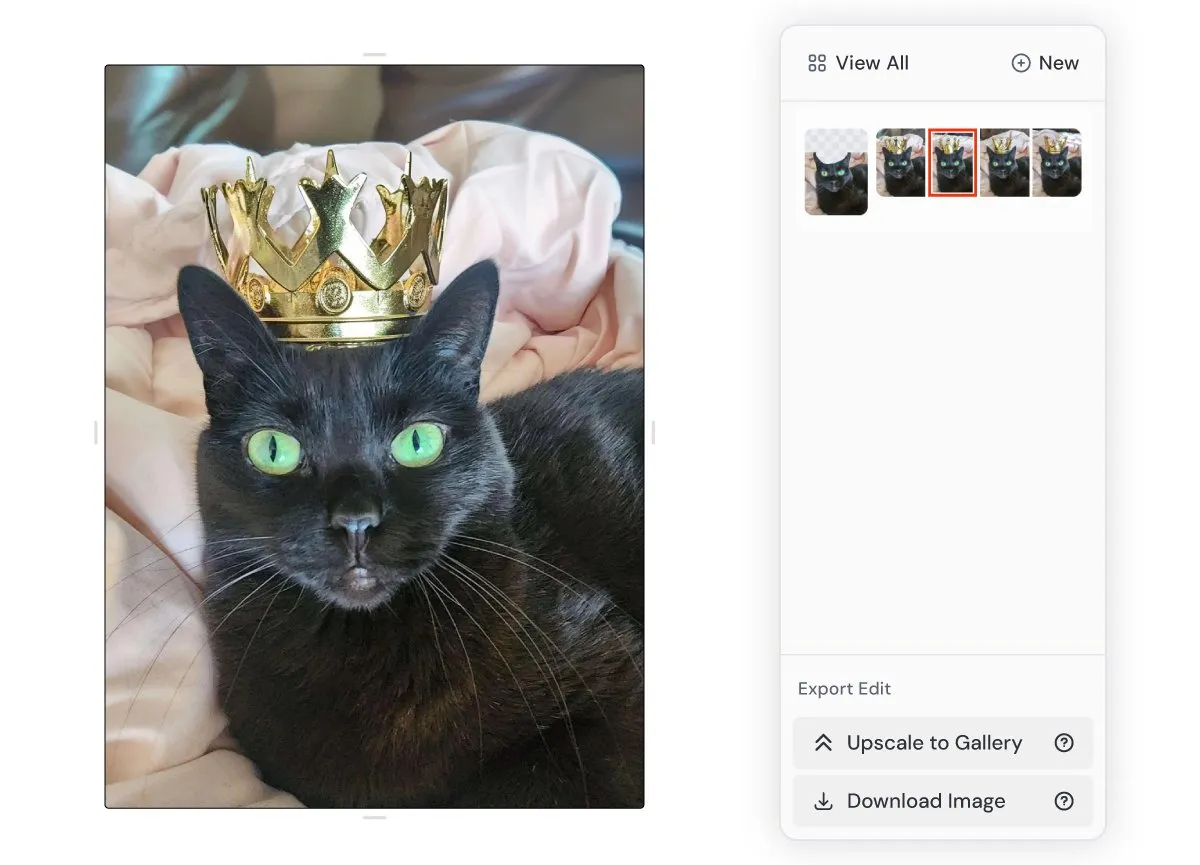
Editing has three entrances: ‘Quick Edit’ in an image’s details puts it in the prompt box; ‘Open Editor’ is for targeted changes; or upload your own photo from ‘Edit’ in the left menu. In the editor you can paint over areas to redraw (inpainting), extend the canvas (outpainting), move and resize, and use Smart Select.
The V8.2 edit model opened for testing on 27 August. Two days later Midjourney shipped an image-quality fix, and on 24 September it changed targeted edits to touch only the selected pixels, so repeated edits no longer degrade the picture. The weekly alpha changelogs are still fixing the editor: on 7 October, for instance, edits stuck on ‘Submitting…’. It doesn’t work with --tile or Remix.
Retexture (keep the structure, change the materials and style) only works with V7 and earlier.
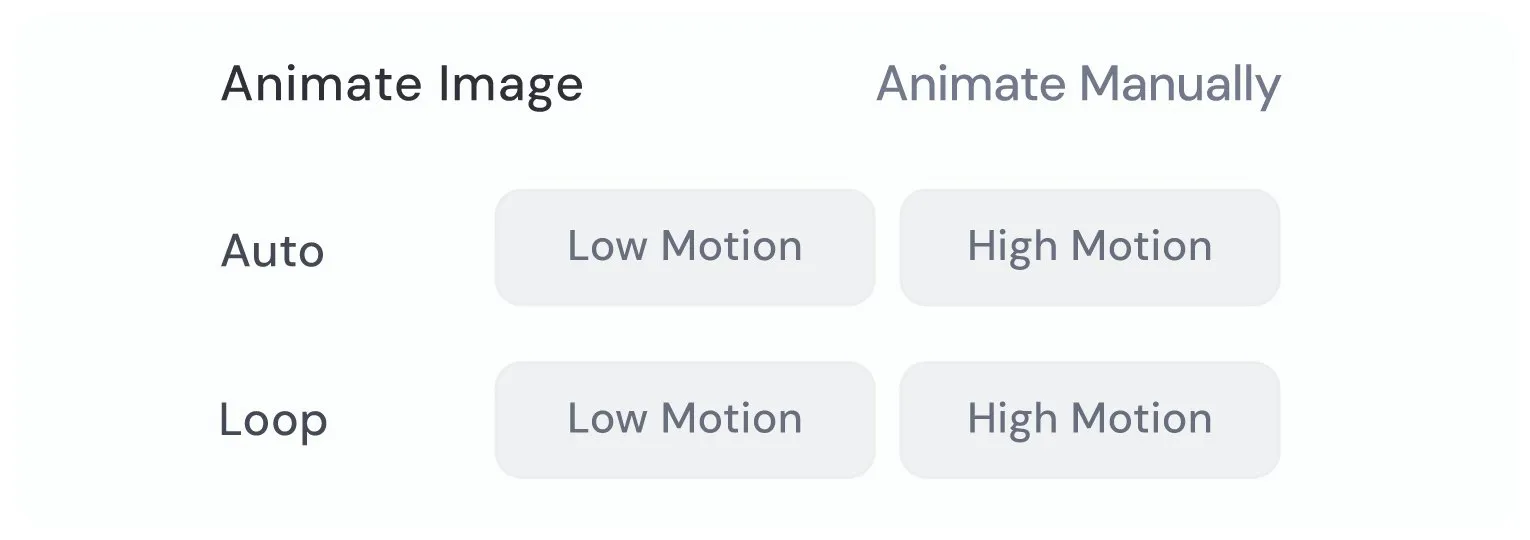
Video is image-to-video: one image becomes the first frame and Midjourney sets it moving. The model is still V1 from June 2025; the 2026 update log mentions no new video model.
- Clips are 5 seconds; you can extend four times by 4 seconds each, to 21 seconds.
- 480p by default; Standard and higher plans can choose 720p, but only in Fast mode.
- A batch of four clips costs 8 minutes of GPU time, the same as 10 standard image jobs; HD costs 26. Use
--bs 1for a single clip to save time. --motion lowsuits ambient scenes with a still camera;--motion highsuits scenes where subject and camera both move, at a higher risk of glitches.
The upside is that you can animate the image you already chose, in the same style. For longer, sharper video you need a dedicated video tool.
Four plans, priced in GPU time rather than images
Midjourney has no free trial on the web or on Discord. The help centre mentions only a limited trial in the anime-focused niji·journey phone app.
| Plan | Monthly | Yearly (per month) | Fast time | Unlimited Relax | Stealth |
|---|---|---|---|---|---|
| Basic | $10 | $96 ($8) | 3.3 hours a month | No | No |
| Standard | $30 | $288 ($24) | 15 hours a month | Images | No |
| Pro | $60 | $576 ($48) | 30 hours a month | Images and SD video | Yes |
| Mega | $120 | $1,152 ($96) | 60 hours a month | Images and SD video | Yes |
How usage is counted: you buy GPU time, not images. Per the official table, a standard-definition job (four images) takes about 0.8 minutes, HD about 1.3, the edit model 1 to 2.3, and a batch of four videos 8. Basic’s 200 minutes is roughly 250 standard jobs or 150 HD ones.
- Fast uses your monthly time, which resets at renewal and doesn’t roll over.
- Relax is unlimited on Standard and above but queued: Midjourney says waits run from 0 to 30 minutes, and longer the more you use it.
- Turbo is up to four times faster but uses double the time; Midjourney says V8.1 doesn’t support it yet.
- Extra time costs $4 an hour, expires after 60 days and can’t be refunded.
- Commercial use is allowed on every paid plan, but companies with more than $1 million a year in revenue must be on Pro or Mega.
Which to choose: try a month of Standard. Fifteen Fast hours plus unlimited Relax is enough for most people; Basic has no Relax, so when it runs out you wait or pay. If you make images for clients and don’t want them public, go straight to Pro.
Public by default: other people can see your images
This is the thing new users most often miss. The terms of service say your content is publicly viewable and remixable by default. Images you make appear on your profile and can turn up on the Explore page. The terms also grant Midjourney a perpetual, irrevocable licence to your inputs and outputs that survives cancellation.
- Stealth mode is only on Pro and Mega. Turn it on via the settings icon at the right of the prompt box → More Options → Stealth: On, or add
--stealthto a prompt. - Upgrading doesn’t make old images private; change them in bulk on the Organize page.
- Images made in public Discord channels are visible even in Stealth mode.
- Trashing an image is not the same as making it private; others may still reach it by link.
- The shared folders added in October don’t change this either: Midjourney notes that non-stealth images in a private folder can still appear on Explore.
On data, the help centre says personal information is stored on US servers. You can request deletion of your account and data at the bottom of midjourney.com/account and reverse the request within 7 days. There is no documented switch to keep your prompts out of training; Midjourney’s EU training summary lists prompts and preference data (your image ratings) among its training content.
The copyright case: Disney, Universal and Warner Bros.
In June 2025 Disney and Universal sued Midjourney in federal court in Los Angeles, the first time major Hollywood studios had taken an AI company to court. Warner Bros. Discovery sued in September, and the cases were combined in November. The studios say Midjourney trained on their films and lets users draw characters such as Darth Vader, Bart Simpson and Superman on demand.
Midjourney claims fair use. According to Variety and The Art Newspaper, the case was still in discovery in 2026: on 15 June a magistrate judge limited the studios’ disclosure to consumer-facing AI products; on 29 June Midjourney asked the trial judge to overturn that and make the studios reveal their internal AI use, arguing that “if Plaintiffs are doing the very thing they seek to punish”, it goes to the heart of its fair use defence. No ruling or settlement has been reported.
What it means for you: the terms say you own what you make, “subject to… the rights of any third-parties”. Don’t generate, and certainly don’t sell, images of famous characters. If you deliver work to a large company, ask first whether it accepts AI images.
Against other image tools: best taste, not best listener
Midjourney has no public API (since July 2025 it has only been collecting applications for an enterprise one), so it is missing from most blind-vote leaderboards. Artificial Analysis’s text-to-image arena doesn’t list it; on Arena’s text-to-image board in July 2026, OpenAI’s GPT Image 2 was first and Google’s Nano Banana 2 was in the top five. So this comparison is by job, not by score:
| Tool | Better than Midjourney at | Worse than Midjourney at |
|---|---|---|
| GPT Image (in ChatGPT) | Text, complex instructions, step-by-step edits in a chat | Comparisons tend to give Midjourney the most stylised, editorial look |
| Nano Banana (in Gemini) | Editing photos by instruction, keeping people consistent; up to 4K (Midjourney tops out at 2K) | No style codes or personalisation profiles |
| Adobe Firefly | Sold as commercially safe, built into Photoshop; Standard is $9.99 a month | Third-party models are mostly on dearer plans and outside the commercial-safety promise |
| Dreamina (Jimeng) | ByteDance’s tool with a free daily allowance; its Seedance video ranks near the top | Free images carry a watermark; global and Chinese versions are separate |
In short: choose Midjourney for looks, GPT Image or Nano Banana for accuracy. Many designers use both, making the mood in Midjourney and fixing details or adding text elsewhere.
From mainland China: no official route
Midjourney has no version for mainland China; the website and Discord are both overseas services. The niji·journey app is listed on the US App Store but doesn’t appear on the Chinese one.
Paying is another hurdle. Midjourney only charges in US dollars through Stripe; the help centre says Alipay works “in some regions”, but Chinese guides on Zhihu and elsewhere report that mainland-issued cards and Alipay often fail, and many people turn to virtual cards, top-up agents or shared accounts. Shared and resold accounts break the rule of one user per account (stated in the help centre) and can get banned. If you are in mainland China and just want images, Jimeng is far simpler.
Company, models and Niji
| Name | What it is | Notes |
|---|---|---|
| Midjourney, Inc. | Company | Founder and CEO David Holz; no outside investors |
| Midjourney | Product | The midjourney.com website and the Discord bot |
| V8.2, V8.1, V7 | Image models | Switch with --v |
| V1 Video | Video model | Image-to-video only |
| Niji 7, niji·journey | Anime model and app | Tuned for anime and East Asian styles; separate phone app |
| Midjourney Medical | New venture | Launched a full-body ultrasound scanner in June 2026; unrelated to image making |
In August 2025 Meta announced it would license Midjourney’s “aesthetic technology”; Holz said it was a licensing deal and the company would stay independent. In July 2026 Midjourney bought the astrology app Co–Star, and Holz said half a dozen similarly ambitious projects would be announced over the following six months. For users, the company’s attention is spreading beyond images.
Getting started
- Go to midjourney.com, click Sign Up and sign in with Discord or Google.
- Pick a plan and pay (a month of Standard is a sensible start).
- Click the settings icon at the right of the prompt box and check the defaults: version 8.2, Fast or Relax, Stealth (Pro and up).
- On the Personalize page, keep picking images you like until the bar fills and personalisation is ready, then turn on the ‘P’ button next to the prompt box.
an old bookshop in Lisbon, afternoon light through dusty windows, a cat asleep on a stack of books --ar 4:5
minimalist poster of a mountain lake at sunrise --draft --sref random
make this photo look like a watercolor illustration, keep the face the same
Recent changes
- Testing a 'thinking' rerun that checks where an image missed the prompt and redraws it; shared folders added
- V8.2 edit model opens for testing, replacing Omni Reference, Character Reference and Retexture
- V8.2 becomes the default model, focused on aesthetics and personalisation
- First acquisition: the astrology app Co–Star
- First hardware: the Midjourney Scanner, a full-body ultrasound machine
- V8.1 replaces V7 as the default, with native 2K HD images
- V8 launches on the alpha site, about five times faster
- Disney and Universal sue MidjourneyOur coverage
Compared with similar products
| Product | Price | What it is |
|---|---|---|
| Adobe FireflyAdobe · handbook | A few generations a day on selected models; $9.99 / $19.99 / $49.99 / $199.99 a month; Creative Cloud Pro $69.99 a month | Adobe's generative AI: images, video, music and voice-over on the web and phone, with the same models working inside Photoshop, Illustrator, Premiere and Express. |
| MidjourneyMidjourney · handbook | No free trial; $10 / $30 / $60 / $120 a month; 20% off yearly | A paid image generator that turns written descriptions into pictures with its signature polish; it can also edit images, copy a style from references and turn pictures into short video clips. |
| Nano Banana (Gemini images)Google · handbook | Free Gemini includes Nano Banana 2, 1K downloads; With a Google AI plan (from $4.99 a month); API about $0.034–$0.24 per image | Google's image model for making pictures, editing photos and combining several images from a plain sentence, with accurate text inside the image. It lives inside the Gemini app, Google Search, Google Photos, Slides and the developer API. |
Sources
- Midjourney Help Center · Comparing Midjourney Plans (updated 2026-05-18)
- Midjourney Help Center · Version (updated 2026-09-01)
- Midjourney Help Center · GPU Speed (Fast, Relax, Turbo) (updated 2026-08-28)
- Midjourney Help Center · Web vs Discord (updated 2026-09-01)
- Midjourney Help Center · Parameter List (updated 2026-09-01)
- Midjourney Help Center · Stylize / Chaos / Raw / Style Reference / Moodboards
- Midjourney Help Center · Personalization (updated 2026-10-15)
- Midjourney Help Center · Edit Model (updated 2026-09-24)
- Midjourney Help Center · Editor and Legacy Features (updated 2026-09)
- Midjourney Help Center · Video (updated 2026-08-31)
- Midjourney Help Center · Stealth Mode
- Midjourney Help Center · Free Trials / Accepted Payment Methods / Payment Currency
- Midjourney Help Center · Purchasing Extra Fast Time
- Midjourney Help Center · Educational Use & Student Billing (one user per account)
- Midjourney · Terms of Service (updated 2026-08-17)
- Midjourney · Data Deletion and Privacy FAQ (2026-09-03)
- Midjourney · Public Summary of Training Content (EU, 2026-03-17)
- Midjourney updates · V8 Alpha (2026-03-17)
- Midjourney updates · V8.1 Alpha (2026-04-14)
- Midjourney updates · Draft mode for V8.1 (2026-06-16)
- Midjourney updates · Version 8.2 (2026-07-24)
- Midjourney updates · Alpha changelogs (2026-09-23 to 10-07)
- Midjourney updates · Introducing Our V1 Video Model (2025-06-18)
- Midjourney updates · Enterprise API Survey (2025-07-16)
- App Store · niji・journey (version 1.44.0)
- The Decoder · Midjourney V8 is 5x faster but charges 4x more for its best features (2026-03-18)
- PingWest · Midjourney begins V8 testing (2026-03-18)
- Variety · Midjourney seeks to reveal studios' use of AI (2026-07-02)
- The Art Newspaper · Midjourney strikes back (2026-07-09)
- Graphic Policy · Court suggests Disney v. Midjourney go to mediation (2025-11-14)
- Euronews · Disney and Universal sue Midjourney (2025-06-12)
- The Verge · Midjourney goes from cat pictures to full-body ultrasound (2026-06-18)
- TechCrunch · Midjourney acquired Co–Star (2026-07-24)
- Engadget · Meta is licensing Midjourney's tech (2025-08-22)
- Artificial Analysis · Text-to-image arena leaderboard (viewed 2026-10-18)
- Arena · Text-to-image leaderboard (July 2026)
- Gradually.ai · Nano Banana Pro vs Midjourney V8.1
- Blend · ChatGPT vs Gemini vs Midjourney vs Nano Banana for images
- Dreamina · Free credits and paid plans explained (2026)
- CyberLink · Dreamina AI overview
- The Neuron · Adobe Firefly plans
- Zhihu · How to subscribe to Midjourney from China (2024)
- Wikipedia: Midjourney