Nano Banana (Gemini images)
By Google · gemini.google/overview/image-generation ↗ · Checked 18 Oct 2026
Google's image model for making pictures, editing photos and combining several images from a plain sentence, with accurate text inside the image. It lives inside the Gemini app, Google Search, Google Photos, Slides and the developer API.
Verdict
For editing photos by describing the change, and for posters and infographics with words in them, Nano Banana is the easiest choice: it is in the free Gemini app, keeps people looking the same and spells English and Chinese text correctly. The catch is resolution (1K downloads on the free plan, 2K on paid, 4K only through the API), and testers often prefer GPT Image or Seedream for composition and finish. Also know that it is not a standalone app: the entry point and your plan decide which version you actually get.
Use it if
- Anyone who wants to edit a photo with a sentence: new background, remove a passer-by, try a haircut
- Posters, menus and infographics with real text, including Chinese
- Keeping the same person or product consistent across several images
- People already in Gemini, Google Photos or Slides: nothing extra to install
- Developers: the cheapest 1K image costs about 3 cents
Use something else if
- Look and style control: Midjourney is better
- Strict sizes and negative instructions: Seedream 5 Pro followed them better in tests
- Free high-resolution images: free Gemini gives 1K only; Dreamina has a daily free allowance
- Living in mainland China: Gemini personal accounts don't work; use Doubao or Dreamina (both on Seedream)
- Free plan
- Free Gemini includes Nano Banana 2, 1K downloads
- Paid
- With a Google AI plan (from $4.99 a month); API about $0.034–$0.24 per image
- Where
- Gemini app, Google Search (AI Mode and Lens), Google Photos, Slides and Vids, Gemini Notebook, Flow, AI Studio and the API
- Versions
- Nano Banana 2.1, 2, 2 Lite and Pro; the original is now legacy
- Resolution
- Gemini app downloads: 1K free, 2K paid; API up to 4K
- Age
- Personal accounts: 13+ to generate, 18+ to edit
- Watermark
- Every image carries invisible SynthID and C2PA credentials; the visible mark can be switched off since August 2026
- Region
- Same as the Gemini app; not available to personal accounts in mainland China
Nano Banana is the name of Google’s image generation and editing models. When it first appeared in August 2025 it was an anonymous codename; after “turn my selfie into a figurine” went viral, Google kept the codename as the real name. Today it is not an app but a family of models: when you ask Gemini to “draw a…”, tell Google Photos to “remove the people in the back”, or click Help me visualize in Slides, this is what does the work.
So before you start, work out two things: which entry point you are using and which plan you are on. Together they decide which version you get and how big a picture you can download. The table below sums up Google’s help centre, the developer docs and media tests.
What to use it for, and what not
| What you want | How | Free plan | How it goes |
|---|---|---|---|
| Make a picture from a sentence | Choose Images in the Gemini prompt box, or just say "draw a…" | Free, 1K download | Fast and obedient; less polished than Midjourney |
| Edit your own photos | Upload to Gemini and say what to change; or Help me edit in Photos | Free, 18+ only | Keeps people recognisable, but faces drift after several rounds |
| Combine several images | Upload them together and say what goes where | Free (the Lite version is weak at it) | Up to 14 references; more than four people gets shaky |
| Posters, menus, infographics | Put the exact words in quotes | Free | Its strength, Chinese included; small text still slips |
| Slide images and whole slides | Help me visualize in the Slides side panel, or Gemini Notebook | Slides needs a paid Workspace plan | Quick infographic slides, generic styling |
| Bulk images or your own product | Gemini API or AI Studio | No free API tier | About 3 cents per 1K image, up to 4K |
| Check whether Google AI made an image | Upload it to Gemini and ask "was this made with AI?" | Free | Only recognises Google's own images |
Not an app: seven places you’ll meet it
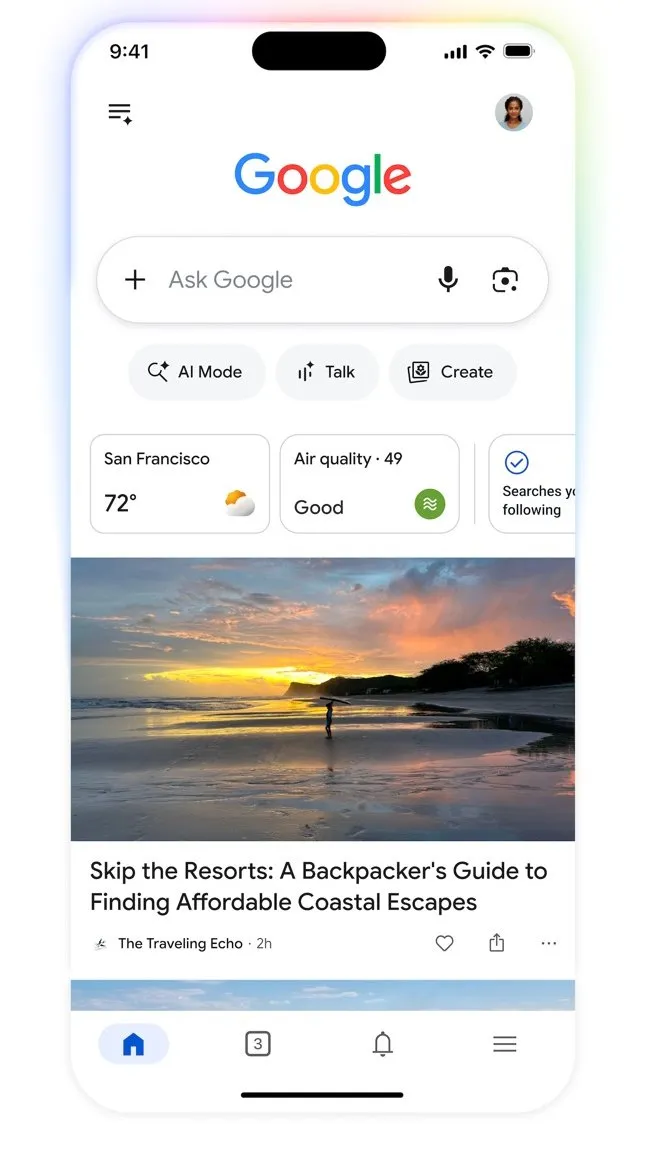
The same model does different things depending on where you meet it:
| Entry point | How to reach it | Best for |
|---|---|---|
| Gemini app (web, phone, Mac, Windows) | Choose Images in the prompt box, or Images in the sidebar | The full set: create, edit, combine, redo; features and limits follow your Gemini plan |
| Google Search | Create mode in Lens (yellow banana icon); in AI Mode, “+” then Create image | Photograph something around you and change it; launched October 2025 in the US and India, in English |
| Google Photos | Open a photo → Edit → Help me edit, and type the change | Fixing your own photos: remove people, open closed eyes, restore old prints |
| Slides, Vids | Help me visualize and Beautify this slide in the Gemini side panel | Images for slides, or turning a text slide into an infographic; needs paid Workspace |
| Gemini Notebook (formerly NotebookLM) | Generate an Infographic or a Slide Deck from your sources | Turning a pile of documents into one infographic or a deck |
| Flow | Pick Nano Banana in the image model menu | Google’s AI filmmaking tool: make frames first, then video |
| AI Studio and the Gemini API | Choose a model ID such as gemini-nano-banana-2.1 | Developers paying per image, up to 4K |
Two smaller entry points: Gemini in Chrome’s side panel can edit an image on the page you are reading (since January 2026), and on Android, long-pressing a photo in Google Messages offers Remix.
These entry points do not always use the same version. When Nano Banana Pro launched in November 2025, Slides and NotebookLM used Pro straight away, while in the Gemini app you had to pick the Thinking model to get it. On names: Google DeepMind trains the models; Nano Banana is the nickname, and the formal names look like “Gemini 3.1 Flash Image”; the Gemini app is where you use it; Google AI Plus / Pro / Ultra are the subscriptions that set your limits. Plan details are in the Gemini handbook.
Four versions, picked for you by your plan
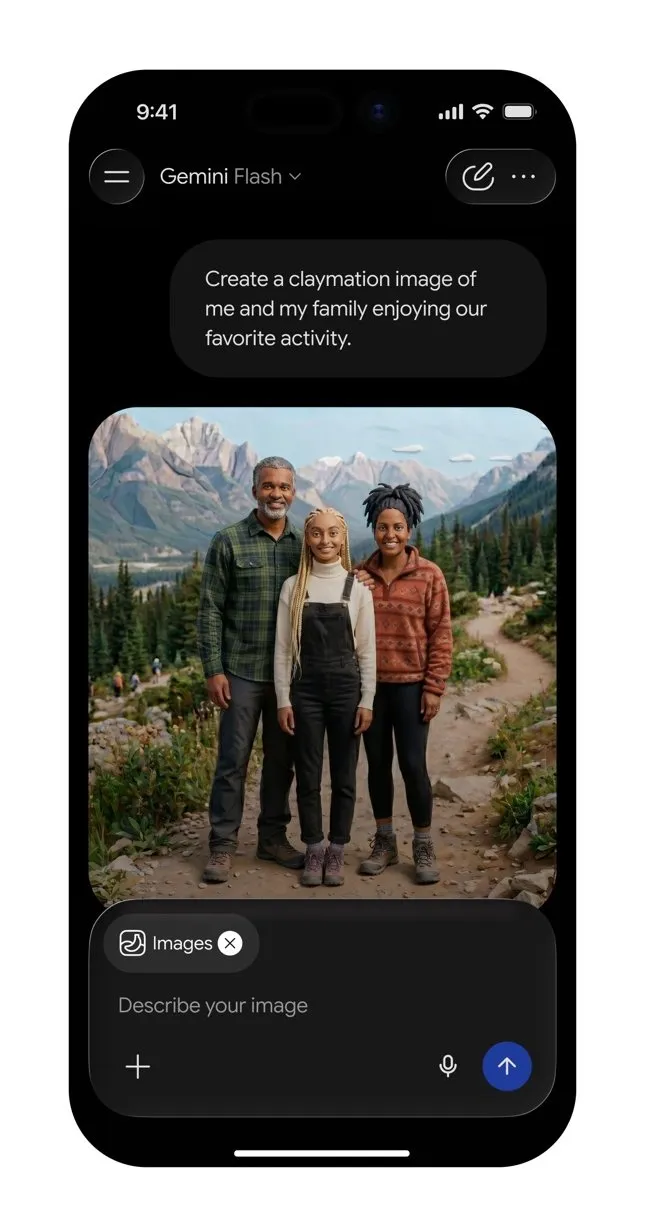
In the Gemini app you cannot pick a Nano Banana version directly. It follows your current Gemini model and plan. The help centre’s rule: with Flash-Lite selected you get Lite; with Flash or Pro you get Nano Banana 2; paid users can click More → Redo with Pro at the bottom right of an image to redraw it with Pro. Since 6 October, paid users get 2.1 by default (TechRadar and Google’s product page); the help centre text has not caught up yet.
The four current Nano Banana versions
Released 6 October 2026 as an update to Nano Banana 2. Google says visual design, masked edits and subject consistency all improved; its own internal score is 1050, against 990 for Nano Banana 2 and 935 for Pro (no independent evaluation yet).
- Use it for
- Everyday creating and editing for Google AI Plus, Pro and Ultra users
- Example
- Make a café opening poster with the headline "First cup of autumn" and a small line underneath: "Opens 20 October, 20% off everything"
- Limits
- 2K downloads in the Gemini app; the API drops the 512-pixel size
Released 26 February 2026, formally Gemini 3.1 Flash Image. It replaced Pro as Gemini's default image model; Google pitched it as "Pro quality at Flash speed".
- Use it for
- Everyday images, photo edits and combinations for free users
- Example
- Change the background of this photo to a beach at dusk; keep the person exactly the same
- Limits
- 1K downloads on the free plan; a daily image cap whose size Google doesn't publish
The fastest and cheapest version. The help centre says it suits quick images and basic ideas and "isn't designed for multiple image references or for multiple edits".
- Use it for
- Used automatically when your Gemini model is Flash-Lite
- Example
- Draw a shiba inu wearing sunglasses, cartoon style
- Limits
- 1K only; weak at combining and repeated edits. The free plan now only has Auto model selection, and by the help centre's rule, being routed to Flash-Lite means Lite
Released 20 November 2025, formally Gemini 3 Pro Image. The most world knowledge; good for detailed infographics and layouts full of small text.
- Use it for
- When a 2.1 or 2 result has wrong text or too little detail, click Redo with Pro
- Example
- Make an infographic explaining photosynthesis in four steps, one sentence per step
- Limits
- Paid plans only; once you hit the day's Nano Banana 2 cap you can't redo with Pro either
Sources: Gemini Apps Help, Google product page, TechRadar (2026-10), DigitalToday (2026-10), GSMArena (2026-02-26)
The original Nano Banana (Gemini 2.5 Flash Image) no longer appears in the Gemini app; in the API it shuts down on 15 March 2027.
Editing photos: change one thing at a time
Editing is what made Nano Banana famous. Upload a photo to Gemini and say what to change: background, clothes, hairstyle, lighting, camera angle, or an object to remove. Images you have made sit under Library in the sidebar; open one and click Chat beneath it to keep editing. Editing requires being 18 or over; 13- to 17-year-olds can generate but not edit.
Help me edit in Google Photos uses the same family of models. Yahoo Tech reports it can handle “remove the motorcycle in the background” and “restore this old photo”, and can even open the eyes of someone who blinked; edited photos carry C2PA content credentials saying AI was involved.
Advice from people who use it:
- One change per message. “Make the background a beach, the shirt red and add a hat” works worse than three separate requests.
- Say “keep everything else the same”. Otherwise it may quietly change the framing or the expression.
- Watch faces in real photos. In Rangy’s August comparison, Nano Banana Pro restored an old photo “clean, but it had altered the face”, flattening the cheek line; the author’s verdict was that for a family photo, a more attractive stranger is a failure.
- If an edit goes wrong, go back to the original rather than editing an image that has already drifted.
Combining images: up to 14 references
You can upload several images at once and have it combine them: you and a friend in one photo, a product in a scene, the style of one picture applied to another. Google’s product page calls this Combine photos.
The developer docs give the limits: up to 14 reference images, but it “remembers” fewer. Nano Banana 2.1 and 2 keep up to four people’s likeness and ten objects’ detail; Pro keeps five people and six objects. Lite isn’t suited to combining.
In tests, one person plus two or three items holds up well. GoEnhance put a robot and a mug into a kitchen, and both 2 and 2.1 kept each recognisable. TechRadar asked 2.1 for a four-panel comic of a fox in a green scarf; the scarf and white-tipped tail stayed the same in every panel, and the strip read more like one story than ChatGPT’s.
Gemini also has an avatar feature: record your face and voice once, and you can make “me in such-and-such a scene” images without uploading a photo each time.
Text and infographics: what it does best
Text in AI images used to be gibberish; from Pro onwards Nano Banana got it right. In November 2025 Simon Willison gave Pro a nine-word prompt for an infographic about his open-source project; it searched the web first, then drew a flowchart in which “the text is all spelled correctly” and “the content is solid too”. Chinese product-community site Woshipm found that Pro “has very stable Chinese”, handling both large poster type and dense small text, and even translating a comic into Chinese and putting the words back in place.
2.1 keeps this up. TechRadar asked for a travel poster for Saturn’s moon Titan with three exact lines including the price “$2,499”; Gemini got every character right, while ChatGPT left a gap between the “$” and the “2”.
Don’t trust it blindly:
- Numbers and details still slip. In the same TechRadar test, a pocket watch meant to read 3:15 showed 3:00. GoEnhance asked for “seven apples and three pears”: Nano Banana 2 drew six apples, 2.1 got it right.
- It adds words of its own. In GoEnhance’s bilingual poster test, Nano Banana 2 invented a label on a tea tin that nobody asked for; 2.1 did this much less.
- Google’s advice is to settle the words first: the developer docs say results are better if you have Gemini write the text, then ask for the image.
Make a portrait poster, 3:4. Headline: "Weekend Book Fair". Subtitle: "26 October · 10am · Community Square". Retro print style, cream background, lettering must be crisp, and no other words besides these two lines.
Limits, resolution and API prices
In the Gemini app, Nano Banana isn’t charged separately; it counts against your Gemini allowance. Google says images, video and music are “high usage” requests, and the help centre mentions a daily Nano Banana 2 cap without giving a number. Plan prices and how usage is counted are in the plans section of the Gemini handbook. Only three differences matter for images:
| Free | Google AI Plus / Pro / Ultra | |
|---|---|---|
| Default model | Nano Banana 2 (or Lite) | Nano Banana 2.1 |
| Download resolution | 1K | 2K |
| Redo with Pro | No | Yes |
In the API you pay per image, with no free tier. Google’s prices (standard mode, checked 18 October 2026):
| Model | 1K | 2K | 4K | Notes |
|---|---|---|---|---|
| Nano Banana 2.1 | $0.034 | $0.050 | $0.113 | Google recommends it for new projects |
| Nano Banana 2 | $0.067 | $0.101 | $0.151 | Also 512 px at $0.045 |
| Nano Banana 2 Lite | $0.034 | — | — | 1K only |
| Nano Banana Pro | $0.134 | $0.134 | $0.24 | The most expensive |
Batch mode (delivered within 24 hours) is half price throughout. One catch: 2.1 halves the image price but raises input and “thinking” prices, with input three times Nano Banana 2’s; the thinking step can’t be turned off, and its tokens are billed. A thousand 1K images cost about $34 with 2.1 and about $134 with Pro.
4K comes only through the API (AI Studio included); the Gemini app tops out at 2K downloads. Simon Willison’s 4K image from Pro was a 5632 × 3072 pixel, 24 MB PNG.
Watermarks: the visible one can go, the invisible one stays
Every image Gemini makes carries three kinds of marking:
- A visible watermark (a small sparkle) in the bottom-right corner. Since 14 August 2026 you can turn it off under Settings → Media Watermark. Exceptions: in India, South Korea and Vietnam only Ultra subscribers get the switch, and work and school accounts can’t turn it off. The switch covers only the Gemini app, not images made in Search or Photos.
- SynthID, an invisible watermark in the pixels, which can’t be switched off.
- C2PA content credentials in the file’s metadata, saying AI made or edited it.
To check whether Google AI made an image, upload it to Gemini and ask “was this generated by AI?”. Simon Willison tried it: he made a fake photo with Pro, scrubbed the visible mark out with Apple Photos’ clean-up tool, and Gemini still answered that SynthID was detected in 25–50% of the image. The limit is that it only recognises Google’s own models, not ChatGPT’s or Midjourney’s.
Real people and safety
Nano Banana edits real photos of real people, which is both the fun and the risk. Indian fact-checker BOOM tested the original Nano Banana in September 2025: dressing politicians in religious clothing and placing two people together who had never met. “Each edit was executed cleanly, without warnings or blocks.”
The rules today:
- 13+ to generate, 18+ to edit; Workspace accounts also need to be over 18 to generate or edit.
- Requests that break Google’s Prohibited Use Policy are refused, or the image is removed after generation, usually without telling you exactly why.
- The developer docs say 2.1 and 2 don’t use real-world images of people when they search the web.
- Edit your own photos freely, but think before using someone else’s: Google’s terms require you not to infringe others’ copyright or privacy.
Against GPT Image, Midjourney and Seedream
The top models are now close; the differences are mostly about obedience and taste. On the Arena blind-vote text-to-image board, OpenAI’s GPT Image 2 was first in July 2026 with Nano Banana 2 in the top five; Seedream 5.0 Pro sat around 12th in September–October (see the Doubao handbook).
| Tool | Better than Nano Banana at | Worse than Nano Banana at |
|---|---|---|
| ChatGPT Images 2.5 | TechRadar found its images more lavish and carefully composed; you can circle one area to change only that | In the same test, its comic character was less consistent and its text had a stray gap |
| Midjourney | Look and style control: style codes, personalisation | No free trial; weaker at text and complex instructions; 2K at most |
| Dreamina (Seedream 5 Pro) | Won six of eight rounds in Rangy’s test, with Nano Banana Pro winning none: it understood “keep the signs but no lettering” and kept a restored face truer to the original | Free images carry a watermark; Chinese and international versions are separate |
In short: for editing your own photos and images with text, Nano Banana is the most convenient, and it may already be inside the Google products you use; for looks, choose Midjourney; for design work that must follow the brief exactly, try GPT Image and Seedream side by side.
First steps: three things to try
- Open gemini.google.com or install the Google Gemini app and sign in with a Google account. Personal accounts don’t work in mainland China; see the Gemini handbook.
- Choose Images in the prompt box (some versions say Create images), or just say “draw a…”.
- If you don’t want the mark in the corner: Settings → Media Watermark.
(Upload a photo of yourself) Keep my face and expression exactly the same, change the background to a snowy street in Kyoto at dusk, and don't change anything else.
(Upload a product photo and a photo of a room) Put the desk lamp from the first image on the desk in the second, with size and lighting that match the room, and keep the lamp exactly as it is.
Make an infographic explaining the four recycling bin colours: one column per colour, with its name and three common examples. Large text, easy to read on a phone.
Recent changes
- Nano Banana 2.1 launches and becomes the default for paid plans; API image price about half of Nano Banana 2
- A Media Watermark switch in Gemini settings lets you remove the visible watermark
- Nano Banana 2 and Pro leave preview; the API moves to stable model names
- Nano Banana 2 launches and replaces Pro as Gemini's default image model
- Gemini in Chrome's side panel can edit images on web pages with Nano Banana
- Google Photos' Help me edit expands to India, Australia and Japan
- Nano Banana Pro launches, also in Slides, Vids and NotebookLM; the Gemini app can check images for SynthID
Compared with similar products
| Product | Price | What it is |
|---|---|---|
| Adobe FireflyAdobe · handbook | A few generations a day on selected models; $9.99 / $19.99 / $49.99 / $199.99 a month; Creative Cloud Pro $69.99 a month | Adobe's generative AI: images, video, music and voice-over on the web and phone, with the same models working inside Photoshop, Illustrator, Premiere and Express. |
| MidjourneyMidjourney · handbook | No free trial; $10 / $30 / $60 / $120 a month; 20% off yearly | A paid image generator that turns written descriptions into pictures with its signature polish; it can also edit images, copy a style from references and turn pictures into short video clips. |
| Nano Banana (Gemini images)Google · handbook | Free Gemini includes Nano Banana 2, 1K downloads; With a Google AI plan (from $4.99 a month); API about $0.034–$0.24 per image | Google's image model for making pictures, editing photos and combining several images from a plain sentence, with accurate text inside the image. It lives inside the Gemini app, Google Search, Google Photos, Slides and the developer API. |
Sources
- Gemini Apps Help · Generate & edit images with Gemini Apps (checked 2026-10-18)
- Google · Nano Banana product page (checked 2026-10-18)
- Gemini Apps Help · Usage limits and features by plan
- Gemini app release notes
- Google AI for Developers · Gemini API pricing (checked 2026-10-18)
- Google AI for Developers · Nano Banana image generation docs
- Google AI for Developers · Model deprecations
- Google · Here's where you can use Nano Banana Pro (2025-11-20)
- Google Workspace Updates · Nano Banana Pro in Slides, Vids and NotebookLM (2025-11-20)
- Google · How to edit images with Nano Banana in Search (2025-10-13)
- App Store · Google Gemini
- App Store · Google
- Let's Data Science · Google releases Nano Banana 2.1 (2026-10-06)
- DigitalToday · Nano Banana 2.1 adds 4K, cuts API price (2026-10)
- TechNews (Taiwan) · Nano Banana 2.1 announced (2026-10-07)
- Techcity Authority · Nano Banana 2.1 appears in Flow first (2026-10)
- TechRadar · Nano Banana 2.1 tested against ChatGPT (2026-10)
- GoEnhance · Nano Banana 2.1 vs 2, eight side-by-side tests (2026-10-08)
- GSMArena · Google launches Nano Banana 2 (2026-02-26)
- Simon Willison · Nano Banana Pro is the best available image generation model (2025-11-20)
- Yahoo Tech · Google Photos brings prompt-based editing to more countries (2026-01-28)
- Crypto Briefing · Google lets users turn off visible watermarks (2026-08-14)
- Rangy · Seedream 5 Pro vs Nano Banana Pro vs GPT Image 2, eight rounds (2026-08)
- Woshipm · Nano Banana Pro hands-on in Chinese (2025-11-22)
- BOOM · Nano Banana makes political disinformation effortless (2025-09)