Suno
By Suno · suno.com ↗ · Checked 18 Oct 2026
Type a description or paste some lyrics and within seconds you get two complete songs with vocals and backing; paid plans add section editing, stems and singing in your own voice.
Verdict
One of the best tools for making AI songs: one line gets you a finished track, and in a 36Kr comparison of Chinese-language songs every judge ranked its arrangements and vocals first. But songs made on the free plan belong to Suno and can't be used commercially, free accounts get only 7 downloads since September 2026, and Chinese lyrics are sometimes mispronounced. The trap is rights: even paid plans give you commercial-use rights, not copyright; fully AI-made songs can't be registered in the US, and the Universal and Sony lawsuits are still running.
Use it if
- Anyone who wants a one-off song for a birthday, wedding or office party
- Video and podcast makers who need music without a stock library
- People who can write lyrics but not arrange: write the words, let Suno arrange and sing
- Producers and songwriters sketching demos and trying styles quickly
Use something else if
- If you care whether all the training data was licensed: ElevenLabs says its ElevenMusic runs on a fully licensed model, worth comparing
- Formal releases you want to register for copyright: Suno grants commercial-use rights only; copyright depends on your own human contribution
- Mandarin R&B, or songs that pass platform content-ID checks more easily: try Kunlun Tech's Mureka
- Free plan
- 50 credits a day (about 10 songs), no commercial use
- Paid
- Pro $10 a month, Premier $30 a month ($8 / $24 billed yearly)
- Where
- Web at suno.com, iOS, Android
- Models
- v6 and v6-wild (paid), v6-mini (free); all older models retired in September 2026
- One generation
- Two songs for 10 credits; up to 8 minutes each
- Scale
- Nearly 100 million music makers (Suno, November 2025); valued at $5.4bn (June 2026)
- Region and language
- On the China App Store as Music & Song Creator: Suno; no Chinese interface
- Data
- The terms let Suno train on what you upload; US company
Suno is an AI songwriting tool from an American company of the same name. Type “a folk song about graduating, female vocal, guitar and harmonica” and within seconds you get two complete songs: lyrics, melody, vocals and backing. It is the biggest name in the field: in November 2025 Suno said nearly 100 million people had made music on it, and in June 2026 it was valued at $5.4bn.
2026 changed it a lot. In September it switched to v6, a model built with Warner, BMG and other music companies, and retired every older model; downloads became limited; and the rules on who owns a song and who may use it commercially were rewritten. Below: what it is good for, then how to do each job and what to watch out for.
What to give it, and what not to
| What you want | How | Free plan | How it goes |
|---|---|---|---|
| A complete song from one line | Create → Simple, write a description | Free, about 10 songs a day | Arrangement is its strength; ranked first in 36Kr's comparison |
| Your own lyrics | Switch to Advanced, fill in Lyrics and Styles | Free | The best way to use it: you write, it arranges |
| Songs in Chinese | Write the lyrics in Chinese | Free | Works; a few characters come out wrong, so retry |
| Fix a section, extend, restyle | The … menu next to a song → Remix/Edit | Some tools are paid | v6 edits one section from a plain-language request |
| Sing in your own voice | Tap + Voice in Create | Pro and up | You verify it's really you first |
| Stems for a DAW | Get Stems, or Suno Studio | Paid; Studio needs Premier | Stems are regenerated, so they're clean |
| Release it or earn from it | Make and download it while subscribed | No | Commercial rights only; platforms are getting stricter |
One line, one song: Simple mode is enough
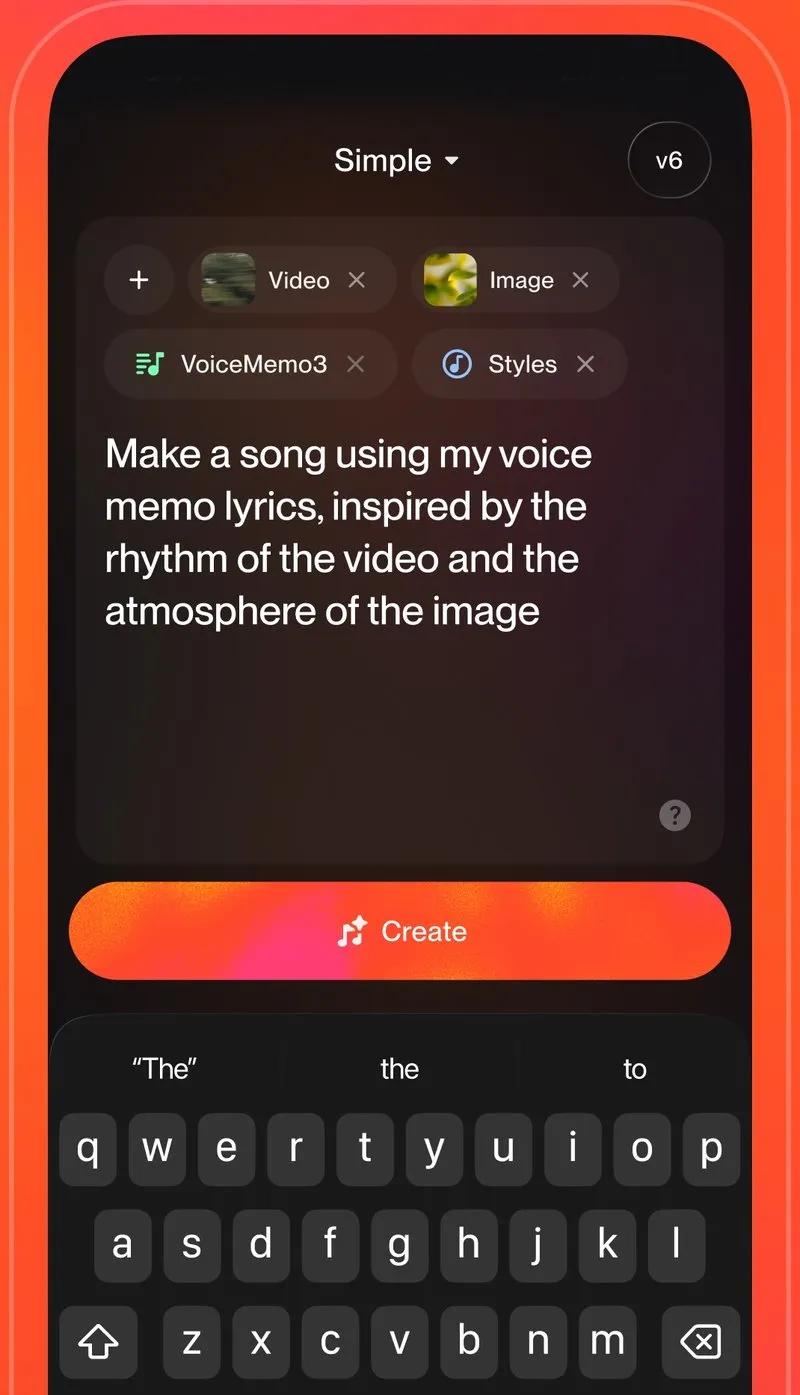
Open suno.com/create or tap the note icon in the middle of the app, choose Simple at the top, describe what you want to hear and tap Create. Each generation gives you two songs for 10 credits; the free plan’s 50 credits a day make 10 songs.
Since v6, Simple mode does much more. Suno says you can give it several things at once: text, a recording, an image, a video, or other songs of yours on Suno, and it works out whether to extend, cover or remix. Lots of images and videos cost extra credits.
Be specific: genre, era, mood, instruments, male or female vocal, who the song is for. Suno’s own example is “a song that feels like midnight on a rooftop”. Stuck? Tap the dice for a random prompt.
Real artists’ names get a prompt blocked. In 36Kr’s test even “imitate so-and-so’s style” was refused outright with a message that naming specific artists isn’t allowed. Describe the sound instead: “raspy baritone”, “80s synth-pop”.
Three models: v6, v6-wild and v6-mini
The model picker sits at the top right of the Create form. Since 9 September 2026 only the v6 generation is left; v5.5 and everything before it are retired, but your old songs stay in your library and can still be played, shared and covered.
The three v6 models
The flagship: reliable, precise and polished across genres. Suno recommends it for most songs.
- Use it for
- You know what you want and need something usable
- Example
- A 90s Cantopop ballad, male vocal, piano and strings, a chorus that really lifts
- Limits
- Pro and Premier only. The Verge found it nailed the surface hallmarks of every genre but couldn't do convincing natural imperfections, with occasional vocal artefacts.
Less predictable and more varied; blends genres and strays further from the prompt.
- Use it for
- You're out of ideas and want a surprise
- Example
- Mix folk with industrial electronica, the stranger the better
- Limits
- Pro and Premier only. Suno suggests using it for ideas, then refining in v6.
A faster, lighter version open to everyone.
- Use it for
- Trying things for free, or testing many directions quickly
- Example
- A comic rap about the Monday-morning commute
- Limits
- Not as good as v6; songs made on the free plan can't be used commercially.
Sources: Suno's v6 announcement and help centre (2026-09-09); Boing Boing quoting The Verge (2026-09-16)
Paid users can also train custom models on their own original tracks so the output sounds more like them, up to three; existing ones have been upgraded to v6 automatically. A Max Mode switch makes v6 work harder, which helps with songs over two minutes, at a higher credit cost.
Your own lyrics: use Advanced mode
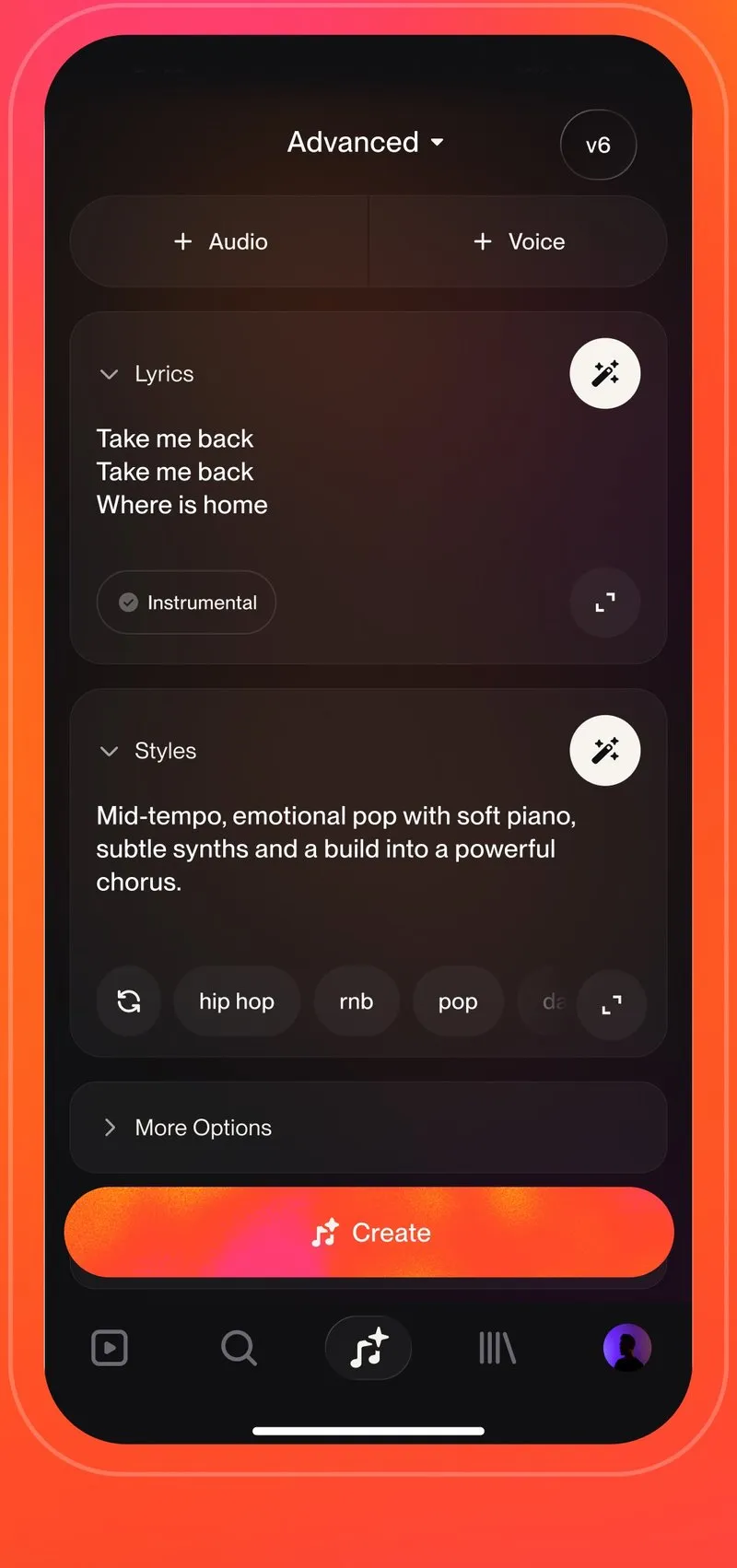
Switch Simple to Advanced at the top (older help articles call it Custom) and you get separate boxes:
- Lyrics: paste your own words. The wand button writes or rewrites them for you. Turn on Instrumental for no vocals.
- Styles: genre and instrumentation, such as “mid-tempo, emotional pop with soft piano, a build into a powerful chorus”. Suggested tags appear underneath.
- More Options: Exclude is where you list what you don’t want, such as “no drums”.
Many users mark sections in the lyrics with square brackets, such as [Verse] and [Chorus], so it knows which part is which.
An AI musician 36Kr interviewed, “Ajie”, puts it well: “you can’t make a good song from a single prompt”. He writes the lyrics himself and lets Suno arrange and sing. According to Suno’s help centre, lyrics you write are yours on every plan.
If you like a song’s voice and feel, save it as a Persona from the … menu → Create → Make Persona and pick it in Advanced mode next time. Personas are public by default; switch to private when you create one if you don’t want others using it.
Chinese songs: it sings them, but check the pronunciation
Suno sings Chinese without any setup, though neither the app nor the website has a Chinese interface and Suno doesn’t market its Chinese ability.
The most useful evidence is a June 2026 comparison by 36Kr (AIX Finance). The same prompt, a Chinese pop song about missing your youth, went to Suno v5.5, ByteDance’s Haimian Music, Kunlun Tech’s Mureka, MiniMax and Yinchao; several AI musicians and a music teacher with over ten years’ experience ranked the results. Every one of them put Suno first: on arrangement and vocals “Suno is still the ceiling”, and its lyrics had the most complete structure. But the article also found “a few Chinese characters pronounced incorrectly”, and said the common belief that Chinese tools sing Chinese better than Suno wasn’t borne out.
That test used v5.5; there is no reliable test of v6 in Chinese yet. What helps:
- You get two songs per generation; keep the one with better diction, and use Replace Section to redo a single badly sung line.
- If one character keeps coming out wrong, try a word with a similar meaning and a more common reading.
- Say “Mandarin” or “Cantonese” explicitly so it doesn’t guess.
Edit, extend, restyle: no need to start again
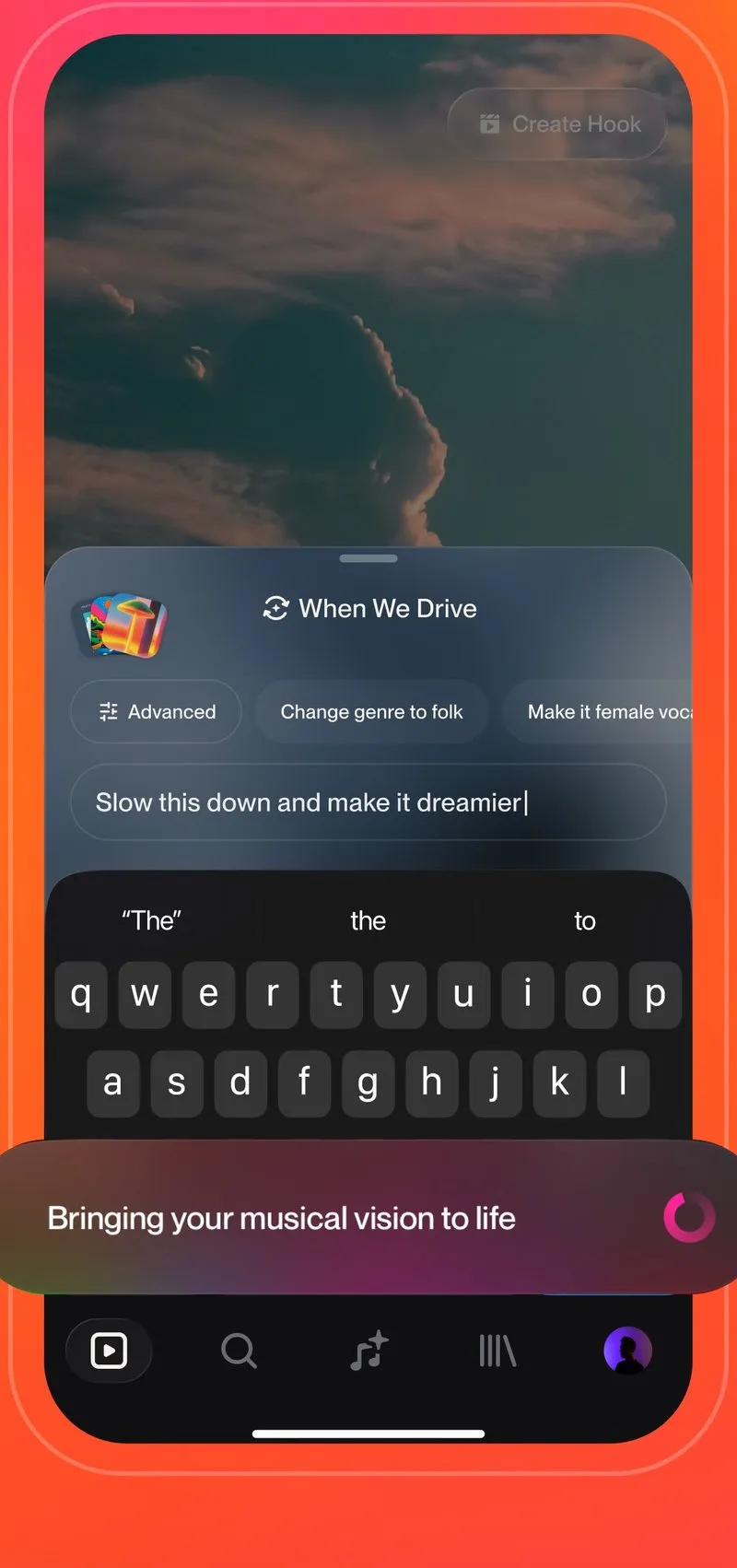
When a song is 80% there, don’t regenerate it. Open the … menu next to it → Remix/Edit:
- Extend: drag the arrow to choose where to continue, add new lyrics, then choose Get Whole Song to stitch the two parts together.
- Cover: keeps the melody, changes the style. Only works on your own songs.
- Replace Section: highlight a middle section, change its lyrics and redo just that part. Paid plans only.
- Plain-language edits: new in v6. Say “change the chorus so it’s sung by a gospel choir” or “change the lyric from ‘love’ to ‘light’” and the rest stays as it was.
To stop it rewriting your style tags, set the Variety slider to 0.
Singing in your own voice
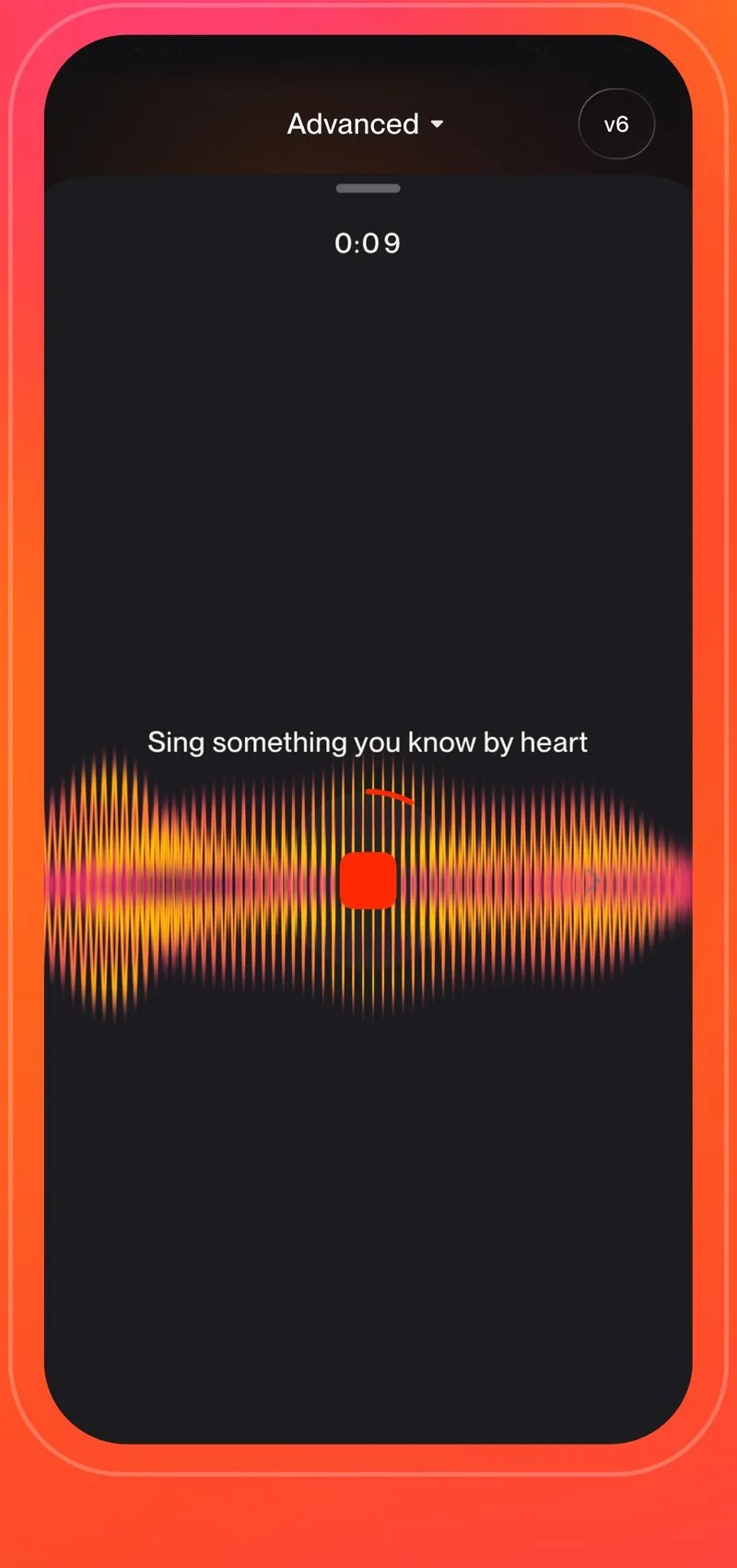
Voices, launched in March 2026 for Pro and Premier, lets Suno sing with your voice. Tap + Voice in Create, then record yourself or upload audio (backing is fine; it separates the vocal). To stop people cloning someone else, it asks you to speak a random phrase and checks the voices match. Your voice is private to you by default.
You can also tap + Audio to upload a melody, a hummed idea or your own demo and build a song from it: up to 8 minutes on Free, 30 minutes on paid plans. Paid users can also add vocals to an instrumental, or add backing to an existing song.
Stems and Studio: for people who make music
Stems are a paid feature, in three kinds. Auto Split breaks a track into up to 12 stems (Pro). Split from Mix pulls out one instrument or voice plus a track of everything else, handy for backing tracks (Pro). Advanced Split lets you pick from nearly 100 instruments, separating a cello from a violin, say (Premier only). Suno says it doesn’t slice the mix apart but regenerates each stem, which is why there is no bleed; the flip side is that a regenerated stem may not match the original in every detail.
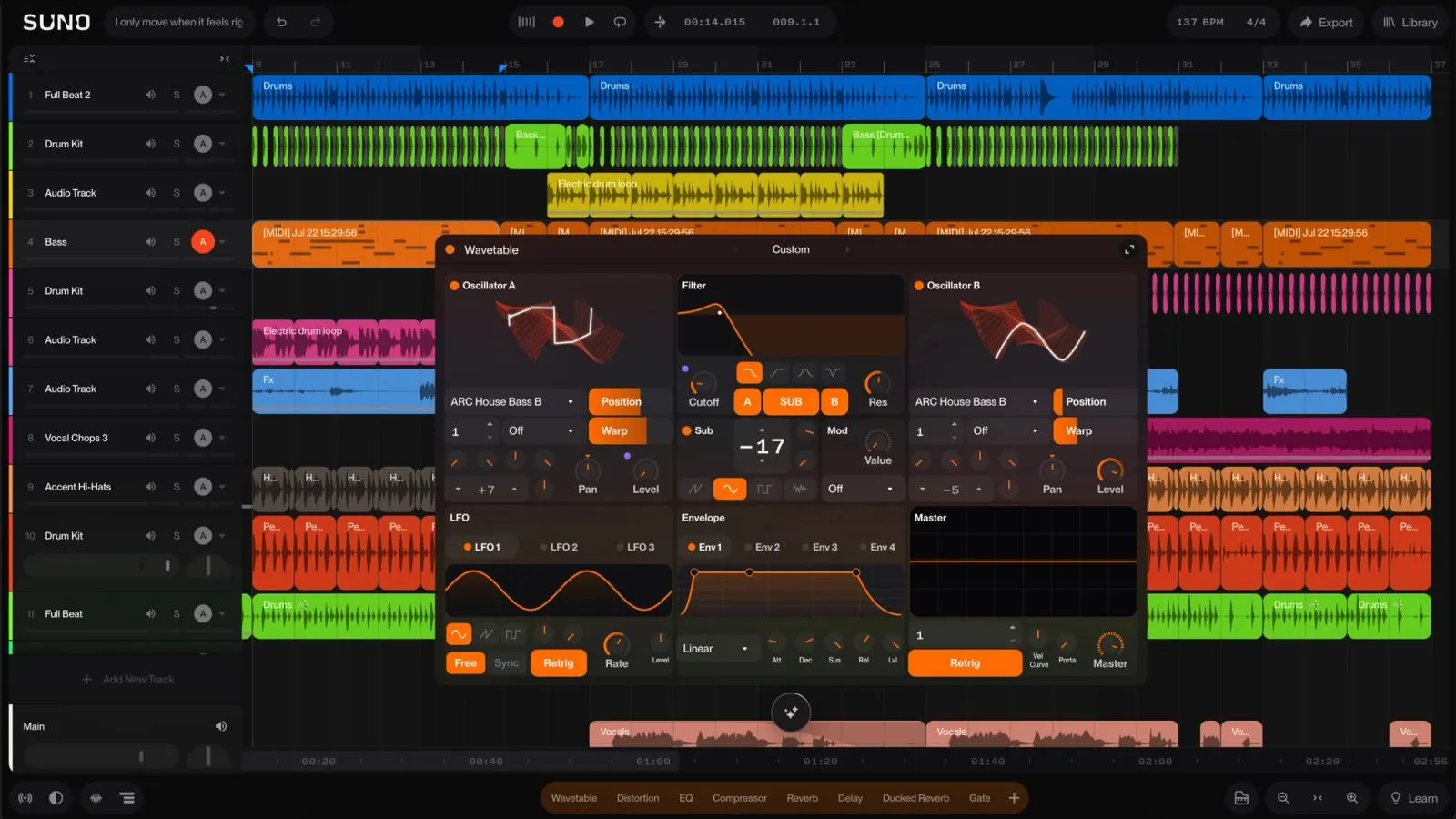
Suno Studio is Suno’s own digital audio workstation, available on Premier only. Studio 2.0 in August 2026 added MIDI, a wavetable synth, effects, automation curves and a chat bar: ask it to “add a warm reverb to this track” and it does, and it can even build a new plugin from a description. Exports from Studio, 32-bit/48kHz stems and multitracks, have no download limit, which is how Premier users get round the monthly cap.
Who owns the song: where free and paid differ
This is the thing to get straight. Under the terms in force since 3 September 2026 and the help centre:
- Free plan: Suno owns the songs. You may use them for personal, non-commercial purposes only and can’t monetise them. Since September 2026 a free account gets 7 downloads for life.
- Paid plans: for songs made while subscribed to Pro or Premier, Suno assigns its rights to you, you may use them commercially, and that survives cancelling. Pro gets 20 downloads a month, Premier 60.
- Not retroactive: the help centre says subscribing later doesn’t, by default, make songs from your free period commercially usable. But a note updated on 6 October says songs made while not subscribed can now qualify by spending a paid download credit. The two don’t agree, so check the terms or ask support before relying on it.
- Commercial rights aren’t copyright: Suno itself says that in the US music made 100% by AI isn’t protected by copyright, and writing the prompt doesn’t count as creating the song. Lyrics you wrote yourself can be registered on their own.
Putting it on Spotify: the platforms are tightening
Suno lets you release songs made while subscribed to Spotify and Apple Music through a distributor, or use them in YouTube and TikTok videos. The platforms’ stance is shifting:
- Spotify allows AI music but bans unauthorised vocal impersonation of real artists; from mid-September 2026 it labels “AI Persona” artist profiles and keeps them out of editorial and algorithmic recommendations.
- Deezer detects and tags tracks from Suno and Udio. It says AI tracks passed half of its daily uploads in June 2026 but make up only 1–3% of streams.
- Bandcamp has banned music made wholly or substantially by AI since January 2026.
- Distributors: Believe and TuneCore once refused Suno music; since their September 2026 deal, v6 songs can go out through them. Suno now watermarks and fingerprints songs so they can be recognised off-platform.
AI musicians in the 36Kr piece added that Suno songs “often struggle” to pass streaming services’ content-ID checks, while Mureka songs get through more easily after light processing.
Lawsuits and licences: Warner settled, Universal and Sony are still suing
| Party | Where it stands |
|---|---|
| Warner Music | Settled in November 2025; now a partner that helped build v6 |
| BMG, Believe | Licensing partnerships signed August–September 2026; part of v6 |
| Universal, Sony | The 2024 suit is unresolved; on 18 September 2026 they sued again over v6, arguing it was trained on outputs of the old models: “the fruit of the same poisoned tree” |
| GEMA (Germany) | On 31 July 2026 a Munich court found Suno infringed, ordering it to stop training on six works and pay damages; not yet final, and Suno is weighing an appeal |
Suno says v6 was trained on content licensed from its partners plus creations and preference signals from its community. For ordinary users this means the rules may change again; before using a Suno song in a serious commercial project, keep a record of when you made it and proof of your subscription.
Is free enough? Pro or Premier
| Plan | Monthly | Yearly, per month | Credits | Downloads | Main differences |
|---|---|---|---|---|---|
| Free | $0 | $0 | 50 a day (about 10 songs) | 7 for life | v6-mini only, no commercial use, no stems, 8-minute uploads |
| Pro | $10 | $8 | 2,500 a month (up to 500 songs) | 20 a month | v6 and v6-wild, commercial use, Voices, two stem types, 30-minute uploads |
| Premier | $30 | $24 | 10,000 a month | 60 a month, unlimited from Studio | Adds Studio and Advanced Split |
On the China App Store, Pro is ¥68 a month or ¥698 a year and Premier ¥198 a month or ¥1,998 a year, close to the dollar prices on the web. Credits don’t roll over; once a subscriber runs out, they still get 50 bonus credits a day.
If you’re just playing or making a song for a friend, Free is enough, though you can only save 7 downloads. To release music or use it in monetised videos you need at least Pro. Premier is for people who work in a DAW and want stems and unlimited exports.
Udio, ElevenLabs or Mureka?
| Product | Company | Compared with Suno |
|---|---|---|
| Udio | Udio | Turned off downloads after settling with Universal in October 2025; third-party reports in September 2026 said its promised licensed platform still hadn’t fully launched |
| ElevenMusic | ElevenLabs | Launched officially in May 2026; ElevenLabs calls its model fully licensed, with partners including Merlin, Kobalt and Believe; listening and remixing in one app |
| Mureka | Kunlun Tech | ¥88 a month for up to 180 songs; strong on Mandarin R&B, but 36Kr’s testers found it drags other styles towards its favourite sound |
| Haimian Music | ByteDance | Free; in 36Kr’s test the arrangements were uneven and words were swallowed, and commercial use is heavily restricted |
Using it from China
- App: it’s on the China App Store as “Music & Song Creator: Suno” and can be paid for with your Apple ID; the Android app is on Google Play.
- Web: suno.com. The payment methods Suno lists are mainly international cards such as Visa and Mastercard; neither renminbi nor Alipay is among its currencies and methods.
- Sign-in: on the web you sign in with Google or another single sign-on account; the app lets you register directly. The help centre admits phone-number sign-in sometimes sends no code or reports a “restricted region”; switch to Google sign-in if that happens.
- Beware look-alikes: searching for a “Chinese version of Suno” turns up many wrapper sites that aren’t Suno.
- Terms: Suno’s terms forbid using a VPN to get round geographic restrictions.
Defaults worth checking
- Songs start as Link Only: only people with the link can hear them; switch to public yourself if you want them on your profile.
- Personas start public: switch to private when you create one.
- Training: the terms let Suno use the audio, lyrics and other material you upload to train and improve its models, and we found no opt-out in the help centre. Don’t upload demos you don’t want used that way.
First time: try these three things
- Go to suno.com or install the app and sign up; on the web, signing in with Google is simplest.
- Make a couple of songs in Simple mode to get a feel for it, then try Advanced with your own lyrics.
- If you plan to use a song commercially, subscribe first and then make it, not the other way round.
An upbeat Mandarin folk song, female vocal, acoustic guitar and harmonica, for a roommate who's about to graduate, a catchy chorus with a touch of sadness.
90s Cantopop ballad, warm male vocal, piano and strings, slow build, big emotional final chorus
Keep the verses as they are, have a choir sing the chorus, and add an 8-bar guitar solo at the end.
Recent changes
- Universal and Sony file a new suit over v6, citing 60,202 recordings
- v6, v6-wild and v6-mini launch; all older models retired
- New terms take effect; download limits: 7 lifetime on Free, 20 a month on Pro, 60 on Premier
- Studio 2.0 adds MIDI, a synth, automation and home-made plugins
- Munich court rules Suno infringed GEMA members' works (not yet final)
- Raises over $400m at a $5.4bn valuation
- v5.5 brings Voices (sing in your own voice) and custom models
- Settles with Warner Music and partners with it, promising licensed models in 2026
Compared with similar products
| Product | Price | What it is |
|---|---|---|
| ElevenLabsElevenLabs · handbook | 10,000 credits a month, no commercial use; $6 / $22 / $99 / $299 / $990 a month | Turns text into speech that sounds close to a real person: pick a stock voice or clone your own, then narrate videos, dub them into other languages, transcribe recordings, make sound effects and music, or build phone agents. |
| SunoSuno · handbook | 50 credits a day (about 10 songs), no commercial use; Pro $10 a month, Premier $30 a month ($8 / $24 billed yearly) | Type a description or paste some lyrics and within seconds you get two complete songs with vocals and backing; paid plans add section editing, stems and singing in your own voice. |
Sources
- Suno · Pricing (viewed 2026-10-18)
- Suno · Introducing v6 (2026-09-09)
- Suno Help · v6 FAQ (2026-09-09)
- Suno Help · What's new in v6? (2026-09-09)
- Suno · An update to our downloads policy and Terms of Service (2026-08-10)
- Suno · Terms of Service (in force 2026-09-03)
- Suno Help · Does Suno own the music I make? (2026-01-07)
- Suno Help · Do I have the copyrights to songs I made? (2026-09-04)
- Suno Help · If I subscribe, do I get rights for the songs I made before? (2025-12-17)
- Suno Help · Can I monetize a Remix? (2026-10-06)
- Suno Help · Can I distribute my songs to Spotify, etc? (2025-12-17)
- Suno Help · What types of payments are accepted?
- Suno Help · What are Personas?
- Suno Help · Does Suno moderate songs?
- Suno Help · How do I make my song longer?
- Suno · Introducing Studio 2.0 (2026-08-13)
- Suno · Improvements to Stem Separation (2026-06-11)
- Suno · v5.5 and Voices (2026-03-26)
- Suno · Partnership with Warner Music Group (2025-11-25)
- Suno · Partnership with BMG (2026-08-12)
- Suno · Partnership with Believe and TuneCore (2026-09-08)
- Suno · Series D (2026-06-03)
- App Store (US) · Suno, version 1.93.0
- App Store (China) · Music & Song Creator: Suno
- 36Kr (AIX Finance) · Who will be China's Suno? (2026-06-17)
- Variety · Sony and Universal sue Suno over v6 (2026-09-18)
- JUVE Patent · Munich court rules for GEMA (2026-07-31)
- Boing Boing · Mixed reviews for v6, quoting The Verge's test (2026-09-16)
- Spotify · AI Persona label (2026-08-13)
- Spotify · Strengthening AI protections (2025-09-25)
- Deezer · AI music tops 50% of daily uploads (2026-07)
- Bandcamp · Keeping Bandcamp Human (2026-01-13)
- Music Business Worldwide · ElevenMusic officially launches (2026-05-01)
- Music Business Worldwide · Universal settles with Udio (2025-10-30)
- Wikipedia: Suno AI